Learn Coding Visually
Learn to code with interactive, live-preview playgrounds — HTML, CSS, JavaScript, React & more.
 HTML Playground42 lessons · Click-based · Live preview
 CSS PlaygroundLearn CSS with a live editor
 JavaScript Playground60 lessons · DOM · Async · Canvas
 React PlaygroundLearn React with a live code editor
 GSAP PlaygroundLearn GSAP animation interactively
 SVG Playground44 lessons · shapes · paths · animation
 SCSS Playground45 lessons · Sass modules · tokens
 Tailwind PlaygroundLearn Tailwind CSS with a live editor
 Bootstrap 5 Playground50 lessons · live preview
Waitlist Hero with Live Position Counter — Free HTML CSS JS Snippet
Waitlist Hero with Live Position Counter · Heroes · Plain HTML, CSS & JS · Live preview
What's included
Features
About this UI Snippet
Waitlist Hero with Live Position Counter — A Genuinely Computed Queue Position, Not a Random Number
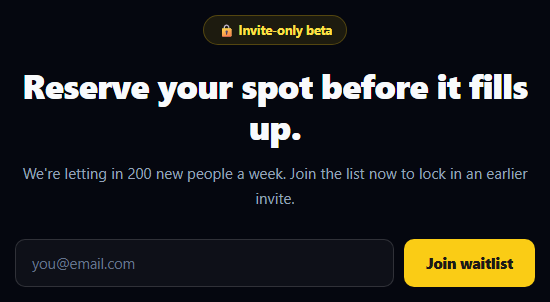
A waitlist form that just says "thanks, you're on the list" wastes the single most persuasive moment a waitlist has: showing the visitor exactly where they stand. This snippet computes a real queue position on submit — starting from a base number and incrementing it per signup within the session — and shows it with a progress bar and a referral hint to skip ahead.
A genuinely incrementing position, not a decoration
The script keeps a queueBase starting point and a signupsThisSession counter that increments by one on every valid submit. The displayed position is queueBase + signupsThisSession — an actual computation, not a random or hardcoded string. Submit the form twice in this demo (refresh to reset) and you'll see the number genuinely go up by one each time, exactly the behavior a real backend-driven counter would produce once you replace the local counter with a server response.
Why a base number instead of starting from #1
Starting everyone at "#1 in line" is not credible — nobody believes they're the very first person to hear about a product. Starting from a realistic base (here, in the low thousands) signals real demand exists while still making each new signup's position feel earned and specific, which is more persuasive than an obviously fake, always-identical number.
The progress bar makes the position legible
A queue position alone is an abstract number; the bar underneath translates it into "roughly how close to the front are you," clamped to a readable range (4%–96%) so it's never visually empty or visually full regardless of the exact number. The fill animates in with a cubic-bezier ease after a short requestAnimationFrame delay, giving the reveal a small sense of motion rather than snapping in instantly.
The referral hint, placed where it matters
Immediately below the position, a line offering to skip ahead by referring three friends turns the "well, I guess I'll wait" moment into an actionable next step — the exact place in the flow where a visitor is primed to act because they just learned their exact spot. The "Copy your referral link" interaction gives real click feedback (swapping to "Link copied!" briefly) even though this demo doesn't wire up an actual clipboard write.
Customizing it
Replace the local queueBase/signupsThisSession logic with a real backend call that returns the visitor's actual database position and the current total list size. Wire the referral link to a real navigator.clipboard.writeText call with the visitor's unique referral URL. Adjust TOTAL_LIST_SIZE to reflect your real target audience size so the progress bar stays meaningful.
Build with AI
Build, Understand, Optimize, and Extend It With AI
You don't have to guess whether the position counter is really incrementing or just look convincing. Paste this snippet's HTML, CSS, and JS into an AI coding assistant like Claude and ask it to explain exactly how queueBase plus signupsThisSession produces a genuinely computed, incrementing position rather than a random or hardcoded number, and why starting the counter from a realistic base is more persuasive than showing "#1" to every visitor. The same assistant can help you connect it to a real backend — ask it to design an API endpoint that atomically increments and returns a visitor's actual database position, race-condition-safe under concurrent signups. It's also useful for extending the flow: ask it to wire the referral link to a real navigator.clipboard.writeText call with a generated per-visitor URL, or to persist the visitor's position in localStorage so it's consistent if they revisit the page. Treat the code less like a finished artifact and more like a starting point for a conversation.
Prompt to recreate it
Copy this into your AI assistant of choice to build the effect from scratch, or as a jumping-off point for your own variant:
Build a waitlist signup hero in plain HTML, CSS, and JavaScript that reveals a genuinely computed queue position after signup — no framework, no backend, but the position math must be real, not decorative.

Requirements:
- A dark hero with a badge, headline, subheading, and an inline email form (input plus submit button).
- On submit, call preventDefault, and validate using the input's native type="email" constraint via checkValidity() plus a trimmed non-empty check. On failure, show an invalid state on the input and an inline error message that clears when the user edits the field again.
- On a valid submit, disable the button and show a brief "joining" label, then after a short simulated delay reveal a result panel showing "You're #N in line" — where N is computed as a starting base number (in the low thousands, not starting from 1) plus a counter that increments by exactly one every time a valid submission happens in the current page session, so resubmitting shows a genuinely higher number each time, not a random or repeated one.
- Below the position number, show a horizontal progress bar whose fill width is derived from dividing the position by a stated total list size constant, clamped to a readable range (for example never fully empty or fully full) and animated in with an eased transition.
- Below the progress bar, add a referral hint line ("refer N friends to skip ahead") with a clickable link that, when clicked, prevents default navigation and shows temporary "Link copied!" text feedback before reverting after a couple seconds.
- Make it responsive: stack the form vertically under a small-screen breakpoint.
Want to tighten it up first? Run this prompt through the AI Prompt Studio to score it across 8 quality dimensions, catch anti-patterns, and tune the wording for Claude, ChatGPT, or Gemini before you paste it in.
Source Code
<section class="wpc-hero">
  <div class="wpc-inner">
    <span class="wpc-badge">🔒 Invite-only beta</span>
    <h1 class="wpc-title" id="wpcTitle">Reserve your spot before it fills up.</h1>
    <p class="wpc-sub" id="wpcSub">We're letting in 200 new people a week. Join the list now to lock in an earlier invite.</p>

    <form class="wpc-form" id="wpcForm" novalidate>
      <input class="wpc-input" id="wpcEmail" type="email" placeholder="you@email.com" aria-label="Email address" autocomplete="email">
      <button class="wpc-btn" type="submit">Join waitlist</button>
    </form>
    <p class="wpc-msg" id="wpcMsg"></p>

    <div class="wpc-result" id="wpcResult" hidden>
      <div class="wpc-position">
        You're <span id="wpcNumber">0</span> in line
      </div>
      <div class="wpc-bar-track"><div class="wpc-bar-fill" id="wpcBarFill"></div></div>
      <p class="wpc-referral">Skip ahead — refer 3 friends and jump to the front of the line. <a href="#" id="wpcRefLink">Copy your referral link</a></p>
    </div>
  </div>
</section>
* { box-sizing: border-box; margin: 0; padding: 0; }
body { font-family: system-ui, -apple-system, sans-serif; background: #05070f; }
.wpc-hero { min-height: 100vh; display: flex; align-items: center; justify-content: center; padding: 48px 24px; }
.wpc-inner { max-width: 520px; text-align: center; }
.wpc-badge { display: inline-block; padding: 6px 14px; background: rgba(250, 204, 21, 0.1); color: #fde047; border: 1px solid rgba(250, 204, 21, 0.25); border-radius: 999px; font-size: 12.5px; font-weight: 700; }
.wpc-title { margin-top: 20px; font-size: 34px; font-weight: 800; line-height: 1.2; letter-spacing: -0.02em; color: #f8fafc; }
.wpc-sub { margin-top: 14px; font-size: 15px; line-height: 1.65; color: #94a3b8; }
.wpc-form { display: flex; gap: 10px; margin-top: 28px; }
.wpc-input { flex: 1; padding: 13px 16px; border-radius: 10px; border: 1.5px solid rgba(255,255,255,0.14); background: rgba(255,255,255,0.04); color: #fff; font-family: inherit; font-size: 14.5px; outline: none; transition: border-color .15s, box-shadow .15s; }
.wpc-input::placeholder { color: #64748b; }
.wpc-input:focus { border-color: #fbbf24; box-shadow: 0 0 0 3px rgba(251, 191, 36, 0.15); }
.wpc-input.invalid { border-color: #f87171; box-shadow: 0 0 0 3px rgba(248, 113, 113, 0.15); }
.wpc-btn { flex-shrink: 0; padding: 13px 22px; background: #facc15; color: #1c1917; border: none; border-radius: 10px; font-family: inherit; font-size: 14.5px; font-weight: 800; cursor: pointer; transition: background .15s, transform .1s; }
.wpc-btn:hover { background: #fde047; }
.wpc-btn:active { transform: scale(0.98); }
.wpc-btn:disabled { opacity: 0.6; cursor: default; }
.wpc-msg { min-height: 18px; margin-top: 10px; font-size: 13px; font-weight: 600; color: #f87171; }
.wpc-result { margin-top: 30px; padding: 22px; background: rgba(255,255,255,0.04); border: 1px solid rgba(255,255,255,0.1); border-radius: 16px; }
.wpc-position { font-size: 20px; font-weight: 800; color: #fde047; }
.wpc-position span { font-size: 26px; }
.wpc-bar-track { margin-top: 14px; height: 6px; border-radius: 999px; background: rgba(255,255,255,0.08); overflow: hidden; }
.wpc-bar-fill { height: 100%; width: 4%; border-radius: 999px; background: linear-gradient(90deg, #facc15, #fb923c); transition: width 1s cubic-bezier(.2,.8,.2,1); }
.wpc-referral { margin-top: 14px; font-size: 12.5px; color: #94a3b8; line-height: 1.6; }
.wpc-referral a { color: #fde047; font-weight: 700; text-decoration: none; }
.wpc-referral a:hover { text-decoration: underline; }
@media (max-width: 480px) {
.wpc-title { font-size: 26px; }
.wpc-form { flex-direction: column; }
}const form = document.getElementById('wpcForm');
const email = document.getElementById('wpcEmail');
const msg = document.getElementById('wpcMsg');
const result = document.getElementById('wpcResult');
const numberEl = document.getElementById('wpcNumber');
const barFill = document.getElementById('wpcBarFill');
const refLink = document.getElementById('wpcRefLink');
// Base queue size for this demo session — a real backend would return the
// visitor's actual position. We start from a realistic base and increment it
// per signup within this session so repeated demo submissions feel live.
let queueBase = 1842;
let signupsThisSession = 0;
const TOTAL_LIST_SIZE = 6000; // used only to size the progress bar visually
function setMsg(text) {
msg.textContent = text;
}
email.addEventListener('input', () => {
if (email.classList.contains('invalid')) {
email.classList.remove('invalid');
setMsg('');
}
});
form.addEventListener('submit', (e) => {
e.preventDefault();
const value = email.value.trim();
if (value === '' || !email.checkValidity()) {
email.classList.add('invalid');
email.focus();
setMsg('Enter a valid email to join the waitlist.');
return;
}
const submitBtn = form.querySelector('.wpc-btn');
submitBtn.disabled = true;
submitBtn.textContent = 'Joining...';
// Simulate a short network delay, then reveal a genuinely computed position
setTimeout(() => {
signupsThisSession += 1;
const position = queueBase + signupsThisSession; // real incrementing computation
numberEl.textContent = '#' + position.toLocaleString();
const pct = Math.min(96, Math.max(4, (position / TOTAL_LIST_SIZE) * 100));
result.hidden = false;
requestAnimationFrame(() => { barFill.style.width = pct + '%'; });
form.style.display = 'none';
setMsg('');
}, 700);
});
refLink.addEventListener('click', (e) => {
e.preventDefault();
refLink.textContent = 'Link copied!';
setTimeout(() => { refLink.textContent = 'Copy your referral link'; }, 1800);
});Step by step
How to Use
- 1Paste the HTML, CSS, and JSA dark waitlist hero renders with a badge, headline, and email form.
- 2Submit a valid emailAfter a short delay, a queue position, progress bar, and referral hint appear.
- 3Submit again (in a new session)Refresh the page and resubmit — the base position resets, but within one session it increments per signup.
- 4Click "Copy your referral link"The link briefly confirms "Link copied!" before reverting.
- 5Replace with a real backendSwap the local counter for a fetch that returns your visitor's actual position and total list size.
- 6Wire the clipboard writeReplace the demo click handler with navigator.clipboard.writeText and a real referral URL.
Real-world uses
Common Use Cases
Got questions?
Frequently Asked Questions
It's genuinely computed: queueBase + signupsThisSession, where signupsThisSession increments by exactly one on every valid submit within the session. It's not randomized and not hardcoded — resubmitting in the same session (after clearing state) will show the number increase predictably. Replace queueBase and the increment logic with a real backend call for production, where the position should come from your actual database.
Nobody finds "you're the very first person" credible when a waitlist is already public. Starting from a realistic base number signals genuine existing demand while still making each visitor's specific position feel earned, which is more persuasive than an obviously repeated, unbelievable number.
The position is divided by a stated TOTAL_LIST_SIZE constant to get a percentage, then clamped between 4% and 96% so the bar is never visually empty or completely full regardless of the exact number — a purely visual translation of the position, not a claim about exact remaining capacity.
In this demo it only shows click feedback ("Link copied!") without a clipboard API call, since there's no real referral URL to copy yet. Wire it to navigator.clipboard.writeText(yourReferralUrl) once you generate a real per-visitor referral link on your backend.
Hold email, position, and submitted state in state. The submit handler validates, then either calls your real waitlist API for the position or increments a local counter in state for a demo. Bind the result card's visibility and the progress bar's width to that state. The referral-link copy handler can call the real Clipboard API directly.