Source Code
<div class="demo">
  <div class="ladder-card">
    <div class="ladder-head">
      <span class="ladder-label">Commit longer, save more</span>
      <div class="ladder-price">
        <span id="ladderPrice">$49</span><small>/mo</small>
      </div>
      <span class="ladder-billed" id="ladderBilled">Billed monthly</span>
    </div>

    <div class="ladder-track" id="ladderTrack" role="slider" tabindex="0" aria-label="Commitment length" aria-valuemin="0" aria-valuemax="3" aria-valuenow="0" aria-valuetext="Monthly, no discount">
      <div class="ladder-fill" id="ladderFill"></div>
      <div class="ladder-stops">
        <button class="stop" data-idx="0" aria-label="Monthly"></button>
        <button class="stop" data-idx="1" aria-label="3 months"></button>
        <button class="stop" data-idx="2" aria-label="12 months"></button>
        <button class="stop" data-idx="3" aria-label="24 months"></button>
      </div>
    </div>
    <div class="ladder-ticks">
      <span>Monthly</span><span>3 mo</span><span>12 mo</span><span>24 mo</span>
    </div>

    <div class="ladder-savings" id="ladderSavings">No commitment — cancel anytime.</div>
  </div>
</div>
* { box-sizing: border-box; margin: 0; padding: 0; }
body { font-family: system-ui, sans-serif; background: #f8fafc; display: flex; align-items: center; justify-content: center; min-height: 100vh; padding: 24px; }
.ladder-card { width: 340px; max-width: 100%; background: #fff; border: 1px solid #e2e8f0; border-radius: 18px; padding: 24px; display: flex; flex-direction: column; gap: 20px; }
.ladder-head { display: flex; flex-direction: column; align-items: center; gap: 4px; text-align: center; }
.ladder-label { font-size: 11.5px; font-weight: 700; color: #6366f1; text-transform: uppercase; letter-spacing: 0.04em; }
.ladder-price { font-size: 34px; font-weight: 800; color: #111827; }
.ladder-price small { font-size: 14px; font-weight: 600; color: #94a3b8; }
.ladder-billed { font-size: 11.5px; color: #94a3b8; font-weight: 600; }
.ladder-track { position: relative; height: 6px; background: #e2e8f0; border-radius: 999px; margin: 10px 4px; cursor: pointer; }
.ladder-track:focus-visible { outline: 2px solid #6366f1; outline-offset: 6px; border-radius: 999px; }
.ladder-fill { position: absolute; top: 0; left: 0; height: 100%; background: #6366f1; border-radius: 999px; transition: width 0.25s ease; width: 0%; }
.ladder-stops { position: absolute; top: 50%; left: 0; right: 0; display: flex; justify-content: space-between; transform: translateY(-50%); }
.stop { width: 18px; height: 18px; border-radius: 50%; background: #fff; border: 3px solid #e2e8f0; cursor: pointer; padding: 0; transition: border-color 0.2s, transform 0.2s; }
.stop.active { border-color: #6366f1; transform: scale(1.15); }
.ladder-ticks { display: flex; justify-content: space-between; font-size: 10.5px; color: #94a3b8; font-weight: 600; padding: 0 2px; }
.ladder-savings { text-align: center; font-size: 12.5px; font-weight: 700; color: #059669; background: #f0fdf4; border-radius: 10px; padding: 10px; transition: color 0.2s, background 0.2s; }
.ladder-savings.neutral { color: #94a3b8; background: #f8fafc; }const track = document.getElementById('ladderTrack');
const fill = document.getElementById('ladderFill');
const priceEl = document.getElementById('ladderPrice');
const billedEl = document.getElementById('ladderBilled');
const savingsEl = document.getElementById('ladderSavings');
const stops = Array.from(track.querySelectorAll('.stop'));
const BASE_MONTHLY = 49;
// Each tier's discount off the base monthly price, and how billing is described.
const tiers = [
{ months: 1, discount: 0, label: 'Monthly, no discount', billed: 'Billed monthly' },
{ months: 3, discount: 0.10, label: '3 month commitment, 10% off', billed: 'Billed every 3 months' },
{ months: 12, discount: 0.20, label: '12 month commitment, 20% off', billed: 'Billed annually' },
{ months: 24, discount: 0.30, label: '24 month commitment, 30% off', billed: 'Billed every 2 years' },
];
let index = 0;
function render() {
const tier = tiers[index];
const price = BASE_MONTHLY * (1 - tier.discount);
const totalSaved = (BASE_MONTHLY - price) * tier.months;
priceEl.textContent = '$' + price.toFixed(price % 1 === 0 ? 0 : 2);
billedEl.textContent = tier.billed;
fill.style.width = (index / (tiers.length - 1)) * 100 + '%';
stops.forEach((s, i) => s.classList.toggle('active', i === index));
if (tier.discount === 0) {
savingsEl.textContent = 'No commitment — cancel anytime.';
savingsEl.classList.add('neutral');
} else {
savingsEl.textContent = `Save $${totalSaved.toFixed(0)} total over ${tier.months} months (${(tier.discount * 100).toFixed(0)}% off).`;
savingsEl.classList.remove('neutral');
}
track.setAttribute('aria-valuenow', String(index));
track.setAttribute('aria-valuetext', tier.label);
}
function setIndex(newIndex) {
index = Math.max(0, Math.min(tiers.length - 1, newIndex));
render();
}
stops.forEach((stop, i) => {
stop.addEventListener('click', (e) => {
e.stopPropagation();
setIndex(i);
});
});
track.addEventListener('click', (e) => {
const rect = track.getBoundingClientRect();
const pct = (e.clientX - rect.left) / rect.width;
setIndex(Math.round(pct * (tiers.length - 1)));
});
track.addEventListener('keydown', (e) => {
if (e.key === 'ArrowRight' || e.key === 'ArrowUp') { setIndex(index + 1); e.preventDefault(); }
if (e.key === 'ArrowLeft' || e.key === 'ArrowDown') { setIndex(index - 1); e.preventDefault(); }
if (e.key === 'Home') { setIndex(0); e.preventDefault(); }
if (e.key === 'End') { setIndex(tiers.length - 1); e.preventDefault(); }
});
render();Learn Coding Visually
Learn to code with interactive, live-preview playgrounds — HTML, CSS, JavaScript, React & more.
 HTML Playground42 lessons · Click-based · Live preview
 CSS PlaygroundLearn CSS with a live editor
 JavaScript Playground60 lessons · DOM · Async · Canvas
 React PlaygroundLearn React with a live code editor
 GSAP PlaygroundLearn GSAP animation interactively
 SVG Playground44 lessons · shapes · paths · animation
 SCSS Playground45 lessons · Sass modules · tokens
 Tailwind PlaygroundLearn Tailwind CSS with a live editor
 Bootstrap 5 Playground50 lessons · live preview
Commitment Length Discount Ladder — Interactive Pricing Slider with Live Savings Math
Commitment Length Discount Ladder · Pricing · Plain HTML, CSS & JS · Live preview
What's included
Features
About this UI Snippet
Commitment Length Discount Ladder — A Discrete Slider With Real Pricing Math Behind It
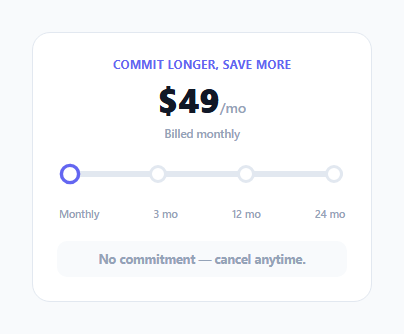
Many pricing pages offer a discount for longer commitments (monthly vs. annual, or a multi-tier version of the same idea) as a set of separate buttons or a simple two-state toggle. This component instead frames it as a discrete four-stop slider, where every stop recomputes the actual displayed price and total savings from a shared discount table — so dragging further along the track isn't just a visual metaphor, it's driving real numbers.
A tiers array, not four hardcoded price displays
Every commitment option is one entry in a tiers array — { months, discount, label, billed } — and render() derives everything shown on screen (the price, the billing cadence text, the savings sentence, the slider fill width) from whichever tier the current index points to. Adding a new commitment length, or changing an existing discount percentage, means editing one array entry; nothing else in the component needs to change.
The slider is discrete, not continuous — and behaves that way deliberately
Unlike a typical range slider, this one only ever rests on exactly four positions, matching the four real pricing tiers that actually exist — there's no such thing as an "8-month" commitment in this pricing model, so letting the handle stop at arbitrary positions would visually imply price points that don't exist. Both the click handler (which rounds the clicked percentage to the nearest valid tier index) and the keyboard handler (which moves exactly one tier per arrow-key press) enforce this snapping, so the slider can never rest at an invalid, in-between state.
The savings sentence does real arithmetic, not a lookup table
totalSaved = (BASE_MONTHLY - price) * tier.months computes the actual dollar amount saved over the full commitment period from the base monthly price and the tier's discount — it isn't a separately hardcoded savings number that could drift out of sync with the displayed price if a discount percentage were ever changed. Changing BASE_MONTHLY or any tier's discount value automatically produces a correct, consistent savings figure with no other line needing to be touched.
Full keyboard operability on a role="slider" element
The track itself is a focusable role="slider" with aria-valuemin/max/now and a descriptive aria-valuetext (e.g. "12 month commitment, 20% off") that's more informative to a screen reader than the raw index number alone would be. Arrow keys move exactly one tier at a time, and Home/End jump straight to the shortest or longest commitment — giving keyboard users the same four discrete stops a mouse user gets by clicking, with no way to land on an invalid in-between state either way.
Build with AI
Build, Understand, Optimize, and Extend It With AI
Ask an AI assistant to explain why snapping every interaction method (drag, stop-click, track-click, keyboard) through the same setIndex() function is important for keeping the slider's behavior consistent, and what could go subtly wrong if each interaction path implemented its own separate snapping logic. It's also worth asking for a version that shows the "you save $X vs. paying monthly for the same period" framing more prominently, or one that supports a currency toggle alongside the commitment-length slider.
Prompt to recreate it
Copy this into your AI assistant of choice to build the effect from scratch, or as a jumping-off point for your own variant:
Build a discrete commitment-length pricing slider in HTML, CSS and vanilla JavaScript with four fixed stops (e.g. Monthly, 3 months, 12 months, 24 months), where every stop shows a different discounted price computed from a shared base price — no external libraries.

Requirements:
- Define all pricing tiers (commitment length in months, discount percentage, a descriptive label, and billing cadence text) in a single array that the rest of the component's rendering logic derives from — no separately hardcoded price or savings text per tier.
- The slider must be genuinely discrete: dragging the handle, clicking anywhere on the track, or clicking a specific stop marker must all snap to the nearest of the four valid tier positions — never an in-between value.
- On every tier change, recompute and display the discounted monthly price and the total dollar amount saved over that commitment period using real arithmetic from the base price and that tier's discount percentage, not separately hardcoded savings numbers.
- Implement the slider track as a role="slider" element with aria-valuemin, aria-valuemax, a live aria-valuenow, and a descriptive aria-valuetext string (not just the raw index) that changes with the selected tier.
- Support full keyboard operation: ArrowLeft/ArrowRight (or ArrowUp/ArrowDown) move one tier at a time, and Home/End jump to the shortest/longest commitment tier respectively.
- Visually distinguish the no-discount base tier from tiers that have an actual discount applied (e.g. different savings message styling).
Want to tighten it up first? Run this prompt through the AI Prompt Studio to score it across 8 quality dimensions, catch anti-patterns, and tune the wording for Claude, ChatGPT, or Gemini before you paste it in.
Step by step
How to Use
- 1Drag the handle, click a stop, or click anywhere on the trackAll three interactions snap to the nearest valid tier and update the price, billing text, and savings sentence together.
- 2Edit the tiers array to change pricingEach entry needs months, discount (as a decimal), a label for screen readers, and billed cadence text — the rest of the UI derives from these.
- 3Change the base monthly priceUpdate the BASE_MONTHLY constant; every tier's displayed price and savings recompute automatically from it.
- 4Add a fifth commitment tierAdd one more object to the tiers array and one more <button class="stop"> in the HTML — the slider's math and snapping logic already generalize to any tier count.
- 5Test keyboard operationFocus the track and use ArrowLeft/ArrowRight/Home/End to confirm the slider is fully usable without a mouse.
Real-world uses
Common Use Cases
Got questions?
Frequently Asked Questions
The underlying pricing model only has four real, discrete commitment options — there's no such thing as an "8-month" plan — so letting the slider rest at arbitrary in-between positions would visually suggest price points that don't actually exist. Every interaction method snaps to the nearest valid tier for exactly this reason.
It's computed directly as (BASE_MONTHLY - discountedPrice) * tier.months — the actual dollar difference per month times the number of months in that commitment — rather than being a separately hardcoded value, so it can never drift out of sync with the displayed price if the discount or base price changes.
The click handler computes the clicked position as a percentage of the track's width and rounds it to the nearest valid tier index, so clicking anywhere on the track still snaps cleanly to one of the four real pricing tiers rather than landing between them.
Yes — the track is a real role="slider" element with aria-valuemin/max/now and a descriptive aria-valuetext sentence, and ArrowLeft/ArrowRight/Home/End all move between the discrete tiers, giving keyboard users the same snapped four-stop behavior a mouse user gets.
Add a new object to the tiers array with its months, discount, label, and billed text in the correct position, and add a matching <button class="stop"> element in the HTML — the slider's snapping, math, and rendering logic all already generalize to any number of tiers.
No — every tier's displayed price is computed live as BASE_MONTHLY * (1 - tier.discount) inside render(), so changing the base price constant automatically updates every tier's price and savings calculation with no other edits needed.