You Might Also Like
Learn Coding Visually
Learn to code with interactive, live-preview playgrounds — HTML, CSS, JavaScript, React & more.
 HTML Playground42 lessons · Click-based · Live preview
 CSS PlaygroundLearn CSS with a live editor
 JavaScript Playground60 lessons · DOM · Async · Canvas
 React PlaygroundLearn React with a live code editor
 GSAP PlaygroundLearn GSAP animation interactively
 SVG Playground44 lessons · shapes · paths · animation
 SCSS Playground45 lessons · Sass modules · tokens
 Tailwind PlaygroundLearn Tailwind CSS with a live editor
 Bootstrap 5 Playground50 lessons · live preview
Cancellation Retention Offer — Free HTML CSS JS Snippet
Cancellation Retention Offer · Pricing · Plain HTML, CSS & JS · Live preview
What's included
Features
About this UI Snippet
Cancellation Retention Offer — Real Accept, Pause, and Cancel Paths With Distinct End States
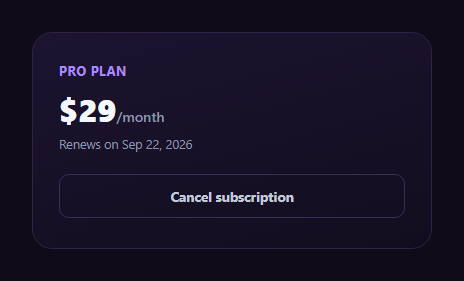
Clicking "Cancel subscription" and having the account genuinely disappear in one step is bad for the business and, more importantly, often bad for the customer — a subscriber canceling because of a temporary budget crunch or a slow month of usage might be perfectly happy to stay with a discount or a pause instead, if the option is ever actually offered. This snippet builds the full decision tree a responsible cancellation flow should present, with three genuinely different end states rather than a single "canceled" dead end.
The cancel button routes to an offer, never directly to cancellation
Clicking #croCancelBtn never cancels anything by itself — it calls showStep(offer), revealing a retention screen with a concrete, computed discount (50% off \$29/month is \$14.50/month, shown for a stated 3-month window) before any cancellation logic runs at all. This is the structural core of the pattern: cancellation is a multi-step decision, not a single click.
Three distinct, real end states
- Accept the offer — #croAcceptOffer leads to a confirmed state stating the discounted price, the exact date it reverts to full price, and that the subscription continues uninterrupted. The subscription was never actually canceled on this path.
- Pause instead — #croPauseBtn leads to a different confirmed state: no charges during the pause, data retained, and an automatic resume date. This is offered as a genuine middle ground between staying at full price and fully canceling, not a repackaged version of the discount offer.
- Continue canceling — #croContinueCancel doesn't cancel immediately either; it asks a one-question reason (useful, real product feedback) and only *then* shows the actual canceled confirmation, which states the exact access-through date and that no further charges will occur.
An undo path from the real cancellation
Even after reaching the genuinely canceled state, #croRestoreBtn offers one more chance to return to the active account view — modeling the common production pattern where a cancellation takes effect at the end of the current billing period rather than instantly, leaving a window during which undoing it is a real, meaningful option rather than cosmetic.
Why each end state has different copy, not a shared template
A single generic "Done!" message would blur the very distinction this pattern exists to preserve. Each path's confirmation states the specific mechanics that differ: the accepted-offer path names a revert date, the paused path names a resume date, and the canceled path names an access-through date — because a customer in any of these three states has a genuinely different question they need answered.
Customizing it
Swap the 50%-off, 3-month terms for your own retention offer, wire each end state to your real subscription-management API instead of local demo state, and pair the reason-collection step with your product analytics so cancellation reasons feed back into your retention strategy.
Build with AI
Build, Understand, Optimize, and Extend It With AI
Paste this snippet into an AI coding assistant like Claude and ask it to explain why the cancel button never directly triggers a canceled state, and how the three end states (accepted offer, paused, and canceled) each encode genuinely different real-world billing mechanics rather than sharing one generic confirmation template. It's also a good candidate to extend — ask it to wire each transition to a real subscription-management API with loading and error states, add a second retention offer tier for users who decline the first, or send the collected cancellation reason to an analytics endpoint.
Prompt to recreate it
Copy this into your AI assistant of choice to build the effect from scratch, or as a jumping-off point for your own variant:
Build a "cancellation retention offer" flow in plain HTML, CSS, and JavaScript with no dependencies, implemented as a simple step-based state machine (show one step at a time, hide the rest).

Requirements:
- An account view showing the current plan and price with a "Cancel subscription" button. Clicking it must NOT cancel anything directly — it must reveal a retention offer screen instead.
- The retention offer screen shows a real, correctly computed discount (e.g. 50% off the actual displayed price, not a separately made-up discounted number) for a stated limited time window, with an "Accept offer" button and, separately, a "Pause instead" option and a "Continue canceling" link.
- Accepting the offer must lead to a distinct confirmed state whose copy states the discounted price, the exact date it reverts to full price, and that the subscription remains active — this must be a different end state from the other two paths, not shared generic text.
- Choosing "Pause instead" must lead to a second distinct confirmed state describing no charges during the pause, retained data, and an automatic resume date — modeled as a genuinely separate alternative from the discount offer, not the same offer relabeled.
- Choosing "Continue canceling" must first ask a one-question reason (a small set of selectable reason buttons), and only after a reason is selected show a third distinct confirmed cancellation state stating the exact date access continues through and that no further charges will occur.
- The canceled confirmation state should include an "undo" control that returns to the active account view, representing a real grace-period window before the cancellation would actually finalize.
Want to tighten it up first? Run this prompt through the AI Prompt Studio to score it across 8 quality dimensions, catch anti-patterns, and tune the wording for Claude, ChatGPT, or Gemini before you paste it in.
Step by step
How to Use
- 1Click Cancel subscriptionThis never cancels immediately — it reveals the retention offer.
- 2Accept the 50% off offerConfirms a distinct state where the plan continues at a discount.
- 3Or choose Pause insteadConfirms a separate state with no charges and an automatic resume date.
- 4Or continue cancelingA one-question reason step appears before the real cancellation confirms.
- 5Read the canceled confirmationStates the exact access-through date and that no further charges occur.
- 6Use the undo optionThe canceled state offers one more path back to the active account.
Real-world uses
Common Use Cases
Got questions?
Frequently Asked Questions
No — by design it never does. The click handler on the cancel button only calls showStep(offer), which reveals the retention screen. Actual cancellation only happens after explicitly clicking "Continue canceling," answering the one-question reason prompt, and reaching the dedicated canceled confirmation state.
No — they are two structurally separate paths with different copy and different real-world mechanics. Accepting the discount keeps the subscription active at a reduced price for a stated window; pausing stops charges entirely for 30 days while retaining saved data, with an automatic resume date. Each end state names its own specific terms rather than sharing generic confirmation text.
Collecting a real reason at the moment of cancellation is valuable, unbiased product feedback — the customer has already decided to leave, so their answer is not influenced by a desire to justify staying. It also gives the flow one more natural pause before the irreversible-feeling final click, without blocking or guilt-tripping the user into staying.
It models a common real-world pattern: many subscription cancellations take effect at the end of the current billing period rather than instantly, leaving a window during which a customer retains access and can genuinely reverse the cancellation. The restore button returns to the active-account view to represent using that window.
Replace each local showStep(done) call with an actual API request (e.g. apply-discount, pause-subscription, or cancel-subscription) and only transition to the corresponding confirmed state once that request succeeds, showing an error state if it fails. The reason selection should also be sent to your backend or analytics pipeline as real signal.