You Might Also Like
Learn Coding Visually
Learn to code with interactive, live-preview playgrounds — HTML, CSS, JavaScript, React & more.
 HTML Playground42 lessons · Click-based · Live preview
 CSS PlaygroundLearn CSS with a live editor
 JavaScript Playground60 lessons · DOM · Async · Canvas
 React PlaygroundLearn React with a live code editor
 GSAP PlaygroundLearn GSAP animation interactively
 SVG Playground44 lessons · shapes · paths · animation
 SCSS Playground45 lessons · Sass modules · tokens
 Tailwind PlaygroundLearn Tailwind CSS with a live editor
 Bootstrap 5 Playground50 lessons · live preview
Transparent Fees Breakdown — Free HTML CSS JS Snippet, No Hidden Fees
Transparent Fees Breakdown · Pricing · Plain HTML, CSS & JS · Live preview
What's included
Features
About this UI Snippet
Transparent Fees Breakdown — A Total That Is Actually the Sum of What You See
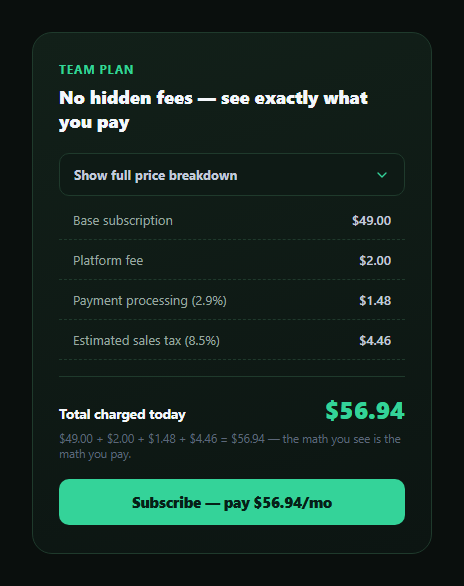
"No hidden fees" is a claim most pricing pages make in text without proving it. This snippet proves it structurally: the checkout total displayed is never a separately hardcoded number sitting next to the itemized fee list — it is computed at runtime by summing the exact line items rendered on screen, so the total and the line items can never silently drift apart.
One array, one reduce, one total
Every fee line is a .hfb-line element carrying its dollar amount in a data-amount attribute. The JS collects all of them and computes lineEls.reduce((sum, el) => sum + parseFloat(el.dataset.amount), 0) — a genuine sum of the base subscription (\$49.00), platform fee (\$2.00), payment processing at 2.9% (\$1.48), and estimated sales tax at 8.5% (\$4.46), landing on \$56.94. That total is written into both the summary row and the CTA button from the same computed variable, so there is structurally no way for the displayed total to disagree with what the itemized lines actually add up to.
The math is shown, not just claimed
Beneath the total, a small line of arithmetic — $49.00 + $2.00 + $1.48 + $4.46 = $56.94 — is generated from the same array the total was computed from, spelling out the addition explicitly rather than asking the visitor to trust an opaque final figure. This is the detail that turns "no hidden fees" from marketing copy into something a skeptical shopper can verify themselves in three seconds.
An accordion, not a wall of fees by default
The itemized breakdown starts collapsed behind a "Show full price breakdown" toggle so the card isn't visually noisy for visitors who just want the bottom-line number — but the total is always visible regardless of whether the accordion is open, and expanding it never changes the total, only reveals how it was derived. aria-expanded on the toggle button keeps the interaction accessible to screen readers and keyboard users, and the chevron icon rotates to reflect state.
Why this pattern matters for checkout trust
Surprise fees revealed only at the final step of checkout are one of the most common reasons for cart abandonment and post-purchase disputes. Structuring the total as a genuine sum of visible line items — rather than a number a designer typed in separately from the fee list — is a small implementation choice with an outsized trust payoff: it makes "no hidden fees" a property of the code, not just a sentence on the page.
Customizing it
Add, remove, or change fee lines by editing the data-amount attributes and their labels — the total, the CTA button text, and the arithmetic line all recompute automatically from whatever lines are present. Pair it with pricing card or a full pricing page as the transparency detail beneath the headline price.
Build with AI
Build, Understand, Optimize, and Extend It With AI
Paste this snippet into an AI coding assistant like Claude and ask it to explain why the displayed total is computed with Array.reduce() over the visible line items instead of being a separately typed number, and why that structural choice is what actually makes a "no hidden fees" claim verifiable rather than just asserted. It's also useful for extending — ask it to add a currency-aware version using Intl.NumberFormat instead of manual toFixed(2), make individual fee lines conditionally appear based on region (e.g. tax only in certain jurisdictions), or add a small tooltip on each fee line explaining what it covers.
Prompt to recreate it
Copy this into your AI assistant of choice to build the effect from scratch, or as a jumping-off point for your own variant:
Build a "transparent fees breakdown" pricing component in plain HTML, CSS, and JavaScript with no dependencies.

Requirements:
- Show a base subscription price plus several itemized fee lines (e.g. a flat platform fee, a percentage-based payment processing fee, and a percentage-based estimated tax), each with a realistic, clearly labeled dollar amount stored as a data attribute on its line element.
- Compute the displayed total by summing the actual data-amount values of every visible line item at runtime using array reduction — do not hardcode the total as a separate number that merely happens to match the sum; verify your example fee amounts actually add up to the total your copy will reference.
- Write the exact same computed total into both a prominent "total charged today" summary and the call-to-action button text, so both are guaranteed to always agree.
- Add a small line of text beneath the total that spells out the literal addition (e.g. "$49.00 + $2.00 + $1.48 + $4.46 = $56.94"), generated from the same line-item data the total was computed from.
- Put the itemized fee lines behind an accessible accordion toggle (using aria-expanded, with a rotating chevron icon) that is collapsed by default, while keeping the total and CTA always visible regardless of whether the accordion is expanded.
- Structure the code so adding, removing, or changing a fee line automatically updates the total, the CTA text, and the arithmetic line with no other code changes required.
Want to tighten it up first? Run this prompt through the AI Prompt Studio to score it across 8 quality dimensions, catch anti-patterns, and tune the wording for Claude, ChatGPT, or Gemini before you paste it in.
Step by step
How to Use
- 1See the always-visible totalThe total is shown before the breakdown is even expanded.
- 2Expand the breakdownClick the toggle to reveal every itemized fee line.
- 3Check the arithmetic lineIt spells out the exact addition that produces the total.
- 4Confirm nothing changes on toggleExpanding or collapsing never alters the computed total.
- 5Add a fee lineAdd a .hfb-line element with a data-amount attribute — the total updates automatically.
- 6Change a fee amountEdit a data-amount value and the sum, CTA text, and arithmetic line all recompute.
Real-world uses
Common Use Cases
Got questions?
Frequently Asked Questions
It is genuinely computed at runtime: the JS collects every .hfb-line element, reads its data-amount attribute, and sums them with Array.reduce(). The total, the CTA button text, and the arithmetic line beneath the total are all written from that single computed value, so there is no separately hardcoded total that could disagree with the itemized lines.
Yes — $49.00 base plus $2.00 platform fee plus $1.48 processing (2.9%) plus $4.46 estimated tax (8.5%) sums to exactly $56.94, and this is the literal reduce() result rather than a coincidentally matching hand-typed number.
Stating a final number alone still asks a skeptical shopper to trust that it was derived correctly. Spelling out the exact addition that produces it — generated from the same data the total was computed from — lets a visitor verify it themselves in seconds, which is a meaningfully stronger trust signal than the total alone.
No. The total is computed once from the underlying data-amount values and displayed regardless of whether the breakdown is expanded. The accordion only controls whether the itemized lines are visible; it never recalculates or alters the total itself.
Add another .hfb-line element inside #hfbLines with its own data-amount attribute and label text. Because the total is computed by summing whatever .hfb-line elements are present at runtime, no other code needs to change — the total, CTA text, and arithmetic line all pick up the new fee automatically.