You Might Also Like
Learn Coding Visually
Learn to code with interactive, live-preview playgrounds — HTML, CSS, JavaScript, React & more.
 HTML Playground42 lessons · Click-based · Live preview
 CSS PlaygroundLearn CSS with a live editor
 JavaScript Playground60 lessons · DOM · Async · Canvas
 React PlaygroundLearn React with a live code editor
 GSAP PlaygroundLearn GSAP animation interactively
 SVG Playground44 lessons · shapes · paths · animation
 SCSS Playground45 lessons · Sass modules · tokens
 Tailwind PlaygroundLearn Tailwind CSS with a live editor
 Bootstrap 5 Playground50 lessons · live preview
Per-Seat vs Usage-Based Pricing Toggle — Free HTML CSS JS Snippet
Pricing Model Toggle (Per-Seat vs Per-Usage) · Pricing · Plain HTML, CSS & JS · Live preview
What's included
Features
About this UI Snippet
Pricing Model Toggle — Per-Seat vs. Usage-Based, Two Real Formulas, Not One Formula Relabeled
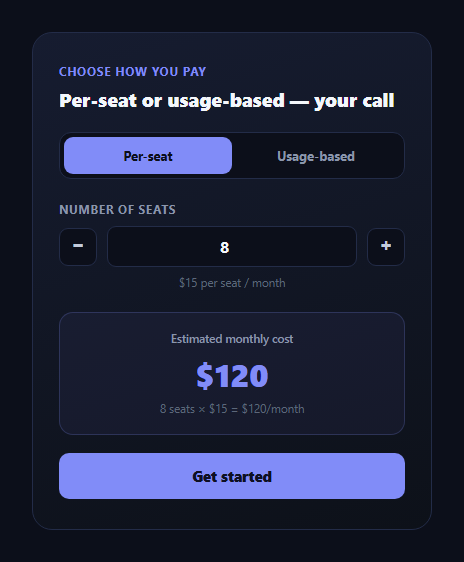
Plenty of "pricing model toggle" components are cosmetic — they swap a label between "per seat" and "usage-based" while running the exact same multiplication underneath. This snippet builds two genuinely different pricing formulas, each with its own independent input and its own unit economics, and switches between them cleanly without either one leaking into the other.
Two real formulas, not one formula relabeled
Per-seat pricing is seats × SEAT_RATE — a flat \$15 charged for every team member, regardless of how much any individual uses the product. Usage-based pricing is calls × USAGE_RATE — a per-unit charge (\$0.02 per API call) that has nothing to do with headcount at all; a team of two making a million calls pays far more than a team of fifty making a thousand. These are different mental models for the same underlying question ("what am I actually paying for?"), and the snippet keeps them structurally separate: two different input fields, two different rate constants, two different result-formula strings.
Independent, isolated inputs per model
Switching modes doesn't just change which formula runs against a shared number — it swaps to an entirely separate input (#vmtSeats vs. #vmtUsage) with its own stepper buttons, its own min/max bounds, and its own unit label ("seats" vs. "API calls per month, in thousands"). This matters because the two inputs represent genuinely different things; forcing them to share one number field would misrepresent at least one of the two models the moment a visitor tried to enter a value that made sense for the other.
The formula is shown, not just the total
Beneath the headline dollar figure, resultFormula renders the literal arithmetic — "8 seats × $15 = $120/month" or "400,000 calls × $0.02 = $8,000/month" — computed from the exact same input the total was computed from, so the total is always traceable back to a number the visitor themselves typed in.
Clamping keeps the math sane at the edges
Both inputs run through clamp(), bounding seats to 1–500 and usage to 1–10,000 (thousand calls), and both stepper buttons and direct typing funnel through the identical recalc() function — so there's exactly one code path computing the cost for each model, not two that could drift out of sync (one driven by buttons, one by typing).
Why this distinction matters for buyers
A team evaluating vendors genuinely needs to know which pricing model fits their usage pattern — a small team with heavy API usage will pay far less under usage-based pricing than per-seat, and vice versa for a large team with light usage. Letting a prospect toggle between both models with their own real numbers, live, turns an abstract pricing-page comparison into a concrete answer to "which one is cheaper for us."
Customizing it
Change SEAT_RATE and USAGE_RATE to your real pricing, adjust the input bounds, or add a third pricing model (e.g. flat-tier) as a third switch option following the same isolated-panel pattern. Pair it with pricing toggle for a monthly/annual dimension layered on top, or seat-based pricing calculator for a per-seat-only deep dive.
Build with AI
Build, Understand, Optimize, and Extend It With AI
Paste this snippet into an AI coding assistant like Claude and ask it to explain why the per-seat and usage-based modes use entirely separate input elements and rate constants rather than one shared number field with a relabeled multiplier, and why every stepper button and direct-typing path funnels through the single recalc() function. It's also a strong candidate to extend — ask it to add a third hybrid pricing model (e.g. a base fee plus per-seat plus usage overage), add a side-by-side comparison showing both totals at once instead of only the active mode, or persist the visitor's last-used inputs in localStorage so returning to the page keeps their numbers.
Prompt to recreate it
Copy this into your AI assistant of choice to build the effect from scratch, or as a jumping-off point for your own variant:
Build a pricing card with a toggle between two fundamentally different, independently computed pricing models in plain HTML, CSS, and JavaScript, using no dependencies.

Requirements:
- A segmented toggle switching between "Per-seat" and "Usage-based" modes, with a smooth animated sliding indicator behind the active option.
- Per-seat mode shows a dedicated number input (with stepper buttons and a sensible min/max range) for number of seats, and computes monthly cost as seats multiplied by a flat per-seat rate constant.
- Usage-based mode shows a SEPARATE dedicated number input (with its own stepper buttons and its own sensible min/max range, in units appropriate to usage rather than seats) for consumption volume, and computes monthly cost as consumption multiplied by a per-unit rate constant — this must be an entirely independent formula and independent input from the per-seat mode, not the same input relabeled.
- Switching modes must hide the inactive model's input panel and show the correct one, and must NOT carry over or reuse the previous mode's numeric value in the new mode's calculation.
- Display both the computed total (formatted with locale-aware number grouping) and a line of text spelling out the literal arithmetic (e.g. "8 seats × $15 = $120/month" or "400,000 calls × $0.02 = $8,000/month") generated from the exact same input value the total was computed from.
- Route every input change — whether from typing directly or clicking a stepper button — through a single shared recalculation function per mode, so there is exactly one code path computing each model's cost.
- Verify your example rate constants produce sensible, correctly computed example totals before finalizing any copy that references specific numbers.
Want to tighten it up first? Run this prompt through the AI Prompt Studio to score it across 8 quality dimensions, catch anti-patterns, and tune the wording for Claude, ChatGPT, or Gemini before you paste it in.
Step by step
How to Use
- 1Start on Per-seatAdjust the seat count with the steppers or by typing directly.
- 2Watch the cost recalculateThe total and formula line update live from seats × rate.
- 3Switch to Usage-basedA completely separate input for monthly API call volume appears.
- 4Adjust the usage inputThe total recalculates as calls × per-call rate, independently of seats.
- 5Compare the two totalsToggle back and forth to see which model is cheaper for your numbers.
- 6Change the ratesEdit SEAT_RATE or USAGE_RATE — both formulas and their shown arithmetic update.
Real-world uses
Common Use Cases
Got questions?
Frequently Asked Questions
They are genuinely different: per-seat cost is seats multiplied by a flat per-seat rate ($15), with no relationship to usage volume at all, while usage-based cost is the number of API calls multiplied by a per-call rate ($0.02), with no relationship to headcount. Each mode reads from its own input and its own rate constant, and switching modes swaps which input panel and which formula are active.
A single shared number field would misrepresent whichever model is not currently selected — "8" means something completely different as a seat count versus as a thousands-of-API-calls figure. Giving each model its own dedicated input, with its own bounds and unit label, keeps both models honestly represented rather than forcing an artificial shared scale.
They are illustrative defaults ($15/seat/month and $0.02/API call) meant to demonstrate the calculation pattern, not live pricing. Replace SEAT_RATE and USAGE_RATE with your actual plan pricing — every displayed total and formula string recalculates automatically from those two constants.
Showing only a final dollar figure asks the visitor to trust an opaque number. Rendering the literal multiplication — the exact input value times the exact rate — lets them verify the total themselves and builds more confidence than a bare total would, especially when comparing two different pricing models against each other.
Add a third button to the #vmtSwitch control with its own data-mode value, a third hidden panel with its own input and bounds, and a third branch in recalc() computing that model's total from its own rate constant — following the same isolated-panel pattern the existing two models use, so the new model does not interfere with the other two.