You Might Also Like
Learn Coding Visually
Learn to code with interactive, live-preview playgrounds — HTML, CSS, JavaScript, React & more.
 HTML Playground42 lessons · Click-based · Live preview
 CSS PlaygroundLearn CSS with a live editor
 JavaScript Playground60 lessons · DOM · Async · Canvas
 React PlaygroundLearn React with a live code editor
 GSAP PlaygroundLearn GSAP animation interactively
 SVG Playground44 lessons · shapes · paths · animation
 SCSS Playground45 lessons · Sass modules · tokens
 Tailwind PlaygroundLearn Tailwind CSS with a live editor
 Bootstrap 5 Playground50 lessons · live preview
Lifetime Deal Pricing Card — Free HTML CSS JS Snippet, Real Payback Math
Lifetime Deal Pricing Card · Pricing · Plain HTML, CSS & JS · Live preview
What's included
Features
About this UI Snippet
Lifetime Deal Pricing Card — Computed Payback Period and a Real Licenses-Remaining Bar
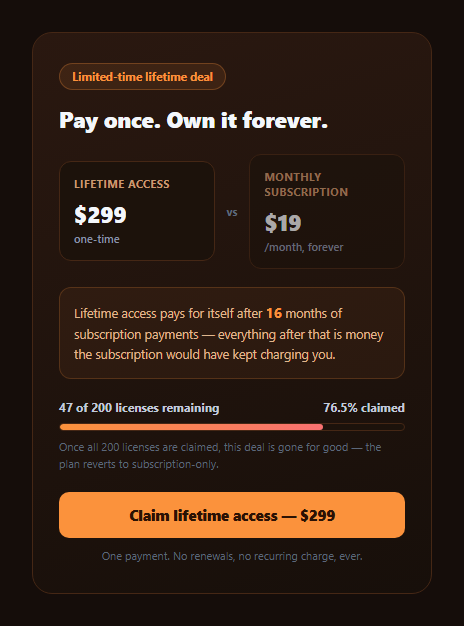
Lifetime deals live or die on one piece of arithmetic: how long does it take before paying once is actually cheaper than paying monthly forever? This snippet computes that number for real — Math.ceil(LIFETIME_PRICE / MONTHLY_PRICE) — rather than writing an arbitrary "pays for itself fast!" claim, and pairs it with a licenses-remaining progress bar built from real claimed/total counts instead of a fake, endlessly-refreshing urgency bar.
The payback period, computed and rounded correctly
At \$299 lifetime versus \$19/month, the raw division is \$299 ÷ \$19 = 15.7368… months. The snippet uses Math.ceil(), not a truncated or rounded-to-nearest value, because the question being answered is "after how many *whole* months of payments does cumulative subscription cost first exceed the lifetime price?" — and 15 months of \$19 payments totals only \$285 (still less than \$299), while 16 months totals \$304 (the first month that actually exceeds it). Rounding down or to-nearest would overstate the deal's value by claiming payback a month earlier than the math actually supports.
Why licenses-remaining needs to be a real fraction, not a decoration
The availability bar's fill width is computed as (CLAIMED_LICENSES / TOTAL_LICENSES) * 100 — at 153 of 200 claimed, that's exactly 76.5%, and the bar's visual width and the "47 of 200 remaining" text both derive from the same two constants. This matters because a scarcity bar with a number that doesn't match its own visual fill (or that resets on every page load regardless of actual claims) is a well-recognized dark pattern that erodes trust the moment a visitor notices the mismatch — this snippet's bar width and its stated numbers are structurally guaranteed to agree, because both come from the same division.
Contrast, not just a headline price
The lifetime price sits directly beside the ongoing subscription price in a two-column comparison, rather than showing the lifetime price in isolation and leaving the "instead of what?" question to the visitor's imagination. Seeing "\$299 once" next to "\$19/month, forever" is what makes the payback-period math feel concrete rather than abstract — the visitor can see exactly what they're comparing before reading the computed months figure.
Urgency that's honest about its own mechanics
The fine print states plainly that once all 200 licenses are claimed, the deal reverts to subscription-only — a real, finite constraint rather than vague "act now" pressure with no actual limit behind it. Pairing a genuinely limited quantity with a genuinely computed payback period is what separates a legitimate lifetime-deal launch from a manufactured-scarcity dark pattern.
Customizing it
Change LIFETIME_PRICE, MONTHLY_PRICE, TOTAL_LICENSES, and CLAIMED_LICENSES — the payback months, the remaining count, the claimed percentage, and the bar's fill width all recalculate from those four constants. Wire CLAIMED_LICENSES to your real database count in production so the bar reflects actual, live claims rather than a static demo number.
Build with AI
Build, Understand, Optimize, and Extend It With AI
Paste this snippet into an AI coding assistant like Claude and ask it to explain exactly why the payback-period calculation uses Math.ceil() rather than Math.round(), and walk through what would change in the displayed month count if the lifetime or monthly price were adjusted slightly. It's also useful for extending — ask it to fetch CLAIMED_LICENSES from a real backend endpoint instead of a hardcoded constant, add a live countdown timer alongside the license bar for a genuinely time-boxed deal, or add a second payback comparison showing the break-even point in years for a higher-priced annual-subscription alternative.
Prompt to recreate it
Copy this into your AI assistant of choice to build the effect from scratch, or as a jumping-off point for your own variant:
Build a "lifetime deal pricing card" in plain HTML, CSS, and JavaScript with no dependencies.

Requirements:
- Show a one-time lifetime-access price directly alongside an ongoing monthly subscription price in a clear two-column comparison, so the trade-off is concrete rather than showing the lifetime price in isolation.
- Compute a real "pays for itself after N months" figure using Math.ceil(lifetimePrice / monthlyPrice) — verify by hand that this correctly identifies the first WHOLE month where cumulative subscription payments would exceed the lifetime price (not simply the unrounded division result) before finalizing the copy.
- Show a licenses-remaining availability bar whose fill width is computed as (claimed / total) * 100 from two real constants (total licenses and claimed licenses), and show accompanying text stating exactly how many licenses remain — both the bar width and the text must derive from the same two numbers so they can never disagree.
- Animate the availability bar's fill-in on page load (e.g. via requestAnimationFrame) to the real computed percentage, not an arbitrary decorative value.
- Include honest urgency copy stating what concretely happens once all licenses are claimed (e.g. the deal reverts to subscription-only), avoiding vague "act now" pressure with no real constraint behind it.
- Structure the four core numbers (lifetime price, monthly price, total licenses, claimed licenses) as easily editable constants that every displayed and computed value on the card derives from.
Want to tighten it up first? Run this prompt through the AI Prompt Studio to score it across 8 quality dimensions, catch anti-patterns, and tune the wording for Claude, ChatGPT, or Gemini before you paste it in.
Step by step
How to Use
- 1Compare the two pricesLifetime and monthly sit side by side so the trade-off is concrete.
- 2Read the computed payback lineThe month count is Math.ceil(lifetime price / monthly price), not a guess.
- 3Watch the availability bar animate inIts fill width is the real claimed/total percentage.
- 4Check the remaining countThe text and the bar width are guaranteed to agree — both derive from the same numbers.
- 5Change the pricesEdit LIFETIME_PRICE or MONTHLY_PRICE — the payback month recalculates.
- 6Wire claimed count to real dataReplace CLAIMED_LICENSES with a live count from your backend.
Real-world uses
Common Use Cases
Got questions?
Frequently Asked Questions
Because the question is "after how many whole months does the subscription cost actually exceed the lifetime price," not "roughly how many months." At $299 lifetime versus $19/month, 15 months of payments totals $285 — still less than $299 — while 16 months totals $304, the first month that genuinely exceeds it. Rounding to nearest (which would give 16 anyway here, but wouldn't in every case) or truncating down would misstate the real crossover point.
Yes — the bar's fill width is computed as (CLAIMED_LICENSES / TOTAL_LICENSES) * 100, and the "47 of 200 remaining" text is computed from the same two constants (TOTAL_LICENSES minus CLAIMED_LICENSES). Both numbers are structurally guaranteed to agree because they derive from the same source, unlike a decorative scarcity bar whose displayed count and visual fill could silently drift apart.
The payback-period claim is meaningless without a comparison point — "pays for itself after 16 months" only means something next to the $19/month figure it is being compared against. Showing both prices side by side lets a skeptical visitor verify the payback math themselves rather than taking a bare "great value!" claim on faith.
The scarcity messaging here is deliberately built to be honest: the remaining-license count and bar fill are real computed values tied to an actual finite quantity (200 total licenses), and the copy states plainly what happens when they run out. The distinction from a dark pattern is whether the constraint is real and consistently represented — a bar that resets on every visit or a count that does not match its own visual fill would cross that line; this one is structured not to.
Replace the hardcoded CLAIMED_LICENSES constant with a value fetched from your backend (e.g. a count query against your licenses table) before the calculation runs, ideally cached briefly rather than queried on every single page view. Every other computed value on the card — remaining count, claimed percentage, and bar width — will then reflect the real live count automatically.