Source Code
<section class="trh-hero">
  <div class="trh-inner">
    <span class="trh-pill">typed.js · smart backspace</span>

    <h1 class="trh-title">
      We build
      <span class="trh-typed"><span id="trhTarget"></span></span>
    </h1>

    <p class="trh-caption" id="trhCaption">Component libraries that survive a rebrand.</p>

    <div class="trh-actions">
      <button class="trh-cta">Book a call</button>
      <button class="trh-ghost" id="trhToggle">Pause</button>
    </div>

    <div class="trh-speeds" id="trhSpeeds">
      <button class="trh-chip" data-speed="90">Slow</button>
      <button class="trh-chip is-on" data-speed="55">Normal</button>
      <button class="trh-chip" data-speed="22">Fast</button>
    </div>
  </div>
</section>*{box-sizing:border-box;margin:0;padding:0}
body{font-family:system-ui,-apple-system,sans-serif;background:#07091a;color:#fff;min-height:100vh}
.trh-hero{--accent:#818cf8;min-height:100vh;display:flex;align-items:center;justify-content:center;padding:32px 24px;background:radial-gradient(110% 80% at 50% 0%,rgba(129,140,248,.16),transparent 60%),#07091a;transition:--accent .5s}
.trh-inner{max-width:720px;text-align:center}
.trh-pill{display:inline-block;font-size:11px;font-weight:700;letter-spacing:.14em;text-transform:uppercase;color:var(--accent);background:rgba(255,255,255,.05);border:1px solid rgba(255,255,255,.14);padding:6px 13px;border-radius:99px;margin-bottom:24px;transition:color .5s}
.trh-title{font-size:clamp(30px,6.2vw,56px);font-weight:800;line-height:1.14;letter-spacing:-.03em}
.trh-typed{display:block;margin-top:6px;color:var(--accent);transition:color .5s}
.trh-typed .typed-cursor{color:var(--accent);font-weight:300;opacity:1;animation:trhBlink .9s infinite}
@keyframes trhBlink{0%,45%{opacity:1}50%,95%{opacity:0}100%{opacity:1}}
.trh-caption{font-size:clamp(14px,2.3vw,16.5px);color:#8d96bb;margin-top:20px;min-height:24px;transition:opacity .3s}
.trh-caption.fade{opacity:0}
.trh-actions{display:flex;gap:12px;justify-content:center;flex-wrap:wrap;margin-top:32px}
.trh-cta{padding:13px 26px;border:none;border-radius:12px;background:var(--accent);color:#0b0d1c;font:700 14px system-ui;cursor:pointer;transition:background .5s,transform .16s}
.trh-cta:hover{transform:translateY(-2px)}
.trh-ghost{padding:13px 24px;border:1px solid rgba(255,255,255,.2);border-radius:12px;background:rgba(255,255,255,.04);color:#dbe3fb;font:600 14px system-ui;cursor:pointer;min-width:104px;transition:background .16s}
.trh-ghost:hover{background:rgba(255,255,255,.1)}
.trh-speeds{display:flex;gap:8px;justify-content:center;margin-top:36px}
.trh-chip{padding:8px 16px;border-radius:99px;border:1px solid rgba(255,255,255,.13);background:rgba(255,255,255,.03);color:#8d96bb;font:600 12px system-ui;cursor:pointer;transition:color .16s,border-color .16s}
.trh-chip:hover{color:#fff}
.trh-chip.is-on{border-color:var(--accent);color:#fff}var STRINGS = [
'design systems that scale.',
'design systems that ship on Friday.',
'dashboards that load in 40ms.',
'docs your team actually reads.',
'onboarding that converts.'
];
var META = [
{ caption: 'Component libraries that survive a rebrand.', accent: '#818cf8' },
{ caption: 'Shipped, reviewed, and documented in one sprint.', accent: '#38bdf8' },
{ caption: 'Server components, edge caching, zero layout shift.', accent: '#34d399' },
{ caption: 'Written by the engineers who built the thing.', accent: '#fbbf24' },
{ caption: 'Three fields, one screen, no dead ends.', accent: '#f472b6' }
];
var hero = document.querySelector('.trh-hero');
var caption = document.getElementById('trhCaption');
var toggleBtn = document.getElementById('trhToggle');
var typed = null;
var speed = 55;
var paused = false;
function applyMeta(i) {
var m = META[i];
if (!m) return;
hero.style.setProperty('--accent', m.accent);
caption.classList.add('fade');
setTimeout(function () {
caption.textContent = m.caption;
caption.classList.remove('fade');
}, 220);
}
function build() {
if (typed) typed.destroy();
typed = new Typed('#trhTarget', {
strings: STRINGS,
typeSpeed: speed,
backSpeed: Math.max(10, Math.round(speed * 0.55)),
backDelay: 1500,
startDelay: 300,
// Only rewinds to the point where two consecutive strings differ, so
// "…that scale." becomes "…that ship on Friday." without retyping the shared prefix.
smartBackspace: true,
loop: true,
showCursor: true,
cursorChar: '▌',
preStringTyped: applyMeta
});
paused = false;
toggleBtn.textContent = 'Pause';
}
build();
toggleBtn.addEventListener('click', function () {
paused = !paused;
if (paused) typed.stop(); else typed.start();
toggleBtn.textContent = paused ? 'Resume' : 'Pause';
});
document.getElementById('trhSpeeds').addEventListener('click', function (e) {
var chip = e.target.closest('.trh-chip');
if (!chip) return;
document.querySelectorAll('.trh-chip').forEach(function (c) { c.classList.remove('is-on'); });
chip.classList.add('is-on');
speed = Number(chip.dataset.speed);
build();
});Learn Coding Visually
Learn to code with interactive, live-preview playgrounds — HTML, CSS, JavaScript, React & more.
 HTML Playground42 lessons · Click-based · Live preview
 CSS PlaygroundLearn CSS with a live editor
 JavaScript Playground60 lessons · DOM · Async · Canvas
 React PlaygroundLearn React with a live code editor
 GSAP PlaygroundLearn GSAP animation interactively
 SVG Playground44 lessons · shapes · paths · animation
 SCSS Playground45 lessons · Sass modules · tokens
 Tailwind PlaygroundLearn Tailwind CSS with a live editor
 Bootstrap 5 Playground50 lessons · live preview
Typed.js Rotating Headline — Hero Typewriter Snippet
Typed.js Rotating Headline · Heroes · Plain HTML, CSS & JS · Live preview
What's included
Features
About this UI Snippet
Typed.js Rotating Headline — Typewriter Text That Drives the Whole Hero
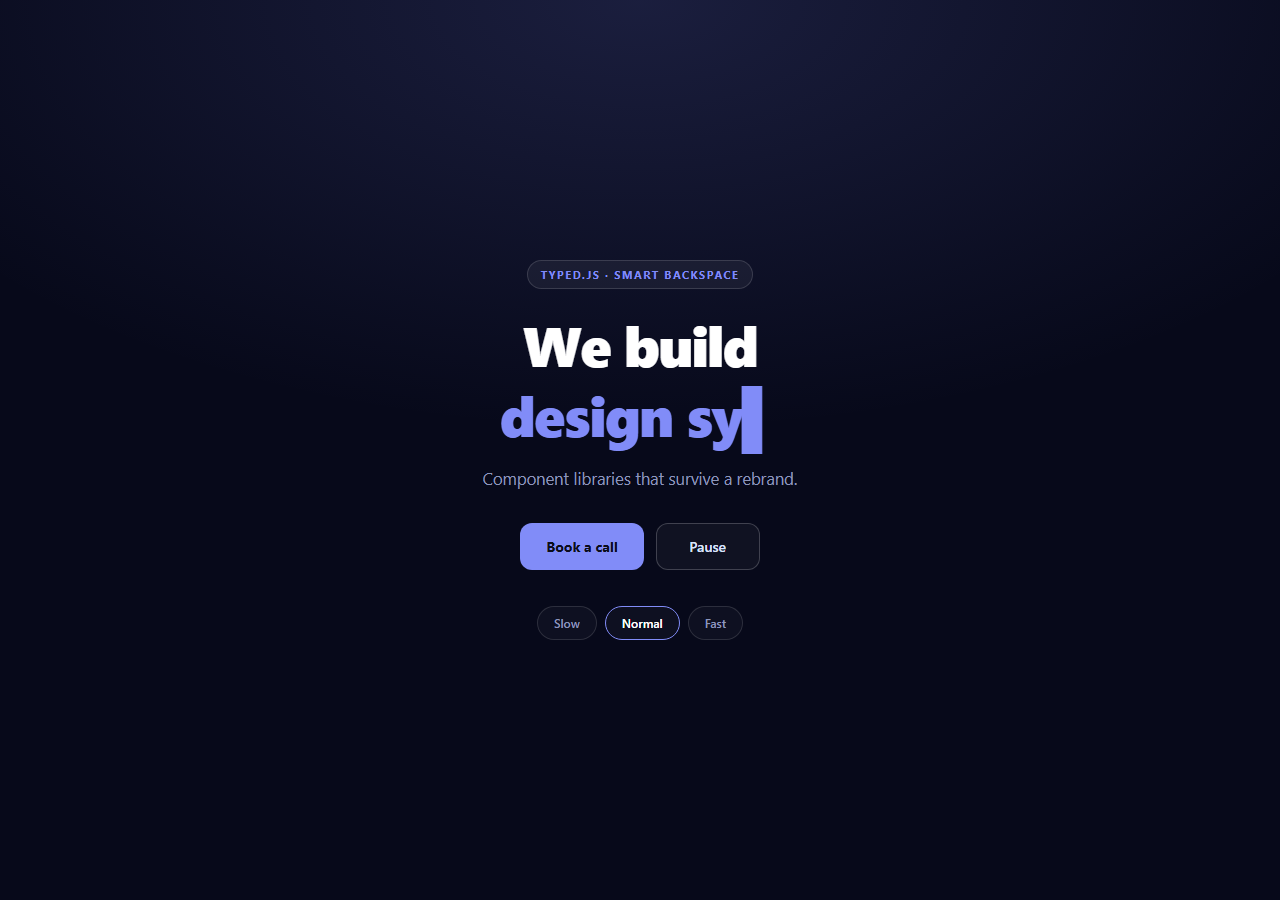
A rotating headline is the most common hero pattern on the web and one of the easiest to do badly. The version that hurts conversion types one character at a time forever, jumps the layout on every wrap, and leaves screen readers reading a stream of half-words. This snippet fixes each of those and adds the thing most implementations miss entirely: the rest of the hero reacts to which line is being typed.
Smart backspace, the feature worth the dependency
You could write a typewriter in thirty lines. The reason to reach for Typed.js is smartBackspace, and it is genuinely hard to reimplement well:
smartBackspace: true
With it off, every rotation deletes the entire line character by character and retypes the next one from nothing. With it on, Typed.js diffs consecutive strings and rewinds only to the point where they differ. The first two strings here are chosen to demonstrate it exactly:
- design systems that scale.
- design systems that ship on Friday.
The shared prefix "design systems that " is never deleted. The line rewinds to that point and continues, which is both dramatically faster and reads as an idea being *revised* rather than erased. Writing your rotating strings to share prefixes is a copywriting decision that this one option turns into a visual one.
Syncing the rest of the hero
The preStringTyped callback fires with the array index of the string about to be typed, before typing starts — which makes it the right hook for changing anything that should already be correct when the new line begins:
preStringTyped: applyMeta
applyMeta(i) writes a new accent color to a CSS custom property on the hero root (hero.style.setProperty('--accent', m.accent)) and swaps the caption underneath. Because --accent is consumed by the pill, the typed text, the CTA background, and the active chip border, one property assignment retints five elements, each with its own CSS transition so they ease rather than snap.
The caption swap is handled with a two-step fade rather than a hard text replacement: a .fade class drops opacity, the text is replaced 220ms later inside a setTimeout, then the class is removed. Replacing the text instantly while the line is still visible produces a jarring flicker that undercuts the smoothness of everything else.
Layout stability
.trh-typed { display: block } puts the rotating phrase on its own line. This is deliberate: an inline rotating span changes the width of the headline on every character, which can rewrap the static text before it and cause visible reflow on every keystroke. Giving it a dedicated line means only that line's width changes.
.trh-caption { min-height: 24px } reserves the caption's space so a shorter line does not collapse the block and shift the buttons upward.
The cursor
Typed.js injects its own .typed-cursor element, which is why the CSS styles a class it never declares in the HTML. The default blink is a simple opacity toggle; the trhBlink keyframe here holds the cursor solid for 45% of the cycle and hidden for 45% with sharp transitions, which matches how a real terminal cursor behaves far better than a smooth fade. cursorChar: '▌' swaps the default pipe for a block character that reads better at display sizes.
Rebuilding for speed changes
Typed.js reads typeSpeed once at construction, so changing speed means a new instance — and if (typed) typed.destroy() must come first. Without it, the old instance keeps its interval running and writes to the same element, so two typewriters fight over one span and produce interleaved garbage. destroy() clears the timers and removes the injected cursor.
Note that backSpeed is derived rather than fixed: Math.max(10, Math.round(speed * 0.55)). Deleting should always feel faster than typing — a rotation that erases at the same speed it writes feels twice as slow as it is.
Pause, and why it matters
The pause button calls typed.stop() and typed.start(). This is not decoration: WCAG 2.2.2 requires that any automatically moving content lasting more than five seconds can be paused. A permanently looping headline qualifies, so shipping one without a pause control is an accessibility failure, not a missing nice-to-have.
Reusing it
Rewrite STRINGS and the matching META array — keep them the same length, since applyMeta indexes straight into it. Write your strings to share leading words wherever the meaning allows, so smartBackspace has something to work with. For a static alternative without the dependency, see typewriter, or word flip hero when you want whole words to swap rather than type.
Build with AI
Build, Understand, Optimize, and Extend It With AI
The genuinely interesting parts of this hero are the callback wiring and one option, so it is worth having explained rather than skimmed. Paste the HTML, CSS, and JS into an AI assistant like Claude and ask it to explain exactly how smartBackspace decides where to stop rewinding between two consecutive strings, then have it rewrite the STRINGS array so that no two entries share a prefix and describe how the rotation would feel differently. Ask why applyMeta is wired to preStringTyped rather than onStringTyped, and what would visibly change if it fired after the line finished instead of before it started. For optimization, ask whether the 220ms setTimeout inside applyMeta can desynchronize from the CSS transition duration and how you would tie them together properly. To extend it: have it pause the loop when the hero scrolls out of view with an IntersectionObserver, respect prefers-reduced-motion by showing a single static line, drive STRINGS from a CMS, or add an aria-live region so assistive tech announces each completed line rather than every keystroke. Treat the code less like a finished artifact and more like a starting point for a conversation.
Prompt to recreate it
Copy this into your AI assistant of choice to build the effect from scratch, or as a jumping-off point for your own variant:
Build a marketing hero with a rotating typewriter headline using Typed.js (v2 UMD from a CDN, global Typed) in plain HTML, CSS, and JavaScript.

Requirements:
- Rotate through about five value-proposition strings, and deliberately write at least two of them to share a leading phrase (for example "design systems that scale." and "design systems that ship on Friday.") so that smartBackspace: true has something to demonstrate — it must rewind only to the point where consecutive strings differ rather than deleting the whole line.
- Maintain a parallel META array, one entry per string, each holding an accent color and a caption. Use the preStringTyped callback — which fires with the array index BEFORE that string starts typing — to apply the matching entry, so the surrounding UI is already correct when the new line begins.
- Applying a meta entry must write its color to a single --accent CSS custom property on the hero root, and the pill, the typed text, the CTA button background and the active speed chip border must all consume that one variable, each with its own CSS transition, so one assignment retints the whole hero smoothly.
- Swap the caption with a two-step cross-fade rather than replacing text instantly: add a fade class to drop opacity, replace the text after a short timeout, then remove the class — a hard swap while the old line is visible flickers.
- Put the rotating phrase on its own line with display: block, and explain why: an inline rotating span changes the headline width every keystroke, which can rewrap the static text and cause visible reflow. Also give the caption a min-height so a shorter line does not collapse the block and shift the buttons.
- Style the cursor that Typed.js injects (the .typed-cursor class it creates itself) with a hard-edged blink keyframe that holds solid then hidden, rather than a smooth fade, and set cursorChar to a block character.
- Provide Slow / Normal / Fast speed buttons that rebuild the Typed instance, calling destroy() on the previous one FIRST — explain that Typed.js reads typeSpeed only at construction and that skipping destroy leaves the old timers running so two typewriters interleave characters into the same span. Derive backSpeed as roughly 55% of typeSpeed (floored around 10ms) so deleting always feels faster than typing.
- Include a Pause/Resume button calling typed.stop() and typed.start(), and note that WCAG 2.2.2 requires automatically moving content lasting over five seconds to be pausable, so this control is a requirement rather than an extra.
Want to tighten it up first? Run this prompt through the AI Prompt Studio to score it across 8 quality dimensions, catch anti-patterns, and tune the wording for Claude, ChatGPT, or Gemini before you paste it in.
Step by step
How to Use
- 1Add the Typed.js CDNInclude the typed.umd build from the CDN panel — global Typed.
- 2Paste HTML, CSS, and JSThe headline starts rotating through five value propositions.
- 3Watch the rewindLines sharing a prefix rewind only to the difference, not to empty.
- 4Notice the hero retintAccent color and caption change with each new line.
- 5Change the speedSlow, Normal, and Fast rebuild the instance with a derived backspace speed.
- 6Write your own linesEdit STRINGS and META together — they are indexed in parallel.
Real-world uses
Common Use Cases
Got questions?
Frequently Asked Questions
It diffs the current string against the next one and rewinds only to the point where they differ, instead of deleting the whole line. With strings like "design systems that scale." followed by "design systems that ship on Friday.", the shared prefix is never erased — the rotation is faster and reads as a revision rather than a restart.
The preStringTyped callback receives the index of the string about to be typed. It writes the matching accent color to a --accent custom property on the hero root, and because the pill, typed text, CTA background, and active chip border all consume that variable, one assignment retints five elements — each easing via its own CSS transition.
An inline rotating span changes the headline width on every character, which can rewrap the static text before it and cause visible reflow on each keystroke. Setting the typed span to display: block confines width changes to that line alone.
Typed.js reads typeSpeed once at construction, so a speed change needs a new instance. destroy() must be called first — otherwise the old instance keeps its timers running against the same element and two typewriters interleave characters into one span.
Deleting should always feel quicker than writing; a rotation that erases at the same rate it types feels about twice as slow as it is. Deriving it as roughly 55% of the type speed, floored at 10ms, keeps that ratio correct at every speed setting.
Create the Typed instance in a mount effect against a ref to the target span, and call destroy() in cleanup so a remount does not leave a running timer writing into a detached node. Hold the accent and caption in state and set them from the preStringTyped callback rather than mutating the DOM. Rebuild the instance in an effect keyed to the speed value.