Learn Coding Visually
Learn to code with interactive, live-preview playgrounds — HTML, CSS, JavaScript, React & more.
 HTML Playground42 lessons · Click-based · Live preview
 CSS PlaygroundLearn CSS with a live editor
 JavaScript Playground60 lessons · DOM · Async · Canvas
 React PlaygroundLearn React with a live code editor
 GSAP PlaygroundLearn GSAP animation interactively
 SVG Playground44 lessons · shapes · paths · animation
 SCSS Playground45 lessons · Sass modules · tokens
 Tailwind PlaygroundLearn Tailwind CSS with a live editor
 Bootstrap 5 Playground50 lessons · live preview
Reaction Time Tester Game — Free HTML CSS JS Snippet
Reaction Time Tester Game · Games · Plain HTML, CSS & JS · Live preview
What's included
Features
About this UI Snippet
Reaction Time Tester Game — performance.now() Timing, Randomized Delay & Too-Soon Detection
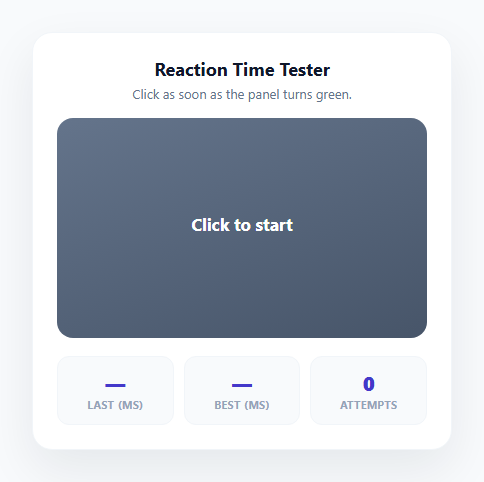
Reaction time testers are a small, self-contained game mechanic that shows up everywhere from neuroscience research tools to mobile app stores full of "test your reflexes" apps. The core loop is simple to describe but easy to get subtly wrong: show a waiting state, switch to a "go" state after an unpredictable delay, measure the time between that switch and the user's click, and correctly reject clicks that happen too early. This snippet implements the full loop in vanilla JavaScript using a finite state machine and the high-resolution performance.now() timing API, avoiding the millisecond-level inaccuracy that Date.now() can introduce under system clock adjustments.
Why a finite state machine keeps the logic correct
The entire game is driven by a single state variable that can only be one of five values: idle, waiting, ready, early, or result. Every click on the panel routes through one handlePanelClick() dispatcher that checks the current state and decides what should happen — starting a new round from idle, early, or result; registering an early-click failure from waiting; or registering a valid reaction time from ready. This explicit state machine is what makes the "click too soon" detection reliable: a click is only ever counted as a valid reaction if the state is exactly ready, which is only set the instant the randomized delay's setTimeout callback fires. Any click before that point necessarily happens while state === 'waiting', so it is unambiguously routed to the early-click failure path instead.
Randomizing the delay to prevent anticipation
If the wait period before the panel turns green were a fixed duration, users would quickly learn to time their click rather than genuinely react to the color change, defeating the purpose of the test. randomDelay() returns a value between 1500ms and 4000ms using 1500 + Math.random() * 2500, so every round has an unpredictable wait length within a comfortable testing window — long enough to prevent rhythm-based guessing, short enough that the test does not feel tedious. This delay is passed directly into a setTimeout, and the returned timeout ID is stored so it can be cancelled with clearTimeout() if the user clicks early, preventing a stray "go" state from firing after the round has already ended in failure.
Precise timing with performance.now()
The moment the panel switches to its green "go" state, goTime = performance.now() captures a high-resolution timestamp — sub-millisecond precision that is not subject to system clock changes, unlike Date.now(). When the user clicks during the ready state, registerReaction() computes Math.round(performance.now() - goTime) to get the reaction time in whole milliseconds. This is the same timing API used by browser performance profiling tools and is the correct choice any time you need to measure a short, precise interval in client-side JavaScript rather than wall-clock time.
Rating labels and best-time tracking
Every completed round is scored against four rating bands via ratingLabel(): under 200ms is "Lightning fast" (near the limit of typical human visual-motor reaction time), 200-300ms is "Great", 300-400ms is "Average", and anything slower is "Keep practicing" — bands roughly informed by published human reaction-time research, where average simple visual reaction time clusters around 200-300ms. A running bestMs variable, scoped outside any single round, tracks the lowest (fastest) reaction time recorded across the whole session, updating only when a new result beats the existing record via a simple if (bestMs === null || reactionMs < bestMs) check. An attempts counter increments on every completed valid round (early-click failures are intentionally excluded from the attempts count and do not affect the best time), giving the user a running sense of how many genuine attempts they have made.
CSS state-driven visual feedback
Each of the five states maps to its own CSS class (.state-idle, .state-wait, .state-go, .state-early, .state-result) applied to the panel via a single panel.className reassignment in setPanelState(), so the background gradient, and by extension the entire visual mood of the game, updates atomically with the state transition. The go state additionally triggers a brief go-pulse scale keyframe animation, giving the color switch a tactile "snap" that reinforces the moment the user needs to react to.
Build with AI
Build, Understand, Optimize, and Extend It With AI
Paste this snippet's HTML, CSS, and JS into an AI coding assistant like Claude and ask it to explain how the five-value state variable prevents race conditions between a pending setTimeout and an early click, and why performance.now() is the right timing API here instead of Date.now(). It's also a great candidate to extend — ask the assistant to persist the best time to localStorage so it survives page refreshes, add a rolling average across the last five attempts alongside the single best time, or add a "false start" penalty that requires the user to wait an extra second before their next attempt after clicking too early, mimicking real sprint-start penalty conventions. Because the whole game logic fits in one small dispatcher function, it's also a good snippet to ask an assistant to convert into a reusable custom hook or class if you are integrating it into a larger React or Vue application.
Prompt to recreate it
Copy this into your AI assistant of choice to build the effect from scratch, or as a jumping-off point for your own variant:
Build a reaction time tester game in plain HTML, CSS, and JavaScript that measures how quickly a user clicks after a color change, with accurate timing and too-soon detection — no external libraries.

Requirements:
- A single panel that starts in an idle/neutral state showing "Click to start"; clicking it begins a round that switches the panel to a red/neutral "waiting" visual state showing a "wait for it" message.
- After a randomized delay between roughly 1.5 and 4 seconds (re-randomized every round so the timing cannot be memorized), switch the panel to a distinct green "ready" state showing a "click now" message, and record a high-resolution timestamp at the exact moment of that switch using performance.now(), not Date.now().
- If the user clicks the panel while it is still in the waiting (red) state, treat it as a failed early click: cancel the pending state change so the panel never turns green for that round, and show a clear "too soon, try again" message instead of any timing result.
- If the user clicks while the panel is in the ready (green) state, calculate the elapsed time since the state switched to ready, round it to a whole number of milliseconds, and display it along with a qualitative rating label using at least four bands (for example under 200ms, 200-300ms, 300-400ms, and over 400ms, each with a distinct label).
- Track and display the best (lowest) valid reaction time achieved across all attempts in the current session, updating only when a new attempt beats the existing record, and track a separate count of total valid attempts that excludes early-click failures.
- Ensure clicking the panel again after a completed round or a failed early-click attempt always correctly starts a brand new round rather than getting stuck, and that no stray timers from a previous round can fire after a new round has started.
Want to tighten it up first? Run this prompt through the AI Prompt Studio to score it across 8 quality dimensions, catch anti-patterns, and tune the wording for Claude, ChatGPT, or Gemini before you paste it in.
Source Code
<div class="reaction-card">
  <div class="card-header">
    <h2 class="card-title">Reaction Time Tester</h2>
    <p class="card-sub">Click as soon as the panel turns green.</p>
  </div>

  <button class="reaction-panel state-idle" id="reaction-panel">
    <span class="panel-message" id="panel-message">Click to start</span>
    <span class="panel-time" id="panel-time"></span>
  </button>

  <div class="stat-row">
    <div class="stat">
      <span class="stat-value" id="stat-last">—</span>
      <span class="stat-label">Last (ms)</span>
    </div>
    <div class="stat">
      <span class="stat-value" id="stat-best">—</span>
      <span class="stat-label">Best (ms)</span>
    </div>
    <div class="stat">
      <span class="stat-value" id="stat-attempts">0</span>
      <span class="stat-label">Attempts</span>
    </div>
  </div>
</div>
* { box-sizing: border-box; margin: 0; padding: 0; }
body { font-family: system-ui, sans-serif; background: #f8fafc; min-height: 100vh; display: flex; align-items: center; justify-content: center; padding: 24px; }
.reaction-card {
width: 420px; max-width: 100%;
background: #ffffff; border-radius: 20px;
padding: 24px; box-shadow: 0 20px 50px rgba(15, 23, 42, 0.08);
border: 1px solid #f1f5f9;
}
.card-header { margin-bottom: 16px; text-align: center; }
.card-title { font-size: 18px; font-weight: 700; color: #0f172a; margin-bottom: 4px; }
.card-sub { font-size: 13px; color: #64748b; }
.reaction-panel {
width: 100%; height: 220px; border: none; border-radius: 16px;
display: flex; flex-direction: column; align-items: center; justify-content: center; gap: 8px;
cursor: pointer; font-family: inherit;
transition: background 0.15s;
margin-bottom: 18px;
}
.panel-message { font-size: 17px; font-weight: 700; color: #fff; text-align: center; padding: 0 16px; }
.panel-time { font-size: 34px; font-weight: 800; color: #fff; font-variant-numeric: tabular-nums; }
.state-idle { background: linear-gradient(160deg, #64748b, #475569); }
.state-wait { background: linear-gradient(160deg, #ef4444, #dc2626); }
.state-go { background: linear-gradient(160deg, #22c55e, #16a34a); animation: go-pulse 0.5s ease; }
.state-early { background: linear-gradient(160deg, #f97316, #ea580c); }
.state-result { background: linear-gradient(160deg, #6366f1, #4f46e5); }
@keyframes go-pulse {
0% { transform: scale(0.97); }
60% { transform: scale(1.02); }
100% { transform: scale(1); }
}
.stat-row { display: flex; gap: 10px; }
.stat { flex: 1; background: #f8fafc; border-radius: 12px; padding: 12px; text-align: center; border: 1px solid #f1f5f9; }
.stat-value { display: block; font-size: 20px; font-weight: 800; color: #4338ca; font-variant-numeric: tabular-nums; }
.stat-label { display: block; font-size: 10.5px; font-weight: 700; letter-spacing: 0.05em; text-transform: uppercase; color: #94a3b8; margin-top: 2px; }const panel = document.getElementById('reaction-panel');
const message = document.getElementById('panel-message');
const timeDisplay = document.getElementById('panel-time');
const statLast = document.getElementById('stat-last');
const statBest = document.getElementById('stat-best');
const statAttempts = document.getElementById('stat-attempts');
const STATES = { IDLE: 'idle', WAITING: 'waiting', READY: 'ready', EARLY: 'early', RESULT: 'result' };
let state = STATES.IDLE;
let waitTimeoutId = null;
let goTime = null;
let bestMs = null;
let attempts = 0;
function setPanelState(cls) {
panel.className = 'reaction-panel state-' + cls;
}
function ratingLabel(ms) {
if (ms < 200) return 'Lightning fast';
if (ms < 300) return 'Great';
if (ms < 400) return 'Average';
return 'Keep practicing';
}
function randomDelay() {
return 1500 + Math.random() * 2500; // 1.5s to 4s
}
function startRound() {
state = STATES.WAITING;
setPanelState('wait');
message.textContent = 'Wait for green...';
timeDisplay.textContent = '';
const delay = randomDelay();
waitTimeoutId = setTimeout(() => {
state = STATES.READY;
goTime = performance.now();
setPanelState('go');
message.textContent = 'Click now!';
}, delay);
}
function registerEarlyClick() {
clearTimeout(waitTimeoutId);
state = STATES.EARLY;
setPanelState('early');
message.textContent = 'Too soon! Try again';
timeDisplay.textContent = '';
}
function registerReaction() {
const reactionMs = Math.round(performance.now() - goTime);
attempts += 1;
statAttempts.textContent = attempts;
statLast.textContent = reactionMs;
if (bestMs === null || reactionMs < bestMs) {
bestMs = reactionMs;
statBest.textContent = bestMs;
}
state = STATES.RESULT;
setPanelState('result');
message.textContent = ratingLabel(reactionMs);
timeDisplay.textContent = reactionMs + ' ms';
}
function handlePanelClick() {
if (state === STATES.IDLE || state === STATES.EARLY || state === STATES.RESULT) {
startRound();
} else if (state === STATES.WAITING) {
registerEarlyClick();
} else if (state === STATES.READY) {
registerReaction();
}
}
panel.addEventListener('click', handlePanelClick);Step by step
How to Use
- 1Click the panel to start a roundFrom the idle, early-failure, or result state, clicking the panel calls startRound(), which switches to the red "waiting" state and schedules a randomized delay between 1.5 and 4 seconds via randomDelay().
- 2Wait for the panel to turn greenWhen the setTimeout fires, the panel switches to the green "ready" state, captures goTime = performance.now(), and displays "Click now!" — click anywhere on the panel as fast as you can at this point.
- 3See your reaction time and ratingregisterReaction() computes the elapsed milliseconds since the panel turned green and displays it along with a rating label (Lightning fast, Great, Average, or Keep practicing) based on ratingLabel() thresholds.
- 4Avoid clicking too earlyIf you click while the panel is still red (state === "waiting"), registerEarlyClick() cancels the pending timeout and shows "Too soon! Try again" instead of recording a time — this attempt does not count toward your best time or attempts total.
- 5Track your best time across attemptsThe Best (ms) stat only updates when a new result is strictly lower than the current bestMs value, so it always reflects your fastest genuine reaction across the current session. Refreshing the page resets it since it is stored in a plain JS variable, not localStorage.
- 6Adjust the delay range or rating thresholdsEdit the constants inside randomDelay() (currently 1500 to 4000ms) to make the wait shorter or longer, and edit the millisecond thresholds inside ratingLabel() to make the rating bands stricter or more forgiving.
Real-world uses
Common Use Cases
Got questions?
Frequently Asked Questions
performance.now() returns a high-resolution timestamp in milliseconds with sub-millisecond precision, measured from a monotonic clock that is not affected by system clock adjustments (such as NTP sync or the user changing their system time), which can cause Date.now() to jump backward or forward mid-measurement. For short, precise intervals like a reaction time measurement, performance.now() is the correct and standard choice, and it is the same API used internally by browser performance profiling tools.
The game tracks its current phase in a state variable. While waiting for the color switch, state is set to "waiting". If the panel is clicked during this phase, handlePanelClick() routes to registerEarlyClick(), which cancels the pending setTimeout via clearTimeout() so the panel never switches to green for that round, and immediately shows a "Too soon! Try again" message instead of a measured time. Only a click that lands while state is exactly "ready" — set the instant the timeout fires — is treated as a valid, measurable reaction.
A fixed wait time would let users learn its exact duration and time their click to that rhythm rather than genuinely reacting to the color change, producing artificially fast but meaningless results. randomDelay() returns a value between 1500 and 4000 milliseconds using Math.random(), so every round has an unpredictable timing window, forcing an authentic visual reaction each time.
The four rating bands (Lightning fast under 200ms, Great 200-300ms, Average 300-400ms, Keep practicing over 400ms) are loosely based on published research on human simple visual reaction time, where typical young-adult reaction times cluster around 200-300 milliseconds. Times consistently under 200ms are unusually fast and may sometimes reflect an anticipatory click rather than a true reaction, though this snippet's too-soon detection filters out the most obvious cases of that.
No, by default bestMs is stored in a plain JavaScript variable that resets to null on every page load, so the best time only persists for the current session. To make it persist across visits, save the value to localStorage whenever a new record is set (localStorage.setItem("reaction-best", bestMs)) and read it back on page load to initialize bestMs and the Best stat display.