Source Code
<div class="cqf-card">
<form class="cqf-form" id="cqfForm" novalidate>
<div class="cqf-head">
<h3>Get a custom quote</h3>
<p>For teams that need enterprise features, security, or scale</p>
</div>
<div class="cqf-field">
<label for="cqfEmail">Work email</label>
<input type="email" id="cqfEmail" name="email" placeholder="you@company.com" />
<span class="cqf-error" id="cqfEmailError"></span>
</div>
<div class="cqf-field">
<label for="cqfCompany">Company name</label>
<input type="text" id="cqfCompany" name="company" placeholder="Acme Inc." />
<span class="cqf-error" id="cqfCompanyError"></span>
</div>
<div class="cqf-field">
<label for="cqfSize">Company size</label>
<select id="cqfSize" name="size">
<option value="">Select a range</option>
<option value="1-10">1–10 employees</option>
<option value="11-50">11–50 employees</option>
<option value="51-200">51–200 employees</option>
<option value="201-1000">201–1,000 employees</option>
<option value="1000+">1,000+ employees</option>
</select>
<span class="cqf-error" id="cqfSizeError"></span>
</div>
<div class="cqf-field">
<label for="cqfUseCase">What are you looking to solve?</label>
<textarea id="cqfUseCase" name="useCase" rows="3" placeholder="Tell us about your use case, timeline, or specific requirements (SSO, SLA, data residency, etc.)"></textarea>
<span class="cqf-error" id="cqfUseCaseError"></span>
</div>
<button type="submit" class="cqf-submit" id="cqfSubmit">Request a quote</button>
</form>
<div class="cqf-success" id="cqfSuccess" hidden>
<span class="cqf-success-icon">✓</span>
<h3>Request received</h3>
<p>Thanks — our team will respond within <b>1 business day</b> with pricing tailored to <b id="cqfSuccessCompany">your company</b>.</p>
<ul class="cqf-next-steps">
<li>A solutions specialist reviews your use case</li>
<li>You'll get a custom quote by email</li>
<li>Optional: book a 20-minute call to walk through it</li>
</ul>
</div>
</div>*{box-sizing:border-box;margin:0;padding:0}
body{font-family:system-ui,-apple-system,sans-serif;background:#0a0c14;min-height:100vh;display:flex;align-items:center;justify-content:center;padding:24px}
.cqf-card{background:#111420;border:1px solid #212537;border-radius:18px;padding:26px;width:100%;max-width:420px;box-shadow:0 20px 50px rgba(0,0,0,.45)}
.cqf-head h3{font-size:19px;font-weight:800;color:#f2f3fa}
.cqf-head p{font-size:12px;color:#848aad;margin-top:5px;margin-bottom:20px}
.cqf-field{display:flex;flex-direction:column;gap:6px;margin-bottom:14px}
.cqf-field label{font-size:11.5px;font-weight:700;color:#9aa0c2}
.cqf-field input,.cqf-field select,.cqf-field textarea{font-family:inherit;background:#171a29;border:1.5px solid #262c47;border-radius:9px;padding:10px 12px;color:#e7e8f7;font-size:13px;outline:none;transition:border-color .15s;resize:vertical}
.cqf-field input:focus,.cqf-field select:focus,.cqf-field textarea:focus{border-color:#6366f1}
.cqf-field input.cqf-invalid,.cqf-field select.cqf-invalid,.cqf-field textarea.cqf-invalid{border-color:#f87171}
.cqf-error{font-size:11px;color:#f87171;min-height:14px}
.cqf-submit{font-family:inherit;width:100%;margin-top:6px;background:#6366f1;border:none;border-radius:10px;padding:13px;color:#fff;font-size:13.5px;font-weight:800;cursor:pointer;transition:background .15s,transform .1s}
.cqf-submit:hover{background:#5457e5}
.cqf-submit:active{transform:scale(.98)}
.cqf-success{text-align:center;padding:8px 4px}
.cqf-success-icon{display:inline-flex;align-items:center;justify-content:center;width:44px;height:44px;border-radius:50%;background:rgba(74,222,128,.14);color:#4ade80;font-size:20px;font-weight:800;margin-bottom:14px}
.cqf-success h3{font-size:18px;font-weight:800;color:#f2f3fa;margin-bottom:9px}
.cqf-success p{font-size:12.5px;color:#a4a9c9;line-height:1.6;margin-bottom:16px}
.cqf-success p b{color:#c7cae8}
.cqf-next-steps{list-style:none;display:flex;flex-direction:column;gap:8px;text-align:left;background:#171a29;border:1px solid #262c47;border-radius:11px;padding:14px 16px}
.cqf-next-steps li{font-size:12px;color:#9aa0c2;padding-left:18px;position:relative}
.cqf-next-steps li::before{content:'\2192';position:absolute;left:0;color:#6366f1;font-weight:700}var form = document.getElementById('cqfForm');
var successEl = document.getElementById('cqfSuccess');
var successCompanyEl = document.getElementById('cqfSuccessCompany');
var fields = {
email: { input: document.getElementById('cqfEmail'), error: document.getElementById('cqfEmailError') },
company: { input: document.getElementById('cqfCompany'), error: document.getElementById('cqfCompanyError') },
size: { input: document.getElementById('cqfSize'), error: document.getElementById('cqfSizeError') },
useCase: { input: document.getElementById('cqfUseCase'), error: document.getElementById('cqfUseCaseError') },
};
function isValidEmail(value) {
return /^[^\s@]+@[^\s@]+\.[^\s@]+$/.test(value);
}
function setError(key, message) {
var field = fields[key];
field.error.textContent = message || '';
field.input.classList.toggle('cqf-invalid', Boolean(message));
}
function validateField(key) {
var value = fields[key].input.value.trim();
if (key === 'email') {
if (!value) { setError(key, 'Work email is required.'); return false; }
if (!isValidEmail(value)) { setError(key, 'Enter a valid email address.'); return false; }
}
if (key === 'company') {
if (!value) { setError(key, 'Company name is required.'); return false; }
}
if (key === 'size') {
if (!value) { setError(key, 'Select a company size.'); return false; }
}
if (key === 'useCase') {
if (!value) { setError(key, 'Tell us a bit about your use case.'); return false; }
if (value.length < 10) { setError(key, 'A few more details would help (10+ characters).'); return false; }
}
setError(key, '');
return true;
}
Object.keys(fields).forEach(function (key) {
fields[key].input.addEventListener('blur', function () { validateField(key); });
fields[key].input.addEventListener('input', function () {
if (fields[key].input.classList.contains('cqf-invalid')) validateField(key);
});
});
form.addEventListener('submit', function (e) {
e.preventDefault();
var results = Object.keys(fields).map(validateField);
var allValid = results.every(Boolean);
if (!allValid) return;
var companyName = fields.company.input.value.trim();
successCompanyEl.textContent = companyName;
form.hidden = true;
successEl.hidden = false;
});Learn Coding Visually
Learn to code with interactive, live-preview playgrounds — HTML, CSS, JavaScript, React & more.
 HTML Playground42 lessons · Click-based · Live preview
 CSS PlaygroundLearn CSS with a live editor
 JavaScript Playground60 lessons · DOM · Async · Canvas
 React PlaygroundLearn React with a live code editor
 GSAP PlaygroundLearn GSAP animation interactively
 SVG Playground44 lessons · shapes · paths · animation
 SCSS Playground45 lessons · Sass modules · tokens
 Tailwind PlaygroundLearn Tailwind CSS with a live editor
 Bootstrap 5 Playground50 lessons · live preview
Custom Quote Request Form — Free Enterprise Lead-Capture Form (HTML/CSS/JS)
Custom Quote Request Form · Pricing · Plain HTML, CSS & JS · Live preview
What's included
Features
About this UI Snippet
Custom Quote Request Form — A Lead Form That Sets Real Expectations
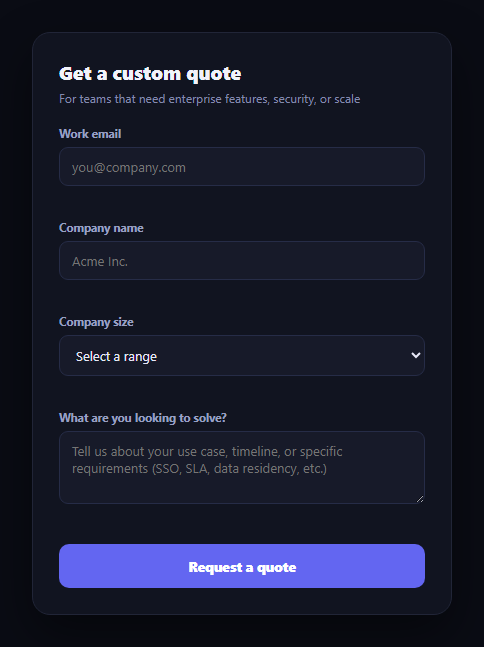
"Contact us for pricing" is where a self-serve pricing page hands off to sales — and the quality of that handoff form shapes whether a qualified enterprise lead actually finishes it. This snippet builds that lead-capture form with real field-level validation and a confirmation screen that tells the visitor exactly what happens next, instead of a bare "thanks, we'll be in touch."
Validation per field, not just on submit
Each field — work email, company name, company size, and use case — has its own validateField(key) rule: email is checked against a real regex pattern for a valid address shape, company name and size just require a non-empty value, and the use case textarea requires at least 10 characters so a one-word answer doesn't slip through. Fields validate on blur (so a visitor isn't interrupted mid-typing) and re-validate on every keystroke *once* they've already been marked invalid — so an error clears the moment it's actually fixed, rather than requiring another blur.
Errors that point at the field, not a summary banner
Each field has its own dedicated error span directly beneath it, populated by setError(), plus a red border on the input itself via a cqf-invalid class. This keeps the correction local — a visitor sees exactly which of the four fields needs attention without scanning a generic error list at the top of the form.
A submit that actually gates on validity
The submit handler calls validateField for every field, collects the results, and only proceeds to the success state if every single field passed — Array.every(Boolean). A form with three valid fields and one invalid one is blocked exactly the same as a completely empty form, and the invalid field's error is shown so the visitor knows what to fix.
A confirmation that sets real expectations
Once submitted, the form hides and a success panel takes over — personalized with the company name the visitor actually typed, restating the specific SLA ("respond within 1 business day"), and a three-step list of exactly what happens next (specialist review, a quote by email, an optional call). Naming both the timeline and the concrete next steps is what turns a form submission into a lead who knows what to expect, rather than one left wondering if it went through.
Where it fits
Route a "Contact sales" CTA from a pricing card's Enterprise tier here, place it at the bottom of an enterprise pricing page, or pair it with a pricing faq addressing objections before the form.
Customizing it Add fields like phone number or expected seat count, wire the submit handler to your real CRM or webhook endpoint, or add a company-size-based routing rule that shows different next-step copy for very large accounts.
Build with AI
Build, Understand, Optimize, and Extend It With AI
You don't have to design the validation-gating logic from scratch. Paste this snippet's HTML, CSS, and JS into an AI coding assistant like Claude and ask it to explain exactly how validateField() applies a different rule per field (a regex check for email, a required check for company and size, a minimum-length check for the use case), how blur-triggered validation paired with input-triggered re-validation avoids interrupting someone mid-typing while still clearing errors quickly once fixed, and why gating the submit handler on Array.every(Boolean) across all four field results is safer than checking a single "isFormValid" flag that could drift out of sync. The same assistant can help you extend it: ask how to add asynchronous validation (e.g. checking the email domain against a list of already-registered companies), how to wire the submit handler to actually POST to a real endpoint with a loading state on the button, or how to add a phone number field with its own format validation. Treat the code less like a finished artifact and more like a starting point for a conversation.
Prompt to recreate it
Copy this into your AI assistant of choice to build the effect from scratch, or as a jumping-off point for your own variant:
Build a "custom quote request" lead-capture form in plain HTML, CSS, and JavaScript with no framework or library.

Requirements:
- Include at least these fields: a work email (text input), a company name (text input), a company size (a select dropdown with several range options), and a free-text use case description (a textarea) — each with its own visible label.
- Implement real inline validation per field: the email field must match a valid email-address pattern (not just be non-empty), the company name and company size fields must be non-empty, and the use case field must be non-empty AND at least a minimum number of characters (e.g. 10) so a one-word answer is rejected.
- Validate each field when it loses focus (on blur) rather than on every keystroke initially, but once a field has been marked invalid, re-validate it on every subsequent keystroke so the error clears as soon as the value becomes valid.
- Show each field's error message directly beneath that specific field (not in one shared banner at the top of the form), and visually mark an invalid field's input/select/textarea with a distinct border color.
- On submit, run validation for every field, and only proceed past the form if every single field passes — if any field is invalid, block the submission, keep the form visible, and make sure that field's error message is showing.
- After a fully valid submission, hide the form and show a confirmation state that: personalizes a message using the company name the user actually typed, states a specific concrete response-time commitment (not a vague "soon"), and lists at least three concrete next steps the user should expect.
Want to tighten it up first? Run this prompt through the AI Prompt Studio to score it across 8 quality dimensions, catch anti-patterns, and tune the wording for Claude, ChatGPT, or Gemini before you paste it in.
Step by step
How to Use
- 1Paste HTML, CSS, and JSA four-field enterprise quote form renders.
- 2Click into and out of a fieldLeaving it empty shows a specific inline error beneath it.
- 3Fix the errorTyping a valid value clears that field's error immediately.
- 4Submit with one field invalidThe submission is blocked and only that field's error shows.
- 5Submit a fully valid formThe form hides and a personalized confirmation panel appears.
- 6Read the next stepsThe confirmation states the 1-business-day SLA and three concrete steps.
Real-world uses
Common Use Cases
Got questions?
Frequently Asked Questions
Each field validates on blur — when focus leaves it — so a visitor isn't interrupted mid-keystroke. Once a field has been marked invalid, it also re-validates on every subsequent input event, so the error clears the instant the value becomes valid rather than waiting for another blur.
No. The submit handler calls validateField on every field, collects all four results into an array, and checks Array.every(Boolean) before proceeding — if even one field fails, the submission is blocked, that field's specific error is shown, and the form stays on screen.
It can't be empty, and it must be at least 10 characters long — enough to rule out a single word like "pricing" while still being a low bar to clear. The error message states the specific requirement ("A few more details would help") rather than a generic "invalid input."
It restates the company name the visitor typed, states a concrete 1-business-day response SLA, and lists three specific next steps: a specialist reviews the use case, the visitor receives a quote by email, and there's an optional 20-minute call to walk through it — setting real expectations rather than a bare "thanks."
Move each field's value and error message into form state, and call the same per-field validation functions on blur and on change. Gate the submit handler on Object.values(errors).every(e => !e) or an equivalent all-valid check, and swap the form/success visibility for a submitted boolean in state.