Source Code
<div class="scene">
  <h1 class="spring-heading" id="heading">Words that land with a bounce</h1>
  <button class="replay" onclick="playSpring()">Replay animation</button>
</div>
* { box-sizing: border-box; margin: 0; padding: 0; }
body { font-family: system-ui, sans-serif; background: #fdf4ff; display: flex; align-items: center; justify-content: center; min-height: 100vh; padding: 20px; }
.scene { display: flex; flex-direction: column; align-items: center; gap: 28px; max-width: 720px; text-align: center; }
.spring-heading {
font-size: clamp(26px, 6vw, 48px);
font-weight: 800;
color: #581c87;
line-height: 1.25;
display: flex;
flex-wrap: wrap;
justify-content: center;
gap: 0.28em;
}
.word {
display: inline-block;
opacity: 0;
transform: scale(0);
}
.word.pop {
animation: springPop 0.7s cubic-bezier(0.34, 1.56, 0.64, 1) forwards;
}
@keyframes springPop {
0% { opacity: 0; transform: scale(0); }
60% { opacity: 1; transform: scale(1.14); }
80% { transform: scale(0.94); }
100% { opacity: 1; transform: scale(1); }
}
.replay {
padding: 9px 20px; font-size: 13px; font-weight: 600;
background: #7e22ce; color: #fff; border: none; border-radius: 999px;
cursor: pointer; transition: background 0.15s, transform 0.1s;
}
.replay:hover { background: #6b21a8; }
.replay:active { transform: scale(0.96); }function wrapWords(el) {
const words = el.textContent.trim().split(/\s+/);
el.innerHTML = words.map((w) => '<span class="word">' + w + '</span>').join(' ');
}
function playSpring() {
const heading = document.getElementById('heading');
const words = heading.querySelectorAll('.word');
words.forEach((w) => {
w.classList.remove('pop');
void w.offsetWidth;
});
words.forEach((w, i) => {
setTimeout(() => w.classList.add('pop'), i * 90);
});
}
wrapWords(document.getElementById('heading'));
playSpring();Learn Coding Visually
Learn to code with interactive, live-preview playgrounds — HTML, CSS, JavaScript, React & more.
 HTML Playground42 lessons · Click-based · Live preview
 CSS PlaygroundLearn CSS with a live editor
 JavaScript Playground60 lessons · DOM · Async · Canvas
 React PlaygroundLearn React with a live code editor
 GSAP PlaygroundLearn GSAP animation interactively
 SVG Playground44 lessons · shapes · paths · animation
 SCSS Playground45 lessons · Sass modules · tokens
 Tailwind PlaygroundLearn Tailwind CSS with a live editor
 Bootstrap 5 Playground50 lessons · live preview
Word Spring Bounce Heading — CSS Stagger Animation
Word Spring Bounce Heading · Animations · Plain HTML, CSS & JS · Live preview
What's included
Features
About this UI Snippet
Word Spring Bounce Heading — Staggered scale(0) Pop-In with Overshoot Easing
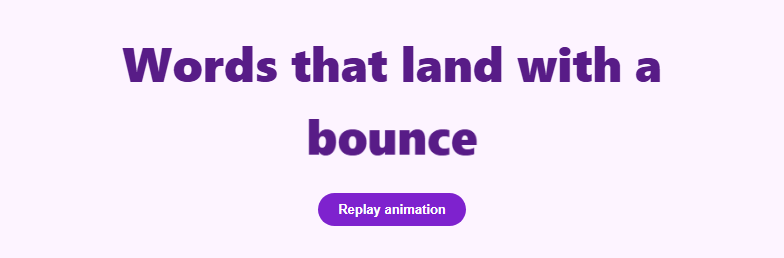
A word spring bounce heading scales each word up from nothing with a slight overshoot before settling, one word after another, so the whole sentence feels like it is being popped into place rather than simply appearing. The spring overshoot — scaling past 1 before settling back — is what separates this from a plain fade-and-scale entrance and gives it the bouncy, playful energy associated with modern spring-physics motion libraries, without needing one. For a per-letter version of a staggered entrance, see split text or scroll letter stagger; for a scrambled-noise reveal instead of a scale-in, see text scramble.
Splitting the heading into words
wrapWords(el) splits the heading's text on whitespace with el.textContent.trim().split(/\s+/), then rebuilds the innerHTML as one <span class="word"> per word joined by literal spaces. Splitting on words rather than characters keeps each unit legible mid-animation and keeps the total number of staggered elements small even for a long headline — a sentence of 8 words only needs 8 timed delays instead of 40+ per-letter ones.
The spring keyframe without a physics library
@keyframes springPop fakes a spring curve using four keyframe stops instead of a real physics simulation: 0% starts at scale(0) and opacity: 0; 60% overshoots to scale(1.14) at full opacity; 80% undershoots slightly to scale(0.94); 100% settles at scale(1). Combined with cubic-bezier(0.34, 1.56, 0.64, 1) — a standard "back ease" curve whose second control point exceeds 1 — the overshoot in the keyframe and the overshoot in the easing function reinforce each other, producing a springier pop than either alone.
Staggering with setTimeout, not animation-delay
playSpring() loops over every .word and calls setTimeout(() => w.classList.add('pop'), i * 90), adding the .pop class (and therefore triggering the keyframe animation) at 90ms intervals per word index. Using setTimeout to add a class — rather than a CSS animation-delay baked into the stylesheet — makes the whole sequence replayable on demand: the "Replay animation" button forces a reflow with void w.offsetWidth after removing .pop from every word, which resets the animation state so classList.add('pop') can retrigger the keyframe from scratch.
Why the forced reflow matters
Removing and immediately re-adding the same CSS class in the same JavaScript tick does not restart a CSS animation, because the browser batches the style recalculation and never observes the class actually being absent. void w.offsetWidth forces the browser to synchronously compute layout in between the remove and the re-add, which is enough to make the animation replay reliably every time the button is clicked.
Build with AI
Build, Understand, Optimize, and Extend It With AI
Paste this snippet's HTML, CSS, and JS into an AI coding assistant like Claude and ask it to explain exactly how the four keyframe stops in springPop and the cubic-bezier easing on the same element combine to fake a spring — try removing the 60% and 80% overshoot stops and comparing the result to see how much of the bounce actually comes from the keyframe versus the easing curve. It is also a good target for a bug-hunting conversation: ask why void w.offsetWidth is necessary before re-adding the pop class, and what would happen (or not happen) visually if that line were deleted. For extending it, ask for a version that uses the Web Animations API instead of CSS classes for finer control over playback speed, one where words bounce in from a random direction instead of straight up in scale, or one that ties the stagger delay to each word's length instead of a fixed interval. Treat the code less like a finished artifact and more like a starting point for a conversation.
Prompt to recreate it
Copy this into your AI assistant of choice to build the effect from scratch, or as a jumping-off point for your own variant:
Build a headline where each word scales up from zero with a staggered spring-bounce entrance, in plain HTML, CSS, and vanilla JavaScript — no animation library, no Web Animations API.

Requirements:
- On page load, split the heading's text content on whitespace and wrap each word in its own inline-block span, joined by literal spaces so normal word wrapping still works.
- Define a CSS keyframe animation for the word-pop that goes through at least four stages: starting at scale(0) and zero opacity, overshooting past full size (for example scale(1.14)) at full opacity partway through, undershooting slightly below full size, then settling exactly at scale(1) — so the motion reads as a spring rather than a linear grow.
- Apply a "back ease" cubic-bezier timing function (one whose control points exceed the 0-1 range, producing its own overshoot) to the same animation so the keyframe overshoot and the easing overshoot reinforce each other.
- Stagger the reveal by adding a "pop" class to each word span via a JavaScript setTimeout, delayed proportionally to the word's index, rather than baking per-word delays into the CSS.
- Include a replay button that resets every word (removing the pop class), forces a synchronous layout read so the browser registers the class as truly absent, and then re-triggers the full staggered sequence from scratch.
- Play the sequence automatically once on page load in addition to being replayable via the button.
Want to tighten it up first? Run this prompt through the AI Prompt Studio to score it across 8 quality dimensions, catch anti-patterns, and tune the wording for Claude, ChatGPT, or Gemini before you paste it in.
Step by step
How to Use
- 1Watch it load, then replayThe headline pops in word by word on page load. Click "Replay animation" to watch it again with a forced reflow reset.
- 2Change the headline textEdit the text inside #heading in the HTML panel — wrapWords() re-splits it into word spans automatically on load.
- 3Adjust the stagger speedIn the JS panel, change the 90 multiplier in setTimeout(() => w.classList.add("pop"), i * 90).
- 4Tune the bounce strengthIn the CSS panel, adjust the 1.14 and 0.94 scale values inside @keyframes springPop for a stronger or gentler overshoot.
- 5Change the easing curveSwap cubic-bezier(0.34, 1.56, 0.64, 1) on .word.pop for a different back-ease curve to make the settle snappier or softer.
- 6Export in your formatClick "HTML" for a standalone file, "JSX" for a React component, or "Tailwind" for a React + Tailwind version.
Real-world uses
Common Use Cases
Got questions?
Frequently Asked Questions
A four-stop @keyframes animation moves scale from 0 to an overshoot of 1.14, back down to 0.94, then settles at 1. Combined with a cubic-bezier "back ease" curve whose control point exceeds 1, the visual result closely approximates a real damped spring without simulating one.
Removing a CSS class and re-adding it in the same synchronous JS tick does not restart the animation because the browser never registers the class as absent. Forcing a layout read with void w.offsetWidth between the remove and the re-add makes the browser compute style in between, so the re-added class reliably retriggers the keyframe.
Word-level staggering keeps the reveal count small and each animated chunk legible even mid-motion. Character-level staggering (see the char-flip-reveal-3d or split-text snippets) creates a denser, busier effect better suited to short, punchy headlines.
Remove the direct playSpring() call at the bottom of the JS and instead call it from an IntersectionObserver callback when the heading element becomes visible, matching the pattern used in the char-flip-reveal-3d snippet.
Yes — set the setTimeout multiplier to 0 to make every word pop in simultaneously, or increase it for a slower, more deliberate word-by-word reveal.
Yes. Click "JSX" for a React component. Split the heading string with .split(/\s+/) in a useMemo, render a span per word, and drive a "played" key or forced remount (changing the key prop) to replay the animation instead of manipulating classList directly.