Source Code
<div class="fsf-wrap">
<div class="fsf-search-bar">
<svg width="16" height="16" viewBox="0 0 24 24" fill="none" stroke="currentColor" stroke-width="2.2"><circle cx="11" cy="11" r="7"/><line x1="21" y1="21" x2="16.65" y2="16.65"/></svg>
<input type="text" id="fsfSearch" placeholder="Search for a feature, e.g. "SSO" or "storage"" autocomplete="off">
<span class="fsf-count" id="fsfCount">12 features</span>
</div>
<table class="fsf-table" id="fsfTable">
<thead>
<tr><th class="fsf-corner">Feature</th><th>Basic</th><th>Pro</th><th>Team</th></tr>
</thead>
<tbody id="fsfBody">
<tr data-feature="team members seats users"><th>Team members</th><td>1</td><td>5</td><td>Unlimited</td></tr>
<tr data-feature="projects workspaces boards"><th>Projects</th><td>3</td><td>Unlimited</td><td>Unlimited</td></tr>
<tr data-feature="storage space files disk"><th>Storage</th><td>2 GB</td><td>50 GB</td><td>500 GB</td></tr>
<tr data-feature="sso saml single sign on login authentication"><th>SSO / SAML</th><td data-no></td><td data-no></td><td data-yes></td></tr>
<tr data-feature="audit logs compliance tracking history"><th>Audit logs</th><td data-no></td><td data-no></td><td data-yes></td></tr>
<tr data-feature="two factor authentication 2fa security mfa"><th>Two-factor auth</th><td data-yes></td><td data-yes></td><td data-yes></td></tr>
<tr data-feature="api access rate limits integrations developer"><th>API access</th><td data-no></td><td data-yes></td><td data-yes></td></tr>
<tr data-feature="webhook retries automation notifications"><th>Webhook retries</th><td data-no></td><td data-yes></td><td data-yes></td></tr>
<tr data-feature="custom templates branding themes"><th>Custom templates</th><td data-no></td><td data-yes></td><td data-yes></td></tr>
<tr data-feature="priority support response time help"><th>Priority support</th><td data-no></td><td data-yes></td><td data-yes></td></tr>
<tr data-feature="offline mode sync mobile"><th>Offline mode</th><td data-yes></td><td data-yes></td><td data-yes></td></tr>
<tr data-feature="role based permissions access control admin"><th>Role-based permissions</th><td data-no></td><td data-no></td><td data-yes></td></tr>
</tbody>
</table>
<p class="fsf-empty" id="fsfEmpty" hidden>No features match "<span id="fsfEmptyTerm"></span>" — try a different word.</p>
</div>*{box-sizing:border-box;margin:0;padding:0}
body{font-family:system-ui,-apple-system,sans-serif;background:#f5f6fb;display:flex;justify-content:center;padding:40px 20px}
.fsf-wrap{width:min(680px,96vw)}
.fsf-search-bar{display:flex;align-items:center;gap:10px;background:#fff;border:1.5px solid #e2e3f0;border-radius:12px;padding:11px 14px;margin-bottom:16px;color:#9aa0b4;transition:border-color .15s}
.fsf-search-bar:focus-within{border-color:#6366f1}
.fsf-search-bar input{flex:1;border:none;outline:none;background:none;font-size:14px;font-family:inherit;color:#16182a;min-width:0}
.fsf-count{font-size:11.5px;font-weight:700;color:#9aa0b4;white-space:nowrap;background:#f4f5fa;padding:4px 9px;border-radius:99px}
.fsf-table{width:100%;border-collapse:collapse;background:#fff;border:1px solid #e7e9f2;border-radius:16px;overflow:hidden;font-size:13.5px}
.fsf-table th,.fsf-table td{padding:12px 16px;text-align:center;border-bottom:1px solid #eef0f6}
.fsf-table tbody th{text-align:left;color:#3b4156;font-weight:600;white-space:nowrap}
.fsf-corner{text-align:left;color:#9aa0b4;font-weight:600;font-size:12.5px}
.fsf-table thead th{color:#16182a;font-weight:800}
.fsf-table td{color:#3b4156}
.fsf-table tbody tr:last-child th,.fsf-table tbody tr:last-child td{border-bottom:none}
.fsf-table tbody tr{transition:background .15s}
.fsf-table tbody tr.fsf-match mark{background:#fde68a;color:#78350f;border-radius:3px;padding:0 1px}
td[data-yes]::after{content:'';display:inline-block;width:16px;height:16px;border-radius:50%;background:#10b981;-webkit-mask:url("data:image/svg+xml,%3Csvg xmlns='http://www.w3.org/2000/svg' viewBox='0 0 24 24' fill='none' stroke='white' stroke-width='3' stroke-linecap='round' stroke-linejoin='round'%3E%3Cpath d='M20 6L9 17l-5-5'/%3E%3C/svg%3E") center/11px no-repeat;mask:url("data:image/svg+xml,%3Csvg xmlns='http://www.w3.org/2000/svg' viewBox='0 0 24 24' fill='none' stroke='white' stroke-width='3' stroke-linecap='round' stroke-linejoin='round'%3E%3Cpath d='M20 6L9 17l-5-5'/%3E%3C/svg%3E") center/11px no-repeat}
td[data-no]::after{content:'\2013';color:#c2c6d4;font-weight:700}
.fsf-empty{text-align:center;font-size:13.5px;color:#7b7f99;padding:20px 10px}
.fsf-empty span{font-weight:700;color:#3b4156}
@media(max-width:560px){.fsf-table th,.fsf-table td{padding:9px 8px;font-size:12px}}// Search matches against BOTH the visible row label AND a hidden data-feature
// attribute holding synonyms — so typing "login" finds the SSO row even though
// the word "login" never appears in the row's visible text.
var searchInput = document.getElementById('fsfSearch');
var rows = document.querySelectorAll('#fsfBody tr');
var countEl = document.getElementById('fsfCount');
var emptyEl = document.getElementById('fsfEmpty');
var emptyTermEl = document.getElementById('fsfEmptyTerm');
var totalCount = rows.length;
function clearHighlight(labelEl) {
labelEl.innerHTML = labelEl.textContent;
}
function highlight(labelEl, term) {
var text = labelEl.textContent;
var idx = text.toLowerCase().indexOf(term.toLowerCase());
if (idx === -1) {
clearHighlight(labelEl);
return;
}
labelEl.innerHTML =
text.slice(0, idx) +
'<mark>' + text.slice(idx, idx + term.length) + '</mark>' +
text.slice(idx + term.length);
}
function runSearch() {
var term = searchInput.value.trim().toLowerCase();
var visibleCount = 0;
rows.forEach(function (row) {
var labelEl = row.querySelector('th');
var haystack = (labelEl.textContent + ' ' + row.dataset.feature).toLowerCase();
var matches = term === '' || haystack.indexOf(term) !== -1;
row.hidden = !matches;
row.classList.toggle('fsf-match', matches && term !== '');
if (matches) {
visibleCount++;
if (term !== '') {
highlight(labelEl, term);
} else {
clearHighlight(labelEl);
}
} else {
clearHighlight(labelEl);
}
});
countEl.textContent = term === ''
? totalCount + ' features'
: visibleCount + ' of ' + totalCount + ' features';
var noResults = visibleCount === 0 && term !== '';
emptyEl.hidden = !noResults;
if (noResults) emptyTermEl.textContent = searchInput.value.trim();
}
searchInput.addEventListener('input', runSearch);
runSearch();Learn Coding Visually
Learn to code with interactive, live-preview playgrounds — HTML, CSS, JavaScript, React & more.
 HTML Playground42 lessons · Click-based · Live preview
 CSS PlaygroundLearn CSS with a live editor
 JavaScript Playground60 lessons · DOM · Async · Canvas
 React PlaygroundLearn React with a live code editor
 GSAP PlaygroundLearn GSAP animation interactively
 SVG Playground44 lessons · shapes · paths · animation
 SCSS Playground45 lessons · Sass modules · tokens
 Tailwind PlaygroundLearn Tailwind CSS with a live editor
 Bootstrap 5 Playground50 lessons · live preview
Pricing Table with Live Feature Search — Free HTML CSS JS Snippet
Pricing Table with Live Feature Search · Pricing · Plain HTML, CSS & JS · Live preview
What's included
Features
About this UI Snippet
Pricing Table with Live Feature Search — Filter Rows and Match Hidden Synonyms
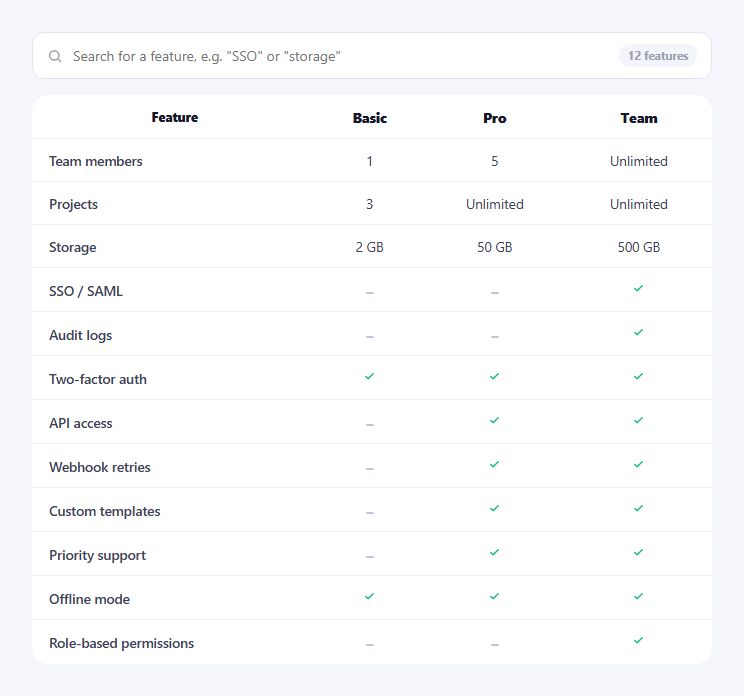
A long pricing feature table forces a visitor to scroll and scan for the one row they actually care about. This snippet adds a live search box above the table: typing filters the visible rows to only those that match, highlights the matched substring inline, and — critically — matches against synonyms a row's visible label doesn't literally contain, so searching "login" still surfaces the "SSO / SAML" row.
Two-field matching: visible text plus a hidden synonym list
Every <tr> carries a data-feature attribute holding a space-separated list of related terms — the SSO row's is "sso saml single sign on login authentication". runSearch() builds its search haystack from labelEl.textContent + ' ' + row.dataset.feature, so a query only has to appear *somewhere* in either the visible label or that hidden synonym string to match. This is what makes searching "login" or "authentication" find a row whose visible text is just "SSO / SAML" — a plain textContent-only search would miss it entirely.
Filtering with the `hidden` attribute, not a display toggle
Non-matching rows get the native hidden attribute set directly (row.hidden = !matches) rather than a CSS class controlling display: none — functionally similar, but using the standards attribute means the row is correctly excluded from the accessibility tree and any :not([hidden]) selectors elsewhere on the page work without extra CSS.
Inline highlighting rebuilds only the matched row's label
highlight() finds the first case-insensitive occurrence of the search term inside a row's *visible* label text (not the hidden synonym list — you can't highlight a substring inside a<th> if the substring only exists in the invisible synonym attribute) and wraps it in <mark>. If a row matched purely because of a synonym rather than any substring in its visible label, indexOf returns -1 and the label is left as plain, unhighlighted text — showing the visitor plainly matched text where it exists, without fabricating a highlight that isn't there.
A live result count and an explicit empty state
The counter above the table ("X of Y features") recalculates from the same pass that determines visibility, so it can never drift out of sync with what's actually shown. When zero rows match, #fsfEmpty — hidden by default — becomes visible with the exact search term interpolated into its text, giving clear feedback instead of a silently empty table.
Clearing highlights correctly
clearHighlight() resets a label back to plain text via labelEl.innerHTML = labelEl.textContent — reading textContent strips any existing <mark> tags before writing back, which is what prevents a stale highlight from a previous search term lingering on a row that still matches under a new term but at a different substring position.
Customizing it
Add a new row by adding a <tr> with its own data-feature synonym list — the search logic queries all #fsfBody tr elements generically, so no JavaScript changes are needed. Expand a row's synonym coverage by adding more space-separated terms to its data-feature attribute; there's no fixed schema beyond "space-separated words," so abbreviations, full names, and related concepts can all live in the same attribute.
Build with AI
Build, Understand, Optimize, and Extend It With AI
Rather than guessing why "login" matches a row labeled "SSO / SAML," paste this snippet's HTML, CSS, and JS into an AI coding assistant like Claude and ask it to explain exactly how the hidden data-feature attribute extends what a search term can match beyond a row's visible label text, and why highlight() deliberately avoids marking up a row whose match came only from that hidden synonym list. The same assistant can help you extend it — ask it to add fuzzy or typo-tolerant matching so a near-miss search term (like "webhok") still finds "webhook retries," debounce the input handler for very large tables with hundreds of rows, or add keyboard navigation that lets Enter jump focus to the first visible matching row. It's also useful for a content audit: ask it to review your own data-feature synonym lists for gaps — terms real users might search that aren't yet covered — based on the visible label and category of each row. Treat the code less like a finished artifact and more like a starting point for a conversation.
Prompt to recreate it
Copy this into your AI assistant of choice to build the effect from scratch, or as a jumping-off point for your own variant:
Build a pricing comparison table with a live search box in plain HTML, CSS, and vanilla JavaScript — no fuzzy-search library, no framework.

Requirements:
- A search input above a comparison table (plan name headers across the top, feature rows below). Each feature row must carry a hidden data attribute containing a space-separated list of synonyms or related terms for that feature, in addition to its normal visible feature-name label and per-plan value/checkmark cells.
- On every keystroke (not on submit), filter the table so only rows whose visible label OR hidden synonym attribute contains the search term (case-insensitive) remain visible, using the native hidden attribute rather than a CSS display toggle so hidden rows are also correctly excluded from the accessibility tree.
- For rows that remain visible because the search term is found in their VISIBLE label specifically, wrap the matched substring in a <mark> element to highlight it inline — but do not fabricate a highlight on a row that only matched because of its hidden synonym attribute, since the term doesn't actually appear in that row's visible text.
- Show a live count above the table (e.g. "4 of 12 features") that always reflects exactly how many rows are currently visible, computed from the same logic that filters the rows so it can never be out of sync.
- When the search term matches zero rows, show a distinct empty-state message that includes the visitor's exact search term, and hide it again as soon as there is at least one match or the search box is cleared.
- Clearing the search box (empty string) must restore every row and remove all highlighting.
Want to tighten it up first? Run this prompt through the AI Prompt Studio to score it across 8 quality dimensions, catch anti-patterns, and tune the wording for Claude, ChatGPT, or Gemini before you paste it in.
Step by step
How to Use
- 1Type in the search boxRows filter live as you type — no submit button, no page reload.
- 2Try a synonymSearch "login" or "authentication" — the SSO / SAML row still matches even though those words aren't in its visible label.
- 3Watch the count updateThe badge above the table shows "X of Y features" reflecting exactly what's visible.
- 4Clear the searchEmptying the box restores every row and removes all highlighting.
- 5Search for something that doesn't existAn empty state message appears, quoting back your exact search term.
- 6Add a new row with synonymsAdd a <tr> with its own data-feature attribute — no JS changes needed.
Real-world uses
Common Use Cases
Got questions?
Frequently Asked Questions
Every row has a hidden data-feature attribute listing related terms — the SSO row's includes "login" and "authentication" alongside "sso" and "saml". The search haystack is built from the row's visible label text plus this hidden attribute combined, so a match against the hidden synonym list is enough to show the row, even when the visible label itself doesn't contain the searched word.
Setting the native hidden attribute directly (row.hidden = !matches) achieves the same visual result as a display:none class, but it also correctly removes the row from the accessibility tree for screen reader users and works automatically with any :not([hidden]) CSS selectors elsewhere, without needing extra style rules to keep both mechanisms in sync.
highlight() only wraps a substring in <mark> if the search term is actually found inside that row's visible label text. A row that matched purely because the term appeared in its hidden data-feature synonym list (and not anywhere in the visible label) is left with plain, unhighlighted text — highlighting a substring that only exists in an invisible attribute would be misleading.
countEl.textContent is set inside the same runSearch() pass that determines each row's visibility, using the same visibleCount variable that was incremented while deciding which rows to show. Because both the filtering and the counting happen from one shared loop over the same data, the displayed count can never disagree with what rows are actually visible.
Add a new <tr> to #fsfBody with a data-feature attribute containing a space-separated list of related terms (abbreviations, full names, or related concepts), alongside the normal <th> label and <td> plan-value cells. No JavaScript changes are required — runSearch() queries all rows inside #fsfBody generically on every keystroke.
All rows get hidden, and the #fsfEmpty message (hidden by default) becomes visible, with the visitor's exact trimmed search term interpolated into its text via a dedicated span so the empty state clearly confirms what was searched for rather than showing a blank table with no explanation.