Learn Coding Visually
Learn to code with interactive, live-preview playgrounds — HTML, CSS, JavaScript, React & more.
 HTML Playground42 lessons · Click-based · Live preview
 CSS PlaygroundLearn CSS with a live editor
 JavaScript Playground60 lessons · DOM · Async · Canvas
 React PlaygroundLearn React with a live code editor
 GSAP PlaygroundLearn GSAP animation interactively
 SVG Playground44 lessons · shapes · paths · animation
 SCSS Playground45 lessons · Sass modules · tokens
 Tailwind PlaygroundLearn Tailwind CSS with a live editor
 Bootstrap 5 Playground50 lessons · live preview
Terms Modal with Scroll-to-Accept — Free HTML CSS JS Snippet
Terms Modal with Scroll-to-Accept · Modals · Plain HTML, CSS & JS · Live preview
What's included
Features
About this UI Snippet
Terms Modal with Scroll-to-Accept — Real Scroll Gating, Not a Timer
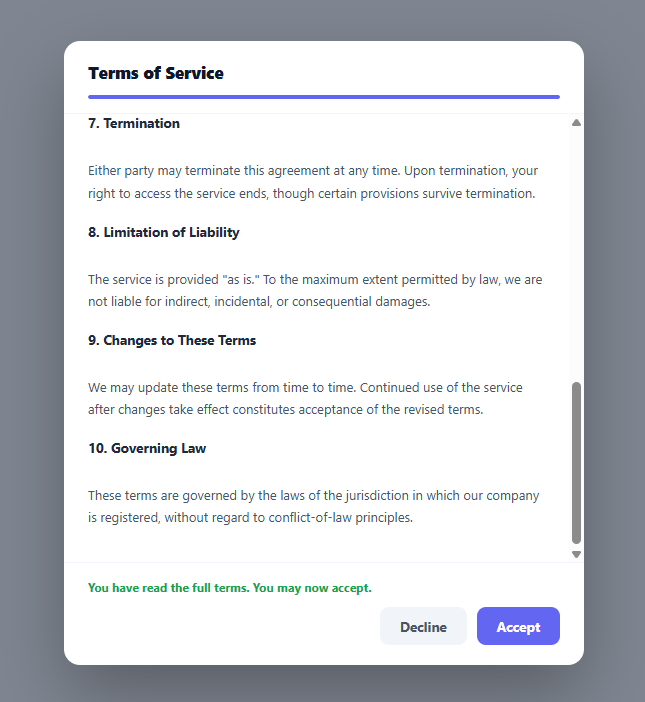
A legal or policy acceptance flow that lets someone click "Accept" without ever seeing the actual terms defeats the point of asking for consent at all. This modal keeps the Accept button genuinely disabled until the visitor has scrolled the terms body all the way to its bottom — tracked continuously with a progress bar so the requirement is visible, not a surprise gate sprung on them at the end.
Why scroll position, not a countdown timer
A common (and weaker) alternative pattern disables Accept for a fixed number of seconds regardless of what the visitor does — which can be satisfied by leaving the tab open and doing something else, proving nothing about whether the text was read. This snippet instead measures actual scroll position inside .tsa-body on every scroll event: checkScroll() computes how much of the content is scrollable (scrollHeight - clientHeight) and how far the visitor has scrolled into that range, tying the button's disabled state to genuine engagement with the content rather than elapsed wall-clock time.
The scroll-math, explained
scrollable = body.scrollHeight - body.clientHeight is the total distance the content *can* be scrolled — the difference between its full height and its visible viewport height. progress divides the current scrollTop by that distance to get a 0–100 percentage, which drives progressBar's width. Separately, atBottom checks scrollTop + clientHeight >= scrollHeight - 4 — the -4 is a small pixel tolerance, because sub-pixel rounding differences between browsers and zoom levels can leave a fraction of a pixel of "unscrolled" distance even when the visitor has genuinely reached the bottom, which would otherwise leave the button stuck disabled forever.
Handling short content
If the terms text is short enough to fit entirely within .tsa-body's visible area with nothing to scroll, scrollable would be zero or negative — dividing by it would produce NaN or a nonsensical percentage. The code explicitly checks scrollable <= 0 and treats that case as already-at-100%, so short content doesn't accidentally trap the visitor behind an impossible-to-satisfy scroll requirement.
`checkScroll()` also runs on open
Beyond the scroll event listener, openModal() calls checkScroll() once immediately when the modal opens — covering the short-content case above, where the button should already be enabled the instant the modal appears, rather than waiting for a scroll event that may never fire because there's nothing to scroll.
A one-way enable, not a re-lock
Once atBottom is true and the button is enabled, later scrolling back up does *not* re-disable it — the code only checks if (atBottom && acceptBtn.disabled), meaning it only acts the first time the condition is met. This matches how most real consent flows work: having read the full text once is what unlocks acceptance, and scrolling back up to re-read a section afterward shouldn't feel like it costs you your progress.
The hint text as a second communication channel
Beyond the disabled button and the progress bar, a text hint beneath the body explicitly states what's required ("Scroll to the bottom to enable the Accept button") and flips to a confirmation message once satisfied — so the requirement isn't communicated purely through a disabled button's visual state, which can be easy to miss or ambiguous about *why* it's disabled.
Extending it for compliance-heavy use cases
For contexts requiring stronger proof of review (regulated industries, for instance), pair this pattern with a server-side timestamp logged when checkScroll() first detects atBottom, and/or require a minimum dwell time in addition to the scroll requirement — the client-side gating here establishes the UX pattern, but a truly auditable consent record needs a server-side log of the event, not just a disabled button.
Build with AI
Build, Understand, Optimize, and Extend It With AI
Rather than getting the scroll-position math subtly wrong, paste this snippet's HTML, CSS, and JS into an AI coding assistant like Claude and ask it to explain why the bottom-detection check includes a small pixel tolerance, and what specific browser or zoom-level conditions would cause the Accept button to get stuck disabled without that tolerance. The same assistant is useful for hardening the pattern for compliance-heavy use cases — ask it how to log a server-side timestamp the first moment the scroll-to-bottom condition is met, tied to a specific terms version and user ID, so there's an auditable record beyond just the client-side button state. It can also help you add a minimum-dwell-time requirement alongside the scroll requirement, or convert the vanilla scroll listener into a React version using a ref and an onScroll handler with the same short-content edge case handled correctly. Treat the code less like a finished artifact and more like a starting point for a conversation.
Prompt to recreate it
Copy this into your AI assistant of choice to build the effect from scratch, or as a jumping-off point for your own variant:
Build a modal dialog in plain HTML, CSS, and vanilla JavaScript containing a long block of terms-of-service text, where the Accept button starts disabled and only becomes clickable once the visitor has actually scrolled the terms content to its bottom — with a live progress bar showing how far they've scrolled — no library.

Requirements:
- A trigger button that opens a modal (backdrop + centered dialog box with a fade/scale transition) containing a header with a title and a thin horizontal progress bar, a scrollable body with at least eight distinct numbered terms sections of realistic paragraph text, and a footer with a hint message plus Decline and Accept buttons.
- The Accept button must start with the disabled attribute set and only become enabled once a scroll listener on the body detects the visitor has reached the bottom of the scrollable content — compute this from the element's scrollTop, scrollHeight, and clientHeight properties, and include a small pixel tolerance in the bottom-detection comparison to account for sub-pixel rounding differences across browsers.
- The progress bar's width must update continuously as a percentage of scroll progress on every scroll event.
- Explicitly handle the edge case where the terms content is short enough to not require scrolling at all — in that case the button should start already enabled rather than being permanently stuck disabled with no way to scroll further.
- Once the Accept button becomes enabled, scrolling back up must not re-disable it.
- The hint text below the progress area should change from a "please scroll to continue" message to a confirmation message once the bottom is reached.
- Support closing the modal via a backdrop click, the Escape key, and the Decline button, none of which should require the terms to have been scrolled.
Want to tighten it up first? Run this prompt through the AI Prompt Studio to score it across 8 quality dimensions, catch anti-patterns, and tune the wording for Claude, ChatGPT, or Gemini before you paste it in.
Source Code
<div class="tsa-page"><button type="button" class="tsa-open" id="tsaOpen">Review Terms of Service</button></div>

<div class="tsa-backdrop" id="tsaBackdrop"></div>
<div class="tsa-modal" id="tsaModal" role="dialog" aria-modal="true" aria-labelledby="tsaTitle">
  <div class="tsa-head">
    <h3 id="tsaTitle">Terms of Service</h3>
    <div class="tsa-progress-track"><div class="tsa-progress-bar" id="tsaProgressBar"></div></div>
  </div>

  <div class="tsa-body" id="tsaBody">
    <p><strong>1. Acceptance of Terms</strong><br>By creating an account, you agree to be bound by these Terms of Service and our Privacy Policy. If you do not agree, do not use the service.</p>
    <p><strong>2. Description of Service</strong><br>We provide a cloud-based platform for project collaboration. Features, availability, and pricing may change with reasonable notice.</p>
    <p><strong>3. Account Responsibilities</strong><br>You are responsible for maintaining the confidentiality of your account credentials and for all activity that occurs under your account.</p>
    <p><strong>4. Acceptable Use</strong><br>You agree not to misuse the service — including attempting unauthorized access, distributing malware, or infringing on the intellectual property of others.</p>
    <p><strong>5. Payment and Billing</strong><br>Paid plans are billed in advance on a recurring basis. Fees are non-refundable except where required by law.</p>
    <p><strong>6. Data and Privacy</strong><br>We process your data as described in our Privacy Policy. You retain ownership of content you upload; we do not claim rights beyond what's needed to operate the service.</p>
    <p><strong>7. Termination</strong><br>Either party may terminate this agreement at any time. Upon termination, your right to access the service ends, though certain provisions survive termination.</p>
    <p><strong>8. Limitation of Liability</strong><br>The service is provided "as is." To the maximum extent permitted by law, we are not liable for indirect, incidental, or consequential damages.</p>
    <p><strong>9. Changes to These Terms</strong><br>We may update these terms from time to time. Continued use of the service after changes take effect constitutes acceptance of the revised terms.</p>
    <p><strong>10. Governing Law</strong><br>These terms are governed by the laws of the jurisdiction in which our company is registered, without regard to conflict-of-law principles.</p>
  </div>

  <div class="tsa-foot">
    <p class="tsa-hint" id="tsaHint">Scroll to the bottom to enable the Accept button.</p>
    <div class="tsa-actions">
      <button type="button" class="tsa-btn tsa-ghost" id="tsaDecline">Decline</button>
      <button type="button" class="tsa-btn tsa-accept" id="tsaAccept" disabled>Accept</button>
    </div>
  </div>
</div>*{box-sizing:border-box;margin:0;padding:0}
body{font-family:system-ui,-apple-system,sans-serif;background:#f1f5f9;min-height:100vh}
.tsa-page{min-height:100vh;display:flex;align-items:center;justify-content:center}
.tsa-open{background:#6366f1;color:#fff;border:none;border-radius:11px;padding:12px 24px;font-size:15px;font-weight:700;cursor:pointer;font-family:inherit}
.tsa-backdrop{position:fixed;inset:0;background:rgba(15,23,42,.5);opacity:0;pointer-events:none;transition:opacity .25s;z-index:90}
.tsa-backdrop.show{opacity:1;pointer-events:all}
.tsa-modal{position:fixed;left:50%;top:50%;transform:translate(-50%,-46%) scale(.97);opacity:0;pointer-events:none;
width:min(520px,92vw);max-height:80vh;background:#fff;border-radius:16px;z-index:91;
transition:opacity .25s,transform .25s;display:flex;flex-direction:column;overflow:hidden;box-shadow:0 30px 70px rgba(0,0,0,.3)}
.tsa-modal.show{opacity:1;transform:translate(-50%,-50%) scale(1);pointer-events:all}
.tsa-head{padding:20px 24px 14px;border-bottom:1px solid #f1f5f9;flex-shrink:0}
.tsa-head h3{font-size:16.5px;font-weight:800;color:#0f172a;margin-bottom:12px}
.tsa-progress-track{height:4px;background:#f1f5f9;border-radius:99px;overflow:hidden}
.tsa-progress-bar{height:100%;width:0%;background:#6366f1;border-radius:99px;transition:width .12s linear}
.tsa-body{padding:18px 24px;overflow-y:auto;flex:1}
.tsa-body p{font-size:13px;line-height:1.7;color:#475569;margin-bottom:16px}
.tsa-body strong{color:#1e293b;display:block;margin-bottom:3px;font-size:13.5px}
.tsa-foot{padding:16px 24px 20px;border-top:1px solid #f1f5f9;flex-shrink:0}
.tsa-hint{font-size:12px;color:#94a3b8;margin-bottom:12px;transition:color .2s}
.tsa-hint.done{color:#16a34a;font-weight:700}
.tsa-actions{display:flex;justify-content:flex-end;gap:10px}
.tsa-btn{border-radius:9px;padding:10px 20px;font-size:13.5px;font-weight:700;cursor:pointer;font-family:inherit;border:none}
.tsa-ghost{background:#f1f5f9;color:#475569}
.tsa-accept{background:#6366f1;color:#fff;transition:background .15s,opacity .15s}
.tsa-accept:disabled{background:#c7cdf7;cursor:not-allowed}
.tsa-accept:not(:disabled):hover{background:#4f46e5}// Real scroll-position gating: the Accept button stays disabled until the terms body
// has actually been scrolled to its bottom, tracked with a live progress bar — not a
// fixed timer or a "click to expand" shortcut that lets someone bypass reading it.
var openBtn = document.getElementById('tsaOpen');
var backdrop = document.getElementById('tsaBackdrop');
var modal = document.getElementById('tsaModal');
var body = document.getElementById('tsaBody');
var progressBar = document.getElementById('tsaProgressBar');
var hint = document.getElementById('tsaHint');
var acceptBtn = document.getElementById('tsaAccept');
var declineBtn = document.getElementById('tsaDecline');
function openModal() {
backdrop.classList.add('show');
modal.classList.add('show');
checkScroll(); // in case the content is short enough to already be "at the bottom"
}
function closeModal() {
backdrop.classList.remove('show');
modal.classList.remove('show');
}
function checkScroll() {
var scrollable = body.scrollHeight - body.clientHeight;
var progress = scrollable <= 0 ? 100 : (body.scrollTop / scrollable) * 100;
progressBar.style.width = Math.min(progress, 100) + '%';
// A small tolerance handles sub-pixel rounding differences across browsers.
var atBottom = body.scrollTop + body.clientHeight >= body.scrollHeight - 4;
if (atBottom && acceptBtn.disabled) {
acceptBtn.disabled = false;
hint.textContent = 'You have read the full terms. You may now accept.';
hint.classList.add('done');
}
}
openBtn.addEventListener('click', openModal);
declineBtn.addEventListener('click', closeModal);
backdrop.addEventListener('click', closeModal);
body.addEventListener('scroll', checkScroll);
acceptBtn.addEventListener('click', function () {
if (acceptBtn.disabled) return;
closeModal();
openBtn.textContent = 'Terms accepted ✓';
});
document.addEventListener('keydown', function (e) {
if (e.key === 'Escape' && modal.classList.contains('show')) closeModal();
});Step by step
How to Use
- 1Open the modalClick "Review Terms of Service" — the Accept button starts disabled and the progress bar starts at 0%.
- 2Scroll through the termsThe progress bar fills as you scroll; Accept stays disabled until you reach the bottom.
- 3Reach the bottomThe hint text confirms you have read the terms and the Accept button becomes clickable.
- 4Click Accept or DeclineAccept closes the modal and updates the trigger button; Decline closes without accepting.
- 5Edit the terms contentReplace the <p> blocks inside .tsa-body with your own sections — the scroll gating adapts to any content length automatically.
- 6Export in your formatClick "HTML" for a standalone file, "JSX" for a React component, or "Tailwind" for a React + Tailwind version.
Real-world uses
Common Use Cases
Got questions?
Frequently Asked Questions
A checkbox can be checked without ever reading the content it refers to, which defeats the purpose of asking for informed consent. Tying the Accept button's enabled state to actual scroll position inside the terms body means the visitor has to have scrolled through the content at least once before they can proceed, which is a meaningfully stronger signal than a checkbox alone.
checkScroll() computes scrollable as body.scrollHeight minus body.clientHeight. If the content fits entirely within the visible area, this value is zero or negative, and the code explicitly checks for that case and treats it as 100% complete immediately — so short content does not accidentally require an impossible scroll action to unlock the button.
Comparing body.scrollTop + body.clientHeight against body.scrollHeight exactly can fail by a fraction of a pixel due to browser rounding differences or non-integer zoom levels, which would leave the Accept button permanently disabled even though the visitor has genuinely reached the bottom. Subtracting a small pixel tolerance (4px here) absorbs that rounding error.
No. checkScroll() only acts when atBottom is true and acceptBtn.disabled is still true — once the button has been enabled, scrolling back up to re-read an earlier section does not re-trigger the disabled state. Having read the full text once is what unlocks acceptance.
This snippet demonstrates the client-side UX pattern, but a genuinely auditable consent record for regulated use cases typically needs a server-side log — for example, timestamping the moment checkScroll() first detects atBottom, along with the user's account ID and the specific terms version — rather than relying solely on client-side button state, which by itself proves nothing once the modal closes.
Replace the <p> blocks inside #tsaBody with your own content — the scroll gating logic reads body.scrollHeight dynamically on every scroll event, so it automatically adapts to whatever length of content is present with no changes needed elsewhere in the JavaScript.