Source Code
<div class="msb-phone">
<div class="msb-screen">
<div class="msb-status"><span>9:41</span><span class="msb-batt"><i></i></span></div>
<header class="msb-head">
<button class="msb-back" aria-label="Back">‹</button>
<b>Split Bill</b>
<span class="msb-spacer"></span>
</header>
<div class="msb-body">
<div class="msb-total-card">
<span class="msb-total-label">Total bill</span>
<span class="msb-total" id="msbTotal">$96.40</span>
</div>
<div class="msb-mode">
<button class="msb-mode-btn active" data-mode="equal">Split Equally</button>
<button class="msb-mode-btn" data-mode="custom">Custom Amounts</button>
</div>
<div class="msb-people" id="msbPeople"></div>
<button class="msb-add-person" id="msbAddPerson">+ Add person</button>
<div class="msb-tip-card">
<span class="msb-tip-label">Tip</span>
<div class="msb-tip-options" id="msbTipOptions">
<button class="msb-tip-opt" data-tip="0.15">15%</button>
<button class="msb-tip-opt active" data-tip="0.18">18%</button>
<button class="msb-tip-opt" data-tip="0.20">20%</button>
<button class="msb-tip-opt" data-tip="0.25">25%</button>
</div>
</div>
<div class="msb-summary" id="msbSummary"></div>
</div>
<div class="msb-footer">
<button class="msb-request-btn" id="msbRequestBtn">Request Payments</button>
</div>
</div>
</div>*{box-sizing:border-box;margin:0;padding:0}
html{scrollbar-width:none;-ms-overflow-style:none}
html::-webkit-scrollbar{display:none}
body{font-family:system-ui,-apple-system,sans-serif;background:#1e293b;display:flex;justify-content:center;align-items:center;min-height:100vh;padding:24px;scrollbar-width:none;-ms-overflow-style:none}
body::-webkit-scrollbar{display:none}
.msb-phone{width:288px;height:600px;background:#0b1220;border-radius:46px;padding:12px;box-shadow:0 30px 60px -20px rgba(0,0,0,.6),inset 0 0 0 2px #1e293b}
.msb-screen{width:100%;height:100%;border-radius:34px;overflow:hidden;background:#f8fafc;color:#0f172a;display:flex;flex-direction:column}
.msb-status{display:flex;justify-content:space-between;align-items:center;padding:13px 24px 0;font-size:13px;font-weight:700}
.msb-batt{width:22px;height:11px;border:1.4px solid currentColor;border-radius:3px;position:relative;display:inline-block}
.msb-batt::after{content:'';position:absolute;right:-3px;top:3px;width:2px;height:5px;background:currentColor;border-radius:0 1px 1px 0}
.msb-batt i{position:absolute;left:1.4px;top:1.4px;bottom:1.4px;width:82%;background:currentColor;border-radius:1px}
.msb-head{display:flex;align-items:center;gap:8px;padding:10px 14px 6px}
.msb-back{background:#fff;border:1px solid #e2e8f0;width:28px;height:28px;border-radius:50%;font-size:16px;color:#0f172a;cursor:pointer;flex-shrink:0}
.msb-head b{flex:1;text-align:center;font-size:14.5px}
.msb-spacer{width:28px;flex-shrink:0}
.msb-body{flex:1;overflow-y:auto;padding:6px 18px 14px;scrollbar-width:none;-ms-overflow-style:none}
.msb-body::-webkit-scrollbar{display:none}
.msb-total-card{text-align:center;padding:14px 4px 18px}
.msb-total-label{display:block;font-size:11px;color:#94a3b8;text-transform:uppercase;letter-spacing:.5px;margin-bottom:4px}
.msb-total{font-size:32px;font-weight:800}
.msb-mode{display:flex;background:#eef2f7;border-radius:12px;padding:3px;margin-bottom:16px}
.msb-mode-btn{flex:1;background:none;border:none;padding:9px 4px;font-size:12px;font-weight:700;color:#64748b;border-radius:9px;cursor:pointer;font-family:inherit;transition:background .15s,color .15s}
.msb-mode-btn.active{background:#fff;color:#0f172a;box-shadow:0 1px 3px rgba(0,0,0,.1)}
.msb-people{display:flex;flex-direction:column;gap:8px;margin-bottom:12px}
.msb-person{display:flex;align-items:center;gap:10px;background:#fff;border:1px solid #e2e8f0;border-radius:14px;padding:10px 12px}
.msb-person-avatar{width:32px;height:32px;border-radius:50%;color:#fff;display:flex;align-items:center;justify-content:center;font-size:12px;font-weight:800;flex-shrink:0}
.msb-person-name{flex:1;font-size:13px;font-weight:600;min-width:0;white-space:nowrap;overflow:hidden;text-overflow:ellipsis}
.msb-person-amount{font-size:14px;font-weight:800;flex-shrink:0}
.msb-person-input{width:64px;text-align:right;border:1.5px solid #e2e8f0;border-radius:8px;padding:6px 8px;font-size:13px;font-weight:700;font-family:inherit;flex-shrink:0}
.msb-person-input:focus{outline:none;border-color:#4f46e5}
.msb-person-remove{background:#fef2f2;color:#dc2626;border:none;width:24px;height:24px;border-radius:50%;font-size:13px;cursor:pointer;flex-shrink:0}
.msb-add-person{width:100%;background:none;border:1.5px dashed #cbd5e1;border-radius:12px;padding:10px;font-size:12.5px;font-weight:700;color:#4f46e5;cursor:pointer;font-family:inherit;margin-bottom:16px}
.msb-add-person:hover{border-color:#a5b4fc}
.msb-tip-card{margin-bottom:16px}
.msb-tip-label{display:block;font-size:11px;font-weight:800;color:#94a3b8;text-transform:uppercase;letter-spacing:.5px;margin-bottom:8px}
.msb-tip-options{display:grid;grid-template-columns:repeat(4,1fr);gap:7px}
.msb-tip-opt{background:#fff;border:1.5px solid #e2e8f0;border-radius:10px;padding:9px 4px;font-size:12.5px;font-weight:700;color:#475569;cursor:pointer;font-family:inherit;transition:border-color .15s}
.msb-tip-opt.active{border-color:#4f46e5;background:#eef2ff;color:#4338ca}
.msb-summary{background:#0f172a;border-radius:14px;padding:14px 16px;color:#e2e8f0;font-size:12px}
.msb-summary-row{display:flex;justify-content:space-between;padding:4px 0}
.msb-summary-row.total{border-top:1px solid #334155;margin-top:6px;padding-top:10px;font-size:13.5px;font-weight:800;color:#fff}
.msb-summary-warn{color:#facc15;font-size:11px;margin-top:8px}
.msb-footer{padding:12px 18px 18px;background:#fff;border-top:1px solid #eef2f7}
.msb-request-btn{width:100%;background:#4f46e5;color:#fff;border:none;border-radius:14px;padding:13px;font-size:13.5px;font-weight:800;cursor:pointer;font-family:inherit;transition:background .15s}
.msb-request-btn:hover{background:#4338ca}
.msb-request-btn[disabled]{background:#cbd5e1;cursor:not-allowed}var billTotal = 96.40;
var tipRate = 0.18;
var mode = 'equal';
var colors = ['#4f46e5', '#0ea5e9', '#f59e0b', '#ec4899', '#10b981', '#8b5cf6'];
var people = [
{ name: 'You', custom: 30 },
{ name: 'Priya', custom: 30 },
{ name: 'Jordan', custom: 36.40 }
];
var peopleEl = document.getElementById('msbPeople');
var summaryEl = document.getElementById('msbSummary');
var tipOptions = document.getElementById('msbTipOptions');
var modeButtons = document.querySelectorAll('.msb-mode-btn');
var addPersonBtn = document.getElementById('msbAddPerson');
var requestBtn = document.getElementById('msbRequestBtn');
function initials(name) {
return name.split(' ').map(function (p) { return p[0]; }).join('').toUpperCase();
}
function customSum() {
return people.reduce(function (sum, p) { return sum + (Number(p.custom) || 0); }, 0);
}
function renderPeople() {
var equalShare = billTotal / people.length;
peopleEl.innerHTML = people.map(function (p, i) {
var color = colors[i % colors.length];
var amountHtml = mode === 'equal'
? '<span class="msb-person-amount">$' + equalShare.toFixed(2) + '</span>'
: '<input class="msb-person-input" type="number" min="0" step="0.01" data-index="' + i + '" value="' + Number(p.custom).toFixed(2) + '">';
return '<div class="msb-person">' +
'<span class="msb-person-avatar" style="background:' + color + '">' + initials(p.name) + '</span>' +
'<span class="msb-person-name">' + p.name + '</span>' +
amountHtml +
'<button class="msb-person-remove" data-remove="' + i + '" aria-label="Remove ' + p.name + '">×</button>' +
'</div>';
}).join('');
}
function renderSummary() {
var tipAmount = billTotal * tipRate;
var grandTotal = billTotal + tipAmount;
var perPersonTip = tipAmount / people.length;
var warn = '';
if (mode === 'custom') {
var sum = customSum();
var diff = Math.round((billTotal - sum) * 100) / 100;
if (Math.abs(diff) > 0.01) {
warn = '<p class="msb-summary-warn">' + (diff > 0 ? '$' + diff.toFixed(2) + ' unassigned' : '$' + Math.abs(diff).toFixed(2) + ' over the bill total') + '</p>';
}
}
summaryEl.innerHTML =
'<div class="msb-summary-row"><span>Subtotal</span><span>$' + billTotal.toFixed(2) + '</span></div>' +
'<div class="msb-summary-row"><span>Tip (' + Math.round(tipRate * 100) + '%)</span><span>$' + tipAmount.toFixed(2) + '</span></div>' +
'<div class="msb-summary-row"><span>Per person tip</span><span>$' + perPersonTip.toFixed(2) + '</span></div>' +
'<div class="msb-summary-row total"><span>Total with tip</span><span>$' + grandTotal.toFixed(2) + '</span></div>' +
warn;
var balanced = mode === 'equal' || Math.abs(billTotal - customSum()) <= 0.01;
requestBtn.disabled = !balanced || people.length === 0;
requestBtn.textContent = balanced ? 'Request Payments' : 'Balance Amounts to Continue';
}
function renderAll() {
renderPeople();
renderSummary();
}
peopleEl.addEventListener('input', function (e) {
var input = e.target.closest('.msb-person-input');
if (!input) return;
var idx = Number(input.dataset.index);
people[idx].custom = Number(input.value) || 0;
renderSummary();
});
peopleEl.addEventListener('click', function (e) {
var removeBtn = e.target.closest('[data-remove]');
if (!removeBtn) return;
people.splice(Number(removeBtn.dataset.remove), 1);
renderAll();
});
addPersonBtn.addEventListener('click', function () {
var n = people.length + 1;
people.push({ name: 'Guest ' + n, custom: 0 });
renderAll();
});
modeButtons.forEach(function (btn) {
btn.addEventListener('click', function () {
modeButtons.forEach(function (b) { b.classList.remove('active'); });
btn.classList.add('active');
mode = btn.dataset.mode;
if (mode === 'custom' && customSum() === 0) {
var share = Math.round((billTotal / people.length) * 100) / 100;
people.forEach(function (p) { p.custom = share; });
}
renderAll();
});
});
tipOptions.addEventListener('click', function (e) {
var btn = e.target.closest('.msb-tip-opt');
if (!btn) return;
tipOptions.querySelectorAll('.msb-tip-opt').forEach(function (b) { b.classList.remove('active'); });
btn.classList.add('active');
tipRate = Number(btn.dataset.tip);
renderSummary();
});
requestBtn.addEventListener('click', function () {
if (requestBtn.disabled) return;
requestBtn.textContent = 'Requests Sent!';
setTimeout(function () { renderSummary(); }, 1800);
});
renderAll();Learn Coding Visually
Learn to code with interactive, live-preview playgrounds — HTML, CSS, JavaScript, React & more.
 HTML Playground42 lessons · Click-based · Live preview
 CSS PlaygroundLearn CSS with a live editor
 JavaScript Playground60 lessons · DOM · Async · Canvas
 React PlaygroundLearn React with a live code editor
 GSAP PlaygroundLearn GSAP animation interactively
 SVG Playground44 lessons · shapes · paths · animation
 SCSS Playground45 lessons · Sass modules · tokens
 Tailwind PlaygroundLearn Tailwind CSS with a live editor
 Bootstrap 5 Playground50 lessons · live preview
What's included
Features
About this UI Snippet
Mobile Split Bill Screen — Equal/Custom Modes with a Live Balance Check
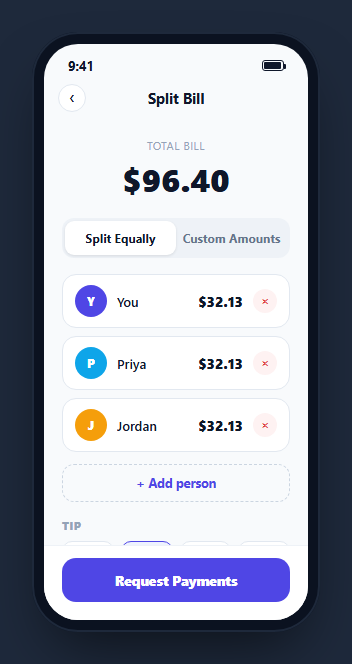
Splitting a bill among friends usually starts as "just split it evenly" and turns into "actually Jordan had the extra appetizer" halfway through. This snippet handles both cases in one screen — an equal-split mode that divides the total automatically, and a custom mode with per-person editable amounts that must add back up to the actual bill before the request button will let you continue.
Two modes sharing one people array
mode is either 'equal' or 'custom', and renderPeople() branches on it: equal mode renders a plain computed $X.XX amount for everyone (billTotal / people.length), while custom mode renders an editable number input per person bound to that person's own custom field. Switching modes never touches a separate data structure — the same people array backs both views.
Switching into custom mode seeds sensible defaults
When a user switches to custom mode with no amounts entered yet, the mode button handler pre-fills every person's custom value with an equal share, computed the same way equal mode would have shown it. This means starting from "everyone pays evenly" and then adjusting one or two amounts is the natural first move, rather than starting from a blank $0.00 for every person.
A live balance check that gates the primary action
customSum() totals every person's custom value, and renderSummary() compares that sum against billTotal (with a small tolerance for floating-point rounding). If they don't match, a warning line states exactly how much is unassigned or over, and the "Request Payments" button disables itself and relabels to "Balance Amounts to Continue" — this prevents sending payment requests that don't actually add up to the real bill.
Tip selection recalculates the whole summary, not just one line
Clicking a tip percentage button updates tipRate and re-runs renderSummary(), which recomputes the tip amount, the per-person tip share, and the grand total together from the one rate — so changing the tip percentage never leaves the total or per-person figures stale relative to the newly selected rate.
Adding and removing people keeps everything derived
addPersonBtn pushes a new guest into the people array and calls renderAll(); removing a person splices them out and does the same. In equal mode this immediately changes everyone's computed share since it divides by the current people.length; in custom mode, the balance warning immediately reflects however far the remaining custom amounts now are from the total.
Wiring it to real payment requests
Replace the setTimeout-based "Requests Sent!" confirmation with real calls to a payments API (Venmo, PayPal, Stripe, or an in-app wallet) for each person's computed share, and pull the initial billTotal from an actual scanned or entered receipt rather than the hardcoded demo value.
Build with AI
Build, Understand, Optimize, and Extend It With AI
Rather than tracing the equal/custom mode branching and balance-check logic by hand, paste this snippet's HTML, CSS, and JS into an AI coding assistant like Claude and ask it to explain exactly how renderPeople() and renderSummary() derive every displayed amount from the same people array and mode variable, and how the balance check gates the Request Payments button using a rounding tolerance to avoid floating-point false positives. The same assistant can help you optimize it, for instance asking whether splitting by percentage shares instead of raw dollar amounts would make custom mode easier to balance for larger groups. It is also useful for extending the screen: ask it to wire in a real payments API for the request button, support splitting specific line items (rather than only the total) among a subset of people, or add a receipt-scanning flow that populates billTotal automatically. Treat the code less like a finished artifact and more like a starting point for a conversation.
Prompt to recreate it
Copy this into your AI assistant of choice to build the effect from scratch, or as a jumping-off point for your own variant:
Build a mobile "split bill" screen in plain HTML, CSS, and JavaScript, framed inside a CSS phone mockup, no library.

Requirements:
- A total bill amount displayed prominently, a toggle between "Split Equally" and "Custom Amounts" modes, and a list of people (with add and remove controls) all backed by one shared JavaScript array of person objects, not separate data per mode.
- In equal mode, every person must show the same computed share (bill total divided by the number of people), automatically recalculating whenever a person is added or removed.
- In custom mode, every person must show an editable number input for their own amount, pre-filled with an equal share as a starting point the first time custom mode is entered with no amounts set.
- A live validation check must compare the sum of all custom amounts against the actual bill total (allowing a small tolerance for floating-point rounding) and, when they don't match, show a message stating exactly how much is unassigned or over, while disabling and relabeling the primary "Request Payments" button until the amounts balance.
- A row of tip percentage options (e.g. 15%, 18%, 20%, 25%) that, when selected, recalculates and displays the tip amount, the per-person tip share, and the grand total together in a summary section, all derived from the one selected tip rate.
- Clicking "Request Payments" when balanced must show a brief confirmation state before reverting.
Want to tighten it up first? Run this prompt through the AI Prompt Studio to score it across 8 quality dimensions, catch anti-patterns, and tune the wording for Claude, ChatGPT, or Gemini before you paste it in.
Step by step
How to Use
- 1Paste HTML, CSS, and JSA bill total and three people render in Split Equally mode, each showing the same computed share.
- 2Switch to Custom AmountsEach person now shows an editable amount input, pre-filled with an equal share to start from.
- 3Edit an amountThe summary and the "Request Payments" button update live, disabling with a warning if the amounts no longer add up to the bill.
- 4Add or remove a personTap "+ Add person" or a person's remove button — totals recompute immediately for the current mode.
- 5Pick a tip percentageThe tip amount, per-person tip share, and grand total in the summary recalculate together.
- 6Wire it to real paymentsReplace the demo confirmation with real API calls to a payments provider for each computed share.
Real-world uses
Common Use Cases
Got questions?
Frequently Asked Questions
renderPeople() divides billTotal by people.length and displays the same computed value for every person whenever mode is "equal" — there is no per-person stored amount used in this mode, so adding or removing a person immediately changes everyone's displayed share.
customSum() totals every person's custom field, and renderSummary() compares it against billTotal with a small rounding tolerance. If they differ, a warning states exactly how much is unassigned or over, and the Request Payments button disables itself and relabels to "Balance Amounts to Continue".
When switching into custom mode with no custom amounts entered yet, the mode-switch handler seeds every person's custom field with an equal share as a sensible starting point, so adjusting one or two people's amounts is the natural first edit rather than filling in every field from scratch.
Clicking a tip option updates the single tipRate variable and re-runs renderSummary(), which recomputes the tip amount, the per-person tip share, and the grand total together from that one rate, so all three figures always reflect the currently selected percentage.
No — it is a UI demo. The button shows a "Requests Sent!" confirmation for a moment before reverting. Wire it to a real payments API (such as Venmo, PayPal, Stripe, or an in-app wallet) to actually send payment requests for each computed share.
Yes. Track people, mode, and tipRate in state, derive each person's displayed amount and the balance-check warning in a computed/useMemo value based on mode, and disable the request button from that same derived balanced boolean.