Source Code
<div class="rfi-phone">
<div class="rfi-screen">
<div class="rfi-status"><span>9:41</span><span class="rfi-batt"><i></i></span></div>
<header class="rfi-head">
<button class="rfi-back" aria-label="Back">‹</button>
<b>Invite Friends</b>
<span class="rfi-spacer"></span>
</header>
<div class="rfi-body">
<div class="rfi-hero">
<div class="rfi-hero-icon">🎁</div>
<h1>Give $10, Get $10</h1>
<p>Invite friends to Northline. They get $10 off their first order, and you get $10 credit when they place it.</p>
</div>
<div class="rfi-code-card">
<span class="rfi-code-label">Your invite code</span>
<div class="rfi-code-row">
<span class="rfi-code" id="rfiCode">NORTH-7QK2</span>
<button class="rfi-copy-btn" id="rfiCopyBtn">Copy</button>
</div>
</div>
<div class="rfi-share-row">
<button class="rfi-share" data-channel="message">
<span class="rfi-share-icon" style="background:#dcfce7">💬</span>
<span>Message</span>
</button>
<button class="rfi-share" data-channel="email">
<span class="rfi-share-icon" style="background:#dbeafe">📧</span>
<span>Email</span>
</button>
<button class="rfi-share" data-channel="link">
<span class="rfi-share-icon" style="background:#fef3c7">🔗</span>
<span>Copy Link</span>
</button>
<button class="rfi-share" data-channel="more">
<span class="rfi-share-icon" style="background:#f1f5f9">⋮</span>
<span>More</span>
</button>
</div>
<div class="rfi-progress-card">
<div class="rfi-progress-head">
<b><span id="rfiInviteCount">2</span> of 5 invites redeemed</b>
<span id="rfiEarned">$20 earned</span>
</div>
<div class="rfi-progress-track"><div class="rfi-progress-fill" id="rfiProgressFill"></div></div>
<p class="rfi-progress-hint" id="rfiProgressHint">Invite 3 more friends to unlock the $50 bonus tier</p>
</div>
<div class="rfi-list">
<p class="rfi-list-label">Your invites</p>
<div id="rfiInviteList"></div>
</div>
</div>
<div class="rfi-toast" id="rfiToast" hidden></div>
</div>
</div>*{box-sizing:border-box;margin:0;padding:0}
html{scrollbar-width:none;-ms-overflow-style:none}
html::-webkit-scrollbar{display:none}
body{font-family:system-ui,-apple-system,sans-serif;background:#1e293b;display:flex;justify-content:center;align-items:center;min-height:100vh;padding:24px;scrollbar-width:none;-ms-overflow-style:none}
body::-webkit-scrollbar{display:none}
.rfi-phone{width:288px;height:600px;background:#0b1220;border-radius:46px;padding:12px;box-shadow:0 30px 60px -20px rgba(0,0,0,.6),inset 0 0 0 2px #1e293b}
.rfi-screen{width:100%;height:100%;border-radius:34px;overflow:hidden;background:#f8fafc;color:#0f172a;display:flex;flex-direction:column;position:relative}
.rfi-status{display:flex;justify-content:space-between;align-items:center;padding:13px 24px 0;font-size:13px;font-weight:700}
.rfi-batt{width:22px;height:11px;border:1.4px solid currentColor;border-radius:3px;position:relative;display:inline-block}
.rfi-batt::after{content:'';position:absolute;right:-3px;top:3px;width:2px;height:5px;background:currentColor;border-radius:0 1px 1px 0}
.rfi-batt i{position:absolute;left:1.4px;top:1.4px;bottom:1.4px;width:82%;background:currentColor;border-radius:1px}
.rfi-head{display:flex;align-items:center;gap:8px;padding:10px 14px 6px}
.rfi-back{background:#fff;border:1px solid #e2e8f0;width:28px;height:28px;border-radius:50%;font-size:16px;color:#0f172a;cursor:pointer;flex-shrink:0}
.rfi-head b{flex:1;text-align:center;font-size:14.5px}
.rfi-spacer{width:28px;flex-shrink:0}
.rfi-body{flex:1;overflow-y:auto;padding:6px 18px 20px;scrollbar-width:none;-ms-overflow-style:none}
.rfi-body::-webkit-scrollbar{display:none}
.rfi-hero{text-align:center;padding:12px 4px 20px}
.rfi-hero-icon{font-size:38px;margin-bottom:8px}
.rfi-hero h1{font-size:20px;font-weight:800;margin-bottom:8px}
.rfi-hero p{font-size:12.5px;color:#64748b;line-height:1.55}
.rfi-code-card{background:#0f172a;border-radius:16px;padding:16px;margin-bottom:16px}
.rfi-code-label{font-size:10.5px;color:#94a3b8;text-transform:uppercase;letter-spacing:.5px}
.rfi-code-row{display:flex;align-items:center;justify-content:space-between;margin-top:8px}
.rfi-code{font-size:18px;font-weight:800;color:#fff;letter-spacing:.5px}
.rfi-copy-btn{background:#4f46e5;color:#fff;border:none;border-radius:10px;padding:8px 14px;font-size:12px;font-weight:700;cursor:pointer;font-family:inherit;transition:background .15s}
.rfi-copy-btn.copied{background:#16a34a}
.rfi-share-row{display:grid;grid-template-columns:repeat(4,1fr);gap:8px;margin-bottom:18px}
.rfi-share{background:#fff;border:1px solid #e2e8f0;border-radius:14px;padding:12px 4px;display:flex;flex-direction:column;align-items:center;gap:7px;cursor:pointer;font-family:inherit;transition:border-color .15s,transform .15s}
.rfi-share:hover{border-color:#a5b4fc;transform:translateY(-1px)}
.rfi-share-icon{width:34px;height:34px;border-radius:50%;display:flex;align-items:center;justify-content:center;font-size:15px}
.rfi-share span:last-child{font-size:10px;font-weight:700;color:#475569}
.rfi-progress-card{background:#fff;border:1px solid #e2e8f0;border-radius:16px;padding:14px 16px;margin-bottom:18px}
.rfi-progress-head{display:flex;align-items:center;justify-content:space-between;margin-bottom:9px}
.rfi-progress-head b{font-size:12.5px}
.rfi-progress-head span{font-size:12px;font-weight:800;color:#16a34a}
.rfi-progress-track{height:8px;background:#f1f5f9;border-radius:5px;overflow:hidden}
.rfi-progress-fill{height:100%;background:linear-gradient(90deg,#6366f1,#4f46e5);border-radius:5px;transition:width .4s ease}
.rfi-progress-hint{font-size:11px;color:#94a3b8;margin-top:8px}
.rfi-list-label{font-size:11px;font-weight:800;color:#94a3b8;text-transform:uppercase;letter-spacing:.5px;margin-bottom:8px}
.rfi-invite-row{display:flex;align-items:center;gap:10px;background:#fff;border:1px solid #eef2f7;border-radius:12px;padding:9px 12px;margin-bottom:7px}
.rfi-invite-avatar{width:30px;height:30px;border-radius:50%;background:#eef2ff;color:#4f46e5;display:flex;align-items:center;justify-content:center;font-size:12px;font-weight:800;flex-shrink:0}
.rfi-invite-info{flex:1;min-width:0}
.rfi-invite-info b{display:block;font-size:12.5px}
.rfi-invite-info span{font-size:10.5px;color:#94a3b8}
.rfi-invite-status{font-size:10.5px;font-weight:800;padding:4px 9px;border-radius:20px;flex-shrink:0}
.rfi-invite-status.redeemed{background:#dcfce7;color:#166534}
.rfi-invite-status.pending{background:#fef3c7;color:#92400e}
.rfi-toast{position:absolute;left:50%;bottom:20px;transform:translate(-50%,10px);background:#0f172a;color:#fff;font-size:12px;font-weight:600;padding:10px 16px;border-radius:12px;z-index:20;opacity:0;transition:opacity .2s,transform .2s;white-space:nowrap}
.rfi-toast.show{opacity:1;transform:translate(-50%,0)}var invites = [
{ name: 'Priya S.', status: 'redeemed', reward: 10 },
{ name: 'Jordan M.', status: 'redeemed', reward: 10 },
{ name: 'Alex T.', status: 'pending', reward: 0 }
];
var goal = 5;
var bonusAt = 5;
var bonusAmount = 50;
var codeEl = document.getElementById('rfiCode');
var copyBtn = document.getElementById('rfiCopyBtn');
var shareRow = document.querySelector('.rfi-share-row');
var toast = document.getElementById('rfiToast');
var toastTimer = null;
var countEl = document.getElementById('rfiInviteCount');
var earnedEl = document.getElementById('rfiEarned');
var fillEl = document.getElementById('rfiProgressFill');
var hintEl = document.getElementById('rfiProgressHint');
var listEl = document.getElementById('rfiInviteList');
var channelLabels = {
message: 'Invite link copied for Messages',
email: 'Invite link copied for Email',
link: 'Invite link copied to clipboard',
more: 'Opening share options\u2026'
};
function showToast(msg) {
toast.textContent = msg;
toast.hidden = false;
requestAnimationFrame(function () { toast.classList.add('show'); });
clearTimeout(toastTimer);
toastTimer = setTimeout(function () {
toast.classList.remove('show');
setTimeout(function () { toast.hidden = true; }, 200);
}, 2000);
}
function renderProgress() {
var redeemed = invites.filter(function (inv) { return inv.status === 'redeemed'; });
var earned = redeemed.reduce(function (sum, inv) { return sum + inv.reward; }, 0);
var shown = Math.min(redeemed.length, goal);
countEl.textContent = shown;
earnedEl.textContent = '$' + earned + ' earned';
fillEl.style.width = Math.min(100, (redeemed.length / goal) * 100) + '%';
var remaining = bonusAt - redeemed.length;
hintEl.textContent = remaining > 0
? 'Invite ' + remaining + ' more friend' + (remaining === 1 ? '' : 's') + ' to unlock the $' + bonusAmount + ' bonus tier'
: 'Bonus tier unlocked! You earned an extra $' + bonusAmount + '.';
}
function renderList() {
listEl.innerHTML = invites.map(function (inv) {
var initials = inv.name.split(' ').map(function (p) { return p[0]; }).join('');
return '<div class="rfi-invite-row">' +
'<span class="rfi-invite-avatar">' + initials + '</span>' +
'<span class="rfi-invite-info"><b>' + inv.name + '</b><span>' + (inv.status === 'redeemed' ? 'Joined and ordered' : 'Invited, not joined yet') + '</span></span>' +
'<span class="rfi-invite-status ' + inv.status + '">' + (inv.status === 'redeemed' ? '+$' + inv.reward : 'Pending') + '</span>' +
'</div>';
}).join('');
}
copyBtn.addEventListener('click', function () {
copyBtn.textContent = 'Copied!';
copyBtn.classList.add('copied');
showToast('Code ' + codeEl.textContent + ' copied to clipboard');
setTimeout(function () {
copyBtn.textContent = 'Copy';
copyBtn.classList.remove('copied');
}, 1500);
});
shareRow.addEventListener('click', function (e) {
var btn = e.target.closest('.rfi-share');
if (!btn) return;
showToast(channelLabels[btn.dataset.channel] || 'Sharing invite link\u2026');
});
setTimeout(function () {
invites[2].status = 'redeemed';
invites[2].reward = 10;
renderProgress();
renderList();
showToast('Alex T. just redeemed your invite \u2014 +$10');
}, 4000);
renderProgress();
renderList();Learn Coding Visually
Learn to code with interactive, live-preview playgrounds — HTML, CSS, JavaScript, React & more.
 HTML Playground42 lessons · Click-based · Live preview
 CSS PlaygroundLearn CSS with a live editor
 JavaScript Playground60 lessons · DOM · Async · Canvas
 React PlaygroundLearn React with a live code editor
 GSAP PlaygroundLearn GSAP animation interactively
 SVG Playground44 lessons · shapes · paths · animation
 SCSS Playground45 lessons · Sass modules · tokens
 Tailwind PlaygroundLearn Tailwind CSS with a live editor
 Bootstrap 5 Playground50 lessons · live preview
What's included
Features
About this UI Snippet
Mobile Referral Screen — Copyable Code, Share Channels & Computed Progress
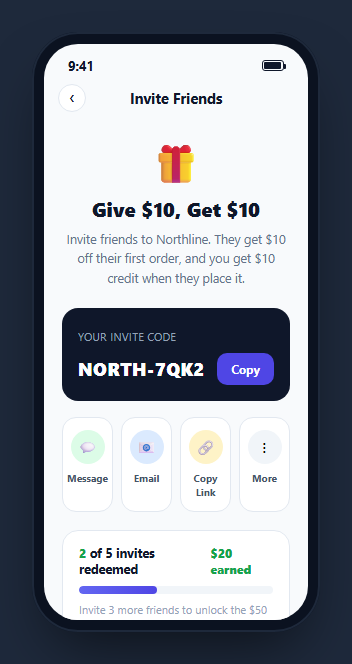
A referral program only works if sharing the code is nearly frictionless and the reward math is visibly trustworthy. This snippet builds a full invite screen around those two requirements: a one-tap copyable invite code with real share-channel buttons, and a progress bar plus earnings total computed directly from an actual list of invited friends rather than displayed as separate, hand-maintained numbers.
Earnings computed from the invite list, never hardcoded
renderProgress() filters the invites array for status === 'redeemed' and sums each one's reward with reduce() to produce the "$X earned" total. The redeemed count also drives the progress bar's width percentage against goal. Because every number on screen is derived from the same array, adding, removing, or changing the status of an invite anywhere in the array automatically keeps the count, the earned total, and the bar in agreement.
A bonus-tier hint that counts down honestly
hintEl computes remaining = bonusAt - redeemed.length and either tells the user exactly how many more invites unlock the next bonus tier, or switches to a celebratory "Bonus tier unlocked" message once remaining reaches zero. This is the kind of small honesty detail that makes a referral program feel real — the number shown is always mathematically exact, not a rounded or vague "almost there."
Four share channels, one shared feedback pattern
The message, email, copy-link, and "more" buttons all route through one click handler that looks up a channel-specific confirmation string in the channelLabels object and shows it as a toast. This keeps the visual feedback for every share action consistent while still telling the user specifically what just happened for the channel they picked.
A live invite list that updates itself
renderList() renders every invited friend as a row with an initials avatar, a status line, and either a "+$10" reward pill (redeemed) or a "Pending" pill (not yet redeemed). A setTimeout call later in the demo flips invites[2] from pending to redeemed and re-runs both renderProgress() and renderList() together — simulating a real-time push when a friend actually completes their first order, with a toast confirming exactly who just redeemed.
The invite code as a one-tap copy target, not just display text
Clicking "Copy" flips the button to a "Copied!" confirmation state, adds a completed-state class, and shows a toast naming the exact code that was copied — matching the low-friction expectation of a referral flow, where every extra tap between "I want to share this" and actually sharing it measurably reduces how many invites get sent.
Wiring it to a real referral backend
Replace the static invites array and the setTimeout-simulated redemption with a real API call that fetches the user's actual referral history and either polls or subscribes via WebSocket for redemption events, and wire navigator.clipboard.writeText() plus the real Web Share API (navigator.share()) into the copy and share-channel buttons in place of the toast-only demo feedback.
Build with AI
Build, Understand, Optimize, and Extend It With AI
Rather than tracing the derived-totals logic by hand, paste this snippet's HTML, CSS, and JS into an AI coding assistant like Claude and ask it to explain exactly how renderProgress() computes the earned total and progress percentage from the invites array using filter and reduce, and how the bonus-tier hint text derives its exact remaining-invites count from the same data. The same assistant can help you optimize it, for instance asking whether the invite list and redemption events should come from a WebSocket subscription instead of the demo's single setTimeout-simulated redemption. It is also useful for extending the screen: ask it to wire in the real Clipboard API and Web Share API for the copy and share buttons, add a leaderboard comparing the user's referral count to friends, or support multiple simultaneous bonus tiers with different thresholds and rewards. Treat the code less like a finished artifact and more like a starting point for a conversation.
Prompt to recreate it
Copy this into your AI assistant of choice to build the effect from scratch, or as a jumping-off point for your own variant:
Build a mobile "referral and invite friends" screen in plain HTML, CSS, and JavaScript, framed inside a CSS phone mockup, no library.

Requirements:
- A hero section explaining the referral offer, a card showing a copyable invite code with a working "Copy" button that shows a temporary "Copied!" confirmation state, and a row of at least four distinct share-channel buttons (e.g. message, email, copy link, more) that each show a channel-specific toast confirmation message on click.
- A progress card showing how many invites have been redeemed out of a goal, a total dollar amount earned, and a progress bar — all three values must be computed live from a single JavaScript array of invite objects (name, status, reward) using array methods like filter and reduce, never hardcoded as separate numbers.
- A dynamic hint line below the progress bar stating exactly how many more invites are needed to unlock a bonus reward tier, computed from the same invite data, switching to a celebratory unlocked message once the threshold is reached.
- A list of individual invited friends below the progress card, each showing an avatar, a status line (joined vs. not yet joined), and a reward pill, rendered from the same invites array.
- Simulate a real-time redemption a few seconds after load: update one invite's status in the array, then re-render both the progress card and the invite list together, and show a toast announcing which friend just redeemed their invite.
Want to tighten it up first? Run this prompt through the AI Prompt Studio to score it across 8 quality dimensions, catch anti-patterns, and tune the wording for Claude, ChatGPT, or Gemini before you paste it in.
Step by step
How to Use
- 1Paste HTML, CSS, and JSThe screen renders an invite code, share buttons, and a progress card showing 2 of 5 invites redeemed.
- 2Tap "Copy"The button confirms "Copied!" and a toast names the specific code that was copied.
- 3Tap a share channel buttonEach shows its own toast message describing that specific channel's action.
- 4Wait a few secondsA third invite automatically flips to redeemed, and the progress bar, earned total, and invite list update together with a toast announcing it.
- 5Edit the invites arrayAdd, remove, or change the status of entries in the JS panel to see the progress bar and totals recompute automatically.
- 6Wire it to a real backendReplace the static invites array with a fetched referral history and connect the copy/share buttons to the real Clipboard and Web Share APIs.
Real-world uses
Common Use Cases
Got questions?
Frequently Asked Questions
renderProgress() filters the invites array down to entries with status "redeemed", then sums each one's reward field with Array.prototype.reduce(). The total is never a separate hand-typed number, so it always matches the actual redeemed invites in the array.
It subtracts the current redeemed count from a bonusAt constant (remaining = bonusAt - redeemed.length) and renders that exact number in the hint text, switching to an "unlocked" message automatically once remaining reaches zero or below.
In this demo, it only shows a visual "Copied!" confirmation and a toast. Wire it to navigator.clipboard.writeText(codeEl.textContent) inside the click handler to perform a real clipboard copy.
A setTimeout call a few seconds after page load flips the third invite's status to "redeemed", sets its reward, and re-runs both renderProgress() and renderList() together, simulating a real-time push notification from a referral backend when a friend completes their first order.
All four route through one click handler that looks up a channel-specific message in the channelLabels object keyed by each button's data-channel attribute, so each channel shows contextually appropriate toast feedback from one shared code path.
Yes. Keep invites as state, derive the earned total and progress percentage in a computed/useMemo value using the same filter-and-reduce logic, and update the array (e.g. via a WebSocket event handler) to trigger a re-render of the progress card and list together.