Source Code
<div class="mpe-phone">
<div class="mpe-screen">
<div class="mpe-status"><span>9:41</span><span class="mpe-batt"><i></i></span></div>
<header class="mpe-head">
<button class="mpe-cancel" id="mpeCancel">Cancel</button>
<h1>Edit Profile</h1>
<button class="mpe-save" id="mpeSave" disabled>Save</button>
</header>
<form class="mpe-form" id="mpeForm">
<div class="mpe-avatar-wrap">
<div class="mpe-avatar" id="mpeAvatar">JM</div>
<label class="mpe-avatar-edit" for="mpeFile">📷</label>
<input type="file" id="mpeFile" accept="image/*" hidden>
</div>
<div class="mpe-field">
<label>Full name</label>
<input type="text" id="mpeName" value="Jordan Mireles" required>
<p class="mpe-err" id="mpeNameErr" hidden>Name is required.</p>
</div>
<div class="mpe-field">
<label>Username</label>
<div class="mpe-prefix-input">
<span>@</span>
<input type="text" id="mpeUsername" value="jordan.m">
</div>
<p class="mpe-hint" id="mpeUserHint">Available</p>
</div>
<div class="mpe-field">
<label>Bio</label>
<textarea id="mpeBio" maxlength="140" rows="3">Product designer. Coffee, trail running, and side projects.</textarea>
<p class="mpe-count"><span id="mpeBioCount">62</span>/140</p>
</div>
<div class="mpe-field">
<label>Email</label>
<input type="email" id="mpeEmail" value="jordan@mireles.studio" required>
<p class="mpe-err" id="mpeEmailErr" hidden>Enter a valid email address.</p>
</div>
<div class="mpe-field">
<label>Phone</label>
<input type="tel" id="mpePhone" value="+1 (555) 019-4482">
</div>
</form>
<p class="mpe-toast" id="mpeToast" hidden>✓ Profile updated</p>
</div>
</div>*{box-sizing:border-box;margin:0;padding:0}
html{scrollbar-width:none;-ms-overflow-style:none}
html::-webkit-scrollbar{display:none}
body{font-family:system-ui,-apple-system,sans-serif;background:#1e293b;display:flex;justify-content:center;align-items:center;min-height:100vh;padding:24px;scrollbar-width:none;-ms-overflow-style:none}
body::-webkit-scrollbar{display:none}
.mpe-phone{position:relative;width:288px;height:600px;background:#0b1220;border-radius:46px;padding:12px;box-shadow:0 30px 60px -20px rgba(0,0,0,.6),inset 0 0 0 2px #1e293b}
.mpe-screen{width:100%;height:100%;border-radius:34px;overflow:hidden;background:#fff;color:#0f172a;display:flex;flex-direction:column}
.mpe-status{display:flex;justify-content:space-between;align-items:center;padding:13px 24px 0;font-size:13px;font-weight:700}
.mpe-batt{width:22px;height:11px;border:1.4px solid currentColor;border-radius:3px;position:relative;display:inline-block}
.mpe-batt::after{content:'';position:absolute;right:-3px;top:3px;width:2px;height:5px;background:currentColor;border-radius:0 1px 1px 0}
.mpe-batt i{position:absolute;left:1.4px;top:1.4px;bottom:1.4px;width:80%;background:currentColor;border-radius:1px}
.mpe-head{display:flex;align-items:center;justify-content:space-between;padding:10px 14px 12px;border-bottom:1px solid #f1f5f9}
.mpe-cancel,.mpe-save{background:none;border:none;font-size:13.5px;font-weight:700;cursor:pointer;font-family:inherit;padding:4px}
.mpe-cancel{color:#64748b}
.mpe-save{color:#6366f1}
.mpe-save:disabled{color:#c7d2fe;cursor:not-allowed}
.mpe-head h1{font-size:15px;font-weight:800}
.mpe-form{flex:1;overflow-y:auto;padding:20px 20px 30px;scrollbar-width:none;-ms-overflow-style:none}
.mpe-form::-webkit-scrollbar{display:none}
.mpe-avatar-wrap{position:relative;width:74px;height:74px;margin:0 auto 26px}
.mpe-avatar{width:74px;height:74px;border-radius:50%;background:linear-gradient(135deg,#6366f1,#ec4899);color:#fff;font-weight:800;font-size:22px;display:flex;align-items:center;justify-content:center}
.mpe-avatar-edit{position:absolute;bottom:-2px;right:-2px;width:26px;height:26px;background:#0f172a;border:2px solid #fff;border-radius:50%;display:flex;align-items:center;justify-content:center;font-size:11px;cursor:pointer}
.mpe-field{margin-bottom:18px}
.mpe-field label{display:block;font-size:11.5px;font-weight:700;color:#64748b;text-transform:uppercase;letter-spacing:.4px;margin-bottom:7px}
.mpe-field input,.mpe-field textarea{width:100%;border:1.5px solid #e2e8f0;border-radius:11px;padding:11px 13px;font-size:13.5px;font-family:inherit;color:#0f172a;outline:none;transition:border-color .15s;resize:none}
.mpe-field input:focus,.mpe-field textarea:focus{border-color:#6366f1}
.mpe-field input.invalid{border-color:#ef4444}
.mpe-prefix-input{display:flex;align-items:center;border:1.5px solid #e2e8f0;border-radius:11px;padding:0 13px;transition:border-color .15s}
.mpe-prefix-input:focus-within{border-color:#6366f1}
.mpe-prefix-input span{color:#94a3b8;font-size:13.5px}
.mpe-prefix-input input{border:none;padding:11px 0 11px 3px}
.mpe-prefix-input input:focus{border:none}
.mpe-hint{font-size:11.5px;color:#16a34a;font-weight:600;margin-top:6px}
.mpe-hint.taken{color:#ef4444}
.mpe-err{font-size:11.5px;color:#ef4444;font-weight:600;margin-top:6px}
.mpe-count{text-align:right;font-size:11px;color:#94a3b8;margin-top:5px}
.mpe-toast{position:absolute;left:50%;bottom:22px;transform:translateX(-50%);background:#0f172a;color:#fff;font-size:12.5px;font-weight:700;padding:10px 18px;border-radius:99px;box-shadow:0 10px 25px -8px rgba(0,0,0,.4)}var form = document.getElementById('mpeForm');
var saveBtn = document.getElementById('mpeSave');
var cancelBtn = document.getElementById('mpeCancel');
var toast = document.getElementById('mpeToast');
var nameInput = document.getElementById('mpeName');
var emailInput = document.getElementById('mpeEmail');
var usernameInput = document.getElementById('mpeUsername');
var bioInput = document.getElementById('mpeBio');
var bioCount = document.getElementById('mpeBioCount');
var userHint = document.getElementById('mpeUserHint');
var initialValues = {};
Array.prototype.slice.call(form.querySelectorAll('input, textarea')).forEach(function (el) {
initialValues[el.id] = el.value;
});
var takenUsernames = ['jordan', 'admin', 'support', 'test'];
function checkDirty() {
var dirty = Array.prototype.slice.call(form.querySelectorAll('input, textarea')).some(function (el) {
return el.value !== initialValues[el.id];
});
saveBtn.disabled = !dirty;
}
form.addEventListener('input', function (e) {
checkDirty();
if (e.target === bioInput) {
bioCount.textContent = bioInput.value.length;
}
if (e.target === usernameInput) {
var val = usernameInput.value.trim().toLowerCase();
if (takenUsernames.indexOf(val) > -1) {
userHint.textContent = 'Username already taken';
userHint.className = 'mpe-hint taken';
} else {
userHint.textContent = 'Available';
userHint.className = 'mpe-hint';
}
}
});
document.getElementById('mpeFile').addEventListener('change', function (e) {
var file = e.target.files && e.target.files[0];
if (!file) return;
var reader = new FileReader();
reader.onload = function (ev) {
var avatar = document.getElementById('mpeAvatar');
avatar.style.backgroundImage = 'url(' + ev.target.result + ')';
avatar.style.backgroundSize = 'cover';
avatar.style.backgroundPosition = 'center';
avatar.textContent = '';
checkDirty();
};
reader.readAsDataURL(file);
});
function validate() {
var valid = true;
var nameErr = document.getElementById('mpeNameErr');
var emailErr = document.getElementById('mpeEmailErr');
if (!nameInput.value.trim()) {
nameInput.classList.add('invalid');
nameErr.hidden = false;
valid = false;
} else {
nameInput.classList.remove('invalid');
nameErr.hidden = true;
}
var emailOk = /^[^\s@]+@[^\s@]+\.[^\s@]+$/.test(emailInput.value.trim());
if (!emailOk) {
emailInput.classList.add('invalid');
emailErr.hidden = false;
valid = false;
} else {
emailInput.classList.remove('invalid');
emailErr.hidden = true;
}
return valid;
}
saveBtn.addEventListener('click', function (e) {
e.preventDefault();
if (!validate()) return;
Array.prototype.slice.call(form.querySelectorAll('input, textarea')).forEach(function (el) {
initialValues[el.id] = el.value;
});
saveBtn.disabled = true;
toast.hidden = false;
setTimeout(function () { toast.hidden = true; }, 1800);
});
cancelBtn.addEventListener('click', function () {
Array.prototype.slice.call(form.querySelectorAll('input, textarea')).forEach(function (el) {
el.value = initialValues[el.id];
});
bioCount.textContent = bioInput.value.length;
userHint.textContent = 'Available';
userHint.className = 'mpe-hint';
checkDirty();
});Learn Coding Visually
Learn to code with interactive, live-preview playgrounds — HTML, CSS, JavaScript, React & more.
 HTML Playground42 lessons · Click-based · Live preview
 CSS PlaygroundLearn CSS with a live editor
 JavaScript Playground60 lessons · DOM · Async · Canvas
 React PlaygroundLearn React with a live code editor
 GSAP PlaygroundLearn GSAP animation interactively
 SVG Playground44 lessons · shapes · paths · animation
 SCSS Playground45 lessons · Sass modules · tokens
 Tailwind PlaygroundLearn Tailwind CSS with a live editor
 Bootstrap 5 Playground50 lessons · live preview
What's included
Features
About this UI Snippet
Mobile Edit Profile Screen — Dirty-State Save, Avatar Upload & Live Validation
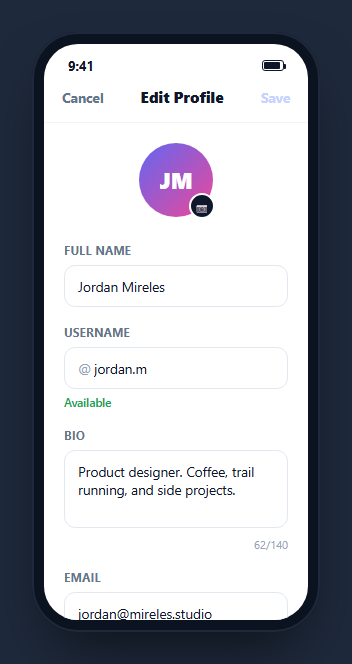
Editing a profile is different from viewing one — see the mobile profile screen for the read-only counterpart — because the interface needs to track what changed, prevent an accidental save of untouched data, and give feedback while the user is still typing rather than only after they submit. This snippet builds a complete edit-profile form: a real avatar upload with an instant image preview, a Save button that only enables once something has actually changed, a live bio character counter, a username-availability check as you type, and field-level validation errors that don't require a submit attempt to appear.
Dirty-state tracking, not just "form has values"
On load, initialValues snapshots every input and textarea's starting value by element id. Every subsequent input event calls checkDirty(), which compares each field's current value against its snapshot and enables Save only if at least one field genuinely differs from where it started. This is meaningfully different from just checking whether required fields are non-empty — a user who opens the form, types something, and then deletes it back to the original value should not have an enabled Save button implying there's something new to persist, and this implementation gets that right because it compares against the actual starting values, not just presence.
A real avatar upload with FileReader, not a stub
Clicking the small camera badge opens the native file picker (via a <label for="mpeFile"> wrapping a hidden <input type="file">, so no custom click-forwarding JavaScript is needed). Selecting an image reads it with FileReader.readAsDataURL(), and on load sets the avatar's background-image directly from the resulting data URL — a genuine local preview with no upload round-trip required to see the result, exactly like production avatar-picker flows show an immediate preview before the file finishes uploading in the background.
Validation that appears without a submit attempt
Name and email fields validate on every keystroke via the shared input listener rather than only when Save is clicked — an empty name or a malformed email shows its red border and inline error message immediately, then clears the moment the field becomes valid again. validate() is still called again inside the Save handler as the authoritative gate (so a user can't defeat validation by never triggering the live check), but by the time they reach Save, they've typically already seen and fixed any problems.
A username check with instant feedback
The username field checks its trimmed, lowercased value against a small takenUsernames array on every keystroke, flipping a hint line between "Available" (green) and "Username already taken" (red) instantly. In production, replace the local array lookup with a debounced request to a real availability-check endpoint, since checking uniqueness against a live username database cannot be done client-side — but keep the same instant-hint UI pattern once the network response resolves.
Cancel reverts, Save commits
Cancel doesn't just close the screen — it writes every field back to its initialValues snapshot, resets the bio counter and username hint, and re-runs checkDirty(), so backing out of an edit-in-progress cleanly discards unsaved changes without navigating away. Save, once validation passes, re-snapshots initialValues to the newly saved values (so Save becomes disabled again until something new changes) and shows a brief toast confirmation.
Build with AI
Build, Understand, Optimize, and Extend It With AI
Rather than tracing the dirty-state comparison by hand, paste this snippet's HTML, CSS, and JS into an AI coding assistant like Claude and ask it to explain exactly how initialValues and checkDirty() work together to enable Save only when a field has genuinely changed, as opposed to simply checking whether required fields are non-empty. The same assistant can help you optimize it, for instance asking whether the username-availability check should be debounced once it is wired to a real API call instead of the instant local array lookup used here. It is also useful for extending the screen: ask it to add a real upload progress indicator for the avatar image once wired to actual file storage, support undoing individual field changes rather than a full-form Cancel, or add a confirmation dialog when navigating away with unsaved dirty changes. Treat the code less like a finished artifact and more like a starting point for a conversation.
Prompt to recreate it
Copy this into your AI assistant of choice to build the effect from scratch, or as a jumping-off point for your own variant:
Build a mobile "edit profile" form screen in plain HTML, CSS, and JavaScript, framed inside a CSS phone mockup, with dirty-state save tracking — no library.

Requirements:
- A header with Cancel and Save buttons and a title; the Save button must start disabled and only become enabled once at least one form field's current value genuinely differs from the value it had when the screen loaded (compare against a snapshot taken on load, not just whether fields are non-empty).
- A circular avatar with an edit badge that, when tapped, opens the native file picker (using a label wrapping a hidden file input, not custom click-forwarding JavaScript) and, on selecting an image, reads it locally with FileReader and shows an instant preview as the avatar's background image.
- A name field and an email field that validate on every keystroke (not only on submit): an empty name or an invalid email format must show a red border and an inline error message immediately, clearing again the moment the field becomes valid.
- A username field with an "@" prefix that checks its value on every keystroke against a small list of taken usernames and shows a live hint line switching between a green "Available" message and a red "already taken" message.
- A bio textarea with a maxlength and a live character counter showing current/max beneath it.
- Clicking Save must re-run full validation before doing anything else, and only if it passes should it re-snapshot the current values as the new baseline (so Save disables again), then show a brief toast confirmation. Clicking Cancel must revert every field to its original snapshotted value and resync all derived UI (counter, hint, Save's disabled state) in one action.
Want to tighten it up first? Run this prompt through the AI Prompt Studio to score it across 8 quality dimensions, catch anti-patterns, and tune the wording for Claude, ChatGPT, or Gemini before you paste it in.
Step by step
How to Use
- 1Paste HTML, CSS, and JSA profile edit form renders inside a phone frame with Save disabled since nothing has changed yet.
- 2Edit a fieldSave enables the moment any field genuinely differs from its starting value.
- 3Upload an avatarTap the camera badge to pick an image — it previews instantly in the circular avatar via FileReader.
- 4Watch live validationClear the name field or type an invalid email to see inline errors appear before you try to save.
- 5Check username availabilityType "admin" or "test" into the username field to see the taken-username hint switch to red.
- 6Save or CancelSave validates and shows a confirmation toast; Cancel reverts every field back to its original value.
Real-world uses
Common Use Cases
Got questions?
Frequently Asked Questions
On load, every input and textarea\u2019s starting value is snapshotted into an initialValues object keyed by element id. On every input event, checkDirty() compares each field\u2019s current value against that snapshot and enables Save only if at least one field genuinely differs — not merely whether required fields are filled in.
No — clicking the camera badge opens the native file picker via a label wrapping a hidden file input, and the selected image is read locally with FileReader.readAsDataURL() to produce an instant preview as the avatar\u2019s background image. No network request is made; a production implementation would additionally upload the file to storage and persist the resulting URL on save.
Live validation gives the user a chance to see and correct a problem (like an empty name or malformed email) while they are still filling out the form, rather than only discovering it after clicking Save. The same validate() function still runs again inside the Save handler as the authoritative check, so validation cannot be bypassed even if the live listener were somehow skipped.
On every keystroke in the username field, the trimmed and lowercased value is checked against a small hardcoded takenUsernames array, and a hint line switches between green "Available" and red "Username already taken" accordingly. In production this local array must be replaced with a debounced request to a real backend availability-check endpoint, since uniqueness cannot be verified without querying the actual user database.
It writes every field\u2019s value back to its initialValues snapshot, resets the derived bio counter and username hint to match, and re-runs checkDirty() (which disables Save again since nothing now differs from the snapshot) — fully discarding any in-progress edits without navigating away from the screen.
Keep the form values in a single state object and a separate initialValues object captured on mount; derive "dirty" as a comparison between the two rather than a separate boolean flag that could drift out of sync. Handle the file input\u2019s change event the same way, reading the selected file with FileReader and storing the resulting data URL in state to drive the avatar\u2019s preview.