
Learn Coding Visually
Learn to code with interactive, live-preview playgrounds — HTML, CSS, JavaScript, React & more.
 HTML Playground42 lessons · Click-based · Live preview
 CSS PlaygroundLearn CSS with a live editor
 JavaScript Playground60 lessons · DOM · Async · Canvas
 React PlaygroundLearn React with a live code editor
 GSAP PlaygroundLearn GSAP animation interactively
 SVG Playground44 lessons · shapes · paths · animation
 SCSS Playground45 lessons · Sass modules · tokens
 Tailwind PlaygroundLearn Tailwind CSS with a live editor
 Bootstrap 5 Playground50 lessons · live preview
Mobile Checkout Screen — Free HTML CSS JS Snippet
Mobile Checkout Screen · Mobile · Plain HTML, CSS & JS · Live preview
What's included
Features
About this UI Snippet
Mobile Checkout Screen — Order Review UI
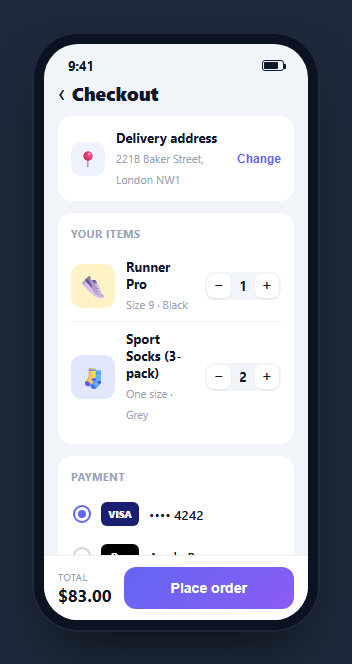
A checkout screen is the last, highest-stakes step in mobile commerce — a delivery address, the cart items with quantity controls, a payment method, a promo field, and an order summary under a sticky pay button. This snippet builds a complete, calculating one inside a CSS phone frame: quantity steppers update the subtotal, a promo code applies a real discount, and the total recomputes live in both the summary and the sticky bar — in HTML, CSS, and vanilla JavaScript with no dependency.
The live order math
Each cart item carries a data-price attribute and shows a quantity. A single recalc() function walks every item, multiplies price by quantity, sums the subtotal, applies the current discount rate, adds flat shipping, and writes the result to the subtotal, discount, total, and sticky-bar figures at once. Centralizing the math in one function means every interaction — stepper or promo — calls the same code path, so the numbers can never drift out of sync.
Quantity steppers with a floor
Each item has a minus/plus stepper. The plus button always increments; the minus button only decrements while the quantity is above one, so an item never drops to zero from the stepper — the same guard real carts use to force an explicit remove action instead. Every change re-runs recalc().
A promo code that actually discounts
Entering SAVE10 and tapping Apply sets a 10% discount rate, reveals the previously hidden discount line in green, and lowers the total; an unknown code shows a red error and clears any discount. The code is upper-cased before comparison so save10 works too, and an empty field prompts you to enter one — the three states every promo field needs.
Custom payment radios
The payment methods are real radio inputs, visually hidden, with a styled .mck-pdot ring driven by the :checked ~ sibling selector so only one can be active. Because they are genuine radios grouped by name, keyboard and screen-reader selection work without any JavaScript.
Sticky action bar
The place-order button lives in a bar pinned below the scroll area, showing the total again so it stays visible as you scroll the summary. Tapping it flips the button to a green confirmed state.
Accessibility and performance
The payment options are genuine radio inputs grouped by name, so arrow keys move between them and screen readers announce the selected method — no custom keyboard handling needed. The steppers and promo controls are real buttons with aria-labels, and the promo feedback is plain text that assistive tech reads on change, with color reinforced by wording rather than carried by color alone. Performance is trivial here: the recalc() function does a single pass over a handful of items and writes a few text nodes, so it can run on every stepper tap without any perceptible cost, and there is no re-render of the item list. Because the total is derived rather than accumulated, there is no risk of floating-point drift compounding across many interactions — each recalculation starts fresh from the item prices. The sticky bar is positioned with the layout rather than on scroll listeners, so scrolling the summary stays smooth. For a real cart, validate promo codes server-side and debounce the field if you check them as the user types.
Reusing it
Replace the items with your cart data, wire the address and payment rows to your real sources, validate promo codes against your backend, and submit the order on place. Lift it out of the phone frame for a responsive web checkout, or keep it framed after a mini cart to present the full purchase flow.
Build with AI
Build, Understand, Optimize, and Extend It With AI
You do not have to trace the pricing math by hand to trust it. Paste this snippet's HTML, CSS, and JS into an AI coding assistant like Claude and ask it to explain exactly why every interaction routes through the single recalc function instead of nudging a running total, or how the mck-pdot custom radio styling relies on the checked sibling selector to stay in sync with the underlying input. The same assistant can help optimize it — ask whether recalculating from every item's data-price on each stepper tap could become a bottleneck with a large cart, or whether the promo-code check belongs behind a debounce if you validate it against a live endpoint as the user types. It is just as good for extending the feature: have it add a remove-item button that respects the same recalc pipeline, support multiple stacked promo codes, or add a subtle highlight animation when the total changes. Treat the code less like a finished artifact and more like a starting point for a conversation.
Prompt to recreate it
Copy this into your AI assistant of choice to build the effect from scratch, or as a jumping-off point for your own variant:
Build a mobile checkout/order-review screen in plain HTML, CSS, and JavaScript inside a phone-frame container — no framework, no state library.

Requirements:
- A delivery-address card, a cart-items card where each item stores its unit price in a data-price attribute and shows a quantity stepper, a payment-method card, a promo-code card, and an order-summary card, followed by a sticky bottom bar showing the total and a place-order button.
- Implement a single recalc function that is the only place totals are computed: it walks every cart item, multiplies its data-price by its current displayed quantity, sums the subtotal, applies a discount rate as a percentage of the subtotal, adds a flat shipping fee, and writes the subtotal, discount line, grand total, and the sticky bar's total from that one calculation, called after every state-changing action.
- Quantity steppers must never let an item's quantity fall below one from the minus button, while the plus button always increments; every stepper click must call recalc.
- The promo-code field must uppercase the entered code before comparison, apply a real percentage discount for one valid code, show a green success message and reveal a previously-hidden discount line for that code, and show a red error message (different wording for empty versus invalid) for anything else, always followed by a recalc call.
- Payment methods must be real, visually hidden radio inputs sharing one name attribute, with a custom circular indicator styled purely through a CSS sibling selector reacting to the checked state, not through JavaScript.
- The place-order button must visually confirm success (label and background color change) when clicked, without a page navigation.
Want to tighten it up first? Run this prompt through the AI Prompt Studio to score it across 8 quality dimensions, catch anti-patterns, and tune the wording for Claude, ChatGPT, or Gemini before you paste it in.
Source Code
<div class="mck-phone">
<div class="mck-screen">
<div class="mck-status"><span>9:41</span><span class="mck-batt"><i></i></span></div>
<header class="mck-head">
<button class="mck-back" aria-label="Back">‹</button>
<h1>Checkout</h1>
</header>
<div class="mck-scroll">
<div class="mck-card mck-ship">
<div class="mck-crow"><span class="mck-ic">📍</span><div><b>Delivery address</b><small>221B Baker Street, London NW1</small></div><button class="mck-chg">Change</button></div>
</div>
<div class="mck-card">
<div class="mck-clabel">Your items</div>
<div class="mck-item" data-price="42">
<div class="mck-thumb t1">👟</div>
<div class="mck-meta"><b>Runner Pro</b><small>Size 9 · Black</small></div>
<div class="mck-qty"><button class="mck-dec" aria-label="Decrease">−</button><span>1</span><button class="mck-inc" aria-label="Increase">+</button></div>
</div>
<div class="mck-item" data-price="18">
<div class="mck-thumb t2">🧦</div>
<div class="mck-meta"><b>Sport Socks (3-pack)</b><small>One size · Grey</small></div>
<div class="mck-qty"><button class="mck-dec" aria-label="Decrease">−</button><span>2</span><button class="mck-inc" aria-label="Increase">+</button></div>
</div>
</div>
<div class="mck-card">
<div class="mck-clabel">Payment</div>
<label class="mck-pay"><input type="radio" name="mckpay" checked><span class="mck-pdot"></span><span class="mck-pic v">VISA</span><span>•••• 4242</span></label>
<label class="mck-pay"><input type="radio" name="mckpay"><span class="mck-pdot"></span><span class="mck-pic ap">Pay</span><span>Apple Pay</span></label>
</div>
<div class="mck-card mck-promo">
<input id="mckPromo" type="text" placeholder="Promo code" autocomplete="off">
<button id="mckApply">Apply</button>
</div>
<p class="mck-promomsg" id="mckPromoMsg" hidden></p>
<div class="mck-card mck-sum">
<div class="mck-line"><span>Subtotal</span><span id="mckSub">$0</span></div>
<div class="mck-line"><span>Shipping</span><span id="mckShip">$5.00</span></div>
<div class="mck-line mck-disc" id="mckDiscLine" hidden><span>Discount</span><span id="mckDisc">-$0</span></div>
<div class="mck-line mck-total"><span>Total</span><span id="mckTotal">$0</span></div>
</div>
</div>
<div class="mck-bar">
<div class="mck-bartotal"><small>Total</small><b id="mckBarTotal">$0</b></div>
<button class="mck-place" id="mckPlace">Place order</button>
</div>
</div>
</div>*{box-sizing:border-box;margin:0;padding:0}
html{scrollbar-width:none;-ms-overflow-style:none}
html::-webkit-scrollbar{display:none}
body{font-family:system-ui,-apple-system,sans-serif;background:#1e293b;display:flex;justify-content:center;align-items:center;min-height:100vh;padding:24px;scrollbar-width:none;-ms-overflow-style:none}
body::-webkit-scrollbar{display:none}
.mck-phone{width:288px;height:600px;background:#0b1220;border-radius:46px;padding:12px;box-shadow:0 30px 60px -20px rgba(0,0,0,.6),inset 0 0 0 2px #1e293b}
.mck-screen{width:100%;height:100%;border-radius:34px;overflow:hidden;background:#f1f5f9;color:#0f172a;display:flex;flex-direction:column}
.mck-status{display:flex;justify-content:space-between;align-items:center;padding:13px 24px 0;font-size:13px;font-weight:700}
.mck-batt{width:22px;height:11px;border:1.4px solid currentColor;border-radius:3px;position:relative;display:inline-block}
.mck-batt::after{content:'';position:absolute;right:-3px;top:3px;width:2px;height:5px;background:currentColor;border-radius:0 1px 1px 0}
.mck-batt i{position:absolute;left:1.4px;top:1.4px;bottom:1.4px;width:70%;background:currentColor;border-radius:1px}
.mck-head{display:flex;align-items:center;gap:6px;padding:6px 14px 10px}
.mck-back{background:none;border:none;font-size:23px;color:#0f172a;cursor:pointer;line-height:1}
.mck-head h1{font-size:19px;font-weight:800}
.mck-scroll{flex:1;overflow-y:auto;padding:0 14px 12px;scrollbar-width:none;-ms-overflow-style:none}
.mck-scroll::-webkit-scrollbar{display:none}
.mck-card{background:#fff;border-radius:14px;padding:13px;margin-bottom:12px}
.mck-clabel{font-size:11px;font-weight:700;text-transform:uppercase;letter-spacing:.4px;color:#94a3b8;margin-bottom:9px}
.mck-crow{display:flex;align-items:center;gap:11px}
.mck-ic{width:34px;height:34px;border-radius:10px;background:#eef2ff;display:flex;align-items:center;justify-content:center;font-size:16px;flex-shrink:0}
.mck-crow b{font-size:13px;display:block}
.mck-crow small{font-size:11px;color:#94a3b8}
.mck-chg{margin-left:auto;background:none;border:none;color:#6366f1;font-size:12px;font-weight:700;cursor:pointer}
.mck-item{display:flex;align-items:center;gap:11px;padding:8px 0;border-top:1px solid #f1f5f9}
.mck-item:nth-of-type(2){border-top:none}
.mck-clabel + .mck-item{border-top:none}
.mck-thumb{width:44px;height:44px;border-radius:11px;display:flex;align-items:center;justify-content:center;font-size:22px;flex-shrink:0}
.t1{background:#fef3c7}.t2{background:#e0e7ff}
.mck-meta{flex:1}
.mck-meta b{font-size:13px;display:block}
.mck-meta small{font-size:11px;color:#94a3b8}
.mck-qty{display:flex;align-items:center;gap:2px;background:#f1f5f9;border-radius:9px;padding:2px}
.mck-qty button{width:24px;height:24px;border:none;background:#fff;border-radius:7px;font-size:15px;cursor:pointer;color:#0f172a;box-shadow:0 1px 2px rgba(0,0,0,.08)}
.mck-qty button:active{transform:scale(.9)}
.mck-qty span{min-width:20px;text-align:center;font-size:13px;font-weight:700}
.mck-pay{display:flex;align-items:center;gap:10px;padding:9px 2px;cursor:pointer;font-size:13px;font-weight:600}
.mck-pay input{position:absolute;opacity:0}
.mck-pdot{width:18px;height:18px;border-radius:50%;border:2px solid #cbd5e1;flex-shrink:0;position:relative;transition:border-color .15s}
.mck-pay input:checked ~ .mck-pdot{border-color:#6366f1}
.mck-pay input:checked ~ .mck-pdot::after{content:'';position:absolute;inset:3px;border-radius:50%;background:#6366f1}
.mck-pic{width:38px;height:24px;border-radius:6px;display:flex;align-items:center;justify-content:center;font-size:10px;font-weight:800;color:#fff}
.mck-pic.v{background:#1a1f71}.mck-pic.ap{background:#000}
.mck-promo{display:flex;gap:8px;align-items:center;padding:9px 11px}
.mck-promo input{flex:1;border:none;background:#f1f5f9;border-radius:9px;padding:9px 11px;font-size:13px;outline:none;font-family:inherit}
.mck-promo button{background:#0f172a;color:#fff;border:none;border-radius:9px;padding:9px 15px;font-size:12.5px;font-weight:700;cursor:pointer}
.mck-promomsg{font-size:12px;font-weight:600;margin:-4px 4px 12px;padding:0}
.mck-promomsg.ok{color:#16a34a}
.mck-promomsg.err{color:#ef4444}
.mck-sum .mck-line{display:flex;justify-content:space-between;font-size:13px;padding:5px 0;color:#475569}
.mck-disc{color:#16a34a!important;font-weight:600}
.mck-total{border-top:1px solid #f1f5f9;margin-top:5px;padding-top:10px!important;font-size:16px!important;font-weight:800;color:#0f172a!important}
.mck-bar{display:flex;align-items:center;gap:12px;padding:11px 14px;background:#fff;border-top:1px solid #eef2f7}
.mck-bartotal small{display:block;font-size:10px;color:#94a3b8;text-transform:uppercase;letter-spacing:.4px}
.mck-bartotal b{font-size:17px}
.mck-place{flex:1;background:linear-gradient(135deg,#6366f1,#8b5cf6);color:#fff;border:none;border-radius:12px;padding:13px;font-size:14px;font-weight:700;cursor:pointer;transition:transform .15s}
.mck-place:active{transform:scale(.97)}
.mck-place.done{background:#16a34a}var SHIP = 5;
var discount = 0;
function money(n){ return '$' + n.toFixed(2); }
function recalc(){
var sub = 0;
document.querySelectorAll('.mck-item').forEach(function(item){
var price = parseFloat(item.getAttribute('data-price'));
var qty = parseInt(item.querySelector('.mck-qty span').textContent, 10);
sub += price * qty;
});
var disc = discount ? sub * discount : 0;
var total = sub + SHIP - disc;
document.getElementById('mckSub').textContent = money(sub);
document.getElementById('mckShip').textContent = money(SHIP);
document.getElementById('mckTotal').textContent = money(total);
document.getElementById('mckBarTotal').textContent = money(total);
var line = document.getElementById('mckDiscLine');
line.hidden = !disc;
document.getElementById('mckDisc').textContent = '-' + money(disc);
}
document.querySelectorAll('.mck-item').forEach(function(item){
var span = item.querySelector('.mck-qty span');
item.querySelector('.mck-inc').addEventListener('click', function(){
span.textContent = parseInt(span.textContent, 10) + 1; recalc();
});
item.querySelector('.mck-dec').addEventListener('click', function(){
var v = parseInt(span.textContent, 10);
if (v > 1){ span.textContent = v - 1; recalc(); }
});
});
document.getElementById('mckApply').addEventListener('click', function(){
var code = document.getElementById('mckPromo').value.trim().toUpperCase();
var msg = document.getElementById('mckPromoMsg');
msg.hidden = false;
if (code === 'SAVE10'){
discount = 0.10; msg.textContent = 'Code applied — 10% off!'; msg.className = 'mck-promomsg ok';
} else if (code === ''){
discount = 0; msg.textContent = 'Enter a promo code first.'; msg.className = 'mck-promomsg err';
} else {
discount = 0; msg.textContent = 'That code is not valid.'; msg.className = 'mck-promomsg err';
}
recalc();
});
document.getElementById('mckPlace').addEventListener('click', function(){
this.textContent = '✓ Order placed';
this.classList.add('done');
});
recalc();Step by step
How to Use
- 1Paste HTML, CSS, and JSA checkout renders with an address, two items, payment options, a promo field, and a summary.
- 2Adjust quantitiesThe plus and minus steppers change item counts and the subtotal and total update instantly.
- 3Apply a promo codeType SAVE10 and tap Apply — a green discount line appears and the total drops 10%.
- 4Try an invalid codeAny other code shows a red error and clears the discount.
- 5Pick a payment methodThe custom radios let only one method be selected.
- 6Place the orderThe sticky button flips to a green confirmed state.
Real-world uses
Common Use Cases
Got questions?
Frequently Asked Questions
All figures are written by one recalc() function. It sums each item's data-price times its quantity, applies the discount rate, adds flat shipping, and updates the subtotal, discount line, summary total, and sticky-bar total together. Every interaction calls this one function, so the numbers can never disagree.
The decrement handler only reduces the quantity while it is above one. This is a deliberate guard: dropping to zero from a stepper is ambiguous, so real carts require an explicit remove action instead. To support removal, add a trash button that deletes the item and calls recalc().
SAVE10 applies a 10% discount. The input is upper-cased before comparison so save10 also works. An empty field shows a prompt to enter a code, and any other value shows an invalid-code error and clears the discount. In production you would validate the code against your backend rather than a hard-coded string.
Yes. Each is a hidden radio input grouped by the same name attribute, with a styled dot driven by the :checked ~ sibling selector. Because they are genuine radios, only one can be selected and keyboard and screen-reader users can choose a method without any JavaScript.
Hold the cart items, selected payment, and discount in state, and compute the totals as derived values with useMemo (React), computed (Vue), or a getter (Angular) instead of writing to the DOM. Bind the steppers and promo apply to handlers that update state, and submit the order on place. The CSS and Tailwind utilities port directly.