Source Code
<section class="asm-hero">
  <div class="asm-inner">
    <div class="asm-copy">
      <span class="asm-badge">★★★★★ 4.9 · 22K ratings</span>
      <h1 class="asm-title">Your whole day, <span>in one tap.</span></h1>
      <p class="asm-sub">Habits, focus timers, and journaling — built for people who open their phone 90 times a day and want fewer of those taps to matter.</p>

      <div class="asm-badges">
        <a href="#" class="asm-store-badge" aria-label="Download on the App Store">
          <svg viewBox="0 0 24 24" width="21" height="21" fill="currentColor"><path d="M17.05 20.28c-.98.95-2.05.8-3.08.35-1.09-.46-2.09-.48-3.24 0-1.44.62-2.2.44-3.06-.35C2.79 15.25 3.51 7.59 9.05 7.31c1.35.07 2.29.74 3.08.8.72-.15 1.66-.85 2.99-.68 3.13.41 4.55 3.34 3.24 5.64-2.42 1.36-1.5 4.83.7 5.55-.5 1.24-1.15 2.47-2.01 3.66zM12.03 7.25c-.15-2.23 1.66-4.09 3.74-4.25.29 2.31-2.08 4.4-3.74 4.25z"/></svg>
          <span><small>Download on the</small>App Store</span>
        </a>
        <a href="#" class="asm-store-badge" aria-label="Get it on Google Play">
          <svg viewBox="0 0 24 24" width="21" height="21" fill="currentColor"><path d="M3.6 2.6c-.3.3-.5.7-.5 1.2v16.4c0 .5.2.9.5 1.2l.1.1L13 12.2v-.4L3.7 2.5l-.1.1z"/><path d="M16.1 15.3l-3.1-3.1v-.4l3.1-3.1 6.9 3.9c.7.4.7 1.1 0 1.5l-6.9 3.9z"/></svg>
          <span><small>Get it on</small>Google Play</span>
        </a>
      </div>

      <div class="asm-qr-row">
        <div class="asm-qr" aria-hidden="true">
          <div class="asm-qr-grid">
            <span style="grid-area:1/1/3/3"></span><span style="grid-area:1/6/3/8"></span><span style="grid-area:6/1/8/3"></span>
            <span style="grid-area:1/4/2/5"></span><span style="grid-area:3/1/4/2"></span><span style="grid-area:3/4/4/6"></span>
            <span style="grid-area:4/3/5/4"></span><span style="grid-area:4/6/5/8"></span><span style="grid-area:5/2/6/4"></span>
            <span style="grid-area:5/5/6/6"></span><span style="grid-area:6/5/7/7"></span><span style="grid-area:7/4/8/5"></span>
            <span style="grid-area:2/4/3/5"></span><span style="grid-area:1/3/2/4"></span><span style="grid-area:7/7/8/8"></span>
          </div>
        </div>
        <span class="asm-qr-label">Scan to get the app<br><small>(layout demo — not a scannable code)</small></span>
      </div>
    </div>

    <div class="asm-phone-wrap">
      <div class="asm-glow"></div>
      <div class="asm-phone">
        <div class="asm-notch"></div>
        <div class="asm-screen">
          <div class="asm-app-bar"><span>Today</span><span class="asm-app-dot"></span></div>
          <div class="asm-app-card asm-c1"><span class="asm-app-ring"></span><div><strong>Deep work</strong><small>52 / 90 min</small></div></div>
          <div class="asm-app-card asm-c2"><span class="asm-app-ring"></span><div><strong>Read</strong><small>3 of 4 done</small></div></div>
          <div class="asm-app-card asm-c3"><span class="asm-app-ring"></span><div><strong>Journal</strong><small>Streak: 14 days</small></div></div>
        </div>
      </div>
    </div>
  </div>
</section>
* { box-sizing: border-box; margin: 0; padding: 0; }
body { font-family: system-ui, -apple-system, sans-serif; background: #fdf4ff; }
.asm-hero { min-height: 100vh; display: flex; align-items: center; padding: 48px 24px; }
.asm-inner { max-width: 1080px; margin: 0 auto; display: grid; grid-template-columns: 1fr 0.85fr; gap: 48px; align-items: center; }
.asm-badge { display: inline-block; font-size: 12.5px; font-weight: 700; color: #a21caf; }
.asm-title { margin-top: 14px; font-size: 42px; font-weight: 900; line-height: 1.12; letter-spacing: -0.02em; color: #1e0a2e; }
.asm-title span { color: #c026d3; }
.asm-sub { margin-top: 16px; font-size: 15.5px; line-height: 1.65; color: #6b5b73; max-width: 420px; }
.asm-badges { display: flex; gap: 10px; margin-top: 28px; flex-wrap: wrap; }
.asm-store-badge { display: flex; align-items: center; gap: 9px; background: #1e0a2e; color: #fff; border-radius: 10px; padding: 9px 16px 9px 13px; text-decoration: none; transition: transform .15s, background .15s; }
.asm-store-badge:hover { background: #341049; transform: translateY(-1px); }
.asm-store-badge span { display: flex; flex-direction: column; line-height: 1.15; }
.asm-store-badge small { font-size: 9.5px; color: #d8b4fe; font-weight: 500; }
.asm-store-badge span:not(small) { font-size: 14px; font-weight: 700; }
.asm-qr-row { display: flex; align-items: center; gap: 12px; margin-top: 24px; }
.asm-qr-grid { width: 60px; height: 60px; background: #fff; border: 1px solid #e9d5ff; border-radius: 8px; display: grid; grid-template-columns: repeat(8,1fr); grid-template-rows: repeat(8,1fr); padding: 6px; gap: 1px; }
.asm-qr-grid span { background: #1e0a2e; border-radius: 1px; }
.asm-qr-label { font-size: 12px; color: #8b7791; line-height: 1.5; }
.asm-qr-label small { color: #b8a5bd; font-size: 10.5px; }
.asm-phone-wrap { position: relative; display: flex; justify-content: center; }
.asm-glow { position: absolute; width: 320px; height: 320px; background: radial-gradient(circle, rgba(192, 38, 211, 0.25), transparent 65%); filter: blur(20px); }
.asm-phone { position: relative; width: 240px; height: 490px; background: #0d0614; border-radius: 42px; padding: 12px; box-shadow: 0 30px 60px rgba(88, 12, 92, 0.25), inset 0 0 0 2px rgba(255,255,255,0.06); }
.asm-notch { position: absolute; top: 12px; left: 50%; transform: translateX(-50%); width: 90px; height: 22px; background: #0d0614; border-radius: 0 0 14px 14px; z-index: 2; }
.asm-screen { position: relative; width: 100%; height: 100%; background: linear-gradient(165deg, #fdf4ff, #f5e0ff); border-radius: 30px; overflow: hidden; padding: 34px 16px 16px; display: flex; flex-direction: column; gap: 10px; }
.asm-app-bar { display: flex; align-items: center; justify-content: space-between; font-size: 15px; font-weight: 800; color: #1e0a2e; margin-bottom: 4px; }
.asm-app-dot { width: 8px; height: 8px; border-radius: 50%; background: #22c55e; }
.asm-app-card { display: flex; align-items: center; gap: 10px; background: #fff; border-radius: 14px; padding: 11px 12px; box-shadow: 0 2px 10px rgba(88,12,92,0.06); }
.asm-app-ring { width: 30px; height: 30px; border-radius: 50%; border: 3px solid #f3e8ff; border-top-color: #c026d3; flex-shrink: 0; }
.asm-c2 .asm-app-ring { border-top-color: #a855f7; }
.asm-c3 .asm-app-ring { border-top-color: #ec4899; }
.asm-app-card strong { display: block; font-size: 12.5px; color: #1e0a2e; }
.asm-app-card small { font-size: 10.5px; color: #8b7791; }
@media (max-width: 860px) {
.asm-inner { grid-template-columns: 1fr; gap: 40px; text-align: center; }
.asm-copy { display: flex; flex-direction: column; align-items: center; }
.asm-badges, .asm-qr-row { justify-content: center; }
.asm-title { font-size: 30px; }
}Learn Coding Visually
Learn to code with interactive, live-preview playgrounds — HTML, CSS, JavaScript, React & more.
 HTML Playground42 lessons · Click-based · Live preview
 CSS PlaygroundLearn CSS with a live editor
 JavaScript Playground60 lessons · DOM · Async · Canvas
 React PlaygroundLearn React with a live code editor
 GSAP PlaygroundLearn GSAP animation interactively
 SVG Playground44 lessons · shapes · paths · animation
 SCSS Playground45 lessons · Sass modules · tokens
 Tailwind PlaygroundLearn Tailwind CSS with a live editor
 Bootstrap 5 Playground50 lessons · live preview
App Hero with Phone Mockup and Store Badges — Free HTML CSS Snippet
App Hero with Phone Mockup and Store Badges · Heroes · Plain HTML & CSS · Live preview
What's included
Features
About this UI Snippet
App Hero with Phone Mockup and Store Badges — CSS Phone Frame, Both Store Badges, and a QR Placeholder
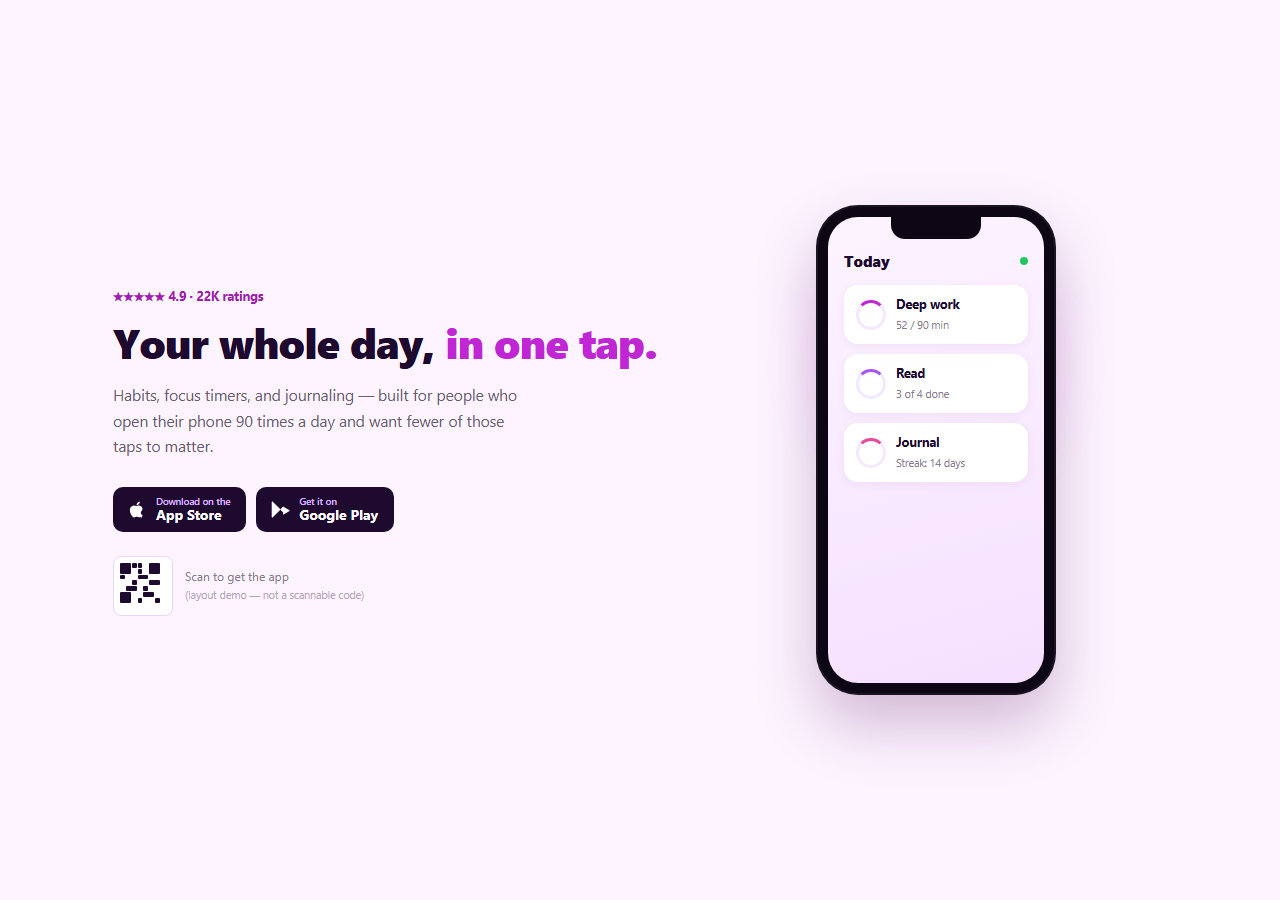
A mobile app's marketing homepage needs to do three things in the hero: show the app itself, make it obvious how to download it, and reassure with real social proof. This snippet builds all three with plain HTML and CSS — a CSS-drawn phone frame showing a mock app screen, both App Store and Google Play badges as accessible anchors, and a QR code placeholder — no screenshots, no image assets, no JavaScript.
A CSS phone frame, not a screenshot
.asm-phone is a rounded rectangle with a notch cutout and an inset screen — built entirely from border-radius, box-shadow, and layered divs, no device-mockup image. The screen inside shows a small mock "today" app UI: three cards each with a colored progress-ring border and a label, giving the hero something dynamic-feeling to show without needing a real app screenshot or a canvas-based render. A soft radial glow sits behind the phone to lift it off the page background.
Store badges as real anchors, matching this library's convention
Both badges are inline SVG glyphs plus two-line text inside real <a> tags — the same approach used in App Download Footer, rather than screenshots of Apple's and Google's official badge artwork. That keeps them accessible, resizable, and recolorable with plain CSS, and avoids an extra image request. As with that snippet, swap in the official brand-compliant badge assets before shipping to production.
A QR code that's honest about being a placeholder
The QR "code" is a fixed 8×8 CSS grid with roughly a dozen cells positioned by grid-area to resemble a scan pattern — decorative only, and labeled directly under it as "(layout demo — not a scannable code)" so nobody mistakes it for something that actually decodes. Replace it with a real generated QR image (from a QR-generation tool or library) once you have the actual store link to encode.
Star rating as immediate proof
A small "★★★★★ 4.9 · 22K ratings" line sits above the headline — a lightweight social-proof signal that costs one line of markup and gives a first-time visitor an immediate reason to trust the download prompt before reading anything else.
Customizing it
Replace the mock app-screen cards with content representative of your actual app. Swap the accent colors (magenta/purple here) for your brand. Update the rating line with your real store rating. Wire both badge hrefs to your actual App Store and Play Store listings, and replace the QR placeholder with a real generated code once you have a link to encode.
Build with AI
Build, Understand, Optimize, and Extend It With AI
You don't have to build a device-mockup image pipeline to get a convincing phone frame. Paste this snippet's HTML and CSS into an AI coding assistant like Claude and ask it to explain how the notch, rounded corners, and inset box-shadow combine to read as a phone frame with zero image assets, or how the App Store and Google Play badges stay accessible and resizable by being built from real anchor tags and inline SVG instead of screenshots. The same assistant is useful for finishing the two deliberate placeholders — ask it to recommend a client-side QR generation approach for the .asm-qr-grid slot, or to walk through Apple's and Google's current badge usage guidelines so replacement artwork stays brand-compliant. It's also handy for extending the mockup: ask it to animate the progress rings on the phone screen, add a second phone tilted behind the first for depth, or swap the mock app cards for a real screenshot with a subtle parallax tilt on mouse move. Treat the code less like a finished artifact and more like a starting point for a conversation.
Prompt to recreate it
Copy this into your AI assistant of choice to build the effect from scratch, or as a jumping-off point for your own variant:
Build a mobile-app marketing hero in plain HTML and CSS only (no JavaScript, no images, no external libraries).

Requirements:
- A two-column hero: a copy column with a star-rating proof line, a headline, a subheading, both an App Store and a Google Play download badge, and a small QR code placeholder with a label; and a mockup column showing a phone.
- Build the phone entirely from CSS: a rounded rectangle frame with a notch cutout near the top and an inset "screen" area, with no device-mockup image or SVG asset. Inside the screen, show a small mock app UI (for example a few cards with a colored circular progress-ring border and a label/value) so the phone doesn't look empty.
- Build both store badges as real anchor tags containing an inline SVG icon and two-line text (a small "Download on the"/"Get it on" line above a bold store name), not screenshots of the official badge artwork — styled as solid dark rounded rectangles with a hover lift.
- Build the QR code as a fixed 8x8 CSS Grid with roughly a dozen dark cells positioned via named grid-area coordinates to resemble a scan pattern, with a caption label underneath explicitly stating it's a layout demo and not a real scannable code.
- Add a soft, blurred radial-gradient glow behind the phone mockup to lift it visually off the page background.
- Make it fully responsive: stack to a single centered column with the phone below the copy on narrow screens.
Want to tighten it up first? Run this prompt through the AI Prompt Studio to score it across 8 quality dimensions, catch anti-patterns, and tune the wording for Claude, ChatGPT, or Gemini before you paste it in.
Step by step
How to Use
- 1Paste the HTML and CSSA two-column hero renders with copy and badges on one side and a CSS phone mockup on the other.
- 2Replace the badge artworkSwap the inline SVG + text badges for the official Apple and Google badge assets before shipping.
- 3Wire the badge linksSet each anchor's href to your real App Store and Google Play listing URLs.
- 4Generate a real QR codeReplace .asm-qr-grid with an actual QR image encoding your download link.
- 5Customize the phone screenEdit the .asm-app-card elements to represent your actual app's UI.
- 6Update the rating lineSet the star rating and review count to your real current numbers.
Real-world uses
Common Use Cases
Got questions?
Frequently Asked Questions
No — like the QR pattern in App Download Footer, it's a fixed CSS Grid pattern styled to resemble a scan code, and it's explicitly labeled as a layout demo underneath it. Replace it with a real generated QR image once you have your actual store link to encode.
The badges are built as accessible anchor tags with inline SVG and text to demonstrate the layout, not the official brand-compliant artwork Apple and Google provide. Replace them with the official downloadable badge assets from each platform's brand guidelines before shipping.
.asm-phone is a rounded div with a dark background, an inset box-shadow ring for depth, and a small notch element positioned absolutely at the top. The screen inside is another rounded div holding ordinary HTML cards styled to look like a small app UI — no image, canvas, or SVG device frame is used.
Replace the .asm-app-card elements with markup representative of your real app's home screen, or drop in a real screenshot image sized to fill .asm-screen with object-fit: cover if you'd rather show an actual capture instead of a mock UI.
Since there's no JavaScript, the conversion is a direct markup translation. Click JSX, Vue, or Angular in the export panel — replace the QR grid and badge artwork with your real assets in the resulting component, same as the plain HTML version.