Learn Coding Visually
Learn to code with interactive, live-preview playgrounds — HTML, CSS, JavaScript, React & more.
 HTML Playground42 lessons · Click-based · Live preview
 CSS PlaygroundLearn CSS with a live editor
 JavaScript Playground60 lessons · DOM · Async · Canvas
 React PlaygroundLearn React with a live code editor
 GSAP PlaygroundLearn GSAP animation interactively
 SVG Playground44 lessons · shapes · paths · animation
 SCSS Playground45 lessons · Sass modules · tokens
 Tailwind PlaygroundLearn Tailwind CSS with a live editor
 Bootstrap 5 Playground50 lessons · live preview
Drag-to-Reorder Carousel — HTML CSS JS Snippet
Drag-to-Reorder Carousel · Cards · Plain HTML, CSS & JS · Live preview
What's included
Features
About this UI Snippet
Drag-to-Reorder Carousel — Dragging Changes the Data, Not Just the View
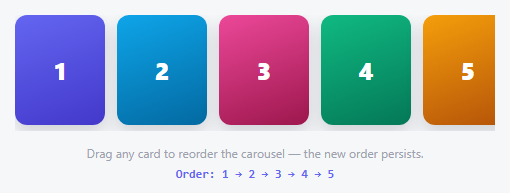
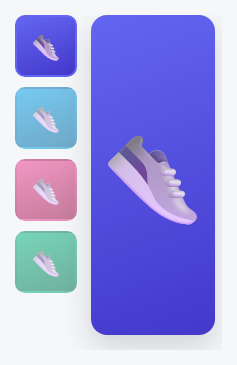
Every other carousel in this library treats dragging as a *navigation* gesture — it moves which slide is showing, then snaps back. This one treats it as an *editing* gesture: drop a card in a new spot and it stays there, because the drag handlers use the native HTML5 Drag and Drop API to physically move DOM nodes, not to read a gesture and animate a transform.
Which side of the target, not just which target
dragover doesn't just detect *which* card you're hovering over — it compares the cursor's x-position against that card's horizontal midpoint to decide whether you're dropping *before* or *after* it, and shows a small visual nudge (drc-drop-before/drc-drop-after) on that side. drop reads the exact same midpoint calculation and calls either target.before(dragging) or target.after(dragging) — real DOM methods that move the dragged element to precisely that position in one call, no array-splicing or re-rendering required.
The DOM order *is* the data — there's no separate array
Because dragged elements are moved with native DOM methods rather than re-rendered from a JavaScript array, the current order at any moment is just whatever order the .drc-slide children actually appear in — updateOrderLabel() reads that directly off track.children after every change. There's no state to keep in sync with the visual order, because the visual order *is* the state.
A real, separate reordering path for keyboard users
Drag-and-drop is unusable without a mouse or touchscreen, so Shift+ArrowLeft/Shift+ArrowRight on a focused card calls the same before/after DOM methods against its immediate sibling — a fully independent, keyboard-only way to reach the identical reordering capability.
Build with AI
Build, Understand, Optimize, and Extend It With AI
Paste this snippet's HTML, CSS, and JS into an AI coding assistant like Claude and ask it to explain why this carousel uses target.before(dragging) and target.after(dragging) to physically move DOM nodes rather than re-rendering the track from a reordered JavaScript array, and what that choice means for where the "current order" actually lives. It's also worth asking the assistant to add localStorage persistence so a reordered sequence survives a page reload, or to reimplement the drag behavior with pointer events for reliable touch support alongside the existing native HTML5 drag-and-drop.
Prompt to recreate it
Copy this into your AI assistant of choice to build the effect from scratch, or as a jumping-off point for your own variant:
Build a carousel in plain HTML, CSS, and vanilla JavaScript where dragging a card permanently reorders the slides (not just navigates between them), using the native HTML5 Drag and Drop API — no library.

Requirements:
- A horizontally scrollable row of card elements, each marked as draggable using the native draggable attribute, each carrying a unique identifier.
- Drag event handling using the native HTML5 Drag and Drop API (dragstart, dragover, drop, dragend) rather than pointer or mouse events — the dragged card must visually indicate it is being dragged (e.g. reduced opacity) for the duration of the drag.
- While dragging over another card, calculate whether the cursor's horizontal position is in the left or right half of that target card, and show a visual indicator on the corresponding side reflecting where the dragged card would land if dropped at that exact moment — this indicator must update live as the cursor moves over different cards or different halves of the same card.
- On drop, physically move the dragged card's actual DOM element to that exact before/after position relative to the target card, using real DOM manipulation methods — the new visual order must become the actual, persistent order of the elements in the document, not merely a temporary animation that reverts.
- A text display showing the current order of card identifiers, read directly from the live DOM order of the cards (not from a separately-maintained array), updating after every reorder.
- A fully independent keyboard-based reordering path: each card must be focusable, and pressing Shift plus the Left or Right arrow key while a card is focused must swap its position with its immediate left or right sibling respectively, using the same underlying DOM-order-changing approach as the drag-and-drop path.
Want to tighten it up first? Run this prompt through the AI Prompt Studio to score it across 8 quality dimensions, catch anti-patterns, and tune the wording for Claude, ChatGPT, or Gemini before you paste it in.
Source Code
<div class="drc-wrap">
  <div class="drc-track" id="drcTrack">
    <div class="drc-slide" draggable="true" data-id="1" style="background:linear-gradient(160deg,#6366f1,#4338ca)">1</div>
    <div class="drc-slide" draggable="true" data-id="2" style="background:linear-gradient(160deg,#0ea5e9,#0369a1)">2</div>
    <div class="drc-slide" draggable="true" data-id="3" style="background:linear-gradient(160deg,#ec4899,#9d174d)">3</div>
    <div class="drc-slide" draggable="true" data-id="4" style="background:linear-gradient(160deg,#10b981,#047857)">4</div>
    <div class="drc-slide" draggable="true" data-id="5" style="background:linear-gradient(160deg,#f59e0b,#b45309)">5</div>
  </div>
  <p class="drc-hint">Drag any card to reorder the carousel — the new order persists.</p>
  <p class="drc-order" id="drcOrder"></p>
</div>*{box-sizing:border-box;margin:0;padding:0}
body{font-family:system-ui,-apple-system,sans-serif;background:#f6f7f9;min-height:100vh;display:flex;align-items:center;justify-content:center;padding:24px}
.drc-wrap{width:100%;max-width:480px}
.drc-track{display:flex;gap:12px;overflow-x:auto;padding-bottom:6px}
.drc-slide{flex:0 0 90px;height:110px;border-radius:12px;display:flex;align-items:center;justify-content:center;color:#fff;font-size:24px;font-weight:800;cursor:grab;box-shadow:0 8px 18px rgba(15,23,42,.16);transition:transform .15s,opacity .15s}
.drc-slide:active{cursor:grabbing}
.drc-slide.drc-dragging{opacity:.35}
.drc-slide.drc-drop-before{transform:translateX(-6px)}
.drc-slide.drc-drop-after{transform:translateX(6px)}
.drc-hint{text-align:center;color:#9ca3af;font-size:12px;margin-top:14px}
.drc-order{text-align:center;font:700 12px ui-monospace,monospace;color:#6366f1;margin-top:6px}var track = document.getElementById('drcTrack');
var orderEl = document.getElementById('drcOrder');
var dragging = null;
function updateOrderLabel() {
var ids = Array.prototype.map.call(track.children, function (el) { return el.dataset.id; });
orderEl.textContent = 'Order: ' + ids.join(' → ');
}
function getSlides() { return Array.prototype.slice.call(track.querySelectorAll('.drc-slide')); }
track.addEventListener('dragstart', function (e) {
dragging = e.target.closest('.drc-slide');
if (!dragging) return;
dragging.classList.add('drc-dragging');
e.dataTransfer.effectAllowed = 'move';
});
track.addEventListener('dragend', function () {
if (dragging) dragging.classList.remove('drc-dragging');
getSlides().forEach(function (s) { s.classList.remove('drc-drop-before', 'drc-drop-after'); });
dragging = null;
updateOrderLabel();
});
track.addEventListener('dragover', function (e) {
e.preventDefault();
var target = e.target.closest('.drc-slide');
if (!target || target === dragging) return;
var rect = target.getBoundingClientRect();
var isAfter = e.clientX - rect.left > rect.width / 2;
getSlides().forEach(function (s) { s.classList.remove('drc-drop-before', 'drc-drop-after'); });
target.classList.add(isAfter ? 'drc-drop-after' : 'drc-drop-before');
});
track.addEventListener('drop', function (e) {
e.preventDefault();
var target = e.target.closest('.drc-slide');
if (!target || !dragging || target === dragging) return;
var rect = target.getBoundingClientRect();
var isAfter = e.clientX - rect.left > rect.width / 2;
if (isAfter) {
target.after(dragging);
} else {
target.before(dragging);
}
});
// Keyboard reordering as a real alternative to drag: focus a card, then hold
// Shift with an arrow key to move it one position left/right in the DOM.
track.addEventListener('keydown', function (e) {
var el = e.target.closest('.drc-slide');
if (!el || !e.shiftKey) return;
if (e.key === 'ArrowRight' && el.nextElementSibling) { el.nextElementSibling.after(el); updateOrderLabel(); e.preventDefault(); }
else if (e.key === 'ArrowLeft' && el.previousElementSibling) { el.previousElementSibling.before(el); updateOrderLabel(); e.preventDefault(); }
});
getSlides().forEach(function (s) { s.tabIndex = 0; });
updateOrderLabel();Step by step
How to Use
- 1Paste HTML, CSS, and JSFive numbered cards appear with their starting order shown below.
- 2Drag a card over anotherA visual nudge shows whether it will drop before or after that card, based on cursor position.
- 3Drop itThe card moves to that exact spot — the order label updates to reflect the real new sequence.
- 4Focus a card and hold ShiftPress Shift+Left or Shift+Right to swap it with its neighbor without a mouse.
- 5Refresh and checkThe order shown is always read directly from the DOM's actual current arrangement, never a stale cached array.
Real-world uses
Common Use Cases
Got questions?
Frequently Asked Questions
After any drop or keyboard reorder, read the current order from track.children (as updateOrderLabel already does) and save that array of ids to localStorage or your backend; on load, re-append the slide elements in that saved order before anything else runs.
The native API is purpose-built for exactly this "pick up and drop a DOM element into a new position" pattern, and gives useful behaviors (a drag ghost image, dragover/drop targeting) for free — pointer events (used elsewhere for free-form gestures like carousel navigation) would require reimplementing that targeting logic by hand.
The native HTML5 Drag and Drop API has inconsistent touch support across mobile browsers — for a touch-reliable version, reimplement the same before/after drop-position logic using pointer events instead, tracking a dragged element's position manually during a touch-driven gesture.
Remove the draggable="true" attribute from any card that should stay fixed, and add a check in the dragover/drop handlers that ignores drop targets adjacent to a locked position if needed.
Yes — Shift+Left/Right on a focused, tabindex="0" card provides a fully independent keyboard reordering path that doesn't depend on drag-and-drop at all; consider adding an aria-live announcement confirming a card's new position after each reorder.