Learn Coding Visually
Learn to code with interactive, live-preview playgrounds — HTML, CSS, JavaScript, React & more.
 HTML Playground42 lessons · Click-based · Live preview
 CSS PlaygroundLearn CSS with a live editor
 JavaScript Playground60 lessons · DOM · Async · Canvas
 React PlaygroundLearn React with a live code editor
 GSAP PlaygroundLearn GSAP animation interactively
 SVG Playground44 lessons · shapes · paths · animation
 SCSS Playground45 lessons · Sass modules · tokens
 Tailwind PlaygroundLearn Tailwind CSS with a live editor
 Bootstrap 5 Playground50 lessons · live preview
Orbit Carousel — HTML CSS JS Snippet
Orbit Carousel · Misc · Plain HTML, CSS & JS · Live preview
What's included
Features
About this UI Snippet
Orbit Carousel — A Fixed Center, Satellites That Re-Flow Around It
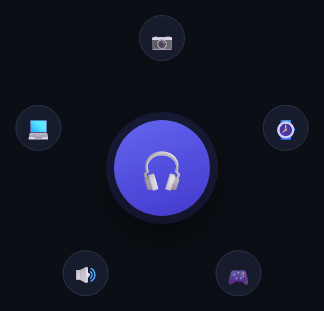
Unlike the Radial Carousel in this library (which rotates a ring so a *different* item reaches a fixed "front" position), this one keeps the featured item permanently large and centered — clicking any orbiting satellite *swaps* it directly into the center role, and every remaining item re-distributes itself evenly around the new center.
The satellite list is recomputed, not rotated
Every render, satelliteOrder() builds a fresh array of every item index *except* whichever one is currently the center — so when the center changes, the satellite list genuinely changes membership, not just position. The five (or however many) physical satellite <div>s in the DOM are then reused as generic "slots": slot 0 always sits at angle -90° (top) regardless of *which* item currently occupies it, and each slot's icon is simply relabeled to whatever item now belongs there.
Why the DOM elements are slots, not items
This reuse is deliberate: because the same five DOM nodes are always positioned at the same five angles, only their *content* changes when the center swaps — so the CSS transition: transform on each satellite only ever needs to animate a slot occasionally staying put or shifting to an adjacent angle (since removing one item shifts everyone after it by one slot), never a full re-layout of new elements entering and old ones leaving.
Build with AI
Build, Understand, Optimize, and Extend It With AI
Paste this snippet's HTML, CSS, and JS into an AI coding assistant like Claude and ask it to explain why satelliteOrder() rebuilds the list of non-center items from scratch on every render instead of maintaining a persistent rotation offset like the Radial Carousel does, and what visual behavior that specific design choice produces when an item is promoted to center. It's also worth asking the assistant to add a brief scale/glow animation on the newly-promoted center item, or to make the orbit radius responsive to the viewport width for better mobile behavior.
Prompt to recreate it
Copy this into your AI assistant of choice to build the effect from scratch, or as a jumping-off point for your own variant:
Build an "orbit" carousel in plain HTML, CSS, and vanilla JavaScript where a large item stays fixed and centered while smaller satellite items orbit around it, and clicking a satellite promotes it to the center role — no library.

Requirements:
- A large, visually prominent center element and a fixed number of smaller "satellite" elements, all absolutely positioned within a shared container.
- A single "center index" variable identifying which item from a shared data list currently occupies the center role.
- A function that computes the list of all remaining items (every item except the current center) and assigns them evenly around a circle using trigonometry (sine and cosine) based on however many remaining items there are — the satellite DOM elements must be treated as reusable positional slots, with only their displayed content (icon/label) changing to match whichever item now occupies that slot, rather than destroying and recreating elements.
- Clicking any satellite must promote that specific item to become the new center, causing the previous center item to rejoin the satellite ring, and all satellite positions must recompute and animate smoothly to their new evenly-spaced positions reflecting the changed membership.
- The center element must update its displayed content and always render visually larger and more prominent than any satellite.
- Left/Right arrow key support that steps the center through the full item list sequentially (in either direction) as an alternative to clicking a satellite directly.
- The angular spacing between satellites must be calculated from the actual current satellite count (total items minus one for the center), not hardcoded, so the layout adapts if items are added or removed.
Want to tighten it up first? Run this prompt through the AI Prompt Studio to score it across 8 quality dimensions, catch anti-patterns, and tune the wording for Claude, ChatGPT, or Gemini before you paste it in.
Source Code
<div class="obc-stage">
  <div class="obc-center" id="obcCenter">
    <span id="obcCenterIcon">🎧</span>
  </div>
  <div class="obc-orbit" id="obcOrbit">
    <div class="obc-sat" data-i="0"><span>📷</span></div>
    <div class="obc-sat" data-i="1"><span>⌚</span></div>
    <div class="obc-sat" data-i="2"><span>🎮</span></div>
    <div class="obc-sat" data-i="3"><span>🔊</span></div>
    <div class="obc-sat" data-i="4"><span>💻</span></div>
  </div>
  <div class="obc-label" id="obcLabel">Headphones</div>
</div>*{box-sizing:border-box;margin:0;padding:0}
body{font-family:system-ui,-apple-system,sans-serif;background:#0b0e14;min-height:100vh;display:flex;align-items:center;justify-content:center;padding:24px}
.obc-stage{position:relative;width:300px;height:300px;display:flex;align-items:center;justify-content:center}
.obc-center{position:absolute;width:96px;height:96px;border-radius:50%;background:linear-gradient(160deg,#6366f1,#4338ca);display:flex;align-items:center;justify-content:center;font-size:40px;box-shadow:0 0 0 8px rgba(99,102,241,.14),0 16px 34px rgba(0,0,0,.5);z-index:2;transition:background .3s}
.obc-orbit{position:absolute;inset:0}
.obc-sat{position:absolute;top:50%;left:50%;width:46px;height:46px;margin:-23px 0 0 -23px;border-radius:50%;background:#161c2c;border:1.5px solid #2a3348;display:flex;align-items:center;justify-content:center;font-size:20px;cursor:pointer;transition:transform .6s cubic-bezier(.65,0,.35,1),background .2s,border-color .2s}
.obc-sat:hover{background:#232c42;border-color:#6366f1}
.obc-label{position:absolute;bottom:-36px;color:#fff;font-size:14px;font-weight:800}var ITEMS = ['Headphones', 'Camera', 'Watch', 'Console', 'Speaker', 'Laptop'];
var ICONS = ['🎧', '📷', '⌚', '🎮', '🔊', '💻'];
var center = document.getElementById('obcCenter');
var centerIcon = document.getElementById('obcCenterIcon');
var label = document.getElementById('obcLabel');
var sats = document.querySelectorAll('.obc-sat');
var radius = 130;
var centerIndex = 0;
// Build the order of satellite indices (everyone except the current center)
function satelliteOrder() {
var order = [];
for (var i = 0; i < ICONS.length; i++) if (i !== centerIndex) order.push(i);
return order;
}
function layout() {
var order = satelliteOrder();
sats.forEach(function (sat, slot) {
var itemIndex = order[slot];
var angle = (360 / order.length) * slot - 90;
var rad = angle * Math.PI / 180;
var x = Math.cos(rad) * radius;
var y = Math.sin(rad) * radius;
sat.style.transform = 'translate(' + x + 'px,' + y + 'px)';
sat.querySelector('span').textContent = ICONS[itemIndex];
sat.dataset.item = itemIndex;
});
centerIcon.textContent = ICONS[centerIndex];
label.textContent = ITEMS[centerIndex];
}
sats.forEach(function (sat) {
sat.addEventListener('click', function () {
centerIndex = parseInt(sat.dataset.item, 10);
layout();
});
});
document.addEventListener('keydown', function (e) {
if (e.key === 'ArrowRight') { centerIndex = (centerIndex + 1) % ICONS.length; layout(); }
else if (e.key === 'ArrowLeft') { centerIndex = (centerIndex - 1 + ICONS.length) % ICONS.length; layout(); }
});
layout();Step by step
How to Use
- 1Paste HTML, CSS, and JSA large "Headphones" icon sits centered, with five smaller satellites orbiting around it.
- 2Click any satelliteIt swaps into the center role; the remaining five items redistribute evenly around the new center.
- 3Use arrow keysLeft/Right steps the center through items in order without clicking.
- 4Watch the satellites reflowBecause slots are fixed but membership changes, satellites subtly shift position as items are removed or added to the ring.
- 5Add a seventh itemAdd one entry to ITEMS/ICONS and one .obc-sat element — angles recalculate from the live count automatically.
Real-world uses
Common Use Cases
Got questions?
Frequently Asked Questions
The Radial Carousel rotates a fixed ring of items so a different one reaches a "front" position — every item keeps its ring membership. This Orbit Carousel instead changes WHICH items are satellites at all: the clicked one leaves the ring and becomes the center, and the previous center rejoins the ring.
Change the radius constant (in pixels) — layout() derives every satellite's x/y position from it and the live satellite count.
Yes — extend ITEMS and ICONS together, and add one matching .obc-sat element per new item; the angle spacing (360 / order.length) adapts to any count automatically.
Because satellite slots are fixed at even angles and membership is recomputed as a plain array each time, removing the clicked item from that array shifts every subsequent item into the previous slot — this is expected and keeps the ring evenly spaced rather than leaving a gap.
Each satellite is directly clickable — for full accessibility, convert them to real <button> elements with descriptive aria-labels naming the item they represent, and ensure the center label updates are announced via an aria-live region.