

Learn Coding Visually
Learn to code with interactive, live-preview playgrounds — HTML, CSS, JavaScript, React & more.
 HTML Playground42 lessons · Click-based · Live preview
 CSS PlaygroundLearn CSS with a live editor
 JavaScript Playground60 lessons · DOM · Async · Canvas
 React PlaygroundLearn React with a live code editor
 GSAP PlaygroundLearn GSAP animation interactively
 SVG Playground44 lessons · shapes · paths · animation
 SCSS Playground45 lessons · Sass modules · tokens
 Tailwind PlaygroundLearn Tailwind CSS with a live editor
 Bootstrap 5 Playground50 lessons · live preview
Mobile Food Order Screen — Free HTML CSS JS Snippet
Mobile Food Order Screen · Mobile · Plain HTML, CSS & JS · Live preview
What's included
Features
About this UI Snippet
Mobile Food Order Screen — Restaurant Menu UI
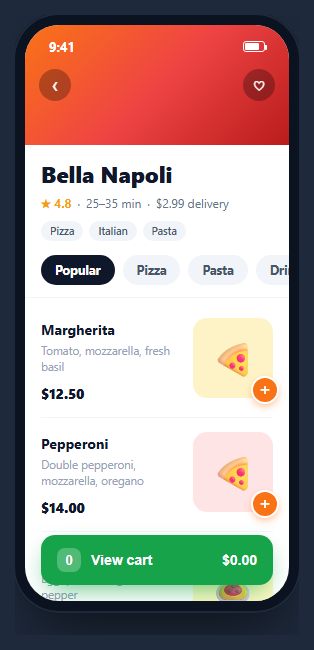
A restaurant screen is the workhorse of every food-delivery app — a hero cover, the name and rating, category chips, a scrollable menu of dishes with add buttons, and a cart bar that rises up once you have something in it. This snippet builds a complete, interactive one inside a CSS phone frame: tapping a dish's plus button adds it to the cart, the button flashes a green check, and a sticky cart bar tallies the item count and running total — in HTML, CSS, and vanilla JavaScript with no dependency.
The overlapping hero and status bar
The status bar is absolutely positioned over a gradient cover so the time and battery sit in white on the image, exactly like a real restaurant page where content scrolls under the notch. The back and favorite buttons float on the cover with a translucent, blurred background via backdrop-filter, keeping them legible over any hero color.
A cart model, not just a counter
Adds are stored in a cart object keyed by dish name, each entry holding a quantity and unit price. A refresh() function derives the total item count and the summed price from that object every time — so adding the same dish twice increments its quantity rather than duplicating it, and the total is always recomputed from the source of truth rather than nudged up by hand. This is the same shape you would send to a real checkout.
Add feedback that resets itself
Each plus button lives on the corner of the dish image with a white ring so it reads as a floating action. On tap it turns green and swaps to a check for half a second, then restores to a plus — instant confirmation that the item landed in the cart without navigating away. The scale-down :active state adds a physical press feel.
The rising cart bar
The cart bar is hidden while the cart is empty and appears with a short rise-and-fade animation the moment the first item is added. It shows a count badge, a label, and the tabular-figure total so the numbers stay aligned as they change. Category chips above the menu switch the active filter with a pill highlight.
Accessibility and performance
Each add button is a real <button> with an item-specific aria-label such as "Add Margherita", so screen-reader users know exactly what they are adding rather than hearing a bare plus. The category chips are buttons too, so the filter is keyboard-operable. When you make the chips actually filter the menu, move focus sensibly and consider aria-pressed on the active chip so its selected state is announced. Performance is light: the refresh() function walks the small cart object and writes two text nodes plus a visibility flag, so it can run on every add without cost, and the add confirmation is a class swap with a timeout rather than a re-render. The rising cart bar animates once with a CSS keyframe when it first appears and otherwise just stays put. If your menu is long, lazy-load the dish images with fixed dimensions so the list does not reflow as you scroll, and virtualize only if you have hundreds of items — most restaurant menus fit comfortably in a plain scroll container.
Reusing it
Feed the dishes from your menu API, wire the category chips to actually filter the list, and pass the cart object to your checkout. Lift the menu out of the phone frame for a responsive web ordering page, or keep it framed leading into a mobile checkout screen to present the full order flow.
Build with AI
Build, Understand, Optimize, and Extend It With AI
You do not have to reverse-engineer the cart bookkeeping by hand. Paste this snippet's HTML, CSS, and JS into an AI coding assistant like Claude and ask it to explain exactly why the cart is a plain object keyed by dish name rather than an array, and why refresh() recomputes the count and total from that object every time instead of incrementing a running total. The same assistant is useful for optimizing it — ask whether the add-button's setTimeout-based reset to a plus icon could race if a user taps the same dish rapidly, or how backdrop-filter blur on the floating back and favorite buttons affects paint cost on lower-end phones. It is just as good for extending the feature: have it add a remove or decrement control per cart item, make the category chips actually filter the visible dish list, or add a per-dish customization sheet (size, extras) that changes the stored unit price. Treat the code less like a finished artifact and more like a starting point for a conversation.
Prompt to recreate it
Copy this into your AI assistant of choice to build the effect from scratch, or as a jumping-off point for your own variant:
Build a mobile restaurant menu / food-ordering screen in plain HTML, CSS, and JavaScript inside a phone-frame container — no framework, no cart library.

Requirements:
- A gradient hero cover with an absolutely-positioned status bar and floating back/favorite buttons using backdrop-filter blur over a translucent background so they stay legible over any hero color, followed by restaurant name, rating, delivery time, and category tag chips.
- A horizontally scrollable row of category filter chips with an active pill style, and a vertically scrolling list of dish rows, each storing its name and unit price as data attributes and showing a plus button positioned on the corner of its dish image.
- Maintain cart state as a single plain object keyed by dish name (not an array), where each entry holds a quantity and unit price; tapping a dish's plus button must create the entry if missing and otherwise increment its existing quantity, never create a duplicate entry for the same dish.
- Write one function that is the sole source of truth for the displayed item count and total price: it must iterate every key in the cart object, sum quantities for the count and quantity times price for the total, and be called after every cart mutation.
- Tapping a dish's plus button must give momentary visual confirmation by swapping its icon to a checkmark and turning it green for about half a second before automatically reverting, without navigating away from the menu.
- A cart summary bar must stay hidden while the cart is empty and appear with a short rise-and-fade-in entrance animation the instant the first item is added, showing the item count, a label, and the running total in tabular figures so digits stay aligned as they change.
Want to tighten it up first? Run this prompt through the AI Prompt Studio to score it across 8 quality dimensions, catch anti-patterns, and tune the wording for Claude, ChatGPT, or Gemini before you paste it in.
Source Code
<div class="mfo-phone">
<div class="mfo-screen">
<div class="mfo-status"><span>9:41</span><span class="mfo-batt"><i></i></span></div>
<div class="mfo-cover">
<button class="mfo-back" aria-label="Back">‹</button>
<button class="mfo-fav" aria-label="Favorite">♡</button>
</div>
<div class="mfo-info">
<h1>Bella Napoli</h1>
<div class="mfo-facts"><span>★ 4.8</span><span>·</span><span>25–35 min</span><span>·</span><span>$2.99 delivery</span></div>
<div class="mfo-tags"><span>Pizza</span><span>Italian</span><span>Pasta</span></div>
</div>
<div class="mfo-cats" id="mfoCats">
<button class="mfo-cat active">Popular</button>
<button class="mfo-cat">Pizza</button>
<button class="mfo-cat">Pasta</button>
<button class="mfo-cat">Drinks</button>
</div>
<div class="mfo-menu" id="mfoMenu">
<div class="mfo-dish" data-name="Margherita" data-price="12.50">
<div class="mfo-dtext"><b>Margherita</b><small>Tomato, mozzarella, fresh basil</small><span class="mfo-price">$12.50</span></div>
<div class="mfo-dimg p1">🍕<button class="mfo-add" aria-label="Add Margherita">+</button></div>
</div>
<div class="mfo-dish" data-name="Pepperoni" data-price="14.00">
<div class="mfo-dtext"><b>Pepperoni</b><small>Double pepperoni, mozzarella, oregano</small><span class="mfo-price">$14.00</span></div>
<div class="mfo-dimg p2">🍕<button class="mfo-add" aria-label="Add Pepperoni">+</button></div>
</div>
<div class="mfo-dish" data-name="Carbonara" data-price="13.75">
<div class="mfo-dtext"><b>Spaghetti Carbonara</b><small>Egg, pecorino, guanciale, pepper</small><span class="mfo-price">$13.75</span></div>
<div class="mfo-dimg p3">🍝<button class="mfo-add" aria-label="Add Carbonara">+</button></div>
</div>
<div class="mfo-dish" data-name="Tiramisu" data-price="6.50">
<div class="mfo-dtext"><b>Tiramisu</b><small>Mascarpone, espresso, cocoa</small><span class="mfo-price">$6.50</span></div>
<div class="mfo-dimg p4">🍰<button class="mfo-add" aria-label="Add Tiramisu">+</button></div>
</div>
</div>
<button class="mfo-cart" id="mfoCart" hidden>
<span class="mfo-badge" id="mfoCount">0</span>
<span>View cart</span>
<span class="mfo-cttl" id="mfoTotal">$0.00</span>
</button>
</div>
</div>*{box-sizing:border-box;margin:0;padding:0}
html{scrollbar-width:none;-ms-overflow-style:none}
html::-webkit-scrollbar{display:none}
body{font-family:system-ui,-apple-system,sans-serif;background:#1e293b;display:flex;justify-content:center;align-items:center;min-height:100vh;padding:24px;scrollbar-width:none;-ms-overflow-style:none}
body::-webkit-scrollbar{display:none}
.mfo-phone{width:288px;height:600px;background:#0b1220;border-radius:46px;padding:12px;box-shadow:0 30px 60px -20px rgba(0,0,0,.6),inset 0 0 0 2px #1e293b}
.mfo-screen{width:100%;height:100%;border-radius:34px;overflow:hidden;background:#fff;color:#0f172a;display:flex;flex-direction:column;position:relative}
.mfo-status{position:absolute;top:0;left:0;right:0;z-index:3;display:flex;justify-content:space-between;align-items:center;padding:13px 24px 0;font-size:13px;font-weight:700;color:#fff}
.mfo-batt{width:22px;height:11px;border:1.4px solid currentColor;border-radius:3px;position:relative;display:inline-block}
.mfo-batt::after{content:'';position:absolute;right:-3px;top:3px;width:2px;height:5px;background:currentColor;border-radius:0 1px 1px 0}
.mfo-batt i{position:absolute;left:1.4px;top:1.4px;bottom:1.4px;width:70%;background:currentColor;border-radius:1px}
.mfo-cover{height:120px;background:linear-gradient(135deg,#f97316,#ef4444,#b91c1c);position:relative}
.mfo-back,.mfo-fav{position:absolute;top:44px;width:32px;height:32px;border-radius:50%;background:rgba(0,0,0,.28);border:none;color:#fff;font-size:17px;cursor:pointer;backdrop-filter:blur(4px)}
.mfo-back{left:14px;font-size:20px}
.mfo-fav{right:14px}
.mfo-info{padding:14px 16px 10px}
.mfo-info h1{font-size:22px;font-weight:800}
.mfo-facts{display:flex;gap:6px;flex-wrap:wrap;font-size:12px;color:#64748b;margin-top:6px}
.mfo-facts span:first-child{color:#f59e0b;font-weight:700}
.mfo-tags{display:flex;gap:6px;margin-top:10px}
.mfo-tags span{font-size:10.5px;background:#f1f5f9;color:#475569;padding:3px 9px;border-radius:99px;font-weight:600}
.mfo-cats{display:flex;gap:8px;padding:4px 16px 12px;overflow-x:auto;border-bottom:1px solid #f1f5f9}
.mfo-cats::-webkit-scrollbar{display:none}
.mfo-cat{flex-shrink:0;border:none;background:#f1f5f9;color:#475569;font-size:12.5px;font-weight:700;padding:7px 14px;border-radius:99px;cursor:pointer;font-family:inherit}
.mfo-cat.active{background:#0f172a;color:#fff}
.mfo-menu{flex:1;overflow-y:auto;padding:6px 16px 80px;scrollbar-width:none;-ms-overflow-style:none}
.mfo-menu::-webkit-scrollbar{display:none}
.mfo-dish{display:flex;gap:12px;padding:14px 0;border-bottom:1px solid #f1f5f9}
.mfo-dtext{flex:1}
.mfo-dtext b{font-size:14px}
.mfo-dtext small{display:block;font-size:11.5px;color:#94a3b8;margin:4px 0 8px;line-height:1.35}
.mfo-price{font-size:13.5px;font-weight:800}
.mfo-dimg{width:80px;height:80px;border-radius:14px;display:flex;align-items:center;justify-content:center;font-size:34px;position:relative;flex-shrink:0}
.p1{background:#fef3c7}.p2{background:#ffe4e6}.p3{background:#fef9c3}.p4{background:#f3e8ff}
.mfo-add{position:absolute;right:-6px;bottom:-6px;width:28px;height:28px;border-radius:50%;border:2px solid #fff;background:#f97316;color:#fff;font-size:18px;cursor:pointer;display:flex;align-items:center;justify-content:center;box-shadow:0 3px 8px -2px rgba(249,115,22,.6);transition:transform .15s}
.mfo-add:active{transform:scale(.85)}
.mfo-add.added{background:#16a34a}
.mfo-cart{position:absolute;left:16px;right:16px;bottom:16px;z-index:4;display:flex;align-items:center;gap:10px;background:#16a34a;color:#fff;border:none;border-radius:14px;padding:13px 16px;font-size:14px;font-weight:700;cursor:pointer;box-shadow:0 10px 26px -8px rgba(22,163,74,.7);animation:mfoRise .25s ease}
@keyframes mfoRise{from{opacity:0;transform:translateY(14px)}to{opacity:1;transform:none}}
.mfo-badge{background:rgba(255,255,255,.25);min-width:24px;height:24px;border-radius:8px;display:flex;align-items:center;justify-content:center;font-size:13px}
.mfo-cart span:nth-child(2){flex:1;text-align:left}
.mfo-cttl{font-variant-numeric:tabular-nums}var cart = {};
var cartBtn = document.getElementById('mfoCart');
var countEl = document.getElementById('mfoCount');
var totalEl = document.getElementById('mfoTotal');
function refresh(){
var count = 0, total = 0;
Object.keys(cart).forEach(function(name){
count += cart[name].qty;
total += cart[name].qty * cart[name].price;
});
countEl.textContent = count;
totalEl.textContent = '$' + total.toFixed(2);
cartBtn.hidden = count === 0;
}
document.querySelectorAll('.mfo-dish').forEach(function(dish){
var name = dish.getAttribute('data-name');
var price = parseFloat(dish.getAttribute('data-price'));
var add = dish.querySelector('.mfo-add');
add.addEventListener('click', function(){
if (!cart[name]) cart[name] = { qty: 0, price: price };
cart[name].qty++;
add.classList.add('added');
add.textContent = '✓';
setTimeout(function(){ add.classList.remove('added'); add.textContent = '+'; }, 500);
refresh();
});
});
document.querySelectorAll('.mfo-cat').forEach(function(cat){
cat.addEventListener('click', function(){
document.querySelectorAll('.mfo-cat').forEach(function(c){ c.classList.remove('active'); });
cat.classList.add('active');
});
});
refresh();Step by step
How to Use
- 1Paste HTML, CSS, and JSA restaurant page renders with a hero cover, category chips, and a dish menu.
- 2Add a dishTap the plus on a dish image — it flashes a green check and the cart bar rises into view.
- 3Add moreAdding the same dish again increments its quantity; the count and total update live.
- 4Watch the totalThe sticky cart bar shows the item count badge and the summed price in aligned figures.
- 5Switch categoriesThe pill chips move the active highlight between menu sections.
- 6Wire your checkoutPass the cart object to your order flow and feed dishes from your API.
Real-world uses
Common Use Cases
Got questions?
Frequently Asked Questions
Adds are stored in a cart object keyed by dish name. Adding a dish that already exists increments its quantity property rather than creating a second entry. The refresh function then sums quantities and prices across all keys, so the count and total always reflect the merged quantities.
The refresh function derives the count and total from the cart object on every change, so the displayed numbers are always consistent with the actual cart contents. Nudging a running total up by hand risks drift if you later add remove or edit actions; deriving from the source object stays correct no matter what changed.
On tap the plus button adds a green class and swaps to a check for about half a second, then a timeout restores the plus. This gives immediate visual confirmation that the item landed in the cart while keeping you on the menu, which is how real delivery apps encourage adding multiple items in one visit.
The bar carries the hidden attribute while the cart is empty and is revealed the moment the count goes above zero, entering with a short rise-and-fade animation. An empty cart bar would be noise, so surfacing it only when there is something to view keeps the screen focused on the menu.
Hold the cart as a keyed object or Map in state and derive the count and total with useMemo (React), computed (Vue), or a getter (Angular). Render dishes from your menu data and wire each add button to a state updater. Show the cart bar conditionally on count. Replace the timeout feedback with a state flag if you prefer. The CSS and Tailwind utilities port directly.