You Might Also Like
Learn Coding Visually
Learn to code with interactive, live-preview playgrounds — HTML, CSS, JavaScript, React & more.
 HTML Playground42 lessons · Click-based · Live preview
 CSS PlaygroundLearn CSS with a live editor
 JavaScript Playground60 lessons · DOM · Async · Canvas
 React PlaygroundLearn React with a live code editor
 GSAP PlaygroundLearn GSAP animation interactively
 SVG Playground44 lessons · shapes · paths · animation
 SCSS Playground45 lessons · Sass modules · tokens
 Tailwind PlaygroundLearn Tailwind CSS with a live editor
 Bootstrap 5 Playground50 lessons · live preview
Live Viewer Count Badge — Free HTML CSS JS Live Stream Snippet
Live Viewer Count Badge · Misc · Plain HTML, CSS & JS · Live preview
What's included
Features
About this UI Snippet
Live Viewer Count Badge — Random-Walk Counter with a Visibility-Aware Timer
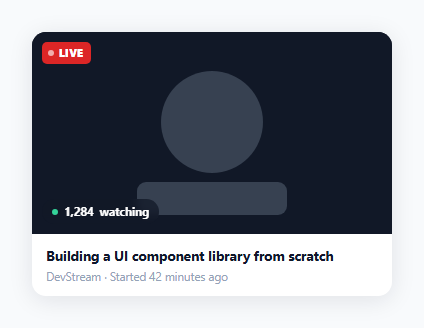
A live viewer count only feels "live" if the number actually moves — a static count next to a pulsing red dot reads as obviously fake within a few seconds. This snippet drives a believable, gently fluctuating counter with a constrained random walk instead of either a static number or fully random noise.
A random walk, not random noise
Each tick() picks a direction (up 55% of the time, down 45%, so the count trends slightly upward like a growing stream) and a magnitude — usually a small move of 1 to 4 viewers, but 15% of the time a larger jump of 10 to 31, simulating a batch of viewers joining or leaving together (e.g. after a clip gets shared). current = Math.max(940, current + direction * magnitude) clamps the result so the count never drifts below a believable floor, preventing an unlucky streak of "down" ticks from crashing the number toward zero.
Two different dots for two different meanings
The "LIVE" badge's dot uses @keyframes lvcPulse fading between full and low opacity — a heartbeat signaling the stream is active. The viewer-count dot is deliberately static (green, no animation) — it represents current status, not a pulse — so the two indicators aren't visually competing for the same "this is animating, pay attention" attention.
A tiny scale bump on every update
Each tick briefly adds .lvc-bump (a 6% CSS transform: scale()) to the whole viewer pill and removes it 150ms later via clearTimeout/setTimeout, giving a subtle tactile confirmation that the number just changed — small enough not to be distracting on a 2.2-second cycle, noticeable enough to register subconsciously.
Pausing work in a backgrounded tab
The visibilitychange listener clears the interval when document.hidden is true and restarts it when the tab becomes visible again. A live counter nobody is looking at doesn't need to keep computing and repainting every 2.2 seconds — this is a small but genuine performance courtesy, especially if a page has several such widgets running simultaneously.
Customizing it
Replace the random-walk simulation with a real WebSocket or Server-Sent Events feed from your streaming backend, keeping the same .lvc-bump visual feedback and formatCount() thousands-separator formatting for whatever real number arrives.
Build with AI
Build, Understand, Optimize, and Extend It With AI
You don't have to work out the random-walk math by hand. Paste this snippet's HTML, CSS, and JS into an AI coding assistant like Claude and ask it to explain why a constrained random walk with an 85/15 split between small and large moves reads as more believable than either a static number or fully random values each tick, and how the visibilitychange listener avoids wasted work in a backgrounded tab. The same assistant can help optimize it too — ask whether the bump animation's timing should vary with the magnitude of each update. It's also useful for extending the badge: ask it to wire in a real WebSocket feed, add a small up/down trend arrow next to the count, or animate the digits individually like an odometer instead of swapping the whole text at once. Treat the code less like a finished artifact and more like a starting point for a conversation.
Prompt to recreate it
Copy this into your AI assistant of choice to build the effect from scratch, or as a jumping-off point for your own variant:
Build a "live viewer count badge" for a stream thumbnail in plain HTML, CSS, and JavaScript with no library.

Requirements:
- A thumbnail area with a "LIVE" badge in one corner featuring a small dot that pulses continuously via a CSS opacity keyframe animation, and a separate viewer-count pill in another corner showing a static (non-pulsing) status dot plus a formatted number and the word "watching".
- A JavaScript function that updates the viewer count on a fixed interval using a constrained random walk: most updates should nudge the current value by a small random amount in a randomly chosen direction, with a smaller chance of a much larger jump in either direction, and the result must be clamped to never fall below a reasonable floor value.
- Format the displayed number with thousands separators using the appropriate built-in string formatting method.
- On every update, briefly apply a small CSS scale transform to the viewer-count pill and remove it a short time later, giving a subtle visual pulse confirming the number changed, using a debounced timer so rapid updates don't stack multiple removals.
- Use the Page Visibility API to pause the update interval entirely when the browser tab is not visible, and resume it automatically when the tab becomes visible again.
Want to tighten it up first? Run this prompt through the AI Prompt Studio to score it across 8 quality dimensions, catch anti-patterns, and tune the wording for Claude, ChatGPT, or Gemini before you paste it in.
Step by step
How to Use
- 1Paste HTML, CSS, and JSA stream thumbnail renders with a pulsing "LIVE" badge and a viewer count that updates every 2.2 seconds.
- 2Watch the counterThe number drifts up and down in small steps, occasionally jumping by a larger amount, and briefly scales up on each change.
- 3Switch to another browser tabUpdates pause automatically; switching back resumes the counter.
- 4Replace the simulation with real dataIn the JS, swap the tick() function's random-walk logic for a value received from a WebSocket or polling endpoint.
- 5Adjust the update frequencyChange the 2200ms interval in setInterval(tick, 2200) to update more or less often.
- 6Tune the movement feelEdit the direction probability and magnitude ranges in tick() to make the count feel calmer or busier.
Real-world uses
Common Use Cases
Got questions?
Frequently Asked Questions
Fully random numbers would make the count jump unpredictably between ticks with no continuity, which reads as obviously fake. A random walk changes the existing value by a small delta each time, so the number drifts naturally the way a real audience count would — mostly small moves, occasionally a bigger jump when a group joins or leaves together.
The tick() function rolls an 85/15 split: 85% of the time it applies a small 1-4 viewer move, and 15% of the time a larger 10-31 viewer swing, simulating something like a clip going semi-viral or a batch of viewers navigating away together. Without the occasional larger jump, the counter would feel too metronomic and uniform.
The Page Visibility API's visibilitychange event and document.hidden property let the script detect when the tab is backgrounded and clear the interval, avoiding unnecessary timer callbacks, DOM updates, and repaints for a widget nobody is currently looking at — then restart the interval once the tab becomes visible again.
Replace the body of tick() with logic that reads the latest count from a WebSocket message handler or a periodic fetch() poll, instead of computing a random delta. Keep calling countEl.textContent = formatCount(newValue) and toggling the .lvc-bump class so the same visual feedback applies to real updates.
Math.max(940, current + direction * magnitude) clamps every update to a floor value. Without this, a long unlucky streak of "down" ticks in the random walk could theoretically drift the number toward zero or negative, which would look obviously wrong for what's meant to represent an active live stream's audience.