Source Code
<div class="demo">
  <div class="phone">
    <div class="notch"></div>
    <div class="screen" id="screen">
      <div class="lock-top">
        <span class="lock-time">9:41</span>
        <span class="lock-date">Thursday, August 27</span>
      </div>

      <div class="lock-mid">
        <button class="scan-ring" id="scanBtn" aria-label="Scan fingerprint to unlock">
          <svg id="fpIcon" width="34" height="34" viewBox="0 0 24 24" fill="none" stroke="currentColor" stroke-width="1.6" stroke-linecap="round"><path d="M12 3a7 7 0 0 0-7 7c0 2 .5 3 1 4M12 3a7 7 0 0 1 7 7c0 3-1 5-1 5M9 21c-.5-1-1-3-1-5a4 4 0 0 1 8 0c0 1 0 2-.5 3M12 7a5 5 0 0 0-5 5c0 2 .5 3 1 4M12 7a5 5 0 0 1 5 5c0 1.5-.3 3-1 4.5M12 11a1.5 1.5 0 0 0-1.5 1.5c0 2 .8 3.5 1.5 4.5"/></svg>
          <svg class="progress-ring" width="96" height="96" viewBox="0 0 96 96">
            <circle cx="48" cy="48" r="44" fill="none" stroke="#334155" stroke-width="3" />
            <circle id="progressCircle" cx="48" cy="48" r="44" fill="none" stroke="#34d399" stroke-width="3" stroke-linecap="round" stroke-dasharray="276.5" stroke-dashoffset="276.5" transform="rotate(-90 48 48)" />
          </svg>
        </button>
        <p class="scan-status" id="scanStatus">Tap to scan fingerprint</p>
      </div>

      <div class="lock-bottom">
        <span id="attemptsNote"></span>
      </div>
    </div>
  </div>
</div>
* { box-sizing: border-box; margin: 0; padding: 0; }
body { font-family: system-ui, sans-serif; background: #f8fafc; display: flex; align-items: center; justify-content: center; min-height: 100vh; padding: 24px; }
.phone { width: 280px; height: 580px; background: #0f172a; border-radius: 42px; padding: 12px; box-shadow: 0 24px 60px rgba(15,23,42,0.35); position: relative; }
.notch { position: absolute; top: 12px; left: 50%; transform: translateX(-50%); width: 100px; height: 22px; background: #0f172a; border-radius: 0 0 16px 16px; z-index: 2; }
.screen { background: linear-gradient(160deg,#1e293b,#0f172a); height: 100%; border-radius: 32px; overflow: hidden; display: flex; flex-direction: column; justify-content: space-between; padding: 40px 20px 26px; }
.lock-top { text-align: center; display: flex; flex-direction: column; gap: 3px; }
.lock-time { font-size: 15px; font-weight: 700; color: #f1f5f9; }
.lock-date { font-size: 11px; color: #64748b; font-weight: 600; }
.lock-mid { display: flex; flex-direction: column; align-items: center; gap: 16px; }
.scan-ring { position: relative; width: 96px; height: 96px; background: none; border: none; cursor: pointer; display: flex; align-items: center; justify-content: center; color: #64748b; transition: color 0.2s; }
.scan-ring:hover { color: #94a3b8; }
.scan-ring.scanning { color: #fbbf24; }
.scan-ring.success { color: #34d399; }
.scan-ring.fail { color: #f87171; animation: shake 0.3s; }
.progress-ring { position: absolute; inset: 0; }
#progressCircle { transition: stroke-dashoffset 0.1s linear; }
@keyframes shake { 25% { transform: translateX(-5px); } 75% { transform: translateX(5px); } }
.scan-status { font-size: 12.5px; color: #94a3b8; font-weight: 600; text-align: center; min-height: 16px; }
.lock-bottom { text-align: center; }
#attemptsNote { font-size: 11px; color: #f87171; font-weight: 600; min-height: 14px; }const scanBtn = document.getElementById('scanBtn');
const fpIcon = document.getElementById('fpIcon');
const statusEl = document.getElementById('scanStatus');
const progressCircle = document.getElementById('progressCircle');
const attemptsNote = document.getElementById('attemptsNote');
const CIRCUMFERENCE = 2 * Math.PI * 44; // matches the r=44 circle
let scanning = false;
let failCount = 0;
function setProgress(pct) {
progressCircle.style.strokeDashoffset = String(CIRCUMFERENCE * (1 - pct));
}
function resetVisual() {
scanBtn.classList.remove('scanning', 'success', 'fail');
setProgress(0);
}
function runScan() {
if (scanning) return;
scanning = true;
resetVisual();
scanBtn.classList.add('scanning');
statusEl.textContent = 'Scanning…';
const duration = 1100;
const start = performance.now();
function frame(now) {
const elapsed = now - start;
const pct = Math.min(elapsed / duration, 1);
setProgress(pct);
if (pct < 1) {
requestAnimationFrame(frame);
} else {
finishScan();
}
}
requestAnimationFrame(frame);
}
function finishScan() {
// Real fingerprint sensors occasionally fail to get a clean read —
// simulate roughly a 1-in-4 failure rate to make the retry path real.
const success = Math.random() > 0.25;
if (success) {
scanBtn.classList.remove('scanning');
scanBtn.classList.add('success');
statusEl.textContent = 'Fingerprint recognized — unlocking…';
attemptsNote.textContent = '';
failCount = 0;
} else {
scanBtn.classList.remove('scanning');
scanBtn.classList.add('fail');
failCount += 1;
statusEl.textContent = 'Not recognized — tap to try again';
attemptsNote.textContent = failCount >= 3
? `${failCount} failed attempts — try your passcode instead.`
: `Attempt ${failCount} of 3 before passcode is required.`;
}
scanning = false;
}
scanBtn.addEventListener('click', runScan);Learn Coding Visually
Learn to code with interactive, live-preview playgrounds — HTML, CSS, JavaScript, React & more.
 HTML Playground42 lessons · Click-based · Live preview
 CSS PlaygroundLearn CSS with a live editor
 JavaScript Playground60 lessons · DOM · Async · Canvas
 React PlaygroundLearn React with a live code editor
 GSAP PlaygroundLearn GSAP animation interactively
 SVG Playground44 lessons · shapes · paths · animation
 SCSS Playground45 lessons · Sass modules · tokens
 Tailwind PlaygroundLearn Tailwind CSS with a live editor
 Bootstrap 5 Playground50 lessons · live preview
Mobile Biometric Unlock Screen — Simulated Fingerprint Scan with Real Retry Logic
Mobile Biometric Unlock Screen · Mobile · Plain HTML, CSS & JS · Live preview
What's included
Features
About this UI Snippet
Mobile Biometric Unlock Screen — A Scan Sequence With a Real Outcome, Not Just an Icon
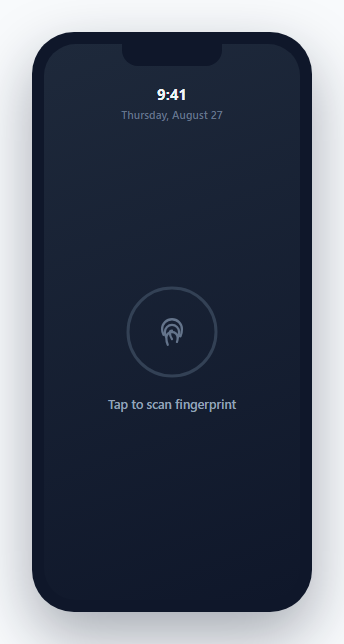
Most lock-screen mockups show a static fingerprint icon with no actual interaction behind it. This one implements the full scan sequence a real biometric unlock goes through: a timed progress ring fills in as the "scan" runs, then resolves to either a success state or — realistically, since real sensors do occasionally fail to get a clean read — a failure state that increments a genuine attempt counter and eventually suggests falling back to a passcode.
The progress ring is driven by elapsed time, not a fixed-step counter
runScan() records a performance.now() timestamp at the start and, inside a requestAnimationFrame loop, computes pct = elapsed / duration on every frame — deriving progress from actual elapsed wall-clock time rather than incrementing a counter by a fixed amount per frame. This keeps the ring's fill rate consistent regardless of the device's actual frame rate; a lower-refresh-rate device gets fewer, larger per-frame progress jumps, while a high-refresh-rate device gets more, smaller ones, but the *total* animation duration stays accurate either way.
Circumference-based stroke-dashoffset, computed once and reused
CIRCUMFERENCE = 2 * Math.PI * 44 is calculated once from the SVG circle's actual radius attribute, and every progress update sets strokeDashoffset as CIRCUMFERENCE * (1 - pct) — the same stroke-dasharray/dashoffset ring-fill technique used elsewhere in this library's loaders, applied here to represent scan progress specifically rather than a generic loading state.
A genuinely randomized failure path, not just a happy-path demo
finishScan() resolves with Math.random() > 0.25 — a real ~25% chance of failure on every scan attempt, deliberately modeling that biometric sensors don't have perfect read rates in practice. A failed scan triggers a distinct visual state (a red icon with a brief shake animation) and increments a persistent failCount that survives across scan attempts until a success resets it back to zero.
The attempt counter changes its own message as it climbs
Below three failed attempts, the note explicitly states how many tries remain before a passcode fallback would be required ("Attempt 2 of 3…"); at three or more, the message itself changes to suggest using a passcode instead — modeling the realistic security UX pattern where a device nudges toward a fallback authentication method after repeated biometric failures, rather than letting a user retry an unreliable scan indefinitely with no escalation.
Build with AI
Build, Understand, Optimize, and Extend It With AI
Ask an AI assistant to explain why deriving animation progress from performance.now() and elapsed time is more robust than incrementing a counter on every requestAnimationFrame callback, especially on devices with inconsistent frame rates. It's also worth asking for a version that integrates the real WebAuthn API for actual biometric authentication instead of a randomized simulation, or one that adds a Face ID-style scanning animation variant alongside the fingerprint version.
Prompt to recreate it
Copy this into your AI assistant of choice to build the effect from scratch, or as a jumping-off point for your own variant:
Build a mobile biometric unlock screen mockup in HTML, CSS and vanilla JavaScript, inside a phone-shaped frame, with a realistic simulated scan sequence — no external libraries.

Requirements:
- A phone frame with a notch, showing the current time and date, and a centered fingerprint icon inside a circular scan button.
- Tapping the scan button must start an animated circular progress ring around the icon that fills over roughly one second, computed from real elapsed time (e.g. via performance.now() inside a requestAnimationFrame loop) rather than a fixed per-frame increment, so the total duration stays accurate regardless of frame rate.
- Once the progress ring completes, resolve the scan to either a success or failure outcome using a genuinely randomized chance of failure (roughly 1 in 4 attempts), not an always-succeeds simulation.
- On success, show a distinct visual state (e.g. a green icon) and a success message, and reset any failed-attempt count back to zero.
- On failure, show a distinct visual state (e.g. a red icon with a brief shake animation) and a "not recognized, tap to try again" message, while incrementing a persistent failed-attempt counter that survives across multiple scan attempts.
- Once the failed-attempt counter reaches a threshold (e.g. 3), change the displayed message to suggest falling back to a passcode instead of continuing to retry the biometric scan.
Want to tighten it up first? Run this prompt through the AI Prompt Studio to score it across 8 quality dimensions, catch anti-patterns, and tune the wording for Claude, ChatGPT, or Gemini before you paste it in.
Step by step
How to Use
- 1Tap the fingerprint icon to run a scanThe ring fills over about 1.1 seconds, then resolves to a success or failure state.
- 2Try scanning several timesAbout 1 in 4 attempts fails — watch the attempt counter and its message change as failures accumulate.
- 3Adjust the scan durationChange the duration constant (in milliseconds) inside runScan() to make the simulated scan faster or slower.
- 4Adjust the simulated failure rateChange the 0.25 threshold in finishScan() — a higher number means a lower failure rate, and vice versa.
- 5Change the passcode-fallback thresholdUpdate the failCount >= 3 check in finishScan() to require more or fewer failed attempts before suggesting a passcode.
Real-world uses
Common Use Cases
Got questions?
Frequently Asked Questions
requestAnimationFrame doesn't guarantee a fixed interval between calls — it varies with the device's actual refresh rate and current load. Computing pct = elapsedTime / totalDuration keeps the animation's real-world duration accurate regardless of how many or how few frames actually get scheduled during that time.
No — finishScan() uses Math.random() > 0.25, giving each attempt roughly a 25% chance of failing, deliberately modeling the reality that biometric sensors occasionally fail to get a clean read, rather than presenting an unrealistic always-succeeds demo.
The failCount variable persists across attempts (resetting only on a successful scan) and the status message changes once it reaches 3 or more, suggesting the user fall back to a passcode instead of continuing to retry — mirroring how real devices handle repeated biometric failures.
It uses the standard SVG stroke-dasharray/stroke-dashoffset technique: the circle's circumference is computed once from its radius, and stroke-dashoffset is set to circumference * (1 - progress) on every animation frame, so the ring visually fills as progress increases from 0 to 1.
Yes — change Math.random() > 0.25 to always return true (e.g. replace it with true), though keeping some randomized failure is what makes the retry-counter and passcode-fallback messaging logic actually demonstrable.
No — this is a purely visual and interaction simulation intended for mockups and prototyping. A production implementation of real biometric authentication would use the WebAuthn API rather than a randomized JavaScript simulation like this one.