Source Code
<div class="otv-phone">
<div class="otv-screen">
<div class="otv-status"><span>9:41</span><span class="otv-batt"><i></i></span></div>
<header class="otv-head">
<button class="otv-back" aria-label="Back">‹</button>
</header>
<div class="otv-body">
<div class="otv-icon">🔒</div>
<h1>Verify your number</h1>
<p class="otv-sub">Enter the 6-digit code sent to<br><b id="otvPhone">+1 (555) •••-••42</b></p>
<div class="otv-boxes" id="otvBoxes">
<input class="otv-box" inputmode="numeric" maxlength="1" autocomplete="one-time-code" data-i="0">
<input class="otv-box" inputmode="numeric" maxlength="1" data-i="1">
<input class="otv-box" inputmode="numeric" maxlength="1" data-i="2">
<input class="otv-box" inputmode="numeric" maxlength="1" data-i="3">
<input class="otv-box" inputmode="numeric" maxlength="1" data-i="4">
<input class="otv-box" inputmode="numeric" maxlength="1" data-i="5">
</div>
<p class="otv-error" id="otvError" hidden>Incorrect code. Please try again.</p>
<button class="otv-verify" id="otvVerify" disabled>Verify</button>
<p class="otv-resend">
Did not receive it?
<button class="otv-resend-btn" id="otvResendBtn">Resend code</button>
<span class="otv-timer" id="otvTimer" hidden>Resend in <b id="otvSecs">30</b>s</span>
</p>
</div>
</div>
</div>*{box-sizing:border-box;margin:0;padding:0}
html{scrollbar-width:none;-ms-overflow-style:none}
html::-webkit-scrollbar{display:none}
body{font-family:system-ui,-apple-system,sans-serif;background:#1e293b;display:flex;justify-content:center;align-items:center;min-height:100vh;padding:24px;scrollbar-width:none;-ms-overflow-style:none}
body::-webkit-scrollbar{display:none}
.otv-phone{width:288px;height:600px;background:#0b1220;border-radius:46px;padding:12px;box-shadow:0 30px 60px -20px rgba(0,0,0,.6),inset 0 0 0 2px #1e293b}
.otv-screen{width:100%;height:100%;border-radius:34px;overflow:hidden;background:#fff;color:#0f172a;display:flex;flex-direction:column}
.otv-status{display:flex;justify-content:space-between;align-items:center;padding:13px 24px 0;font-size:13px;font-weight:700}
.otv-batt{width:22px;height:11px;border:1.4px solid currentColor;border-radius:3px;position:relative;display:inline-block}
.otv-batt::after{content:'';position:absolute;right:-3px;top:3px;width:2px;height:5px;background:currentColor;border-radius:0 1px 1px 0}
.otv-batt i{position:absolute;left:1.4px;top:1.4px;bottom:1.4px;width:78%;background:currentColor;border-radius:1px}
.otv-head{padding:8px 14px}
.otv-back{background:rgba(15,23,42,.06);border:none;width:32px;height:32px;border-radius:50%;font-size:20px;color:#0f172a;cursor:pointer;line-height:1}
.otv-body{flex:1;display:flex;flex-direction:column;align-items:center;text-align:center;padding:6px 26px 24px}
.otv-icon{width:56px;height:56px;border-radius:16px;background:#eef2ff;display:flex;align-items:center;justify-content:center;font-size:24px;margin-bottom:16px}
.otv-body h1{font-size:20px;font-weight:800;margin-bottom:8px}
.otv-sub{font-size:12.5px;color:#64748b;line-height:1.6;margin-bottom:26px}
.otv-sub b{color:#0f172a}
.otv-boxes{display:flex;gap:8px;margin-bottom:14px}
.otv-box{width:38px;height:48px;border:1.6px solid #e2e8f0;border-radius:11px;text-align:center;font-size:19px;font-weight:800;font-family:inherit;outline:none;transition:border-color .15s,box-shadow .15s}
.otv-box:focus{border-color:#6366f1;box-shadow:0 0 0 3px rgba(99,102,241,.15)}
.otv-boxes.shake{animation:otvShake .35s}
.otv-boxes.shake .otv-box{border-color:#ef4444}
@keyframes otvShake{10%,90%{transform:translateX(-1px)}20%,80%{transform:translateX(2px)}30%,50%,70%{transform:translateX(-4px)}40%,60%{transform:translateX(4px)}}
.otv-error{color:#ef4444;font-size:12px;font-weight:600;margin-bottom:10px}
.otv-verify{width:100%;background:#6366f1;color:#fff;border:none;border-radius:13px;padding:13px;font-size:14.5px;font-weight:800;cursor:pointer;font-family:inherit;margin:12px 0 20px;transition:background .15s,opacity .15s}
.otv-verify:disabled{background:#c7d2fe;cursor:not-allowed}
.otv-verify:not(:disabled):hover{background:#4f46e5}
.otv-verify.success{background:#16a34a}
.otv-resend{font-size:12.5px;color:#94a3b8}
.otv-resend-btn{background:none;border:none;color:#6366f1;font-weight:700;cursor:pointer;font-family:inherit;font-size:12.5px;padding:0}
.otv-resend-btn:disabled{color:#c7d2fe;cursor:not-allowed}
.otv-timer b{color:#334155}var boxes = Array.prototype.slice.call(document.querySelectorAll('.otv-box'));
var boxesWrap = document.getElementById('otvBoxes');
var verifyBtn = document.getElementById('otvVerify');
var errorMsg = document.getElementById('otvError');
var resendBtn = document.getElementById('otvResendBtn');
var timerEl = document.getElementById('otvTimer');
var secsEl = document.getElementById('otvSecs');
var CORRECT_CODE = '482913';
var timerId = null;
function currentCode() {
return boxes.map(function (b) { return b.value; }).join('');
}
function updateVerifyState() {
verifyBtn.disabled = currentCode().length !== 6;
}
boxes.forEach(function (box, i) {
box.addEventListener('input', function () {
box.value = box.value.replace(/[^0-9]/g, '').slice(0, 1);
errorMsg.hidden = true;
boxesWrap.classList.remove('shake');
if (box.value && boxes[i + 1]) boxes[i + 1].focus();
updateVerifyState();
});
box.addEventListener('keydown', function (e) {
if (e.key === 'Backspace' && !box.value && boxes[i - 1]) {
boxes[i - 1].focus();
}
});
box.addEventListener('paste', function (e) {
e.preventDefault();
var text = (e.clipboardData || window.clipboardData).getData('text').replace(/[^0-9]/g, '');
text.split('').forEach(function (ch, j) {
if (boxes[j]) boxes[j].value = ch;
});
var next = boxes[Math.min(text.length, 5)];
if (next) next.focus();
updateVerifyState();
});
});
function startTimer() {
var secs = 30;
resendBtn.hidden = true;
timerEl.hidden = false;
secsEl.textContent = secs;
clearInterval(timerId);
timerId = setInterval(function () {
secs -= 1;
secsEl.textContent = secs;
if (secs <= 0) {
clearInterval(timerId);
timerEl.hidden = true;
resendBtn.hidden = false;
}
}, 1000);
}
startTimer();
resendBtn.addEventListener('click', function () {
boxes.forEach(function (b) { b.value = ''; });
boxes[0].focus();
updateVerifyState();
startTimer();
});
verifyBtn.addEventListener('click', function () {
if (currentCode() === CORRECT_CODE) {
verifyBtn.classList.add('success');
verifyBtn.textContent = 'Verified ✓';
boxes.forEach(function (b) { b.disabled = true; });
} else {
boxesWrap.classList.add('shake');
errorMsg.hidden = false;
setTimeout(function () { boxesWrap.classList.remove('shake'); }, 400);
}
});Learn Coding Visually
Learn to code with interactive, live-preview playgrounds — HTML, CSS, JavaScript, React & more.
 HTML Playground42 lessons · Click-based · Live preview
 CSS PlaygroundLearn CSS with a live editor
 JavaScript Playground60 lessons · DOM · Async · Canvas
 React PlaygroundLearn React with a live code editor
 GSAP PlaygroundLearn GSAP animation interactively
 SVG Playground44 lessons · shapes · paths · animation
 SCSS Playground45 lessons · Sass modules · tokens
 Tailwind PlaygroundLearn Tailwind CSS with a live editor
 Bootstrap 5 Playground50 lessons · live preview
Mobile OTP Verification Screen — Free Snippet
Mobile OTP Verification Screen · Mobile · Plain HTML, CSS & JS · Live preview
What's included
Features
About this UI Snippet
Mobile OTP Verification Screen — Auto-Advancing Digit Boxes with Resend Timer
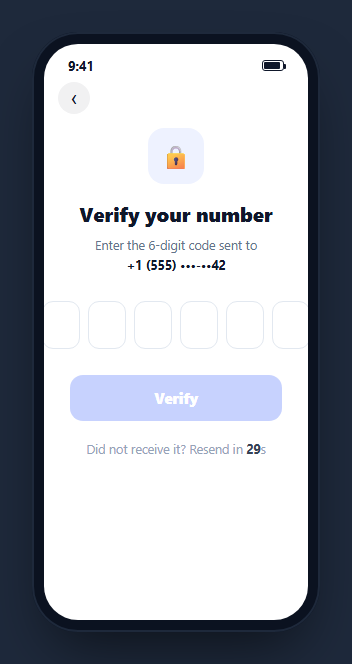
A one-time-passcode screen is the gate between a phone number and a logged-in session — six small boxes, a resend timer, and a verify button that together need to feel instant and forgiving of typos. This snippet builds a complete, working OTP verification screen inside a CSS phone frame: auto-advancing digit inputs, full paste support for codes copied from an SMS, a live countdown before resend is allowed, and shake-and-error feedback on a wrong code.
Six inputs acting like one field
Each .otv-box is a real <input maxlength="1" inputmode="numeric">, not a styled div, so it gets the native numeric keyboard on mobile and remains fully accessible. On every input event, the handler strips any non-digit character, clamps the value to one character, and — if a digit was entered — moves focus to the next box automatically. Backspace on an empty box moves focus back to the previous one, so the whole six-box row behaves like a single continuous field even though it is six separate inputs under the hood.
Real paste support, not just typing
SMS autofill and copy-paste both deliver the whole code as one string, not one digit at a time, which is why the paste handler exists separately from the input handler: it reads the clipboard text, strips non-digits, and distributes each character into consecutive boxes starting from wherever the paste happened, then focuses the box just past the last filled one (or the last box, if the pasted string filled everything). The first box also carries autocomplete="one-time-code", the standard attribute that lets browsers and password managers offer to autofill an SMS-delivered code directly.
A resend timer that actually counts down
startTimer() hides the "Resend code" button, shows a live "Resend in 30s" countdown, and decrements every second via setInterval until it hits zero, at which point the timer hides and the resend button reappears. Clicking resend clears all six boxes, refocuses the first one, and restarts the same 30-second timer — the same cooldown pattern used to prevent SMS-cost abuse from repeated resend taps in a real implementation.
Verify with honest error feedback
The Verify button stays disabled until currentCode() — the six box values joined — reaches exactly six characters, computed fresh on every keystroke via updateVerifyState(). Clicking Verify compares the entered code against a fixed demo value; a match turns the button green with a checkmark and locks the boxes, while a mismatch triggers a CSS shake keyframe animation on the whole box row plus a visible red error line — feedback that is immediate and physically legible rather than a silent failure.
Reusing it
Swap CORRECT_CODE for a real server-side verification call (the client should never hold the correct answer in production — this constant exists purely so the demo is interactively testable), point the masked phone number at the actual number on file, and wire the resend button to your SMS provider's resend endpoint. Pair it with a mobile login screen as the step immediately after phone-number entry.
Build with AI
Build, Understand, Optimize, and Extend It With AI
Rather than tracing the focus-management logic by hand, paste this snippet's HTML, CSS, and JS into an AI coding assistant like Claude and ask it to explain exactly how the paste handler distributes a copied code across six separate inputs starting from an arbitrary box, and how that differs from the simpler per-keystroke auto-advance handler used for typing. The same assistant can help you optimize it, for instance asking whether the fixed 30-second resend cooldown is a reasonable default or should be configurable, and whether debouncing the Verify-button disabled check is worth doing for very fast typers. It is also useful for extending the screen: ask it to wire the Verify button to a real server-side verification endpoint instead of the demo\u2019s hardcoded correct code, add a biometric fallback option alongside the code entry, or animate the six boxes with a subtle stagger when the screen first appears. Treat the code less like a finished artifact and more like a starting point for a conversation.
Prompt to recreate it
Copy this into your AI assistant of choice to build the effect from scratch, or as a jumping-off point for your own variant:
Build a mobile "OTP verification" screen in plain HTML, CSS, and JavaScript, framed inside a CSS phone mockup, using six real numeric input fields — no OTP library.

Requirements:
- Six single-character numeric inputs in a row, each using inputmode="numeric" and maxlength="1" so mobile devices show the correct keyboard; entering a digit in one box must automatically move focus to the next box, and pressing Backspace on an empty box must move focus back to the previous box.
- A paste handler that intercepts pasting into any of the six boxes, strips non-digit characters from the pasted text, and distributes the remaining digits across consecutive boxes starting from wherever the paste occurred, then focuses the box immediately after the last one filled.
- The first box should carry the autocomplete="one-time-code" attribute so browsers with SMS-autofill integration can detect and offer to fill in an incoming code.
- A Verify button that stays disabled until all six boxes are filled, and on click compares the joined six digits against a fixed demo "correct code" value: a match must show a success state (button turns green with a checkmark, inputs become disabled), and a mismatch must trigger a brief CSS shake animation on the row of boxes plus a visible inline error message that clears automatically as soon as the user types again.
- A "Resend code" control that starts as a live countdown timer (e.g. "Resend in 30s", updating every second) and only becomes a clickable button once the countdown reaches zero; clicking it must clear all six boxes, refocus the first one, and restart the countdown.
Want to tighten it up first? Run this prompt through the AI Prompt Studio to score it across 8 quality dimensions, catch anti-patterns, and tune the wording for Claude, ChatGPT, or Gemini before you paste it in.
Step by step
How to Use
- 1Paste HTML, CSS, and JSA phone-framed OTP screen renders with six empty digit boxes and a 30-second resend timer running.
- 2Type a codeDigits auto-advance to the next box; backspace on an empty box moves focus back.
- 3Paste a codePaste a 6-digit string into any box and it distributes across all six boxes automatically.
- 4Try the demo codeEnter 482913 and click Verify to see the success state; any other code triggers a shake and error message.
- 5Watch the resend timerThe countdown replaces the resend button until it hits zero, then the button reappears.
- 6Wire it to a real backendReplace the client-side CORRECT_CODE comparison with a server verification call, and connect resend to your SMS provider.
Real-world uses
Common Use Cases
Got questions?
Frequently Asked Questions
A paste event handler on each box calls preventDefault() to stop the browser\u2019s default paste, reads the clipboard text, strips any non-digit characters, then writes each remaining character into consecutive boxes starting from the pasted-into position, and finally focuses the box just past the last one it filled.
It exists purely so this demo is interactively testable without a backend. In a real implementation, the entered code must be sent to a server for verification — the correct code should never be present in client-side JavaScript, since anyone could read it directly from the page source.
Clicking resend clears the boxes and restarts a 30-second countdown during which the resend button is hidden and replaced by the live timer text, preventing rapid repeated taps. The same cooldown pattern is used in production to control SMS delivery costs and reduce abuse of the resend endpoint.
Yes — it is a standard HTML attribute that modern mobile browsers and OS-level SMS integrations use to detect an incoming one-time-code text message and offer to autofill it directly into the marked input, without the user needing to switch apps and copy the code manually.
The six-box row plays a brief CSS shake keyframe animation, every box border turns red for that instant, and a red "Incorrect code" message appears below the boxes. The error and shake automatically clear as soon as the user starts typing a new digit into any box.
Model the six digits as an array in state, updating one index per keystroke and deriving the joined code for the disabled check on the Verify button. Keep a ref array to the six input elements so you can imperatively call focus() on the next/previous one, since focus management like this is easier done with refs than pure declarative state.