Source Code
<div class="mrs-phone">
<div class="mrs-screen">
<div class="mrs-status"><span>9:41</span><span class="mrs-batt"><i></i></span></div>
<header class="mrs-head">
<div>
<p class="mrs-date">Thursday, Sep 4</p>
<h1>Today</h1>
</div>
<div class="mrs-streak">
<span class="mrs-streak-flame">🔥</span>
<b id="mrsStreak">12</b>
</div>
</header>
<div class="mrs-progress-card">
<div class="mrs-ring" id="mrsRing">
<svg width="58" height="58" viewBox="0 0 58 58">
<circle cx="29" cy="29" r="25" fill="none" stroke="#e2e8f0" stroke-width="6"/>
<circle id="mrsRingFg" cx="29" cy="29" r="25" fill="none" stroke="#059669" stroke-width="6" stroke-linecap="round" stroke-dasharray="157" stroke-dashoffset="157" transform="rotate(-90 29 29)"/>
</svg>
<span class="mrs-ring-label" id="mrsRingLabel">0/4</span>
</div>
<div>
<p class="mrs-progress-title" id="mrsProgressTitle">0 of 4 doses taken</p>
<p class="mrs-progress-sub" id="mrsProgressSub">Next: Metformin at 8:00 AM</p>
</div>
</div>
<div class="mrs-scroll">
<ul class="mrs-list" id="mrsList">
<li class="mrs-item" data-time="8:00 AM" data-status="upcoming">
<span class="mrs-time">8:00<small>AM</small></span>
<span class="mrs-pill mrs-pill-blue"></span>
<div class="mrs-info"><b>Metformin</b><small>500mg · 1 tablet · with food</small></div>
<button class="mrs-check" aria-label="Mark as taken"></button>
</li>
<li class="mrs-item" data-time="8:00 AM" data-status="upcoming">
<span class="mrs-time">8:00<small>AM</small></span>
<span class="mrs-pill mrs-pill-amber"></span>
<div class="mrs-info"><b>Vitamin D3</b><small>1000IU · 1 capsule</small></div>
<button class="mrs-check" aria-label="Mark as taken"></button>
</li>
<li class="mrs-item" data-time="1:00 PM" data-status="upcoming">
<span class="mrs-time">1:00<small>PM</small></span>
<span class="mrs-pill mrs-pill-purple"></span>
<div class="mrs-info"><b>Lisinopril</b><small>10mg · 1 tablet</small></div>
<button class="mrs-check" aria-label="Mark as taken"></button>
</li>
<li class="mrs-item" data-time="9:00 PM" data-status="upcoming">
<span class="mrs-time">9:00<small>PM</small></span>
<span class="mrs-pill mrs-pill-blue"></span>
<div class="mrs-info"><b>Metformin</b><small>500mg · 1 tablet · with food</small></div>
<button class="mrs-check" aria-label="Mark as taken"></button>
</li>
</ul>
</div>
<div class="mrs-toast" id="mrsToast" hidden>All doses logged for today ✓</div>
</div>
</div>*{box-sizing:border-box;margin:0;padding:0}
html{scrollbar-width:none;-ms-overflow-style:none}
html::-webkit-scrollbar{display:none}
body{font-family:system-ui,-apple-system,sans-serif;background:#1e293b;display:flex;justify-content:center;align-items:center;min-height:100vh;padding:24px;scrollbar-width:none;-ms-overflow-style:none}
body::-webkit-scrollbar{display:none}
.mrs-phone{width:288px;height:600px;background:#0b1220;border-radius:46px;padding:12px;box-shadow:0 30px 60px -20px rgba(0,0,0,.6),inset 0 0 0 2px #1e293b}
.mrs-screen{width:100%;height:100%;border-radius:34px;overflow:hidden;background:#f8fafc;color:#0f172a;display:flex;flex-direction:column;position:relative}
.mrs-status{display:flex;justify-content:space-between;align-items:center;padding:13px 24px 0;font-size:13px;font-weight:700}
.mrs-batt{width:22px;height:11px;border:1.4px solid currentColor;border-radius:3px;position:relative;display:inline-block}
.mrs-batt::after{content:'';position:absolute;right:-3px;top:3px;width:2px;height:5px;background:currentColor;border-radius:0 1px 1px 0}
.mrs-batt i{position:absolute;left:1.4px;top:1.4px;bottom:1.4px;width:82%;background:currentColor;border-radius:1px}
.mrs-head{display:flex;justify-content:space-between;align-items:flex-end;padding:10px 18px 14px}
.mrs-date{font-size:11.5px;color:#94a3b8;font-weight:600;margin-bottom:2px}
.mrs-head h1{font-size:21px;font-weight:800}
.mrs-streak{display:flex;align-items:center;gap:5px;background:#fff7ed;border-radius:20px;padding:6px 11px;font-size:13px;font-weight:800;color:#c2410c}
.mrs-streak-flame{font-size:13px}
.mrs-progress-card{margin:0 18px 14px;background:#fff;border-radius:16px;padding:14px 16px;display:flex;align-items:center;gap:14px;box-shadow:0 2px 10px rgba(0,0,0,.05)}
.mrs-ring{position:relative;width:58px;height:58px;flex-shrink:0}
.mrs-ring svg circle{transition:stroke-dashoffset .5s ease}
.mrs-ring-label{position:absolute;inset:0;display:flex;align-items:center;justify-content:center;font-size:12px;font-weight:800}
.mrs-progress-title{font-size:13.5px;font-weight:800}
.mrs-progress-sub{font-size:11.5px;color:#94a3b8;margin-top:2px}
.mrs-scroll{flex:1;overflow-y:auto;padding:0 18px 20px;scrollbar-width:none;-ms-overflow-style:none}
.mrs-scroll::-webkit-scrollbar{display:none}
.mrs-list{list-style:none;display:flex;flex-direction:column;gap:8px}
.mrs-item{display:flex;align-items:center;gap:10px;background:#fff;border-radius:14px;padding:11px 12px;box-shadow:0 1px 4px rgba(0,0,0,.04);transition:opacity .2s}
.mrs-time{font-size:11.5px;font-weight:800;color:#334155;width:38px;line-height:1.1}
.mrs-time small{display:block;font-size:8.5px;color:#94a3b8;font-weight:700}
.mrs-pill{width:7px;height:20px;border-radius:4px;flex-shrink:0}
.mrs-pill-blue{background:#3b82f6}
.mrs-pill-amber{background:#f59e0b}
.mrs-pill-purple{background:#8b5cf6}
.mrs-info{flex:1;min-width:0}
.mrs-info b{display:block;font-size:13px}
.mrs-info small{font-size:10.5px;color:#94a3b8}
.mrs-check{width:26px;height:26px;border-radius:50%;border:2px solid #e2e8f0;background:#fff;cursor:pointer;flex-shrink:0;position:relative;transition:background .15s,border-color .15s}
.mrs-check::after{content:'';position:absolute;left:5px;top:1px;width:6px;height:11px;border:solid #fff;border-width:0 2.5px 2.5px 0;transform:rotate(45deg);opacity:0;transition:opacity .1s}
.mrs-item[data-status="taken"]{opacity:.55}
.mrs-item[data-status="taken"] .mrs-check{background:#059669;border-color:#059669}
.mrs-item[data-status="taken"] .mrs-check::after{opacity:1}
.mrs-item[data-status="taken"] .mrs-info b{text-decoration:line-through}
.mrs-toast{position:absolute;left:18px;right:18px;bottom:20px;background:#0f172a;color:#fff;text-align:center;padding:12px;border-radius:12px;font-size:12.5px;font-weight:700;animation:mrsRise .25s ease}
@keyframes mrsRise{from{opacity:0;transform:translateY(10px)}to{opacity:1;transform:none}}var items = document.querySelectorAll('.mrs-item');
var ringFg = document.getElementById('mrsRingFg');
var ringLabel = document.getElementById('mrsRingLabel');
var progressTitle = document.getElementById('mrsProgressTitle');
var progressSub = document.getElementById('mrsProgressSub');
var streakEl = document.getElementById('mrsStreak');
var toast = document.getElementById('mrsToast');
var total = items.length;
var RING_LENGTH = 157;
var baseStreak = 12;
function nextUpcoming() {
for (var i = 0; i < items.length; i++) {
if (items[i].dataset.status === 'upcoming') {
var name = items[i].querySelector('b').textContent;
var time = items[i].dataset.time;
return name + ' at ' + time;
}
}
return null;
}
function updateProgress() {
var taken = document.querySelectorAll('.mrs-item[data-status="taken"]').length;
var offset = RING_LENGTH - (RING_LENGTH * taken) / total;
ringFg.style.strokeDashoffset = offset;
ringLabel.textContent = taken + '/' + total;
progressTitle.textContent = taken + ' of ' + total + ' doses taken';
var next = nextUpcoming();
if (next) {
progressSub.textContent = 'Next: ' + next;
} else {
progressSub.textContent = 'All doses complete for today';
streakEl.querySelector('b').textContent = baseStreak + 1;
toast.hidden = false;
setTimeout(function () { toast.hidden = true; }, 2600);
}
}
items.forEach(function (item) {
var checkBtn = item.querySelector('.mrs-check');
checkBtn.addEventListener('click', function () {
var taken = item.dataset.status === 'taken';
item.dataset.status = taken ? 'upcoming' : 'taken';
updateProgress();
});
});
updateProgress();Learn Coding Visually
Learn to code with interactive, live-preview playgrounds — HTML, CSS, JavaScript, React & more.
 HTML Playground42 lessons · Click-based · Live preview
 CSS PlaygroundLearn CSS with a live editor
 JavaScript Playground60 lessons · DOM · Async · Canvas
 React PlaygroundLearn React with a live code editor
 GSAP PlaygroundLearn GSAP animation interactively
 SVG Playground44 lessons · shapes · paths · animation
 SCSS Playground45 lessons · Sass modules · tokens
 Tailwind PlaygroundLearn Tailwind CSS with a live editor
 Bootstrap 5 Playground50 lessons · live preview
Mobile Medication Reminder Screen — Free Snippet
Mobile Medication Reminder Screen · Mobile · Plain HTML, CSS & JS · Live preview
What's included
Features
About this UI Snippet
Mobile Medication Reminder Screen — Progress Ring with Tap-to-Log Doses
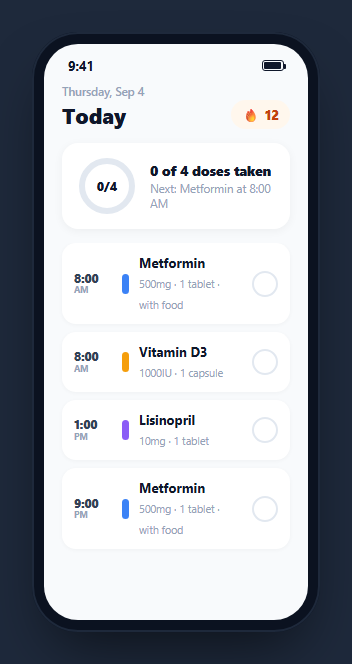
Medication adherence apps live or die on one interaction: how quickly and clearly a user can confirm they took a dose. This snippet builds that core loop inside a CSS phone frame — a scrollable list of today's doses grouped by time, a single tap on each item to toggle it taken, an SVG progress ring that animates as doses are logged, a "next dose" line that always points at the correct upcoming medication, and a streak counter that increments the moment the day is fully complete.
One data attribute drives the whole item state
Each .mrs-item carries a single data-status attribute set to either "upcoming" or "taken". Every visual change on a logged dose — the filled green checkmark circle, the reduced opacity, the strikethrough on the medication name — is expressed as a CSS rule scoped to .mrs-item[data-status="taken"], so toggling one attribute in JavaScript drives every visual consequence at once rather than needing several class toggles kept in sync by hand.
The progress ring animates its stroke, it does not just relabel
#mrsRingFg is an SVG circle with stroke-dasharray set to its full circumference and stroke-dashoffset computed on every update as circumference - (circumference * takenCount) / total — the same stroke-offset technique used by most circular progress indicators. Because stroke-dashoffset has a CSS transition, each dose logged causes the ring to visibly sweep forward rather than snapping to its new fraction instantly, giving the same satisfying motion as a fitness-ring close animation.
"Next dose" is computed, not written per item
nextUpcoming() walks the item list in DOM order and returns the name and time of the first item still marked "upcoming" — so the subtitle under the progress ring always reflects whichever dose is genuinely next, automatically updating (or disappearing entirely once nothing remains) as doses get logged in any order, not necessarily top to bottom.
A streak that only increments on real completion
updateProgress() checks whether nextUpcoming() returns null — meaning every dose for the day has been marked taken — and only then increments the displayed streak number and shows a completion toast. Marking every dose taken and then un-marking one immediately reverts the subtitle back to a "next dose" line and the streak stays at its prior value, since the increment is a direct consequence of the current state rather than a one-time event that could double-fire or fire on a partial day.
A toast that confirms without blocking
The "All doses logged for today" toast rises in from the bottom with a small transform animation and clears itself automatically after roughly 2.6 seconds via setTimeout, celebrating the completion moment without requiring a dismiss tap or interrupting the user from continuing to review their list.
Extending it for a real medication schedule
Swap the four hardcoded <li> items for a schedule fetched from a real prescriptions API (dose name, dosage, time, and any food/timing instructions), persist the taken/upcoming state to a backend rather than only in the DOM so a mark-as-taken action survives an app restart, and drive the streak counter from a real day-over-day adherence log instead of the single-session increment used in this demo.
Build with AI
Build, Understand, Optimize, and Extend It With AI
Rather than tracing the ring-math and next-dose logic by hand, paste this snippet's HTML, CSS, and JS into an AI coding assistant like Claude and ask it to explain exactly how the SVG stroke-dashoffset value is computed from the taken count and the ring’s circumference, and how nextUpcoming() always finds the correct next dose regardless of which item in the list was toggled. The same assistant can help you optimize it, for instance asking whether grouping doses by time-of-day section headers would make a longer real medication list easier to scan than one flat list. It is also useful for extending the screen: ask it to persist taken/upcoming state to localStorage or a backend so it survives a reload, add a missed-dose state for times that have passed without being logged, or wire real push notification scheduling for each dose time. Treat the code less like a finished artifact and more like a starting point for a conversation.
Prompt to recreate it
Copy this into your AI assistant of choice to build the effect from scratch, or as a jumping-off point for your own variant:
Build a mobile "medication reminder" screen in plain HTML, CSS, and JavaScript, framed inside a CSS phone mockup, with a tap-to-log dose list and an animated progress ring, no library.

Requirements:
- A scrollable list of medication dose items, each showing a time, a colored pill/tag, a medication name with dosage details, and a circular check button. Every visual state of an item (checkmark fill, reduced opacity, strikethrough on the name) must be driven entirely from one data-status attribute on that item (for example "upcoming" or "taken") via CSS attribute selectors, not from several independently toggled classes.
- Tapping an item’s check button must toggle its status between taken and upcoming, and the action must be fully reversible — tapping an already-taken item must revert it back to upcoming and undo every visual change.
- An SVG circular progress ring above the list must show the fraction of doses currently taken, animating its stroke (using stroke-dasharray/stroke-dashoffset with a CSS transition) to sweep to the new value every time a dose is toggled, rather than snapping instantly or being redrawn as a completely new circle each time.
- A "next dose" line must be computed live by finding the first remaining item still marked upcoming (in list order), updating automatically as doses are logged in any order, and switching to a distinct "all doses complete" message once nothing remains upcoming.
- A streak counter must increment only at the exact moment every dose becomes marked taken (a genuine full-day completion), and an auto-dismissing confirmation toast must appear at that same moment and clear itself after a couple of seconds without requiring a manual dismiss action.
Want to tighten it up first? Run this prompt through the AI Prompt Studio to score it across 8 quality dimensions, catch anti-patterns, and tune the wording for Claude, ChatGPT, or Gemini before you paste it in.
Step by step
How to Use
- 1Paste HTML, CSS, and JSA medication list renders with a 0/4 progress ring and a "Next: Metformin at 8:00 AM" subtitle.
- 2Tap a dose’s check buttonIt fills green, the name gets a strikethrough, and the progress ring sweeps forward to reflect the new count.
- 3Tap it againThe dose reverts to upcoming and the ring animates back, demonstrating the toggle is fully reversible.
- 4Mark every dose takenThe subtitle switches to "All doses complete," the streak count increments, and a completion toast rises in.
- 5Watch the toastIt clears itself automatically after about 2.6 seconds without needing a dismiss tap.
- 6Wire it to a real scheduleReplace the hardcoded list items with a fetched prescription schedule and persist taken state to a backend.
Real-world uses
Common Use Cases
Got questions?
Frequently Asked Questions
updateProgress() counts every item whose data-status attribute equals "taken", computes a stroke-dashoffset value from that count against the ring’s known circumference, and applies it to the ring’s foreground circle. A CSS transition on stroke-dashoffset animates the visible sweep rather than jumping instantly.
nextUpcoming() iterates the dose list in its current DOM order and returns the name and time of the first item still marked "upcoming". Because it re-runs after every toggle, the subtitle always reflects an accurate next dose regardless of which item was logged.
Yes — tapping an already-taken item’s check button toggles its data-status back to "upcoming", which reverses every visual state (checkmark, opacity, strikethrough) and recalculates the ring, next-dose subtitle, and streak accordingly.
Only when nextUpcoming() returns null, meaning every dose in the list is currently marked taken. Un-marking any dose afterward reverts the subtitle to a next-dose line without decrementing the streak, since the increment models same-day completion rather than a fragile one-time event.
No — this demo keeps state only in the DOM via data-status attributes, so a page refresh resets every dose to upcoming. A production build should persist each toggle to a backend or local storage so a logged dose survives an app restart.
Yes. Model each dose as an object with a taken boolean in an array or state list, derive the taken count and the next-upcoming dose from that array on every render, and compute the same ring stroke-dashoffset value from the derived count.