Source Code
<section class="nbl-hero">
  <div class="nbl-inner">
    <div class="nbl-copy">
      <span class="nbl-eyebrow">The Weekly Signal</span>
      <h1 class="nbl-title">One sharp email. <span>Every Thursday.</span></h1>
      <p class="nbl-sub">No fluff, no daily noise — just the five things worth knowing in product and design this week, read in under four minutes.</p>

      <form class="nbl-form" id="nblForm" novalidate>
        <input class="nbl-input" id="nblEmail" type="email" placeholder="you@work.com" aria-label="Email address" autocomplete="email">
        <button class="nbl-btn" type="submit">Subscribe free</button>
      </form>
      <p class="nbl-msg" id="nblMsg"></p>
      <p class="nbl-fineprint">Join 18,400+ readers. No spam, ever.</p>
    </div>

    <ul class="nbl-benefits" aria-label="Newsletter benefits">
      <li><span class="nbl-check">✓</span><div><strong>Weekly, not daily</strong><small>One email, every Thursday — never more.</small></div></li>
      <li><span class="nbl-check">✓</span><div><strong>Under 4 minutes</strong><small>Curated, not comprehensive. Respect for your time.</small></div></li>
      <li><span class="nbl-check">✓</span><div><strong>Zero sponsored fluff</strong><small>No ad reads dressed up as insight.</small></div></li>
      <li><span class="nbl-check">✓</span><div><strong>Unsubscribe anytime</strong><small>One click, no dark patterns, no guilt trip.</small></div></li>
      <li><span class="nbl-check">✓</span><div><strong>Archive access</strong><small>Every past issue searchable, free forever.</small></div></li>
    </ul>
  </div>
</section>
* { box-sizing: border-box; margin: 0; padding: 0; }
body { font-family: system-ui, -apple-system, sans-serif; background: #f8f7f4; }
.nbl-hero { min-height: 100vh; display: flex; align-items: center; padding: 48px 24px; }
.nbl-inner { max-width: 1040px; margin: 0 auto; display: grid; grid-template-columns: 1.1fr 0.9fr; gap: 64px; align-items: center; }
.nbl-eyebrow { display: inline-block; font-size: 12.5px; font-weight: 800; letter-spacing: .06em; text-transform: uppercase; color: #b45309; }
.nbl-title { margin-top: 16px; font-size: 44px; font-weight: 900; line-height: 1.1; letter-spacing: -0.02em; color: #1c1917; }
.nbl-title span { color: #ea580c; }
.nbl-sub { margin-top: 16px; font-size: 16px; line-height: 1.65; color: #57534e; max-width: 440px; }
.nbl-form { display: flex; gap: 10px; margin-top: 28px; max-width: 420px; }
.nbl-input { flex: 1; padding: 13px 16px; border: 1.5px solid #d6d3d1; border-radius: 10px; font-family: inherit; font-size: 14.5px; background: #fff; color: #1c1917; outline: none; transition: border-color .15s, box-shadow .15s; }
.nbl-input::placeholder { color: #a8a29e; }
.nbl-input:focus { border-color: #ea580c; box-shadow: 0 0 0 3px rgba(234, 88, 12, 0.15); }
.nbl-input.invalid { border-color: #dc2626; box-shadow: 0 0 0 3px rgba(220, 38, 38, 0.15); }
.nbl-btn { flex-shrink: 0; padding: 13px 22px; background: #1c1917; color: #fff; border: none; border-radius: 10px; font-family: inherit; font-size: 14.5px; font-weight: 700; cursor: pointer; transition: background .15s, transform .1s; }
.nbl-btn:hover { background: #ea580c; }
.nbl-btn:active { transform: scale(0.98); }
.nbl-msg { min-height: 18px; margin-top: 10px; font-size: 13px; font-weight: 600; }
.nbl-msg.error { color: #dc2626; }
.nbl-msg.success { color: #15803d; }
.nbl-fineprint { margin-top: 10px; font-size: 12.5px; color: #a8a29e; }
.nbl-benefits { list-style: none; display: flex; flex-direction: column; gap: 18px; background: #fff; border: 1px solid #e7e5e4; border-radius: 18px; padding: 26px; }
.nbl-benefits li { display: flex; gap: 12px; align-items: flex-start; }
.nbl-check { flex-shrink: 0; width: 22px; height: 22px; border-radius: 50%; background: #dcfce7; color: #15803d; font-size: 13px; font-weight: 900; display: flex; align-items: center; justify-content: center; margin-top: 1px; }
.nbl-benefits strong { display: block; font-size: 14.5px; color: #1c1917; font-weight: 700; }
.nbl-benefits small { display: block; margin-top: 2px; font-size: 12.5px; color: #78716c; line-height: 1.5; }
@media (max-width: 800px) {
.nbl-inner { grid-template-columns: 1fr; gap: 36px; }
.nbl-title { font-size: 34px; }
.nbl-form { flex-direction: column; }
}const form = document.getElementById('nblForm');
const email = document.getElementById('nblEmail');
const msg = document.getElementById('nblMsg');
function setMsg(text, type) {
msg.textContent = text;
msg.className = 'nbl-msg' + (type ? ' ' + type : '');
}
email.addEventListener('input', () => {
if (email.classList.contains('invalid')) { email.classList.remove('invalid'); setMsg('', ''); }
});
form.addEventListener('submit', (e) => {
e.preventDefault();
const value = email.value.trim();
// Real validation: rely on the input's own type=email constraint
if (value === '' || !email.checkValidity()) {
email.classList.add('invalid');
email.focus();
setMsg('Enter a valid email to subscribe.', 'error');
return;
}
form.querySelector('.nbl-btn').textContent = 'Subscribed!';
form.querySelector('.nbl-btn').disabled = true;
email.disabled = true;
setMsg("You're in. First issue lands Thursday.", 'success');
});Learn Coding Visually
Learn to code with interactive, live-preview playgrounds — HTML, CSS, JavaScript, React & more.
 HTML Playground42 lessons · Click-based · Live preview
 CSS PlaygroundLearn CSS with a live editor
 JavaScript Playground60 lessons · DOM · Async · Canvas
 React PlaygroundLearn React with a live code editor
 GSAP PlaygroundLearn GSAP animation interactively
 SVG Playground44 lessons · shapes · paths · animation
 SCSS Playground45 lessons · Sass modules · tokens
 Tailwind PlaygroundLearn Tailwind CSS with a live editor
 Bootstrap 5 Playground50 lessons · live preview
Newsletter Hero with Benefit Checklist — Free HTML CSS JS Snippet
Newsletter Hero with Benefit Checklist · Heroes · Plain HTML, CSS & JS · Live preview
What's included
Features
About this UI Snippet
Newsletter Hero with Benefit Checklist — Signup Form Paired with Concrete Reasons to Subscribe
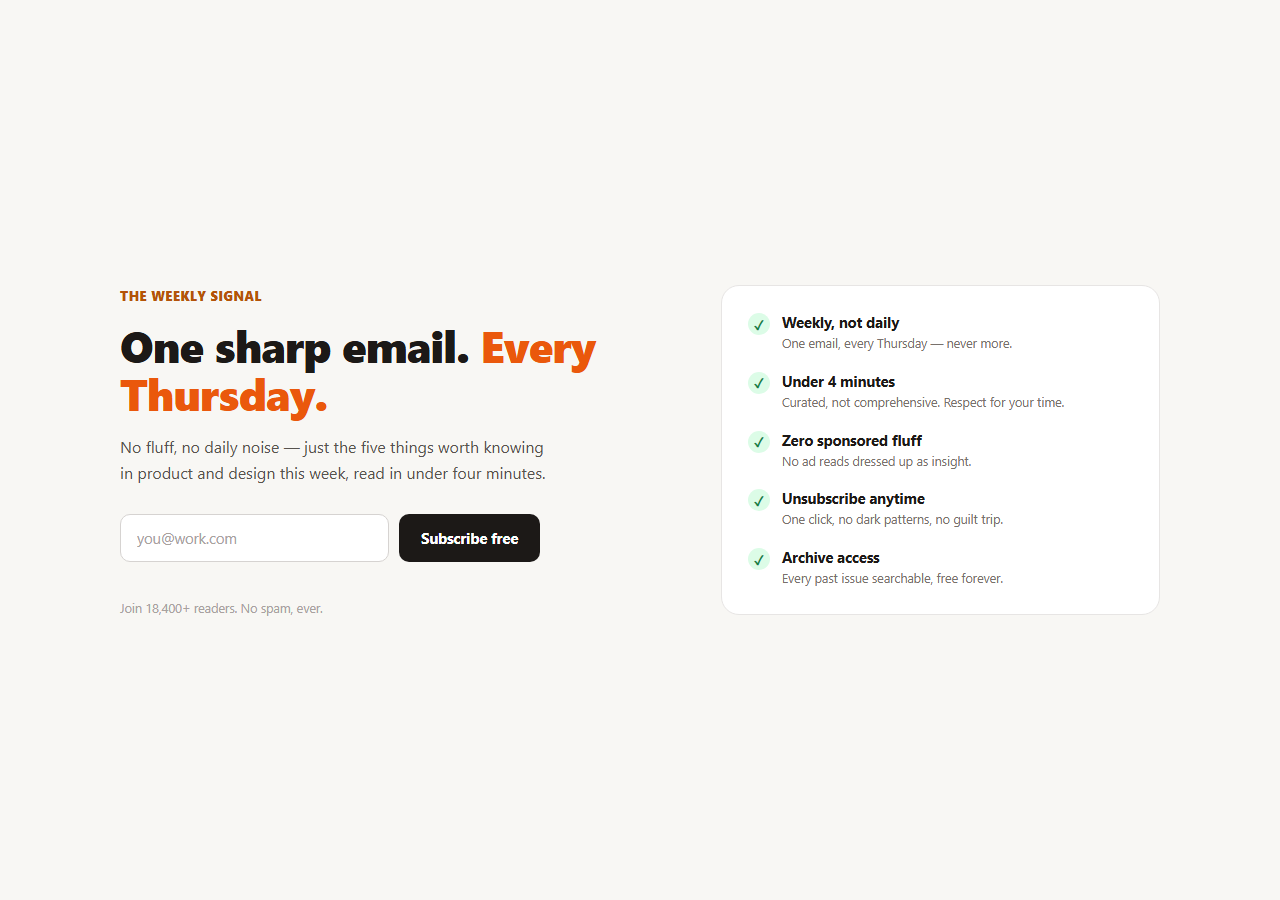
Most newsletter heroes ask for an email and offer nothing but a vague promise of "great content." This snippet pairs the signup form with a short, specific checklist of benefits sitting right beside it — "weekly, not daily," "under 4 minutes," "unsubscribe anytime" — so the visitor's actual hesitations get answered before they even form. It's a two-column hero: headline, subheading, and a real validated email form on the left; a card of five checkmarked benefits on the right.
Why a benefit list beats a tagline
A headline like "Stay informed" answers nothing a skeptical visitor is actually worried about. The five benefits here are chosen because they preempt real objections to subscribing: frequency anxiety ("weekly, not daily"), time cost ("under 4 minutes"), trust in the content ("zero sponsored fluff"), commitment fear ("unsubscribe anytime"), and sunk-cost value ("archive access"). Each is paired with a green checkmark badge and a one-line elaboration, so the card reads as a mini FAQ answered in advance rather than a bullet list of adjectives.
Real email validation, not decoration
The form leans on the input's own type="email" constraint via checkValidity() plus a trimmed non-empty check — the same pattern used across this library's other capture forms. An invalid submission adds an .invalid class (red border and focus ring), focuses the field, and shows an inline error; the error and red state clear the instant the visitor edits the field again, so the form never feels punitive.
A committed success state
On a valid submit, the button label changes to "Subscribed!" and both the button and input are disabled — a small but important detail: it makes clear the action succeeded and prevents an accidental double-submit, without needing a spinner or a full page-state swap for a form this short.
Warm, editorial visual tone
Unlike the darker SaaS-style capture heroes elsewhere in this set, this one uses a warm off-white background, a deep charcoal headline, and a single orange accent — closer to how a newsletter or publication brands itself than a startup product page. The benefit card's white background and soft border give it enough visual weight to compete with the form for attention without overpowering it.
Customizing it
Swap the five benefits for whatever actually differentiates your list — cadence, format, guest contributors, no algorithm gatekeeping. Wire the submit handler to a real provider (ConvertKit, Beehiiv, Substack, Resend) by replacing the synchronous success branch with an awaited fetch, keeping the same validation and success-state pattern. Pair it with a newsletter signup block further down the page for readers who scroll past the hero, or an announcement bar above it for a launch promotion.
Build with AI
Build, Understand, Optimize, and Extend It With AI
You don't have to guess which benefits belong on the checklist. Paste this snippet's HTML, CSS, and JS into an AI coding assistant like Claude and ask it to explain why pairing a specific, objection-answering benefit list next to the signup form is a stronger conversion pattern than a generic tagline, or how the checkValidity-based validation avoids the maintenance cost of a custom email regex. The same assistant can help optimize it — ask whether the success state should reset after a delay to allow a correction, or whether the benefit list should be reordered by which objection is most common for your specific audience. It's also useful for extending the hero: ask it to wire the submit handler to a real newsletter provider's API, add a double opt-in confirmation step, or animate the benefit checkmarks in with a staggered entrance when the hero loads. Treat the code less like a finished artifact and more like a starting point for a conversation.
Prompt to recreate it
Copy this into your AI assistant of choice to build the effect from scratch, or as a jumping-off point for your own variant:
Build a newsletter signup hero in plain HTML, CSS, and JavaScript with a two-column layout — no framework, no validation library.

Requirements:
- Left column: an eyebrow label, a headline with one emphasized phrase in an accent color, a subheading, an inline email form (input plus submit button), an inline message area below the form, and a small fineprint line with a subscriber count.
- Right column: a card containing a list of five specific subscriber benefits (for example weekly not daily cadence, reading time under a set number of minutes, no sponsored content, unsubscribe anytime, and archive access), each with a green circular checkmark badge, a bold title, and a one-line description — not generic adjectives.
- On submit, call preventDefault and validate using only the input's native type="email" constraint via checkValidity() plus a check that the trimmed value isn't empty — no manual regex. On failure, add a visible invalid style to the input, focus it, and show an inline error message that clears itself as soon as the user edits the field again.
- On a valid submit, change the submit button's label to a confirmation word, disable both the button and the input so the form can't be submitted twice, and show a success message — no page reload, no spinner needed for a form this small.
- Make it responsive: collapse the two columns into a single stacked column with the form above the benefit card under a mobile breakpoint, and stack the input and button vertically at that width too.
Want to tighten it up first? Run this prompt through the AI Prompt Studio to score it across 8 quality dimensions, catch anti-patterns, and tune the wording for Claude, ChatGPT, or Gemini before you paste it in.
Step by step
How to Use
- 1Paste the HTML, CSS, and JSA two-column hero renders — headline and form on the left, a benefit checklist card on the right.
- 2Submit an invalid emailThe input gets a red ring and focus, and an inline error asks for a valid address.
- 3Submit a valid emailThe button reads "Subscribed!", the form disables, and a confirmation message appears.
- 4Edit the benefit listChange the five .nbl-benefits items to the reasons that actually apply to your publication.
- 5Connect a real providerReplace the synchronous success branch with a fetch to ConvertKit, Beehiiv, or Substack.
- 6Retheme itSwap the orange accent and warm background for your brand's palette.
Real-world uses
Common Use Cases
Got questions?
Frequently Asked Questions
A headline sets the tone, but it doesn't answer specific hesitations. The five benefits are each chosen to preempt a real objection — frequency, time cost, trust, commitment, and past-value — so a skeptical visitor's actual questions get answered before they scroll away. That's a stronger conversion lever than a punchier tagline alone.
The input has type="email", so checkValidity() returns false for a malformed address with no custom regex needed. Combined with a trimmed non-empty check, invalid submissions get a red ring, focus, and an inline error message that clears the moment the visitor starts typing again.
Disabling the input and changing the button to "Subscribed!" makes success unambiguous and prevents an accidental double submission, which matters more for a newsletter form than a spinner or animation would. It's a lighter-weight success state appropriate for a form this small.
Replace the synchronous success branch in the submit handler with an async fetch POST to your provider's API (ConvertKit, Beehiiv, Substack, or a serverless endpoint), keeping the same validation checks in front of it and swapping the success/error messages based on the response.
Hold the email value and a submitted boolean in state. The submit handler validates with the input's checkValidity (via a ref) or your own check, then sets submitted to true on success. Bind the disabled attribute and button label to that state. The benefit list and layout port unchanged as static markup.