


Learn Coding Visually
Learn to code with interactive, live-preview playgrounds — HTML, CSS, JavaScript, React & more.
 HTML Playground42 lessons · Click-based · Live preview
 CSS PlaygroundLearn CSS with a live editor
 JavaScript Playground60 lessons · DOM · Async · Canvas
 React PlaygroundLearn React with a live code editor
 GSAP PlaygroundLearn GSAP animation interactively
 SVG Playground44 lessons · shapes · paths · animation
 SCSS Playground45 lessons · Sass modules · tokens
 Tailwind PlaygroundLearn Tailwind CSS with a live editor
 Bootstrap 5 Playground50 lessons · live preview
FLIP List Reorder Animation — Smoothly Animating a Sort with First-Last-Invert-Play
FLIP Technique List Reorder Animation · Animations · Plain HTML, CSS & JS · Live preview
What's included
Features
About this UI Snippet
FLIP List Reorder Animation — Animating Position Changes You Can't Directly Animate
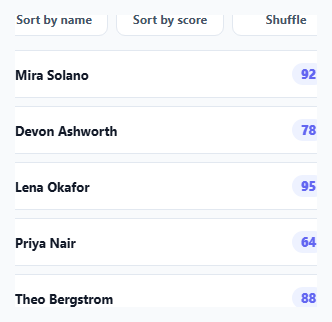
Sorting a list by re-appending its DOM elements in a new order is instant and abrupt — every item jumps to its new position with no visual continuity. FLIP (First, Last, Invert, Play) is the standard technique for turning that jump into a smooth slide, and it works for exactly this kind of change: one where you *can't* animate the property directly (DOM order isn't animatable), but you *can* animate a cheap visual stand-in (a transform) that fakes the same motion.
First: measuring where everything starts
Before touching the DOM, flipReorder() records every item's current getBoundingClientRect() into a Map keyed by the element itself. This is the "First" position — a snapshot taken while the list is still in its old, pre-sort order.
The actual reorder is real and instant, on purpose
reorderFn(items) — whichever sort or shuffle function was passed in — genuinely re-appends every list item into its new DOM order using real appendChild calls. This is the "expensive," layout-triggering step, and it's allowed to happen instantly and messily; FLIP doesn't try to animate the reorder itself, only to disguise its visual result.
Last, Invert: making the jump invisible for one frame
Immediately after the reorder, each element's *new* position is measured (Last), and the delta between old and new position is computed. Setting transform: translate(deltaX, deltaY) with transition: none snaps the element visually back to exactly where it was before the reorder — so even though the DOM has already changed, nothing appears to move yet. This is the "Invert" step: using a transform to counteract the position change that already happened.
Play: animating only a transform, which is cheap
The forced el.getBoundingClientRect() read between setting the inverted transform and clearing it is a well-known trick to force the browser to actually apply the "snap back" styles before the next change — without it, the browser could batch both style changes together and skip the transition entirely. Once that reflow is forced, re-enabling transition and clearing the transform (el.style.transform = '') lets the browser smoothly animate from the inverted position back to the real, final position — and because only transform is animating (not top/left/DOM order), this runs on the compositor thread, staying smooth even while re-sorting many items simultaneously.
Why this generalizes beyond sorting
FLIP works for any change that repositions elements without a directly animatable CSS property behind it — filtering a grid, removing an item and having the rest collapse upward, or reflowing a masonry layout. The technique here (measure, mutate, measure again, invert, play) is the same regardless of *what* caused the reorder.
Build with AI
Build, Understand, Optimize, and Extend It With AI
Ask an AI assistant to walk through why the forced reflow (the "empty" getBoundingClientRect() call) is necessary between setting the inverted transform and clearing it, and what would visibly break if that line were removed. It's also worth asking for a version that handles items being added or removed during the reorder (not just repositioned), or one that staggers each item's animation start slightly for a more choreographed group-reorder effect.
Prompt to recreate it
Copy this into your AI assistant of choice to build the effect from scratch, or as a jumping-off point for your own variant:
Build a sortable list in HTML, CSS and vanilla JavaScript that smoothly animates items sliding to their new positions whenever the list is re-sorted, using the FLIP (First, Last, Invert, Play) technique — no animation library.

Requirements:
- A list of items, each showing a name and a numeric score, with buttons to sort by name, sort by score, and randomly shuffle the order.
- Implement a reusable FLIP helper function that: records every item's bounding rectangle before a reorder ("First"), performs the actual DOM reorder via real appendChild calls, records each item's new bounding rectangle after the reorder ("Last"), then for every item that moved, applies an inverted CSS transform to make it appear to still be in its original position, forces a reflow, and finally animates the transform back to its natural value ("Invert" and "Play").
- The reorder function itself (sort-by-name, sort-by-score, shuffle) must be a plain function that just mutates the DOM directly with no knowledge of the animation logic — the FLIP helper should accept any such function and animate its resulting position changes generically.
- Only the CSS transform property should be animated (not top/left or other layout-triggering properties), so the animation remains smooth even when many items reorder simultaneously.
- Ensure items that don't actually change position after a reorder are skipped and not needlessly animated.
Want to tighten it up first? Run this prompt through the AI Prompt Studio to score it across 8 quality dimensions, catch anti-patterns, and tune the wording for Claude, ChatGPT, or Gemini before you paste it in.
Source Code
<div class="demo">
  <div class="flip-controls">
    <button class="flip-btn" id="sortNameBtn">Sort by name</button>
    <button class="flip-btn" id="sortScoreBtn">Sort by score</button>
    <button class="flip-btn" id="shuffleBtn">Shuffle</button>
  </div>
  <ul class="flip-list" id="flipList">
    <li class="flip-item" data-id="mira"><span class="flip-name">Mira Solano</span><span class="flip-score">92</span></li>
    <li class="flip-item" data-id="devon"><span class="flip-name">Devon Ashworth</span><span class="flip-score">78</span></li>
    <li class="flip-item" data-id="lena"><span class="flip-name">Lena Okafor</span><span class="flip-score">95</span></li>
    <li class="flip-item" data-id="priya"><span class="flip-name">Priya Nair</span><span class="flip-score">64</span></li>
    <li class="flip-item" data-id="theo"><span class="flip-name">Theo Bergstrom</span><span class="flip-score">88</span></li>
  </ul>
</div>
* { box-sizing: border-box; margin: 0; padding: 0; }
body { font-family: system-ui, sans-serif; background: #f8fafc; display: flex; align-items: center; justify-content: center; min-height: 100vh; padding: 24px; }
.demo { width: 340px; max-width: 100%; display: flex; flex-direction: column; gap: 14px; }
.flip-controls { display: flex; gap: 8px; }
.flip-btn { flex: 1; background: #fff; border: 1.5px solid #e2e8f0; padding: 8px; border-radius: 9px; font-size: 12px; font-weight: 700; color: #475569; cursor: pointer; font-family: inherit; }
.flip-btn:hover { background: #f1f5f9; }
.flip-list { list-style: none; display: flex; flex-direction: column; gap: 8px; }
.flip-item { display: flex; align-items: center; justify-content: space-between; background: #fff; border: 1px solid #e2e8f0; border-radius: 10px; padding: 12px 14px; will-change: transform; }
.flip-name { font-size: 13px; font-weight: 700; color: #111827; }
.flip-score { font-size: 12.5px; font-weight: 800; color: #6366f1; background: #eef2ff; padding: 3px 9px; border-radius: 999px; }const list = document.getElementById('flipList');
function getItems() {
return Array.from(list.querySelectorAll('.flip-item'));
}
// --- FLIP: First, Last, Invert, Play ---
function flipReorder(reorderFn) {
const items = getItems();
// FIRST: record every item's current position before anything changes.
const first = new Map();
items.forEach((el) => first.set(el, el.getBoundingClientRect()));
// Actually reorder the DOM (the "expensive", layout-triggering part).
reorderFn(items);
// LAST: record where each item ended up after the DOM reorder.
items.forEach((el) => {
const last = el.getBoundingClientRect();
const firstRect = first.get(el);
const deltaX = firstRect.left - last.left;
const deltaY = firstRect.top - last.top;
if (deltaX === 0 && deltaY === 0) return;
// INVERT: immediately jump the element back to its old position visually,
// using a transform (cheap, no layout) so the reorder appears not to have
// happened yet.
el.style.transition = 'none';
el.style.transform = `translate(${deltaX}px, ${deltaY}px)`;
// Force the browser to apply the above styles before we change them again,
// otherwise the transition below would be skipped entirely.
el.getBoundingClientRect();
// PLAY: animate from the inverted (old) position back to transform: none,
// i.e. its real new position — this is the only part that actually looks
// like an animation, and it's cheap because it only animates a transform.
el.style.transition = 'transform 0.35s cubic-bezier(.2,.8,.2,1)';
el.style.transform = '';
});
}
function sortByName(items) {
const sorted = [...items].sort((a, b) => a.querySelector('.flip-name').textContent.localeCompare(b.querySelector('.flip-name').textContent));
sorted.forEach((el) => list.appendChild(el));
}
function sortByScore(items) {
const sorted = [...items].sort((a, b) => Number(b.querySelector('.flip-score').textContent) - Number(a.querySelector('.flip-score').textContent));
sorted.forEach((el) => list.appendChild(el));
}
function shuffle(items) {
const shuffled = [...items].sort(() => Math.random() - 0.5);
shuffled.forEach((el) => list.appendChild(el));
}
document.getElementById('sortNameBtn').addEventListener('click', () => flipReorder(sortByName));
document.getElementById('sortScoreBtn').addEventListener('click', () => flipReorder(sortByScore));
document.getElementById('shuffleBtn').addEventListener('click', () => flipReorder(shuffle));Step by step
How to Use
- 1Click any sort/shuffle buttonWatch every row smoothly slide to its new position rather than instantly jumping there.
- 2Write your own reorder functionAny function that takes the current items array and re-appends them to the list in a new order works with flipReorder() — no changes to the FLIP logic itself needed.
- 3Adjust the animation timingChange the transition's duration and cubic-bezier easing in the PLAY step to taste.
- 4Add or remove list itemsThe FLIP measurement logic works on whatever .flip-item elements currently exist — no fixed count assumed.
- 5Reuse the flipReorder helper for filteringThe same First/Last/Invert/Play helper works for any DOM mutation that repositions elements, not just sorting — e.g. showing/hiding filtered items.
Real-world uses
Common Use Cases
Got questions?
Frequently Asked Questions
First (measure every element's starting position), Last (measure its ending position after the real, instant DOM mutation), Invert (use a transform to make the element appear to still be in its First position even though it's now actually in its Last position), and Play (animate that transform back to zero, so the element visibly slides from First to Last).
DOM order and layout position aren't CSS properties that can be transitioned — there's no way to animate "this element's index in its parent." FLIP works around that by letting the reorder happen instantly and disguising the resulting jump with an animated transform instead.
Browsers often batch consecutive style changes together for performance. Without forcing a reflow between setting the inverted transform (with transitions disabled) and then clearing it (with transitions enabled), the browser could apply both changes in the same paint and skip the animation entirely — the forced read guarantees the "snapped back" state is actually rendered first.
Yes — because every animated element only transitions its own transform property (not top/left, which would trigger layout), each animation runs independently on the compositor thread, keeping performance smooth even when most or all items in the list change position simultaneously.
Yes — the same flipReorder() helper works for any function that mutates the DOM in a way that repositions existing elements, including removing an item and letting the rest collapse into the gap, or inserting a new item and having existing ones shift to make room.
No — reorder functions like sortByName or shuffle are completely unaware of the animation; they just mutate the DOM directly and normally. All FLIP-specific logic (measuring, inverting, animating) lives entirely inside flipReorder() itself, keeping the two concerns cleanly separated.