Source Code
<div class="vc-app">
  <div class="vc-header">
    <h2>Site Navigation</h2>
    <button type="button" class="vc-mic" id="vcMic" aria-label="Navigate by voice">
      <svg width="17" height="17" viewBox="0 0 24 24" fill="none" stroke="currentColor" stroke-width="2.2"><path d="M12 2a3 3 0 0 0-3 3v6a3 3 0 0 0 6 0V5a3 3 0 0 0-3-3Z"/><path d="M19 10v1a7 7 0 0 1-14 0v-1M12 18v4M8 22h8"/></svg>
    </button>
  </div>

  <p class="vc-hint" id="vcHint">Click the mic and say a page name, like "pricing" or "contact".</p>

  <nav class="vc-list" id="vcList">
    <a href="#home" class="vc-link" data-page="home">Home</a>
    <a href="#features" class="vc-link" data-page="features">Features</a>
    <a href="#pricing" class="vc-link" data-page="pricing">Pricing</a>
    <a href="#docs" class="vc-link" data-page="documentation">Documentation</a>
    <a href="#blog" class="vc-link" data-page="blog">Blog</a>
    <a href="#contact" class="vc-link" data-page="contact">Contact</a>
  </nav>

  <p class="vc-transcript" id="vcTranscript"></p>
</div>
* { box-sizing: border-box; margin: 0; padding: 0; }
body { font-family: system-ui, sans-serif; background: #f8fafc; display: flex; justify-content: center; padding: 40px 20px; }
.vc-app { width: 100%; max-width: 360px; }
.vc-header { display: flex; align-items: center; justify-content: space-between; margin-bottom: 6px; }
.vc-header h2 { font-size: 18px; font-weight: 800; color: #1e293b; }
.vc-mic {
width: 38px; height: 38px; border-radius: 50%; border: 1.5px solid #e2e8f0;
background: #fff; color: #6366f1; display: flex; align-items: center; justify-content: center;
cursor: pointer; transition: background 0.15s, box-shadow 0.15s;
}
.vc-mic:hover { background: #f1f5f9; }
.vc-mic.listening { background: #eef2ff; box-shadow: 0 0 0 5px rgba(99,102,241,0.16); animation: vc-pulse 1.1s ease-in-out infinite; }
@keyframes vc-pulse { 0%, 100% { box-shadow: 0 0 0 5px rgba(99,102,241,0.16); } 50% { box-shadow: 0 0 0 9px rgba(99,102,241,0.1); } }
.vc-hint { font-size: 12px; color: #94a3b8; line-height: 1.6; margin-bottom: 14px; }
.vc-list { display: flex; flex-direction: column; gap: 3px; }
.vc-link {
display: block; padding: 11px 14px; border-radius: 10px; font-size: 13.5px; font-weight: 600;
color: #334155; text-decoration: none; background: #fff; border: 1px solid #e2e8f0; transition: background 0.15s, border-color 0.15s, color 0.15s;
}
.vc-link:hover { background: #f1f5f9; }
.vc-link.matched { background: #eef2ff; border-color: #6366f1; color: #4338ca; }
.vc-transcript { margin-top: 12px; font-size: 11.5px; color: #94a3b8; font-style: italic; min-height: 16px; text-align: center; }const micBtn = document.getElementById('vcMic');
const hint = document.getElementById('vcHint');
const transcriptEl = document.getElementById('vcTranscript');
const links = Array.from(document.querySelectorAll('.vc-link'));
const SpeechRecognitionImpl = window.SpeechRecognition || window.webkitSpeechRecognition;
function normalize(text) {
return text.toLowerCase().replace(/[^a-z0-9\s]/g, '').trim();
}
// A heard phrase matches a page if the page name appears in the phrase, or
// the phrase appears in the page name — this tolerates "go to pricing" as
// well as a recognizer that clips the phrase down to just "pricing page".
function findMatch(heard) {
const spoken = normalize(heard);
return links.find((link) => {
const page = normalize(link.dataset.page);
return spoken.includes(page) || page.includes(spoken);
});
}
function clearHighlights() {
links.forEach((l) => l.classList.remove('matched'));
}
function handleResult(heardText) {
transcriptEl.textContent = 'Heard: \u201c' + heardText + '\u201d';
const match = findMatch(heardText);
clearHighlights();
if (match) {
match.classList.add('matched');
hint.textContent = 'Navigating to ' + match.textContent + '\u2026';
match.scrollIntoView({ block: 'nearest' });
} else {
hint.textContent = 'No matching page found. Try saying a link name directly.';
}
}
function startListening() {
if (!SpeechRecognitionImpl) {
hint.textContent = 'Voice navigation is not supported in this browser \u2014 try Chrome or Edge, or click a link below.';
return;
}
const recognition = new SpeechRecognitionImpl();
recognition.lang = 'en-US';
recognition.interimResults = false;
recognition.maxAlternatives = 1;
micBtn.classList.add('listening');
hint.textContent = 'Listening\u2026 say a page name.';
transcriptEl.textContent = '';
recognition.addEventListener('result', (e) => {
const heardText = e.results[0][0].transcript;
handleResult(heardText);
});
recognition.addEventListener('error', (e) => {
hint.textContent = 'Could not hear that (' + e.error + '). Click the mic to try again.';
});
recognition.addEventListener('end', () => {
micBtn.classList.remove('listening');
});
recognition.start();
}
micBtn.addEventListener('click', startListening);
links.forEach((link) => {
link.addEventListener('click', () => {
clearHighlights();
link.classList.add('matched');
});
});Learn Coding Visually
Learn to code with interactive, live-preview playgrounds — HTML, CSS, JavaScript, React & more.
 HTML Playground42 lessons · Click-based · Live preview
 CSS PlaygroundLearn CSS with a live editor
 JavaScript Playground60 lessons · DOM · Async · Canvas
 React PlaygroundLearn React with a live code editor
 GSAP PlaygroundLearn GSAP animation interactively
 SVG Playground44 lessons · shapes · paths · animation
 SCSS Playground45 lessons · Sass modules · tokens
 Tailwind PlaygroundLearn Tailwind CSS with a live editor
 Bootstrap 5 Playground50 lessons · live preview
Voice Command Navigation Menu — Free Speech Recognition Nav JS Snippet
Voice Command Navigation Menu · Navigation · Plain HTML, CSS & JS · Live preview
What's included
Features
About this UI Snippet
Voice Command Navigation Menu — Web Speech API Driven Site Navigation
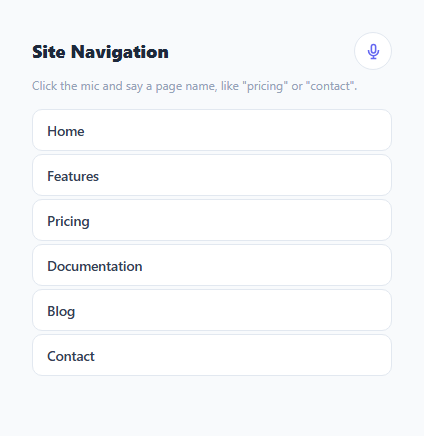
A voice command navigation menu lets a visitor say a page name out loud instead of clicking a link — press the mic, speak "pricing" or "go to contact," and the matching nav item highlights and the browser navigates there. It is built entirely on the browser-native SpeechRecognition API (part of the Web Speech API), so there is no external speech service, API key, or backend involved; recognition happens in the browser itself.
Feature-detecting the API before using it
Speech recognition support varies by browser — Chrome and Edge expose it as webkitSpeechRecognition, and the unprefixed SpeechRecognition name is still inconsistently available. const SpeechRecognitionImpl = window.SpeechRecognition || window.webkitSpeechRecognition checks for either name once at load time. startListening() checks this value before doing anything else and shows a plain-language fallback message — "try Chrome or Edge, or click a link below" — rather than throwing an error or silently failing, since every navigation link in the menu is a normal clickable <a> regardless of voice support.
Fuzzy matching a spoken phrase to a link
Speech recognition rarely returns exactly the string you'd expect — a user might say "go to pricing", "the pricing page", or just "pricing", and the recognizer's own transcription can clip words unpredictably. findMatch() normalizes both the heard phrase and each link's data-page name (lowercasing and stripping punctuation via normalize()), then checks a two-way substring relationship: spoken.includes(page) || page.includes(spoken). This tolerates a heard phrase that *contains* the page name as one word among several ("go to pricing please" still contains "pricing"), and also tolerates a heard phrase that's a *substring* of the page name in unusual clipped-recognition cases, without requiring exact equality either way.
Result, error, and end events drive the UI, not a polling loop
The recognition object is event-driven: a result listener receives the final transcript and calls handleResult(); an error listener surfaces the specific error code (e.g. no-speech, not-allowed for a denied microphone permission) directly in the hint text; and an end listener removes the pulsing .listening animation from the mic button regardless of whether a match was found, an error occurred, or the user simply stopped talking. Structuring the UI purely around these events means the mic button's visual state always accurately reflects whether the browser is actively listening.
Graceful, link-first design
Every item in .vc-list is a real <a> element with a real href, styled and clickable identically whether or not voice input is used. Voice recognition only adds a .matched highlight and a programmatic scroll into view on top of that — it never replaces the underlying navigation, so the menu remains fully usable via mouse, touch, or keyboard even in browsers with no SpeechRecognition support at all.
Build with AI
Build, Understand, Optimize, and Extend It With AI
Paste this snippet's HTML, CSS, and JS into an AI coding assistant like Claude and ask it to explain exactly how the two-way substring check in findMatch() tolerates natural spoken phrases without requiring an exact match, and how the result/error/end event trio keeps the mic button's visual state always accurate. It's also a strong candidate for extension — ask the assistant to support continuous listening with interimResults for live partial-match highlighting as the user speaks, add multi-language support by exposing recognition.lang as a user-selectable option, or extend the fuzzy matcher into a small Levenshtein-distance fallback for phrases that do not contain an exact substring match at all.
Prompt to recreate it
Copy this into your AI assistant of choice to build the effect from scratch, or as a jumping-off point for your own variant:
Build a voice-controlled site navigation menu in plain HTML, CSS, and JavaScript using the browser's native Web Speech API — no external speech service, API key, or library.

Requirements:
- A list of real navigation links (actual anchor elements with href attributes), each carrying a short page-name identifier used for voice matching, alongside a microphone button.
- Before attempting to use speech recognition, feature-detect it by checking for both the unprefixed SpeechRecognition and the webkitSpeechRecognition global. If neither exists, show a clear fallback message and leave every link fully clickable and functional on its own.
- Clicking the microphone button must start a speech recognition session with English language, non-interim (final-only) results, and a single alternative, giving the mic button an active "listening" visual state for the duration.
- When a final transcript is received, normalize it (lowercase, strip punctuation) and fuzzily match it against every link's page-name identifier using a two-way substring check — the transcript containing the page name, or the page name containing the transcript — so that natural phrases like "go to pricing" match a link whose identifier is just "pricing".
- If a match is found, visually highlight that link and scroll it into view; if no match is found, show a clear "no matching page" message instead of failing silently.
- Handle the recognition's error event by showing the specific error code in the UI (e.g. a denied microphone permission), and handle its end event by always removing the "listening" visual state regardless of whether a match, an error, or silence ended the session.
- Display a live transcript of exactly what was heard, for transparency.
Want to tighten it up first? Run this prompt through the AI Prompt Studio to score it across 8 quality dimensions, catch anti-patterns, and tune the wording for Claude, ChatGPT, or Gemini before you paste it in.
Step by step
How to Use
- 1Click the microphone buttonstartListening() feature-detects SpeechRecognition, and if available, creates a recognizer, starts it, and pulses the mic button.
- 2Say a page nameSpeak a link name like "pricing" or a short phrase like "go to contact". The recognizer's result event fires once with the final transcript.
- 3Watch the matching link highlightfindMatch() normalizes and fuzzily compares the heard phrase against every link's data-page attribute, highlighting the first match and scrolling it into view.
- 4Handle no-match or errors gracefullyAn unmatched phrase shows a helpful hint instead of failing silently; a denied microphone permission or recognition error shows the specific error message.
- 5Add more nav linksAdd another .vc-link anchor with a data-page attribute containing the spoken phrase you want it to match against.
- 6Wire up real navigationSince every link is a real <a href>, clicking it (or matching it by voice and adding your own navigation call) works with standard browser navigation or your router.
Real-world uses
Common Use Cases
Got questions?
Frequently Asked Questions
startListening() checks for window.SpeechRecognition or window.webkitSpeechRecognition before doing anything else. If neither exists, it shows a plain-language fallback message suggesting Chrome or Edge and pointing to the clickable links below, which work identically with or without voice support.
findMatch() normalizes both the heard phrase and each link's data-page value by lowercasing and stripping punctuation, then checks whether the spoken phrase contains the page name as a substring, or vice versa. This matches natural phrases like "go to pricing" against a page name of just "pricing" in either direction.
No. The SpeechRecognition API performs recognition using the browser's own implementation (which, depending on the browser, may process audio on-device or via the browser vendor's own service) — this snippet only reads the resulting text transcript locally in JavaScript and never sends it anywhere itself.
The recognition object's error event fires with a specific error code such as not-allowed, which is displayed directly in the hint text so the user understands exactly what went wrong rather than seeing a generic failure.
Yes. Add another anchor with class vc-link and a data-page attribute set to whatever word or short phrase you want spoken input to match against — no other code changes are required since findMatch() reads every .vc-link element's data-page dynamically.
The listening CSS class adds a looping box-shadow animation (vc-pulse) purely as visual feedback that the browser is actively capturing audio, and it is removed automatically when the recognition object's end event fires, regardless of whether a match, an error, or silence ended the session.