Source Code
<div class="wrap">
  <div class="table-head">
    <h2 class="table-title">Projects</h2>
  </div>
  <div class="table-scroll">
    <table class="tbl">
      <thead>
        <tr>
          <th>Project</th>
          <th>Owner</th>
          <th>Status</th>
          <th>Updated</th>
          <th class="menu-col"></th>
        </tr>
      </thead>
      <tbody id="tbody"></tbody>
    </table>
  </div>
  <div class="toast" id="toast"></div>
</div>
* { box-sizing: border-box; margin: 0; padding: 0; }
body { font-family: system-ui, sans-serif; background: #f8fafc; min-height: 100vh; padding: 32px 20px; position: relative; }
.wrap { max-width: 720px; margin: 0 auto; position: relative; }
.table-head { margin-bottom: 12px; }
.table-title { font-size: 18px; font-weight: 800; color: #0f172a; }
.table-scroll { overflow-x: auto; overflow-y: visible; border-radius: 12px; box-shadow: 0 1px 6px rgba(0,0,0,0.06); }
.tbl { width: 100%; border-collapse: collapse; background: #fff; }
.tbl thead tr { background: #f8fafc; }
.tbl th { padding: 11px 14px; text-align: left; font-size: 11px; font-weight: 700; text-transform: uppercase; letter-spacing: 0.5px; color: #64748b; border-bottom: 1px solid #e2e8f0; }
.menu-col { width: 44px; }
.tbl td { padding: 12px 14px; border-bottom: 1px solid #f1f5f9; font-size: 13.5px; color: #334155; vertical-align: middle; }
.tbl tbody tr:last-child td { border-bottom: none; }
.tbl tbody tr:hover { background: #fafafa; }
.tbl tbody tr.archiving { opacity: 0.4; }
.proj-name { font-weight: 700; color: #0f172a; }
.status-pill { font-size: 11px; font-weight: 700; padding: 4px 10px; border-radius: 999px; display: inline-block; }
.status-pill.active { background: #dcfce7; color: #15803d; }
.status-pill.paused { background: #fef3c7; color: #b45309; }
.status-pill.archived { background: #f1f5f9; color: #64748b; }
.menu-cell { position: relative; text-align: center; }
.menu-btn { width: 30px; height: 30px; border-radius: 8px; border: none; background: transparent; color: #94a3b8; cursor: pointer; font-size: 16px; display: inline-flex; align-items: center; justify-content: center; transition: background 0.12s, color 0.12s; }
.menu-btn:hover, .menu-btn.open { background: #f1f5f9; color: #0f172a; }
.menu-dropdown { position: absolute; top: calc(100% + 4px); right: 0; min-width: 168px; background: #fff; border: 1px solid #e2e8f0; border-radius: 11px; box-shadow: 0 10px 30px rgba(15,23,42,0.14); padding: 6px; z-index: 20; display: none; }
.menu-dropdown.open { display: block; animation: menu-in 0.12s ease; }
@keyframes menu-in { from { opacity: 0; transform: translateY(-4px); } to { opacity: 1; transform: none; } }
.menu-item { width: 100%; display: flex; align-items: center; gap: 9px; padding: 8px 10px; border-radius: 8px; border: none; background: none; font-size: 13px; font-weight: 600; color: #334155; cursor: pointer; text-align: left; font-family: inherit; }
.menu-item:hover { background: #f8fafc; }
.menu-item.danger { color: #dc2626; }
.menu-item.danger:hover { background: #fef2f2; }
.menu-divider { height: 1px; background: #f1f5f9; margin: 5px 2px; }
.toast { position: fixed; bottom: 24px; left: 50%; transform: translateX(-50%) translateY(20px); background: #0f172a; color: #fff; font-size: 13px; font-weight: 600; padding: 10px 18px; border-radius: 10px; opacity: 0; pointer-events: none; transition: opacity 0.2s, transform 0.2s; z-index: 50; }
.toast.show { opacity: 1; transform: translateX(-50%) translateY(0); }let projects = [
{ id: 1, name: 'Marketing site redesign', owner: 'Priya N.', status: 'active', updated: '2h ago' },
{ id: 2, name: 'Mobile app v3', owner: 'Diego R.', status: 'active', updated: '5h ago' },
{ id: 3, name: 'Internal admin tools', owner: 'Sam K.', status: 'paused', updated: '1d ago' },
{ id: 4, name: 'Q3 data pipeline', owner: 'Priya N.', status: 'active', updated: '3d ago' },
{ id: 5, name: 'Legacy billing migration', owner: 'Wei L.', status: 'archived', updated: '2w ago' },
];
let openMenuId = null;
function toast(msg) {
const el = document.getElementById('toast');
el.textContent = msg;
el.classList.add('show');
clearTimeout(toast._t);
toast._t = setTimeout(() => el.classList.remove('show'), 1800);
}
function closeAllMenus() {
openMenuId = null;
document.querySelectorAll('.menu-dropdown.open').forEach(m => m.classList.remove('open'));
document.querySelectorAll('.menu-btn.open').forEach(b => b.classList.remove('open'));
}
function render() {
const tbody = document.getElementById('tbody');
tbody.innerHTML = projects.map(p => `
<tr data-id="${p.id}">
<td class="proj-name">${p.name}</td>
<td>${p.owner}</td>
<td><span class="status-pill ${p.status}">${p.status.charAt(0).toUpperCase() + p.status.slice(1)}</span></td>
<td>${p.updated}</td>
<td class="menu-cell">
<button class="menu-btn${openMenuId === p.id ? ' open' : ''}" data-menu-toggle="${p.id}" aria-haspopup="true" aria-expanded="${openMenuId === p.id}">\u22EF</button>
<div class="menu-dropdown${openMenuId === p.id ? ' open' : ''}" data-menu="${p.id}" role="menu">
<button class="menu-item" data-action="rename" data-id="${p.id}" role="menuitem">Rename</button>
<button class="menu-item" data-action="toggle-pause" data-id="${p.id}" role="menuitem">${p.status === 'paused' ? 'Resume' : 'Pause'}</button>
<button class="menu-item" data-action="duplicate" data-id="${p.id}" role="menuitem">Duplicate</button>
<div class="menu-divider"></div>
<button class="menu-item danger" data-action="archive" data-id="${p.id}" role="menuitem">Archive</button>
</div>
</td>
</tr>
`).join('');
}
function handleAction(action, id) {
const proj = projects.find(p => p.id === id);
if (!proj) return;
closeAllMenus();
if (action === 'rename') {
const next = prompt('Rename project:', proj.name);
if (next && next.trim()) { proj.name = next.trim(); toast('Renamed to "' + proj.name + '"'); render(); }
} else if (action === 'toggle-pause') {
proj.status = proj.status === 'paused' ? 'active' : 'paused';
toast(proj.status === 'paused' ? 'Project paused' : 'Project resumed');
render();
} else if (action === 'duplicate') {
const copy = { ...proj, id: Math.max(...projects.map(p => p.id)) + 1, name: proj.name + ' (copy)', updated: 'just now' };
projects.push(copy);
toast('Duplicated "' + proj.name + '"');
render();
} else if (action === 'archive') {
const row = document.querySelector('tr[data-id="' + id + '"]');
if (row) row.classList.add('archiving');
setTimeout(() => {
projects = projects.filter(p => p.id !== id);
toast('Archived "' + proj.name + '"');
render();
}, 200);
}
}
document.addEventListener('click', (e) => {
const toggle = e.target.closest('[data-menu-toggle]');
if (toggle) {
const id = Number(toggle.dataset.menuToggle);
const wasOpen = openMenuId === id;
closeAllMenus();
if (!wasOpen) { openMenuId = id; render(); }
return;
}
const actionBtn = e.target.closest('[data-action]');
if (actionBtn) {
handleAction(actionBtn.dataset.action, Number(actionBtn.dataset.id));
return;
}
if (!e.target.closest('.menu-dropdown')) closeAllMenus(), render();
});
document.addEventListener('keydown', (e) => {
if (e.key === 'Escape' && openMenuId !== null) { closeAllMenus(); render(); }
});
render();Learn Coding Visually
Learn to code with interactive, live-preview playgrounds — HTML, CSS, JavaScript, React & more.
 HTML Playground42 lessons · Click-based · Live preview
 CSS PlaygroundLearn CSS with a live editor
 JavaScript Playground60 lessons · DOM · Async · Canvas
 React PlaygroundLearn React with a live code editor
 GSAP PlaygroundLearn GSAP animation interactively
 SVG Playground44 lessons · shapes · paths · animation
 SCSS Playground45 lessons · Sass modules · tokens
 Tailwind PlaygroundLearn Tailwind CSS with a live editor
 Bootstrap 5 Playground50 lessons · live preview
Table with Row Action Dropdown — Free HTML CSS JS Snippet
Table with Row Action Dropdown · Tables · Plain HTML, CSS & JS · Live preview
What's included
Features
About this UI Snippet
Table with Row Action Dropdown — Per-Row Kebab Menu, Single-Open State & Click-Outside Close
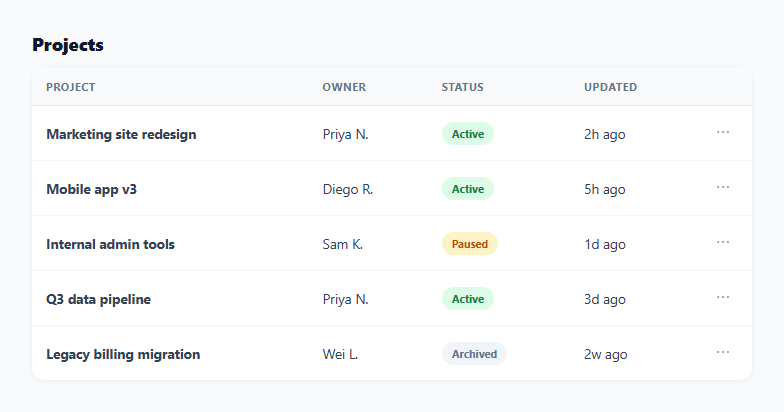
Cramming five action buttons into every row of a table makes the table unreadable at a glance and wastes horizontal space on actions most rows won't need at any given moment. The kebab-menu pattern — a single small "⋯" button per row that opens a dropdown of contextual actions — keeps the table scannable while still surfacing rename, pause, duplicate, and archive actions exactly where they apply.
One open menu at a time, tracked by id
Rather than a boolean per row, the whole table tracks a single openMenuId value. Clicking a row's toggle button compares its id against openMenuId: if that row's menu was already open, it closes; otherwise closeAllMenus() runs first (closing whatever else was open) before the new id is set. This guarantees exactly one dropdown can be open across the entire table at any time — two simultaneously open menus in a scrollable table would be visually confusing and could overlap each other.
Closing on outside click and Escape, not just re-toggling
A single document-level click listener checks whether the click landed on a toggle button, an action item, or neither. When it's neither — and specifically not inside .menu-dropdown itself — every open menu closes. A separate keydown listener closes the open menu on Escape. Both are standard expectations for any dropdown menu; without them, a menu that only closes when its own toggle is clicked again would trap users into re-finding the same tiny button just to dismiss it.
Actions read the current data, not a stale snapshot
Every action handler (handleAction) looks up the project fresh from the projects array by id rather than closing over the object as it existed when the row was rendered. This matters because the dropdown's own rendering depends on current status (the "Pause" item becomes "Resume" once a project is paused) — reading fresh data on each click keeps the label and the action it performs in sync even across multiple menu opens.
Archive as a fade-then-remove, not an instant delete
Clicking "Archive" first adds an .archiving class (dimming the row via opacity) and only removes the project from the array — via setTimeout — after that visual cue has had a moment to register. An item vanishing from a list the instant a menu item is clicked can read as the table glitching rather than the action succeeding; the brief fade confirms cause and effect before the row disappears.
A shared toast instead of a modal for every confirmation
Every action (rename, pause, duplicate, archive) reports its result through one shared toast() element at the bottom of the screen rather than a blocking modal or alert. This keeps rapid actions — like duplicating three rows in a row — from interrupting the workflow with a dialog to dismiss after each one.
Build with AI
Build, Understand, Optimize, and Extend It With AI
Paste this snippet's HTML, CSS, and JS into an AI coding assistant like Claude and ask it to explain exactly how the single openMenuId variable, combined with the document-level click listener's closest() checks, guarantees that at most one dropdown can ever be open at a time even as the table re-renders on every click. The same assistant can help optimize it — for instance asking whether the dropdown should reposition itself when it would overflow the viewport near the table's edges, or the bottom of a scrollable table. It's also useful for extending the table: ask it to add keyboard arrow-key navigation between menu items once a dropdown is open, add a confirmation step before the destructive Archive action, or wire the whole thing to a real backend API with optimistic updates. Treat the code less like a finished artifact and more like a starting point for a conversation.
Prompt to recreate it
Copy this into your AI assistant of choice to build the effect from scratch, or as a jumping-off point for your own variant:
Build a data table in plain HTML, CSS, and JavaScript where each row has its own per-row "kebab menu" (a small ⋯ button) that opens a dropdown of contextual actions — no library, no framework.

Requirements:
- Keep the table's data in a single array of plain objects and re-render the full table body from that array on every state change, the same render-from-array pattern any state-driven table should use.
- Track which row's dropdown is currently open using a single shared value (such as one row id, not a boolean flag per row), so that opening one row's dropdown always closes any other row's dropdown that might currently be open — never allow two dropdowns open simultaneously.
- Clicking anywhere outside an open dropdown (and outside its own toggle button) must close it, and pressing the Escape key must also close whichever dropdown is currently open, from anywhere on the page.
- Include at least four distinct actions in the dropdown (for example rename, toggle a status field, duplicate the row, and a destructive delete/archive action), where at least one action's label text changes dynamically based on that row's current data (for example a Pause action that becomes a Resume action once the row is already paused).
- The destructive action must not remove its row from the DOM instantly — first apply a brief visual transition (such as a fade or dim) to the row, then remove the underlying data and re-render only after that transition has had time to be seen.
- Confirm the result of every action (including the destructive one) via a single small shared toast/snackbar element that appears briefly and does not block further interaction with the table, rather than a blocking modal or native alert dialog.
Want to tighten it up first? Run this prompt through the AI Prompt Studio to score it across 8 quality dimensions, catch anti-patterns, and tune the wording for Claude, ChatGPT, or Gemini before you paste it in.
Step by step
How to Use
- 1Click the ⋯ button on any rowOpens that row's dropdown with Rename, Pause/Resume, Duplicate, and Archive actions. Opening a new row's menu automatically closes any other open one.
- 2Click outside or press EscapeBoth close the currently open dropdown without taking any action.
- 3Try each actionRename prompts for a new name, Pause/Resume toggles status, Duplicate adds a copy, and Archive fades the row out before removing it — each shows a toast confirmation.
- 4Edit the menu itemsAdd or remove <button class="menu-item" data-action="..."> elements in the render() template string, then add a matching branch in handleAction().
- 5Replace the data-driven actions with real API callsInside each handleAction() branch, replace the local array mutation with a fetch call to your backend, then re-render once it succeeds.
- 6Export in your formatClick "HTML" for a standalone file, "JSX" for a React component, or "Tailwind" for a Tailwind CSS version.
Real-world uses
Common Use Cases
Got questions?
Frequently Asked Questions
The whole table tracks a single openMenuId variable rather than a per-row open flag. Clicking a toggle button calls closeAllMenus() (which clears openMenuId and removes every .open class) before conditionally setting openMenuId to the clicked row's id — so opening one row's menu always closes any other.
A single document-level click listener checks e.target.closest(".menu-dropdown") — if the click did not land inside an open dropdown (and was not the toggle button or a menu item, both handled earlier in the same listener), closeAllMenus() runs and the table re-renders.
The archive action first adds an .archiving class that dims the row via CSS opacity, then uses setTimeout to actually splice the project out of the array and re-render after 200ms. This gives the user a moment to see the row respond before it disappears, rather than an instant jump.
Add a new <button class="menu-item" data-action="export" data-id="${p.id}">Export</button> inside the dropdown template in render(), then add an else if (action === "export") { ... } branch inside handleAction() implementing the behavior.
The dropdown is positioned with right: 0 relative to its menu cell, so it aligns to the right edge of the button by default, which works well for a right-aligned action column. For a table where the action column is not the last column, you would need to add logic that flips the dropdown to open leftward when it would overflow the viewport.
Keep openMenuId in useState(null), toggle it in the button's onClick, and use a useEffect with a document click/keydown listener (cleaned up on unmount) to close it on outside click or Escape — the same logic as the vanilla JS version, just moved into React's state and effect model.