Source Code
<div class="scene">
  <h1 class="gravity-heading" id="heading">Letters fall into place</h1>
  <button class="replay" onclick="dropLetters()">Drop again</button>
</div>
* { box-sizing: border-box; margin: 0; padding: 0; }
body { font-family: system-ui, sans-serif; background: #ecfeff; display: flex; align-items: center; justify-content: center; min-height: 100vh; padding: 20px; overflow: hidden; }
.scene { text-align: center; display: flex; flex-direction: column; align-items: center; gap: 30px; max-width: 720px; }
.gravity-heading {
font-size: clamp(28px, 6.5vw, 52px);
font-weight: 800;
color: #0e7490;
display: flex;
flex-wrap: wrap;
justify-content: center;
}
.letter {
display: inline-block;
position: relative;
will-change: transform;
}
.letter.space { width: 0.32em; }
.replay {
padding: 9px 20px; font-size: 13px; font-weight: 600;
background: #0e7490; color: #fff; border: none; border-radius: 999px;
cursor: pointer; transition: background 0.15s, transform 0.1s;
}
.replay:hover { background: #155e75; }
.replay:active { transform: scale(0.96); }const GRAVITY = 2600;
const START_HEIGHT = 260;
const BOUNCE_DAMPING = 0.42;
function buildLetters(el) {
const text = el.textContent.trim();
el.textContent = '';
const frag = document.createDocumentFragment();
text.split('').forEach((ch) => {
const span = document.createElement('span');
span.className = 'letter' + (ch === ' ' ? ' space' : '');
span.textContent = ch === ' ' ? '\u00a0' : ch;
frag.appendChild(span);
});
el.appendChild(frag);
}
function animateDrop(el, delay) {
return new Promise((resolve) => {
setTimeout(() => {
const startTime = performance.now();
let restY = 0;
let velocity = Math.sqrt(2 * GRAVITY * (START_HEIGHT / 1000));
let y = -START_HEIGHT;
let bounces = 0;
el.style.opacity = '1';
let last = startTime;
function loop(now) {
const dt = Math.min((now - last) / 1000, 0.032);
last = now;
velocity += GRAVITY * dt;
y += velocity * dt;
if (y >= restY) {
y = restY;
velocity = -velocity * BOUNCE_DAMPING;
bounces++;
if (Math.abs(velocity) < 45 || bounces > 5) {
el.style.transform = 'translateY(0px)';
resolve();
return;
}
}
el.style.transform = 'translateY(' + y + 'px)';
requestAnimationFrame(loop);
}
requestAnimationFrame(loop);
}, delay);
});
}
function dropLetters() {
const letters = document.querySelectorAll('.letter');
letters.forEach((l) => {
l.style.opacity = '0';
l.style.transform = 'translateY(-' + START_HEIGHT + 'px)';
});
letters.forEach((l, i) => animateDrop(l, i * 45));
}
buildLetters(document.getElementById('heading'));
dropLetters();Learn Coding Visually
Learn to code with interactive, live-preview playgrounds — HTML, CSS, JavaScript, React & more.
 HTML Playground42 lessons · Click-based · Live preview
 CSS PlaygroundLearn CSS with a live editor
 JavaScript Playground60 lessons · DOM · Async · Canvas
 React PlaygroundLearn React with a live code editor
 GSAP PlaygroundLearn GSAP animation interactively
 SVG Playground44 lessons · shapes · paths · animation
 SCSS Playground45 lessons · Sass modules · tokens
 Tailwind PlaygroundLearn Tailwind CSS with a live editor
 Bootstrap 5 Playground50 lessons · live preview
Letter Gravity Drop Text Animation — Bounce Physics JS
Letter Gravity Drop Text · Animations · Plain HTML, CSS & JS · Live preview
What's included
Features
About this UI Snippet
Letter Gravity Drop Text — Gravity Acceleration, Bounce Damping & requestAnimationFrame
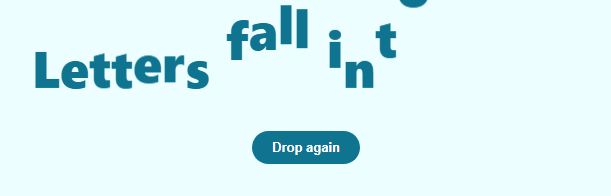
A letter gravity drop animates each character of a headline falling from above the baseline under simulated gravity, bouncing once or twice off the resting position with diminishing height, and settling — the way a dropped ball behaves, applied to typography. It reads as more physically grounded than a CSS ease-out, because the motion is computed frame by frame from actual velocity and acceleration rather than sampled from a fixed easing curve. For a rotational, hinge-style entrance instead of a vertical drop, see 3D character flip reveal; for a scale-based spring instead of gravity, see word spring bounce heading.
Splitting into letters and priming them off-screen
buildLetters(el) wraps every character of the heading in its own <span class="letter">, converting spaces to non-breaking spaces so word gaps hold their width. Before dropping, dropLetters() sets every letter's opacity to 0 and transform to translateY(-260px) — parking each letter well above its resting line, invisible, ready to fall.
Simulating gravity with velocity and acceleration
Rather than a CSS @keyframes curve, each letter's fall is computed manually inside a requestAnimationFrame loop. velocity += GRAVITY * dt accelerates the letter downward every frame (GRAVITY = 2600, an arbitrary pixels/second² constant tuned for a snappy but visible fall), and y += velocity * dt integrates that velocity into a position update. dt is the real elapsed time since the previous frame ((now - last) / 1000, clamped to avoid a huge jump after a tab is backgrounded), so the fall speed is consistent regardless of the display's refresh rate.
The bounce
When y >= restY (the letter has reached or passed its resting baseline), the code clamps y back to restY and reverses the velocity with damping: velocity = -velocity * BOUNCE_DAMPING (BOUNCE_DAMPING = 0.42). Because the reflected velocity is smaller than the impact velocity, each successive bounce is lower than the last — exactly like a real dropped object losing energy to an inelastic surface. The loop keeps bouncing until the velocity magnitude falls below a small threshold or a bounce-count cap is hit, at which point it snaps to exactly translateY(0px) and resolves.
Staggering the drops
dropLetters() calls animateDrop(l, i * 45) for every letter, delaying the start of each letter's fall by 45ms times its index via setTimeout. Because each letter runs its own independent requestAnimationFrame loop with its own velocity state, letters that start falling later do not interfere with ones already bouncing — the whole headline settles in a cascading, slightly chaotic rhythm rather than a mechanically uniform one.
Build with AI
Build, Understand, Optimize, and Extend It With AI
Paste this snippet's HTML, CSS, and JS into an AI coding assistant like Claude and ask it to walk through exactly how the velocity and position variables update every frame inside the requestAnimationFrame loop, and why BOUNCE_DAMPING being less than 1 is what makes each successive bounce lower than the last — try changing GRAVITY and BOUNCE_DAMPING together and predicting how the motion will feel before testing it. It's also worth a performance conversation: since every letter runs its own independent requestAnimationFrame loop simultaneously, ask whether a single shared loop driving an array of letter states would be more efficient for very long headlines, and at what letter count that would start to matter. For extending it, ask for a version where letters bounce off each other (basic collision) instead of only the baseline, one where a subtle squash-and-stretch is applied to each letter proportional to its impact velocity, or one triggered by scroll position instead of firing on page load. Treat the code less like a finished artifact and more like a starting point for a conversation.
Prompt to recreate it
Copy this into your AI assistant of choice to build the effect from scratch, or as a jumping-off point for your own variant:
Build a headline where each letter drops in from above under simulated gravity and bounces to a stop, in plain HTML, CSS, and vanilla JavaScript — no physics or animation library, driven entirely by requestAnimationFrame.

Requirements:
- On page load, split the heading's text into one span per character (preserving spaces as non-breaking spaces in their own span so word gaps do not collapse), then position every letter above its natural resting position and hidden.
- For each letter independently, run a requestAnimationFrame loop that tracks a velocity and a vertical position, increasing velocity every frame by a gravity constant multiplied by the real elapsed time since the previous frame (not a fixed per-frame increment), and integrating that velocity into the position the same way.
- When a letter's simulated position reaches or passes its resting line, clamp it back to the resting line and reverse its velocity, multiplying the reversed velocity by a damping factor less than 1 so each bounce is measurably lower than the last, continuing until the velocity magnitude drops below a small threshold (or a maximum bounce count is reached), at which point the letter snaps exactly to its resting position and its loop stops.
- Stagger the start of each letter's fall using a per-letter delay proportional to its position in the string, so letters cascade in from left to right rather than all beginning to fall in the same frame.
- Include a replay button that resets every letter back above the line, invisible, and restarts the full staggered gravity-drop sequence for all letters from scratch.
- Play the sequence once automatically on page load in addition to being replayable via the button.
Want to tighten it up first? Run this prompt through the AI Prompt Studio to score it across 8 quality dimensions, catch anti-patterns, and tune the wording for Claude, ChatGPT, or Gemini before you paste it in.
Step by step
How to Use
- 1Watch it load, then replayLetters fall in with a bounce on page load. Click "Drop again" to reset every letter above the line and replay the cascade.
- 2Change the headline textEdit the text inside #heading in the HTML panel — buildLetters() re-splits it into per-letter spans on load.
- 3Adjust the fall strengthIn the JS panel, increase GRAVITY for a faster, snappier fall or decrease it for a slower, floatier one.
- 4Change how bouncy letters areUpdate BOUNCE_DAMPING (0 to 1) — closer to 1 means more energy is retained and letters bounce more times before settling.
- 5Adjust the stagger between lettersChange the 45 multiplier in animateDrop(l, i * 45) inside dropLetters() to speed up or slow down the cascade.
- 6Export in your formatClick "HTML" for a standalone file, "JSX" for a React component, or "Tailwind" for a React + Tailwind version.
Real-world uses
Common Use Cases
Got questions?
Frequently Asked Questions
It is a genuine (simplified) simulation. Each letter has its own velocity that increases every frame by GRAVITY * dt, and position that increases every frame by velocity * dt — real numerical integration, not a value sampled from a fixed bezier curve. This is what allows the bounce to look organic rather than mechanically repeating.
When a letter's falling position reaches its resting line, its velocity is reversed and multiplied by BOUNCE_DAMPING (0.42), which is less than 1. Each bounce therefore launches the letter upward with less speed than it landed with, so peak height decreases every bounce until the velocity drops below a stop threshold.
Delta time (now - last) / 1000 measures real elapsed seconds between frames, so the fall speed stays consistent whether the display runs at 60Hz, 120Hz, or drops frames under load. A fixed per-frame step would make the animation run at different real-world speeds on different devices.
Staggering the start time with i * 45ms per letter index creates a cascading left-to-right rhythm. Each letter runs an independent physics loop with its own velocity and position state, so staggering starts never causes two letters to fight over the same animation state.
Increase BOUNCE_DAMPING toward 1 for more bounces retaining more energy each time; decrease it toward 0 for a fall that barely bounces at all and settles almost immediately on impact.
Yes. Click "JSX" for a React component. Store each letter's DOM node in a ref array, run the same requestAnimationFrame velocity loop inside a useEffect triggered by a "play" trigger prop, and clean up any pending animation frames on unmount.