Source Code
<div class="jd-stage">
  <p class="jd-hint">Hover each icon — it squashes down then stretches up with real spring physics, like soft rubber</p>
  <div class="jd-dock" id="jdDock">
    <button class="jd-icon" style="background:#6366f1">🏠</button>
    <button class="jd-icon" style="background:#22c55e">💬</button>
    <button class="jd-icon" style="background:#f59e0b">🎵</button>
    <button class="jd-icon" style="background:#ec4899">📷</button>
    <button class="jd-icon" style="background:#0ea5e9">📁</button>
    <button class="jd-icon" style="background:#8b5cf6">⚙️</button>
  </div>
</div>
* { box-sizing: border-box; margin: 0; padding: 0; }
body { font-family: system-ui, sans-serif; background: #0b0f1a; display: flex; align-items: center; justify-content: center; min-height: 100vh; }
.jd-stage { display: flex; flex-direction: column; align-items: center; gap: 32px; padding: 24px; }
.jd-hint { font-size: 13px; color: #64748b; text-align: center; max-width: 380px; }
.jd-dock {
display: flex;
gap: 16px;
padding: 14px;
background: rgba(255,255,255,0.04);
border: 1px solid rgba(255,255,255,0.08);
border-radius: 22px;
backdrop-filter: blur(12px);
}
.jd-icon {
width: 56px; height: 56px;
border-radius: 16px;
border: none;
font-size: 24px;
display: flex; align-items: center; justify-content: center;
cursor: pointer;
will-change: transform;
transform-origin: bottom center;
box-shadow: 0 6px 16px rgba(0,0,0,0.3);
}// Each icon runs its own spring-damper simulation on scaleX/scaleY, anchored
// to transform-origin: bottom center, so hovering it looks like poking a soft
// rubber tile: it compresses downward on entry, then overshoots into a taller
// stretch before settling — real per-frame physics, not a fixed keyframe.
function attachJellySpring(el) {
var sx = 1, sy = 1, vx = 0, vy = 0;
var targetSx = 1, targetSy = 1;
var stiffness = 0.22, damping = 0.68;
var running = false;
function frame() {
var fx = (targetSx - sx) * stiffness;
var fy = (targetSy - sy) * stiffness;
vx = (vx + fx) * damping;
vy = (vy + fy) * damping;
sx += vx;
sy += vy;
el.style.transform = 'scale(' + sx.toFixed(4) + ',' + sy.toFixed(4) + ')';
var settled = Math.abs(vx) < 0.0008 && Math.abs(vy) < 0.0008 &&
Math.abs(targetSx - sx) < 0.0015 && Math.abs(targetSy - sy) < 0.0015;
if (settled) {
sx = targetSx; sy = targetSy;
el.style.transform = 'scale(' + sx + ',' + sy + ')';
running = false;
return;
}
requestAnimationFrame(frame);
}
function wake() { if (!running) { running = true; requestAnimationFrame(frame); } }
el.addEventListener('mouseenter', function () {
targetSx = 1.22; targetSy = 0.74; // quick compress, wider footprint
wake();
setTimeout(function () {
// Rebound into a taller stretch before finally settling at 1,1.
targetSx = 0.92; targetSy = 1.28;
wake();
setTimeout(function () { targetSx = 1; targetSy = 1; wake(); }, 140);
}, 90);
});
el.addEventListener('mouseleave', function () {
targetSx = 1; targetSy = 1;
wake();
});
}
document.querySelectorAll('.jd-icon').forEach(attachJellySpring);Learn Coding Visually
Learn to code with interactive, live-preview playgrounds — HTML, CSS, JavaScript, React & more.
 HTML Playground42 lessons · Click-based · Live preview
 CSS PlaygroundLearn CSS with a live editor
 JavaScript Playground60 lessons · DOM · Async · Canvas
 React PlaygroundLearn React with a live code editor
 GSAP PlaygroundLearn GSAP animation interactively
 SVG Playground44 lessons · shapes · paths · animation
 SCSS Playground45 lessons · Sass modules · tokens
 Tailwind PlaygroundLearn Tailwind CSS with a live editor
 Bootstrap 5 Playground50 lessons · live preview
Jelly Icon Dock Hover — Spring Physics Icon Snippet
Jelly Icon Dock Hover · Animations · Plain HTML, CSS & JS · Live preview
What's included
Features
About this UI Snippet
Jelly Icon Dock Hover — Bottom-Anchored Spring Squash-Rebound-Settle Sequence
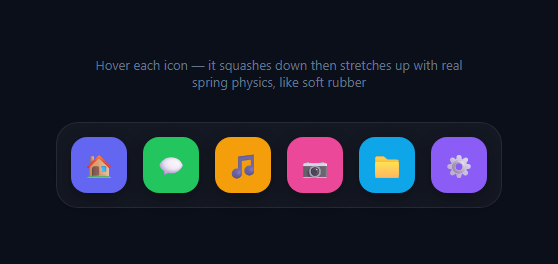
This dock treats each icon like a soft rubber tile sitting on a surface: hovering one compresses it downward, then it rebounds into a taller stretch before finally settling back to normal size — a three-stage physical sequence, not a single squash-and-return like jelly press button, and not a rigid scale-up like a typical macOS-style dock magnification effect. Each icon runs its own independent spring simulation, so hovering across the row shows several icons at different points in their own compress-rebound-settle cycle at once.
Bottom-anchored transform origin
Every .jd-icon has transform-origin: bottom center. This single CSS property is what makes the squash read as "sitting on a surface" rather than floating in space — when scaleY shrinks, the icon's bottom edge stays anchored and only its top compresses downward, exactly like pressing down on a rubber tile fixed to a shelf, rather than shrinking symmetrically from its own center.
The three-stage sequence
On mouseenter, the target scale first becomes { sx: 1.22, sy: 0.74 } — wide and flat, the compression. A setTimeout of 90ms later, the target flips to { sx: 0.92, sy: 1.28 } — narrow and tall, the rebound stretch, simulating the stored energy from the compression releasing upward. A further 140ms later, the target settles at { sx: 1, sy: 1 }, natural size. Each stage change calls wake() to restart the physics loop if it had gone idle, and because the spring's own velocity carries over between target changes, the transitions between stages blend smoothly rather than snapping.
The spring-damper loop itself
Identical in structure to jelly press button's physics: each frame computes a force toward the current target ((target - current) * stiffness), accumulates it into velocity, damps that velocity, and integrates it into the current scale. The loop self-terminates once velocity and distance-to-target both fall under a small epsilon, avoiding wasted requestAnimationFrame calls once an icon is visually at rest.
Per-icon independence
attachJellySpring(el) creates a fresh closure over its own sx, sy, vx, vy, and running flag for every icon it's called on. There's no shared state between icons — hovering one doesn't affect any other icon's spring, and rapidly hovering several icons in sequence lets each one run its full three-stage sequence independently and concurrently.
Interrupted hovers
If the cursor leaves an icon mid-sequence, mouseleave immediately overrides the target back to { 1, 1 } — because the spring loop always chases whatever the current target is, this cleanly interrupts an in-progress compress or rebound stage rather than needing to cancel and restart a separate timeline.
Build with AI
Build, Understand, Optimize, and Extend It With AI
You don't have to compose the multi-stage timing by hand. Paste this snippet's HTML, CSS, and JS into an AI coding assistant like Claude and ask it to explain exactly why the mouseenter handler chains three separate target changes via nested setTimeout calls on top of one continuous spring loop, rather than running three fully separate animations back to back. The same assistant can help optimize it — for instance asking whether the pending setTimeout calls from a hover should be tracked and cleared on mouseleave to avoid a queued stage change firing after the icon has already been told to return to rest. It's also useful for extending the effect: ask it to make the compression amount scale with how fast the cursor was moving when it entered the icon, add a subtle rotation wobble alongside the scale sequence, or synchronize a soft "thud" sound effect with the compression stage. Treat the code less like a finished artifact and more like a starting point for a conversation.
Prompt to recreate it
Copy this into your AI assistant of choice to build the effect from scratch, or as a jumping-off point for your own variant:
Build a "jelly icon dock hover" effect in plain HTML, CSS, and JavaScript with no libraries and no CSS @keyframes for the squash motion.

Requirements:
- A row of icon buttons styled like an application dock.
- Each icon must use transform-origin: bottom center, so that any scale transform anchors at the icon's bottom edge rather than its geometric center.
- On mouseenter of an icon, it must play a three-stage sequence: first compress (scale wider and shorter, simulating being pressed down), then rebound into a stretch (scale narrower and taller, simulating released energy), then settle back to its normal 1:1 scale — using timed target changes (e.g. via setTimeout) layered on top of one continuous spring physics loop, not three separate discrete CSS animations.
- The actual motion between each target scale must be produced by a hand-written spring-damper physics loop running on requestAnimationFrame (target scale, current scale, velocity, a stiffness constant, a damping constant) — not CSS transitions and not @keyframes — so that velocity naturally carries over between the compression, rebound, and settle stages for smooth blending.
- Each icon's physics state (current scale, velocity, whether its animation loop is currently running) must be fully independent per icon, implemented so that hovering multiple icons in quick succession lets each animate its own sequence concurrently without interfering with any other icon.
- If the cursor leaves an icon before its sequence finishes, the icon must smoothly redirect back toward its normal resting scale from wherever it currently is, rather than needing to finish the in-progress rebound stage first.
- The physics loop for a given icon must stop calling requestAnimationFrame once that icon's scale has visibly settled, rather than running indefinitely.
Want to tighten it up first? Run this prompt through the AI Prompt Studio to score it across 8 quality dimensions, catch anti-patterns, and tune the wording for Claude, ChatGPT, or Gemini before you paste it in.
Step by step
How to Use
- 1Hover any dock iconWatch the three-stage motion: a quick downward compression, a rebound into a taller stretch, then a settle back to normal size.
- 2Hover multiple icons quicklySweep across the dock — each icon runs its own independent sequence, so several can be mid-motion simultaneously.
- 3Move away mid-sequenceLeave an icon partway through its rebound and watch the spring smoothly redirect back toward normal size instead of finishing the stretch first.
- 4Tune the timingIn the JS panel, adjust the 90ms and 140ms setTimeout delays to change how quickly each stage of the sequence transitions.
- 5Tune the physics feelChange stiffness and damping at the top of attachJellySpring for a snappier or bouncier overall feel.
- 6Export in your formatClick "HTML" for a standalone file, "JSX" for a React component, or "Tailwind" for a React + Tailwind version.
Real-world uses
Common Use Cases
Got questions?
Frequently Asked Questions
The sequence models a physical compression-and-release: the icon first compresses under an implied "poke" (wide and flat), then the stored energy rebounds it into a taller stretch, before settling to rest. This three-stage motion reads as far more physical and tactile than an instant scale-up.
Without it, scaling shrinks and grows symmetrically from the icon's own center, which looks like it is floating and expanding in place. Anchoring at the bottom edge keeps the icon's base fixed, so only the top visibly compresses and stretches — matching how a real tile pressed on a surface would deform.
Each call to attachJellySpring(el) creates its own private sx, sy, vx, vy, and running variables inside a closure. There is no shared state between icons, so hovering several icons in quick succession lets each run its own full sequence independently and concurrently.
The mouseleave listener immediately sets the target back to {1, 1}. Because the spring loop always chases whatever the current target is (using its existing velocity), this smoothly redirects the icon back to rest from wherever it currently is in its sequence, rather than snapping or requiring the rebound stage to finish first.
Adjust the target values inside the mouseenter handler: {sx: 1.22, sy: 0.74} for the compression stage and {sx: 0.92, sy: 1.28} for the rebound stage. Values closer to 1 on both axes produce a subtler effect; further from 1 produces a more exaggerated cartoon-like jelly motion.
Yes. Click "JSX" for a React component. Keep the spring state (sx, sy, vx, vy, running, and any pending timeout ids) in a ref per icon rather than component state, since it updates on every animation frame, and clear any pending setTimeout calls on unmount to avoid memory leaks.