Source Code
<div class="jp-stage">
  <p class="jp-hint">Press and hold, then release — watch it settle like real jelly</p>
  <div class="jp-row">
    <button class="jp-btn jp-primary" id="jpBtn1"><span>Add to cart</span></button>
    <button class="jp-btn jp-outline" id="jpBtn2"><span>Save</span></button>
  </div>
</div>
* { box-sizing: border-box; margin: 0; padding: 0; }
body { font-family: system-ui, sans-serif; background: #0f172a; display: flex; align-items: center; justify-content: center; min-height: 100vh; }
.jp-stage { display: flex; flex-direction: column; align-items: center; gap: 32px; }
.jp-hint { font-size: 13px; color: #64748b; text-align: center; max-width: 320px; }
.jp-row { display: flex; gap: 20px; flex-wrap: wrap; justify-content: center; }
.jp-btn {
padding: 16px 36px;
font-size: 15px; font-weight: 700;
border-radius: 14px;
cursor: pointer; font-family: inherit;
will-change: transform;
transform-origin: center;
display: block;
}
.jp-btn span { display: block; pointer-events: none; }
.jp-primary { background: linear-gradient(135deg, #f472b6, #ec4899); border: none; color: #fff; box-shadow: 0 6px 24px rgba(236,72,153,0.45); }
.jp-outline { background: transparent; color: #e2e8f0; border: 2px solid #334155; }
.jp-outline:hover { border-color: #f472b6; }// Real spring physics (critically-damped-ish spring), not a canned CSS keyframe.
// scaleX/scaleY are driven every animation frame from a spring simulation so the
// squash-and-stretch overshoots and settles the way a soft object actually would.
function attachJelly(btn) {
var state = { sx: 1, sy: 1, vx: 0, vy: 0 };
var targetSx = 1, targetSy = 1;
var stiffness = 0.28;
var damping = 0.62;
var running = false;
function step() {
var fx = (targetSx - state.sx) * stiffness;
var fy = (targetSy - state.sy) * stiffness;
state.vx = (state.vx + fx) * damping;
state.vy = (state.vy + fy) * damping;
state.sx += state.vx;
state.sy += state.vy;
btn.style.transform = 'scale(' + state.sx.toFixed(4) + ',' + state.sy.toFixed(4) + ')';
var atRest = Math.abs(state.vx) < 0.0006 && Math.abs(state.vy) < 0.0006 &&
Math.abs(targetSx - state.sx) < 0.001 && Math.abs(targetSy - state.sy) < 0.001;
if (atRest) {
state.sx = targetSx; state.sy = targetSy;
btn.style.transform = 'scale(' + targetSx + ',' + targetSy + ')';
running = false;
return;
}
requestAnimationFrame(step);
}
function wake() {
if (!running) { running = true; requestAnimationFrame(step); }
}
btn.addEventListener('pointerdown', function () {
// Squash flat and wide on press.
targetSx = 1.16; targetSy = 0.78;
wake();
});
function release() {
// Springs back past 1 (stretch) then oscillates down to rest at 1,1.
targetSx = 1; targetSy = 1;
wake();
}
btn.addEventListener('pointerup', release);
btn.addEventListener('pointerleave', release);
btn.addEventListener('pointercancel', release);
}
document.querySelectorAll('.jp-btn').forEach(attachJelly);Learn Coding Visually
Learn to code with interactive, live-preview playgrounds — HTML, CSS, JavaScript, React & more.
 HTML Playground42 lessons · Click-based · Live preview
 CSS PlaygroundLearn CSS with a live editor
 JavaScript Playground60 lessons · DOM · Async · Canvas
 React PlaygroundLearn React with a live code editor
 GSAP PlaygroundLearn GSAP animation interactively
 SVG Playground44 lessons · shapes · paths · animation
 SCSS Playground45 lessons · Sass modules · tokens
 Tailwind PlaygroundLearn Tailwind CSS with a live editor
 Bootstrap 5 Playground50 lessons · live preview
Jelly Press Button — Spring Physics Click Snippet
Jelly Press Button · Animations · Plain HTML, CSS & JS · Live preview
What's included
Features
About this UI Snippet
Jelly Press Button — Spring-Physics Squash & Stretch on Click, No CSS Keyframes
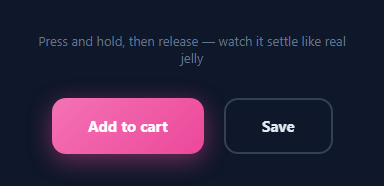
A jelly press button reacts to a click the way a soft rubber object reacts to a poke: it flattens under pressure, then springs back past its resting size before settling, exactly like wobble-card's drag-to-squish surface but triggered by a press instead of a drag. Most "bouncy button" effects on the web fake this with a CSS @keyframes that plays a fixed sequence of scale values — which looks the same every time regardless of how hard or how long you pressed. This snippet instead runs an actual spring simulation on every animation frame, so the motion responds to real state (current velocity, current scale) rather than a canned timeline.
Why a spring simulation instead of `transition: transform`
A CSS transition eases linearly between two fixed values with a bezier curve — it cannot overshoot past its target and settle back, because a bezier curve is monotonic once you tell it "go from A to B." A spring, on the other hand, is defined by physical quantities: a target value, a current value, a velocity, a stiffness (how hard it's pulled toward the target), and a damping (how much energy is lost each frame). Because velocity persists across frames, the spring can fly past its target and get pulled back — that overshoot-then-settle motion is exactly what reads as "jelly" or "rubber" rather than "eased."
The physics loop
Each button gets its own state = { sx, sy, vx, vy } — separate scale and velocity for the X and Y axes, because jelly squash is not uniform: pressing flattens height while widening horizontally. On every requestAnimationFrame, the force toward the target is (target - current) * stiffness, added to velocity, then velocity itself is multiplied by damping (a value under 1) to bleed off energy. Position updates by adding velocity: state.sx += state.vx. This is a textbook explicit-Euler spring-damper integrator — simple enough to hand-write in a dozen lines, accurate enough to feel convincing.
Squash on `pointerdown`, release on `pointerup`
On pointerdown the target becomes { sx: 1.16, sy: 0.78 } — wider and flatter, like a ball hitting the floor. The spring loop wakes up (requestAnimationFrame(step)) and chases that target. On pointerup, pointerleave, or pointercancel, the target resets to { sx: 1, sy: 1 } — natural size — and because the button still has velocity from the squash, it overshoots past 1 (a brief stretch) before the damping settles it, which is the signature jelly wobble.
Stopping the loop cleanly
The loop checks atRest: both velocities and both distances-to-target below a small epsilon. Once true, it snaps state exactly to the target and sets running = false so requestAnimationFrame stops firing — the button is not burning frames once it's visually settled. wake() restarts the loop only when a new press or release changes the target while the loop is idle.
Tuning the feel
stiffness (default 0.28) controls how quickly the spring accelerates toward its target — higher feels snappier and more urgent. damping (default 0.62) controls how much overshoot survives each bounce — closer to 1 means almost no energy loss and a long wobbly settle; lower values converge faster with less bounce. The squash amounts themselves (1.16/0.78) set how dramatic the flattening looks; smaller deltas from 1 read as a subtle "press acknowledgment" rather than full cartoon jelly.
Applying it to any button
Call attachJelly(el) on any button-like element. No extra markup is required beyond an inner span so the transform origin stays centered and the label doesn't intercept pointer events oddly. Because the transform is applied directly via el.style.transform, this works identically on a magnetic button, a pill CTA, or a plain form submit button.
Build with AI
Build, Understand, Optimize, and Extend It With AI
You don't need to derive the spring math from scratch. Paste this snippet's HTML, CSS, and JS into an AI coding assistant like Claude and ask it to explain exactly why the velocity is multiplied by damping after adding the stiffness force, and why that ordering matters for how quickly the oscillation decays. The same assistant can help optimize it — for instance asking whether the epsilon thresholds in the atRest check are tight enough to avoid a visible "snap" versus running one extra unnecessary frame. It's also useful for extending the effect: ask it to add a third spring dimension for rotation on an off-center click, make the squash direction depend on where within the button the pointer landed, or expose stiffness/damping as CSS custom properties so designers can tune feel without touching JS. Treat the code less like a finished artifact and more like a starting point for a conversation.
Prompt to recreate it
Copy this into your AI assistant of choice to build the effect from scratch, or as a jumping-off point for your own variant:
Build a "jelly press" button effect in plain HTML, CSS, and JavaScript with no animation libraries and no CSS @keyframes for the press motion itself.

Requirements:
- One or more button elements that squash (scale down vertically, scale up horizontally) on pointerdown and spring back to normal size on pointerup/pointerleave/pointercancel.
- The spring-back must be driven by a hand-written physics loop running on requestAnimationFrame — not a CSS transition — using a target scale, a current scale, a velocity, a stiffness constant, and a damping constant, updated with the standard spring-damper integration: velocity += (target - current) * stiffness, then velocity *= damping, then current += velocity.
- Track scaleX and scaleY as independent spring values so the squash is non-uniform (flatter and wider under pressure, not a plain uniform shrink).
- On release, the target resets to 1,1 for both axes, and because the button retains velocity from the press, it must visibly overshoot past 1 (stretch slightly larger) before settling back to rest — that overshoot is the entire point of using a spring instead of a simple ease.
- The animation loop must stop itself (not keep calling requestAnimationFrame forever) once both axes' velocity and distance-to-target fall under a small threshold, snapping exactly to the target scale at that point.
- Expose stiffness and damping as easily tunable constants near the top of the script.
- Apply the final scale via a single transform: scale(sx, sy) style write per frame, with a transform-origin of center so the squash reads as centered on the button.
Want to tighten it up first? Run this prompt through the AI Prompt Studio to score it across 8 quality dimensions, catch anti-patterns, and tune the wording for Claude, ChatGPT, or Gemini before you paste it in.
Step by step
How to Use
- 1Press and hold a buttonClick and hold either button in the preview — it flattens and widens instantly under pressure.
- 2Release to see the overshootLet go and watch the button spring past its normal size before settling — that overshoot is the spring math, not a CSS keyframe.
- 3Tune the physicsIn the JS panel, adjust stiffness (snappiness) and damping (how much it wobbles before settling) at the top of attachJelly.
- 4Change the squash amountEdit the 1.16 / 0.78 target values on pointerdown to make the press more subtle or more exaggerated.
- 5Attach to your own buttonsCall attachJelly(yourButtonElement) on any button — no extra HTML structure required beyond an inner span for the label.
- 6Export in your formatClick "HTML" for a standalone file, "JSX" for a React component, or "Tailwind" for a React + Tailwind version.
Real-world uses
Common Use Cases
Got questions?
Frequently Asked Questions
A CSS active state jumps to one fixed scale and eases back — it cannot overshoot. This snippet runs a real spring simulation with velocity, so on release the button flies past its resting scale and wobbles back, producing genuine jelly-like motion instead of a simple shrink-and-grow.
stiffness sets how strongly the current scale is pulled toward its target each frame (higher = snappier acceleration). damping is a per-frame velocity multiplier under 1 that bleeds off energy (closer to 1 = more bounce before settling, lower = converges faster with less wobble).
Real squashed material does not shrink uniformly — pressing down flattens height while the material bulges outward horizontally. Separate scaleX/scaleY targets (1.16 wide, 0.78 flat) reproduce that non-uniform deformation instead of a plain uniform scale().
No. The requestAnimationFrame loop only runs while running is true, and it sets running = false as soon as velocity and the distance to target both drop below a small epsilon — the button is fully idle between interactions.
Yes. attachJelly(element) only needs pointerdown/up/leave/cancel listeners and reads/writes element.style.transform — it works on any HTML element, including cards, icon buttons, or badges.
Yes. Click "JSX" for a React component. Keep the spring state in a ref (not useState) since it updates every animation frame, and attach the same pointer handlers via onPointerDown/onPointerUp/onPointerLeave to avoid re-render overhead on every frame.