Source Code
<div class="demo">
<form id="settingsForm" class="settings-form">
<div class="f-row">
<label for="fName">Display name</label>
<input id="fName" name="name" type="text" value="Alex Rivera" />
</div>
<div class="f-row">
<label for="fEmail">Email</label>
<input id="fEmail" name="email" type="email" value="alex@company.com" />
</div>
<div class="f-row">
<label for="fRole">Role</label>
<select id="fRole" name="role">
<option value="viewer">Viewer</option>
<option value="editor" selected>Editor</option>
<option value="admin">Admin</option>
</select>
</div>
<div class="f-row f-checkbox">
<label><input type="checkbox" id="fNotify" name="notify" checked /> Email notifications</label>
</div>
<button type="submit" class="save-btn" id="saveBtn" disabled>No changes to save</button>
</form>
<div class="diff-panel" id="diffPanel" hidden>
<h3>Review changes</h3>
<ul class="diff-list" id="diffList"></ul>
<div class="diff-actions">
<button type="button" class="btn ghost" id="cancelDiff">Keep editing</button>
<button type="button" class="btn primary" id="confirmDiff">Confirm & save</button>
</div>
</div>
</div>* { box-sizing: border-box; margin: 0; padding: 0; }
body { font-family: system-ui, sans-serif; background: #f8fafc; display: flex; align-items: center; justify-content: center; min-height: 100vh; padding: 24px; }
.demo { width: 400px; max-width: 100%; display: flex; flex-direction: column; gap: 16px; }
.settings-form { background: #fff; border: 1px solid #e2e8f0; border-radius: 16px; padding: 22px; display: flex; flex-direction: column; gap: 14px; }
.f-row { display: flex; flex-direction: column; gap: 6px; }
.f-row label { font-size: 12.5px; font-weight: 700; color: #334155; }
.f-row input[type="text"], .f-row input[type="email"], .f-row select { padding: 9px 12px; border: 1.5px solid #e2e8f0; border-radius: 9px; font-size: 13.5px; font-family: inherit; }
.f-row input:focus-visible, .f-row select:focus-visible { outline: none; border-color: #6366f1; box-shadow: 0 0 0 3px rgba(99,102,241,0.15); }
.f-checkbox label { display: flex; align-items: center; gap: 8px; font-weight: 500; color: #475569; }
.save-btn { margin-top: 4px; padding: 11px; border: none; border-radius: 10px; background: #4f46e5; color: #fff; font-size: 13.5px; font-weight: 700; cursor: pointer; font-family: inherit; transition: background 0.15s, opacity 0.15s; }
.save-btn:disabled { background: #cbd5e1; cursor: not-allowed; }
.save-btn:not(:disabled):hover { background: #4338ca; }
.diff-panel { background: #fff; border: 1px solid #e2e8f0; border-radius: 16px; padding: 20px; display: flex; flex-direction: column; gap: 12px; box-shadow: 0 12px 30px rgba(15,23,42,0.08); }
.diff-panel h3 { font-size: 14px; font-weight: 800; color: #111827; }
.diff-list { display: flex; flex-direction: column; gap: 8px; list-style: none; }
.diff-item { display: flex; flex-direction: column; gap: 3px; padding: 10px 12px; border-radius: 9px; background: #f8fafc; }
.diff-field { font-size: 11px; font-weight: 700; color: #94a3b8; text-transform: uppercase; letter-spacing: 0.4px; }
.diff-values { font-size: 13px; display: flex; align-items: center; gap: 8px; flex-wrap: wrap; }
.diff-old { color: #b91c1c; text-decoration: line-through; background: #fef2f2; padding: 1px 6px; border-radius: 5px; }
.diff-new { color: #047857; font-weight: 700; background: #ecfdf5; padding: 1px 6px; border-radius: 5px; }
.diff-arrow { color: #94a3b8; }
.diff-actions { display: flex; gap: 10px; margin-top: 4px; }
.btn { flex: 1; border: none; padding: 10px; border-radius: 9px; font-size: 13px; font-weight: 700; cursor: pointer; font-family: inherit; }
.btn.ghost { background: #f1f5f9; color: #334155; }
.btn.ghost:hover { background: #e2e8f0; }
.btn.primary { background: #4f46e5; color: #fff; }
.btn.primary:hover { background: #4338ca; }const form = document.getElementById('settingsForm');
const saveBtn = document.getElementById('saveBtn');
const diffPanel = document.getElementById('diffPanel');
const diffList = document.getElementById('diffList');
const cancelDiff = document.getElementById('cancelDiff');
const confirmDiff = document.getElementById('confirmDiff');
const FIELD_LABELS = { name: 'Display name', email: 'Email', role: 'Role', notify: 'Email notifications' };
// Snapshot every field's original value once, on load — this is the baseline
// every future comparison is measured against, not "whatever it was a moment ago."
function snapshotForm() {
const data = new FormData(form);
const snap = {};
for (const [key, value] of data.entries()) snap[key] = value;
// FormData omits unchecked checkboxes entirely, so record that explicitly.
snap.notify = form.notify.checked ? 'on' : 'off';
return snap;
}
const originalValues = snapshotForm();
function currentValues() {
const data = new FormData(form);
const snap = {};
for (const [key, value] of data.entries()) snap[key] = value;
snap.notify = form.notify.checked ? 'on' : 'off';
return snap;
}
function formatValue(field, value) {
if (field === 'notify') return value === 'on' ? 'Enabled' : 'Disabled';
if (field === 'role') return value.charAt(0).toUpperCase() + value.slice(1);
return value;
}
// Diffing is a plain key-by-key comparison against the original snapshot —
// deliberately simple, since the goal is transparency, not cleverness.
function computeDiff() {
const now = currentValues();
const changes = [];
for (const field of Object.keys(originalValues)) {
if (originalValues[field] !== now[field]) {
changes.push({ field, from: originalValues[field], to: now[field] });
}
}
return changes;
}
function refreshSaveButton() {
const changes = computeDiff();
saveBtn.disabled = changes.length === 0;
saveBtn.textContent = changes.length === 0
? 'No changes to save'
: `Save ${changes.length} change${changes.length > 1 ? 's' : ''}`;
}
form.addEventListener('input', refreshSaveButton);
form.addEventListener('change', refreshSaveButton);
form.addEventListener('submit', (e) => {
e.preventDefault();
const changes = computeDiff();
if (changes.length === 0) return;
diffList.innerHTML = changes.map((c) => `
<li class="diff-item">
<span class="diff-field">${FIELD_LABELS[c.field] || c.field}</span>
<span class="diff-values">
<span class="diff-old">${formatValue(c.field, c.from)}</span>
<span class="diff-arrow">→</span>
<span class="diff-new">${formatValue(c.field, c.to)}</span>
</span>
</li>
`).join('');
diffPanel.hidden = false;
diffPanel.scrollIntoView({ behavior: 'smooth', block: 'nearest' });
});
cancelDiff.addEventListener('click', () => { diffPanel.hidden = true; });
confirmDiff.addEventListener('click', () => {
// In a real app, this is where the actual save request fires.
// After a successful save, the new values become the baseline for future diffs.
Object.assign(originalValues, currentValues());
diffPanel.hidden = true;
refreshSaveButton();
});Learn Coding Visually
Learn to code with interactive, live-preview playgrounds — HTML, CSS, JavaScript, React & more.
 HTML Playground42 lessons · Click-based · Live preview
 CSS PlaygroundLearn CSS with a live editor
 JavaScript Playground60 lessons · DOM · Async · Canvas
 React PlaygroundLearn React with a live code editor
 GSAP PlaygroundLearn GSAP animation interactively
 SVG Playground44 lessons · shapes · paths · animation
 SCSS Playground45 lessons · Sass modules · tokens
 Tailwind PlaygroundLearn Tailwind CSS with a live editor
 Bootstrap 5 Playground50 lessons · live preview
Form Change Diff Preview — Confirm Exactly What Will Change Before Saving
Form Change Diff Preview — Show Exactly What Will Change Before Saving · Forms · Plain HTML, CSS & JS · Live preview
What's included
Features
About this UI Snippet
Form Change Diff Preview — Reviewable Confirmation Before You Save
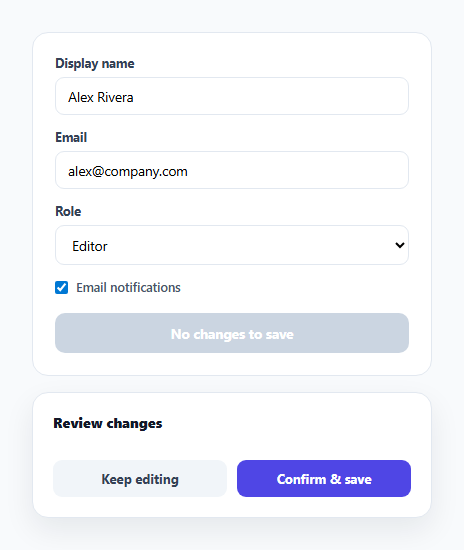
Most settings forms save silently — click submit, and whatever the form currently contains overwrites whatever was there before, with no chance to review exactly what changed. That's fine for a single text field, but risky for a form with several fields where a user might not remember which value they actually edited. This snippet computes a genuine diff between the form's original state and its current state, and only lets the save proceed after showing that diff for confirmation.
Snapshotting the baseline once, correctly
snapshotForm() runs exactly once, when the page loads, and captures every field's value into a plain object using FormData. The one non-obvious detail: FormData omits unchecked checkboxes entirely — an unchecked box simply doesn't appear as an entry — so the snapshot function explicitly reads form.notify.checked and records 'on'/'off' itself rather than trusting FormData to represent that field's absence-or-presence correctly. Get this wrong and an unchecked-then-rechecked box would never show up in the diff at all.
Diffing is deliberately dumb — and that's the point
computeDiff() does nothing clever: it loops over every key in the original snapshot and does a strict string comparison against the current value. There's no fuzzy matching, no attempt to interpret *meaning* — just "is this exact string different from that exact string." For a confirmation UI whose entire job is to be trustworthy, predictable beats clever; a user reviewing a diff needs to know it reflects reality with zero ambiguity.
The Save button as a live change counter
refreshSaveButton() runs on every input and change event, recomputing the diff and updating the button's label to read "Save 2 changes" or disabling it entirely back down to "No changes to save" the moment a user reverts a field back to its original value. This means the button is never a lie — if it says "no changes," there genuinely are none, and if it's disabled, submitting is correctly impossible rather than merely discouraged.
Confirming applies the new baseline, not just closes the panel
When the user clicks Confirm & save, the code doesn't just hide the diff panel — it calls Object.assign(originalValues, currentValues()), replacing the baseline with the just-saved values. This matters: without it, a second edit-and-save cycle would incorrectly diff against the *original* pre-first-save values instead of the form's actual last-saved state, showing changes that were already committed as if they were still pending.
Build with AI
Build, Understand, Optimize, and Extend It With AI
Ask an AI assistant to explain why the checkbox snapshot needs special handling given how FormData represents unchecked boxes, and to discuss what would go wrong if the baseline weren't updated after a confirmed save. It's also worth asking for a version that diffs nested or repeated form fields (like a dynamic list of email addresses), or one that persists the diff-confirmation requirement only for specific "sensitive" fields while letting harmless ones save immediately.
Prompt to recreate it
Copy this into your AI assistant of choice to build the effect from scratch, or as a jumping-off point for your own variant:
Build a settings form in HTML, CSS, and vanilla JavaScript that requires reviewing a diff before saving — no framework, no external library.

Requirements:
- A form with at least a text input, an email input, a select dropdown, and a checkbox, each with a starting value.
- On page load, snapshot every field's original value into a baseline object. Handle the checkbox correctly given that FormData omits unchecked checkboxes as entries entirely — do not lose that field from the diff.
- On every input/change event, recompute a field-by-field diff between the current form values and the baseline, and update the Save button's label to show the exact number of pending changes (or disable it entirely with a "no changes" label when nothing differs).
- Submitting the form must not save immediately — instead, open a review panel listing every changed field, showing its old value struck through next to its new value.
- The review panel needs two actions: a cancel action that simply closes the panel without saving, and a confirm action that applies the save and updates the baseline to the newly saved values (so a second edit-and-save cycle diffs correctly against the latest state, not the original pre-first-save values).
- Do not let the confirm review panel open at all if there are no actual changes to show.
Want to tighten it up first? Run this prompt through the AI Prompt Studio to score it across 8 quality dimensions, catch anti-patterns, and tune the wording for Claude, ChatGPT, or Gemini before you paste it in.
Step by step
How to Use
- 1Edit one or more fieldsThe Save button updates live, counting how many fields differ from their original values and disabling itself entirely when nothing has changed.
- 2Click SaveInstead of submitting immediately, a diff panel opens showing every changed field with its old value struck through next to the new value.
- 3Review the diffEach row is field-by-field — exactly what will change, nothing summarized or hidden. Revert manually in the form if something looks wrong.
- 4Confirm or keep editingConfirm & save applies the change (wire your real API call into the confirmDiff click handler) and resets the baseline; Keep editing closes the panel without saving.
- 5Adapt the field listUpdate FIELD_LABELS and formatValue() to match your own form's fields and how each value should be displayed in the diff.
Real-world uses
Common Use Cases
Got questions?
Frequently Asked Questions
FormData only includes checked checkboxes as entries — an unchecked box is simply absent from the FormData object rather than present with a false value. Reading form.notify.checked directly and recording "on"/"off" explicitly avoids silently losing that field from the diff.
The diff recomputes on every input/change event, so a reverted field simply drops out of the change list — if every field is reverted, the Save button disables itself again automatically.
The confirmDiff click handler is where you'd wire in your real API call. As written it updates the local baseline snapshot to simulate a successful save, so a second round of edits diffs correctly against the just-saved state.
Yes — add the field to FIELD_LABELS with its display name, and to formatValue() if it needs special formatting (like the role and notify fields do). The diff and snapshot logic already iterate generically over every field.
A confirmation UI needs to be exactly trustworthy — if it says a field changed, it must genuinely differ, byte for byte. Fuzzy comparisons would risk either hiding a real change or flagging a non-change, undermining the entire point of a review step.