

Learn Coding Visually
Learn to code with interactive, live-preview playgrounds — HTML, CSS, JavaScript, React & more.
 HTML Playground42 lessons · Click-based · Live preview
 CSS PlaygroundLearn CSS with a live editor
 JavaScript Playground60 lessons · DOM · Async · Canvas
 React PlaygroundLearn React with a live code editor
 GSAP PlaygroundLearn GSAP animation interactively
 SVG Playground44 lessons · shapes · paths · animation
 SCSS Playground45 lessons · Sass modules · tokens
 Tailwind PlaygroundLearn Tailwind CSS with a live editor
 Bootstrap 5 Playground50 lessons · live preview
Virtual Scroll HTML CSS JS — 10000 Item List
Virtual Scroll List · Layouts · Plain HTML, CSS & JS · Live preview
What's included
Features
About this UI Snippet
How to Build a Virtual Scroll List for 10,000 Items in JavaScript
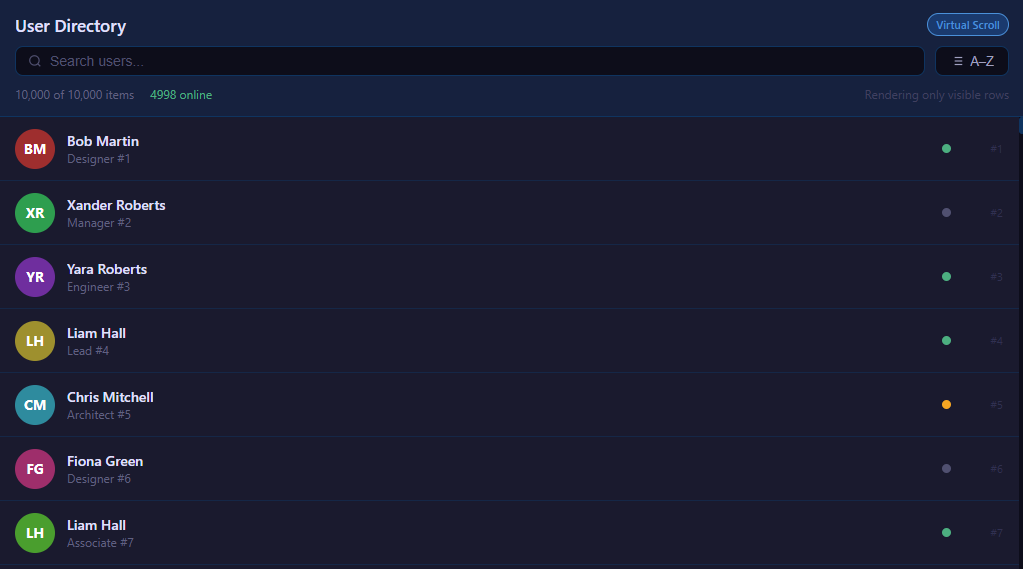
Rendering a list of ten thousand rows the naive way creates ten thousand DOM nodes, which janks scrolling, balloons memory and slows every layout. Virtual scrolling solves this by rendering only the handful of rows actually visible in the viewport while making the scrollbar behave as if the whole list were present. This component demonstrates the technique in plain JavaScript — no framework, no library — and adds live search and sort on top. Here is exactly how it works.
The core idea: a tall spacer plus a few real rows
A virtual list has three structural pieces. An outer viewport element has a fixed height and overflow-y: auto, giving it a scrollbar. Inside it sits a spacer whose height equals the total content height — items.length * ITEM_HEIGHT — so the scrollbar's range and thumb size are correct as if every row existed. Layered over the spacer is a small pool of actual row elements that get repositioned and refilled as you scroll. The user scrolls a giant invisible column but only ever sees a dozen or so real DOM nodes.
The single most important constant is ITEM_HEIGHT, the fixed pixel height of every row. A uniform height is what makes the math trivial: any row's vertical position is just its index times this height, and any scroll offset maps directly back to an index.
Computing the visible window
On each scroll, the handler reads viewport.scrollTop and derives which rows to render:
startIndex = Math.floor(scrollTop / ITEM_HEIGHT) visibleCount = Math.ceil(viewport.clientHeight / ITEM_HEIGHT) endIndex = startIndex + visibleCount + BUFFER
startIndex is simply how many full rows have scrolled past the top. visibleCount is how many rows fit in the viewport. BUFFER is a few extra rows rendered above and below the visible range so fast scrolling does not flash blank gaps before the next render catches up. The render loop then iterates only from startIndex to endIndex, a constant-size slice regardless of whether the dataset has a thousand or a million entries.
Positioning rows absolutely
Each rendered row is given position: absolute with top = index * ITEM_HEIGHT inside the spacer. This places every row at its true position in the full list even though only a window of them exists in the DOM. As you scroll, the same pool of row elements is recycled — their content and top values are rewritten to represent different indices — so the node count stays flat. The visual result is indistinguishable from a fully rendered list: smooth scrolling, a correctly sized scrollbar and rows appearing exactly where they should.
Throttling the scroll handler
Scroll events fire rapidly, often many times per frame. To avoid doing redundant work, the render is throttled with requestAnimationFrame: the scroll handler sets a pending flag and schedules a single render on the next animation frame, coalescing a burst of scroll events into one DOM update per frame. This keeps the main thread free and the list buttery even during flings.
Search filtering
Search recomputes a filtered array from the source data based on the query, then resets the virtual list to operate over that filtered array. Crucially, the spacer height is recalculated as filtered.length * ITEM_HEIGHT so the scrollbar shrinks to match the result count, and the visible window is re-derived from the new scrollTop. Because the index math only depends on the array length and item height, searching ten thousand items and re-rendering is instant — only the visible slice is ever touched in the DOM.
Sorting
A sort toggle reorders the underlying (or filtered) array by a field such as name. After sorting, the spacer height is unchanged but the row contents at each index differ, so a single re-render repaints the visible window in the new order. Sorting a huge list stays cheap for the same reason: the sort runs on plain data, and only the visible rows are rebuilt.
Generating the dataset
To exercise the technique, the demo generates ten thousand records programmatically, each with a name, role, status and a colored avatar initial. This synthetic data shows that the approach is bound by the number of *visible* rows, not the total. A counter typically displays how many DOM nodes are actually present — usually a dozen or two — versus the ten thousand a naive list would create, making the performance win concrete.
Why it matters
Virtual scrolling is the standard technique behind every high-performance list and table on the web — chat histories, data grids, file explorers, infinite feeds. The essentials are always the same: a fixed item height, a spacer sized to the full content, index math mapping scroll offset to a visible window, a small render buffer, absolute positioning by index, and rAF-throttled updates. This component distills all of that into a self-contained, dependency-free example you can adapt to any large dataset.
Build with AI
Build, Understand, Optimize, and Extend It With AI
Instead of tracing the index math by hand, paste this snippet's HTML, CSS, and JS into an AI coding assistant like Claude and ask it to explain exactly why render() recycles existing row elements (growing or shrinking the pool to match "needed") rather than clearing and rebuilding listItems.innerHTML on every scroll event, and how that choice relates to the rAF-throttled scheduleRender pattern. It's a good optimization target too — ask what would need to change if rows had variable, non-uniform heights instead of the fixed ITEM_HEIGHT this approach depends on. For extending it, have it add keyboard navigation (arrow keys move a focused row and scroll it into view), infinite loading that appends new records as the user nears the bottom, or column virtualization for a very wide table. Treat the code less like a finished artifact and more like a starting point for a conversation.
Prompt to recreate it
Copy this into your AI assistant of choice to build the effect from scratch, or as a jumping-off point for your own variant:
Build a virtual scrolling list capable of smoothly displaying 10,000 rows, in plain HTML, CSS, and vanilla JavaScript with no libraries.

Requirements:
- A fixed-height scrollable viewport container containing two children: an empty "spacer" element whose height is set to totalItemCount times a fixed per-row pixel height (so the scrollbar's size and range behave as if every row existed), and a row container absolutely positioned to overlay the spacer.
- On every scroll event (throttled to at most once per animation frame via requestAnimationFrame, not fired synchronously on every scroll event), compute a start index from Math.floor(scrollTop / rowHeight), an end index from the viewport's visible row count plus a small buffer of extra rows above and below, and only ever touch DOM nodes for that index range.
- Maintain a pool of reusable row DOM elements: grow the pool by appending new row elements when more are needed than currently exist, and shrink it by removing trailing elements when fewer are needed, rather than destroying and recreating every row on each render.
- Position each visible row absolutely at top = its real data index times the fixed row height, so scrolling reveals rows at their true position even though only a small window of them exist in the DOM at any moment.
- Add a text search input that filters the full dataset down to a matching subset, recalculates the spacer height for the new (possibly much smaller) filtered length, resets scroll to the top, and re-renders using the exact same windowing logic against the filtered array.
- Add a sort toggle that reorders the current (possibly filtered) array and re-renders the visible window, without changing the spacer height.
- Generate at least 10,000 synthetic data records to demonstrate that only a small, constant number of DOM nodes exist at any time regardless of total dataset size.
Want to tighten it up first? Run this prompt through the AI Prompt Studio to score it across 8 quality dimensions, catch anti-patterns, and tune the wording for Claude, ChatGPT, or Gemini before you paste it in.
Source Code
<div class="app">
  <div class="list-header">
    <div class="header-top">
      <h2>User Directory</h2>
      <span class="perf-badge">Virtual Scroll</span>
    </div>
    <div class="header-controls">
      <div class="search-wrap">
        <svg width="14" height="14" viewBox="0 0 24 24" fill="none" stroke="currentColor" stroke-width="2"><circle cx="11" cy="11" r="8"/><line x1="21" y1="21" x2="16.65" y2="16.65"/></svg>
        <input type="text" id="searchInput" placeholder="Search users...">
      </div>
      <button id="sortBtn" class="sort-btn">
        <svg width="14" height="14" viewBox="0 0 24 24" fill="none" stroke="currentColor" stroke-width="2"><line x1="8" y1="6" x2="21" y2="6"/><line x1="8" y1="12" x2="21" y2="12"/><line x1="8" y1="18" x2="21" y2="18"/><line x1="3" y1="6" x2="3.01" y2="6"/><line x1="3" y1="12" x2="3.01" y2="12"/><line x1="3" y1="18" x2="3.01" y2="18"/></svg>
        A–Z
      </button>
    </div>
    <div class="stats-row">
      <span id="countLabel">10,000 of 10,000 items</span>
      <span id="onlineLabel" class="online-label"></span>
      <span class="hint-label">Rendering only visible rows</span>
    </div>
  </div>
  <div class="scroll-container" id="scrollContainer">
    <div id="spacer" class="spacer"></div>
    <div id="listItems" class="list-items"></div>
  </div>
</div>
* { margin: 0; padding: 0; box-sizing: border-box; }
body { background: #1a1a2e; color: #e0e0e0; font-family: system-ui, sans-serif; height: 100vh; display: flex; flex-direction: column; overflow: hidden; }
.app { display: flex; flex-direction: column; height: 100vh; }
.list-header {
background: #16213e; border-bottom: 1px solid #0f3460;
padding: 14px 16px; display: flex; flex-direction: column; gap: 10px; flex-shrink: 0;
}
.header-top { display: flex; align-items: center; justify-content: space-between; }
h2 { font-size: 17px; color: #e0e0ff; font-weight: 600; }
.perf-badge {
font-size: 11px; padding: 3px 8px; background: #1a3a6e;
border: 1px solid #4a90d9; border-radius: 12px; color: #4a90d9; font-weight: 600;
}
.header-controls { display: flex; gap: 10px; }
.search-wrap {
display: flex; align-items: center; gap: 8px;
background: #0d0d1a; border: 1px solid #0f3460; border-radius: 8px;
padding: 6px 12px; flex: 1;
}
.search-wrap svg { color: #505070; flex-shrink: 0; }
#searchInput {
background: none; border: none; outline: none; color: #e0e0ff;
font-size: 14px; width: 100%;
}
#searchInput::placeholder { color: #505070; }
.sort-btn {
display: flex; align-items: center; gap: 6px; padding: 6px 14px;
background: #0d0d1a; border: 1px solid #0f3460; border-radius: 8px;
color: #a0a0c0; font-size: 13px; cursor: pointer; white-space: nowrap; transition: all 0.15s;
}
.sort-btn:hover { border-color: #4a90d9; color: #a0c0ff; }
.stats-row { display: flex; align-items: center; gap: 16px; font-size: 12px; }
#countLabel { color: #606080; }
.online-label { color: #4caf80; }
.hint-label { color: #404060; margin-left: auto; }
.scroll-container { flex: 1; overflow-y: auto; position: relative; }
.scroll-container::-webkit-scrollbar { width: 6px; }
.scroll-container::-webkit-scrollbar-track { background: #0d0d1a; }
.scroll-container::-webkit-scrollbar-thumb { background: #0f3460; border-radius: 3px; }
.spacer { width: 100%; }
.list-items { position: absolute; top: 0; left: 0; right: 0; }
.list-row {
position: absolute; left: 0; right: 0;
display: flex; align-items: center; gap: 12px;
padding: 0 16px; border-bottom: 1px solid rgba(15,52,96,0.5);
background: transparent; transition: background 0.1s;
}
.list-row:hover { background: rgba(74,144,217,0.05); }
.avatar {
width: 40px; height: 40px; border-radius: 50%;
display: flex; align-items: center; justify-content: center;
font-size: 14px; font-weight: 700; color: #fff; flex-shrink: 0;
}
.user-info { flex: 1; min-width: 0; }
.user-name { font-size: 14px; color: #e0e0ff; font-weight: 500; white-space: nowrap; overflow: hidden; text-overflow: ellipsis; }
.user-role { font-size: 12px; color: #606080; white-space: nowrap; overflow: hidden; text-overflow: ellipsis; }
.status-dot { width: 9px; height: 9px; border-radius: 50%; flex-shrink: 0; }
.status-dot.online { background: #4caf80; }
.status-dot.away { background: #f5a623; }
.status-dot.offline { background: #505070; }
.row-num { font-size: 11px; color: #303050; min-width: 40px; text-align: right; flex-shrink: 0; }const ITEM_HEIGHT = 64;
const BUFFER = 4;
const TOTAL = 10000;
const FIRST_NAMES = ['Alice','Bob','Carol','David','Emma','Frank','Grace','Henry','Iris','Jack','Kate','Liam','Mia','Noah','Olivia','Paul','Quinn','Rachel','Sam','Tara','Uma','Victor','Wendy','Xander','Yara','Zoe','Aaron','Beth','Chris','Diana','Ethan','Fiona','Greg','Hannah','Ivan','Julia','Kevin','Laura','Mike','Nina'];
const LAST_NAMES = ['Smith','Johnson','Williams','Brown','Jones','Garcia','Miller','Davis','Wilson','Taylor','Anderson','Thomas','Jackson','White','Harris','Martin','Thompson','Young','Lee','Walker','Hall','Allen','King','Wright','Scott','Green','Adams','Baker','Nelson','Hill','Ramirez','Campbell','Mitchell','Carter','Roberts'];
const ROLES = ['Engineer','Designer','Manager','Analyst','Director','Consultant','Developer','Architect','Lead','Coordinator','Specialist','Associate'];
const STATUSES = ['online','online','online','away','offline','offline'];
function rand(arr) { return arr[Math.floor(Math.random()*arr.length)]; }
function hue(i) { return (i * 137.5) % 360; }
// Generate all data once
const allData = Array.from({length: TOTAL}, (_, i) => {
const firstName = rand(FIRST_NAMES);
const lastName = rand(LAST_NAMES);
return {
id: i+1,
name: firstName + ' ' + lastName,
role: rand(ROLES),
hue: hue(i),
initials: firstName[0] + lastName[0],
status: rand(STATUSES),
};
});
const onlineCount = allData.filter(d => d.status === 'online').length;
document.getElementById('onlineLabel').textContent = onlineCount + ' online';
let displayData = allData;
let sortDir = 1;
let rafPending = false;
const scrollContainer = document.getElementById('scrollContainer');
const spacer = document.getElementById('spacer');
const listItems = document.getElementById('listItems');
const countLabel = document.getElementById('countLabel');
function updateSpacer() {
spacer.style.height = (displayData.length * ITEM_HEIGHT) + 'px';
}
function render() {
const scrollTop = scrollContainer.scrollTop;
const containerH = scrollContainer.clientHeight;
const visibleCount = Math.ceil(containerH / ITEM_HEIGHT);
let startIdx = Math.floor(scrollTop / ITEM_HEIGHT) - BUFFER;
let endIdx = startIdx + visibleCount + BUFFER * 2;
startIdx = Math.max(0, startIdx);
endIdx = Math.min(displayData.length, endIdx);
const rows = listItems.children;
const needed = endIdx - startIdx;
// Pool management: reuse existing rows
while (listItems.children.length < needed) {
const row = document.createElement('div');
row.className = 'list-row';
row.innerHTML = `<div class="avatar"></div><div class="user-info"><div class="user-name"></div><div class="user-role"></div></div><div class="status-dot"></div><div class="row-num"></div>`;
listItems.appendChild(row);
}
while (listItems.children.length > needed) {
listItems.removeChild(listItems.lastChild);
}
for (let i = 0; i < needed; i++) {
const dataIdx = startIdx + i;
const item = displayData[dataIdx];
const row = listItems.children[i];
const top = dataIdx * ITEM_HEIGHT;
row.style.top = top + 'px';
row.style.height = ITEM_HEIGHT + 'px';
const avatar = row.querySelector('.avatar');
avatar.textContent = item.initials;
avatar.style.background = `hsl(${item.hue}, 55%, 40%)`;
row.querySelector('.user-name').textContent = item.name;
row.querySelector('.user-role').textContent = item.role + ' #' + item.id;
const dot = row.querySelector('.status-dot');
dot.className = 'status-dot ' + item.status;
row.querySelector('.row-num').textContent = '#' + item.id;
}
}
function scheduleRender() {
if (rafPending) return;
rafPending = true;
requestAnimationFrame(() => { render(); rafPending = false; });
}
scrollContainer.addEventListener('scroll', scheduleRender);
let searchTimeout = null;
document.getElementById('searchInput').addEventListener('input', e => {
clearTimeout(searchTimeout);
searchTimeout = setTimeout(() => {
const q = e.target.value.trim().toLowerCase();
displayData = q ? allData.filter(d => d.name.toLowerCase().includes(q) || d.role.toLowerCase().includes(q)) : allData;
const n = displayData.length;
countLabel.textContent = n.toLocaleString() + ' of 10,000 items';
scrollContainer.scrollTop = 0;
updateSpacer();
render();
}, 150);
});
document.getElementById('sortBtn').addEventListener('click', () => {
sortDir *= -1;
displayData = [...displayData].sort((a,b) => a.name.localeCompare(b.name) * sortDir);
document.getElementById('sortBtn').childNodes[2].textContent = sortDir === 1 ? ' A–Z' : ' Z–A';
scrollContainer.scrollTop = 0;
render();
});
updateSpacer();
render();Step by step
How to Use
- 1Scroll the listScroll through ten thousand items as smoothly as if there were only a few rows.
- 2Check the DOM countWatch the live node counter show only the dozen-or-so rows actually in the DOM.
- 3Search instantlyType in the search box to filter the dataset and resize the scrollbar to the results.
- 4Toggle sortClick sort to reorder the underlying data and repaint the visible window.
- 5Compare to naiveNote how rendering only visible rows avoids the jank of ten thousand DOM nodes.
- 6Adapt the dataSwap in your own records and adjust ITEM_HEIGHT to fit your row design.
Real-world uses
Common Use Cases
Got questions?
Frequently Asked Questions
A uniform height makes the math exact: any row position is its index times the height, and any scrollTop maps straight back to a start index. Variable heights require measuring or estimating rows, which is more complex though achievable.
The spacer is an element whose height equals the full list height. It gives the scrollbar the correct range and thumb size so scrolling feels like the whole list is present, even though only the visible rows actually exist in the DOM.
During fast scrolling the next render may not run before new rows enter view, causing a blank flash. Rendering a few extra rows above and below the visible window hides that gap and keeps scrolling seamless.
Search rebuilds a filtered array and resizes the spacer, while sort reorders plain data. Both operate on the underlying array, not the DOM, and only the small visible window is ever re-rendered, so cost stays constant.
Scroll events fire many times per frame. Coalescing them into a single render per animation frame avoids redundant DOM work, keeps the main thread responsive and prevents stutter during fast scrolling.
Yes. Click JSX for a React component, Vue for a Vue 3 SFC, Angular for a standalone component, or Tailwind for a utility-class version. In React, derive the visible slice from scrollTop state in an onScroll handler and render only those rows — or compare with react-window, which implements the same windowing technique.