Source Code
<div class="app" id="app">
  <!-- Grid view -->
  <div class="grid-view" id="grid-view">
    <h2 class="view-title">Collection</h2>
    <div class="cards" id="cards"></div>
  </div>

  <!-- Detail view -->
  <div class="detail-view" id="detail-view" hidden>
    <button class="back-btn" id="back-btn">
      <svg width="14" height="14" viewBox="0 0 24 24" fill="none" stroke="currentColor" stroke-width="2.5"><path d="M19 12H5M12 19l-7-7 7-7"/></svg>
      Back
    </button>
    <div class="detail-hero" id="detail-hero"></div>
    <h2 class="detail-title" id="detail-title"></h2>
    <p class="detail-sub" id="detail-sub"></p>
    <p class="detail-body">The thumbnail and this hero are the same element morphing between two layouts — the browser captures both states and animates position, size and border-radius automatically via the View Transitions API. No FLIP math, no animation library.</p>
  </div>

  <p class="support-note" id="support-note" hidden>Your browser doesn't support the View Transitions API — views switch instantly instead.</p>
</div>
* { box-sizing: border-box; margin: 0; padding: 0; }
body { font-family: system-ui, sans-serif; background: #0f172a; min-height: 100vh; display: flex; justify-content: center; padding: 28px 20px; }
.app { width: 100%; max-width: 520px; }
.view-title { font-size: 18px; font-weight: 700; color: #f1f5f9; margin-bottom: 16px; }
/* — Grid — */
.cards { display: grid; grid-template-columns: repeat(3, 1fr); gap: 12px; }
.card { cursor: pointer; }
.card-thumb {
aspect-ratio: 1/1; border-radius: 14px;
transition: transform 0.2s;
}
.card:hover .card-thumb { transform: scale(1.04); }
.card-name { font-size: 12px; font-weight: 600; color: #94a3b8; margin-top: 7px; }
/* — Detail — */
.back-btn {
display: inline-flex; align-items: center; gap: 7px;
background: #1e293b; border: 1px solid #334155; color: #cbd5e1;
border-radius: 9px; padding: 7px 14px; margin-bottom: 16px;
font-size: 12.5px; font-weight: 600; font-family: inherit; cursor: pointer;
transition: border-color 0.15s;
}
.back-btn:hover { border-color: #6366f1; }
.detail-hero {
width: 100%; aspect-ratio: 16/9;
border-radius: 18px;
}
.detail-title { font-size: 22px; font-weight: 800; color: #f8fafc; margin-top: 18px; }
.detail-sub { font-size: 13px; color: #818cf8; font-weight: 600; margin-top: 4px; }
.detail-body { font-size: 14px; color: #94a3b8; line-height: 1.7; margin-top: 12px; }
.support-note {
margin-top: 18px; font-size: 12px; color: #f59e0b;
background: rgba(245,158,11,0.1); border: 1px solid rgba(245,158,11,0.3);
border-radius: 9px; padding: 9px 13px;
}
/* — View Transitions — */
/* The shared element: whichever element currently has this name
is matched across the DOM change and morphed by the browser. */
.vt-hero { view-transition-name: hero; }
.vt-title { view-transition-name: hero-title; }
/* Slow the default cross-fade + morph slightly so it reads clearly */
::view-transition-group(hero),
::view-transition-group(hero-title) {
animation-duration: 0.45s;
animation-timing-function: cubic-bezier(0.4, 0, 0.2, 1);
}
/* Fade the rest of the page a touch slower than default */
::view-transition-old(root),
::view-transition-new(root) {
animation-duration: 0.3s;
}
@media (prefers-reduced-motion: reduce) {
::view-transition-group(*),
::view-transition-old(*),
::view-transition-new(*) { animation: none !important; }
}const ITEMS = [
{ name: 'Dunes', sub: 'Warm gradient study', bg: 'linear-gradient(135deg,#f59e0b,#ef4444,#7c2d92)' },
{ name: 'Reef', sub: 'Cool gradient study', bg: 'linear-gradient(135deg,#22d3ee,#6366f1,#312e81)' },
{ name: 'Meadow', sub: 'Green gradient study', bg: 'linear-gradient(135deg,#4ade80,#0ea5e9,#1e3a8a)' },
{ name: 'Orchid', sub: 'Pink gradient study', bg: 'linear-gradient(135deg,#f472b6,#a855f7,#4c1d95)' },
{ name: 'Ember', sub: 'Red gradient study', bg: 'linear-gradient(135deg,#fbbf24,#f97316,#b91c1c)' },
{ name: 'Midnight', sub: 'Dark gradient study', bg: 'linear-gradient(135deg,#64748b,#334155,#0f172a)' },
];
const gridView = document.getElementById('grid-view');
const detailView = document.getElementById('detail-view');
const cardsEl = document.getElementById('cards');
let currentIdx = null;
cardsEl.innerHTML = ITEMS.map((it, i) =>
'<div class="card" data-idx="' + i + '">' +
'<div class="card-thumb" style="background:' + it.bg + '"></div>' +
'<div class="card-name">' + it.name + '</div>' +
'</div>'
).join('');
// Core helper: run a DOM mutation inside a view transition when supported,
// or immediately when not. This is the whole integration surface of the API.
function withTransition(mutate) {
if (!document.startViewTransition) {
document.getElementById('support-note').hidden = false;
mutate();
return;
}
document.startViewTransition(mutate);
}
function openDetail(i) {
const it = ITEMS[i];
currentIdx = i;
// 1. Tag the clicked thumbnail as the shared element BEFORE the transition,
// so the browser captures its "old" position from the grid.
const thumb = cardsEl.children[i].querySelector('.card-thumb');
const name = cardsEl.children[i].querySelector('.card-name');
thumb.classList.add('vt-hero');
name.classList.add('vt-title');
withTransition(() => {
// 2. Inside the callback: mutate the DOM to the new state. The detail hero
// now carries the same view-transition-name, so the browser morphs
// thumbnail -> hero (position, size, border-radius) automatically.
thumb.classList.remove('vt-hero');
name.classList.remove('vt-title');
document.getElementById('detail-hero').style.background = it.bg;
document.getElementById('detail-hero').classList.add('vt-hero');
document.getElementById('detail-title').textContent = it.name;
document.getElementById('detail-title').classList.add('vt-title');
document.getElementById('detail-sub').textContent = it.sub;
gridView.hidden = true;
detailView.hidden = false;
});
}
function closeDetail() {
const i = currentIdx;
withTransition(() => {
// Reverse: strip names from detail, re-tag the grid thumbnail as the
// destination, and swap views. Same morph, opposite direction.
document.getElementById('detail-hero').classList.remove('vt-hero');
document.getElementById('detail-title').classList.remove('vt-title');
detailView.hidden = true;
gridView.hidden = false;
const thumb = cardsEl.children[i].querySelector('.card-thumb');
const name = cardsEl.children[i].querySelector('.card-name');
thumb.classList.add('vt-hero');
name.classList.add('vt-title');
});
// Clean up the names after the transition so future transitions
// never see two elements sharing one name.
const done = document.startViewTransition ? 500 : 0;
setTimeout(() => {
document.querySelectorAll('.vt-hero').forEach(el => el.classList.remove('vt-hero'));
document.querySelectorAll('.vt-title').forEach(el => el.classList.remove('vt-title'));
}, done);
}
cardsEl.addEventListener('click', e => {
const card = e.target.closest('.card');
if (card) openDetail(+card.dataset.idx);
});
document.getElementById('back-btn').addEventListener('click', closeDetail);Learn Coding Visually
Learn to code with interactive, live-preview playgrounds — HTML, CSS, JavaScript, React & more.
 HTML Playground42 lessons · Click-based · Live preview
 CSS PlaygroundLearn CSS with a live editor
 JavaScript Playground60 lessons · DOM · Async · Canvas
 React PlaygroundLearn React with a live code editor
 GSAP PlaygroundLearn GSAP animation interactively
 SVG Playground44 lessons · shapes · paths · animation
 SCSS Playground45 lessons · Sass modules · tokens
 Tailwind PlaygroundLearn Tailwind CSS with a live editor
 Bootstrap 5 Playground50 lessons · live preview
View Transitions API Gallery — HTML CSS JS Snippet
View Transitions Gallery · Animations · Plain HTML, CSS & JS · Live preview
What's included
Features
About this UI Snippet
View Transitions Gallery — Shared-Element Morph with document.startViewTransition, view-transition-name & Pseudo-Element Animation Control
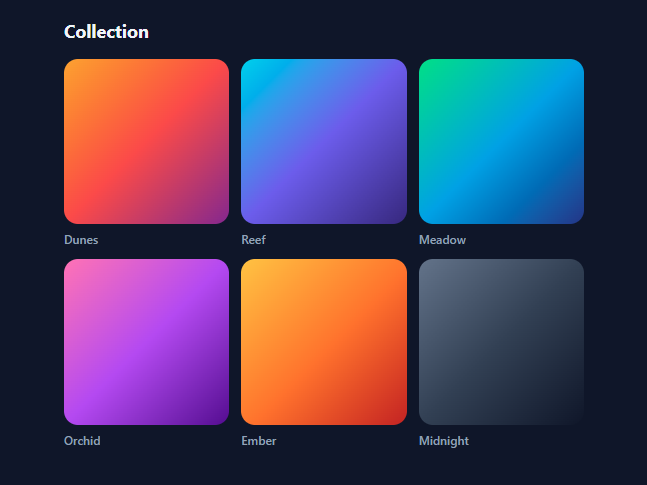
The shared-element transition — a thumbnail that grows into a detail hero as you navigate — used to require FLIP libraries (Framer Motion's layoutId, GSAP Flip) doing getBoundingClientRect math and transform interpolation by hand. The View Transitions API moved that entire job into the browser: you mutate the DOM inside document.startViewTransition(), tag the elements that should morph with a view-transition-name, and the engine captures before/after snapshots and animates position, size, and border-radius between them. This snippet is a complete, working grid-to-detail gallery built on the native API with a graceful fallback — the demo everyone searches for when they first hear about view transitions.
How the API actually works: snapshot, mutate, animate
Calling document.startViewTransition(callback) does three things. First, the browser screenshots the current page — both the full page and a separate snapshot for every element carrying a view-transition-name. Second, it runs your callback, which synchronously mutates the DOM into the new state (here: hide the grid, unhide the detail view). Third, it builds a pseudo-element tree — ::view-transition-old(name) and ::view-transition-new(name) inside a ::view-transition-group(name) — and animates between the snapshots: unnamed content cross-fades as root, while each named group *morphs*, with the browser interpolating the group's transform and size from the old element's box to the new element's box. The morph you see is not your elements moving; it is the browser animating screenshots of them.
The dynamic-naming trick for grids
The subtlety every real implementation hits: view-transition-name must be *unique in the DOM at snapshot time*. A grid of six thumbnails cannot all be named hero. The solution used here — and in production apps — is dynamic tagging: the name lives in a class (.vt-hero { view-transition-name: hero }) applied to the clicked thumbnail *just before* the transition starts, so the old snapshot captures it; inside the callback the class moves to the detail hero, so the new snapshot captures that instead. One name, two moments, two elements — the browser matches them and morphs. On close, the tagging reverses, and a cleanup timeout strips stray classes after the animation so no future transition ever finds two elements sharing a name (which would cancel the transition with a console error). The title text is tagged the same way with a second name, so the caption morphs alongside the artwork.
Styling the transition from CSS
Because the animation runs on pseudo-elements, you customise it in CSS, not JS: ::view-transition-group(hero) { animation-duration: 0.45s; animation-timing-function: cubic-bezier(0.4,0,0.2,1) } slows the morph enough to read, and ::view-transition-old(root)/::view-transition-new(root) tune the page cross-fade independently. This split is the API's quiet superpower — motion design lives entirely in the stylesheet. The snippet also includes the accessibility requirement most demos skip: a prefers-reduced-motion block that disables all transition animations for users who ask for that.
Progressive enhancement in one function
All API access routes through a five-line withTransition(mutate) helper: if document.startViewTransition exists, wrap the mutation; if not, run the mutation directly and show a support note. The app is fully functional either way — views still switch, clicks still work — which is exactly how this API is meant to be adopted: as pure enhancement. Chrome, Edge, and Safari support same-document view transitions today; the helper means Firefox users simply get instant switches until support lands. The same callback-wrapping pattern scales to SPA routers, and the cross-document variant (@view-transition { navigation: auto }) brings the identical morphs to full page navigations on MPA sites.
Build with AI
Build, Understand, Optimize, and Extend It With AI
The View Transitions API is small enough that an AI assistant can teach it to you through this one file: paste the snippet into Claude and ask it to trace a single click — what the browser snapshots when startViewTransition is called, why the vt-hero class is added before the call but moved inside the callback, and what would visibly break if you swapped that order (then actually swap it and watch). Once the model is clear, put the assistant to work on your real codebase: ask it to wire withTransition() into your router — flushSync in React, withViewTransitions() in Angular, or @view-transition CSS for an MPA — and to convert this demo's single-hero naming into per-item names for a list where several elements morph at once. Ask for taste, too: have it propose duration/easing pairs for the group animation and generate the reduced-motion and fallback variants for your browser-support matrix. Native API demos age well; the assistant's job is mapping this one onto your stack.
Prompt to recreate it
Copy this into your AI assistant of choice to build the effect from scratch, or as a jumping-off point for your own variant:
Build a grid-to-detail gallery using the native View Transitions API in plain HTML, CSS, and JavaScript — a shared-element morph with no animation libraries and no FLIP math.

Requirements:
- A 3-column grid of six cards, each with a gradient-filled square thumbnail and a caption, plus a hidden detail view containing a back button, a 16:9 hero, a title, a subtitle, and body copy; clicking a card switches to the detail view and Back returns to the grid.
- Route every view switch through a small helper that wraps the DOM mutation in document.startViewTransition when the API exists and runs the mutation directly otherwise, so the app is fully functional in unsupported browsers (and shows a small notice there).
- Implement the shared-element morph with dynamic naming: a CSS class carrying view-transition-name is added to the clicked thumbnail immediately before starting the transition, then inside the mutation callback the class is removed from the thumbnail and added to the detail hero — so the browser captures the thumbnail as the old state and the hero as the new state and morphs position, size, and border-radius between them automatically.
- Morph the caption into the detail title the same way with a second transition name, reverse both morphs on Back so the hero returns to the exact originating grid cell, and clean up all transition-name classes after the animation completes so no two elements can ever share a name (which would cancel transitions).
- Style the motion entirely in CSS: slow the named ::view-transition-group animations to ~0.45s with a smooth cubic-bezier, tune the root cross-fade duration separately, and include a prefers-reduced-motion block that disables all view-transition animations.
- Comment the code explaining the snapshot-mutate-animate lifecycle: why the mutation must happen inside the callback, what the browser pairs by name, and where an SPA router or cross-document @view-transition rule would slot into the same pattern.
Want to tighten it up first? Run this prompt through the AI Prompt Studio to score it across 8 quality dimensions, catch anti-patterns, and tune the wording for Claude, ChatGPT, or Gemini before you paste it in.
Step by step
How to Use
- 1Click through the morphClick any thumbnail: it morphs into the 16:9 detail hero — position, size, and corner radius animating together — while the caption glides into the title position and the rest of the page cross-fades. Click Back and the morph reverses into the exact grid cell it came from. In a browser without the API (Firefox), a notice appears and views switch instantly — the demo of graceful degradation is part of the demo.
- 2Understand the three moving partsEverything reduces to: (1) the .vt-hero class carrying view-transition-name: hero, (2) the withTransition() helper wrapping DOM mutations in document.startViewTransition when available, and (3) the tag-before/retag-inside choreography in openDetail() — tag the clicked thumbnail, then inside the callback move the tag to the detail hero. Read those ~30 lines and you understand the entire API surface this pattern needs.
- 3Swap in real imagesReplace the gradient divs with <img> elements: give the thumbnail and hero the same src (or srcset variants of the same photo) and keep the classes identical. Images morph exactly like gradients since the browser animates snapshots. For different crops between views, object-fit: cover on both keeps the morph clean; wildly different aspect ratios morph better if you also set overflow: hidden via ::view-transition-group styling.
- 4Tune the motion in CSS onlyAdjust ::view-transition-group(hero) animation-duration (0.3–0.5s reads best for morphs) and easing. For a springier feel, use cubic-bezier(0.34, 1.3, 0.64, 1). To animate the incoming detail text separately — slide up instead of cross-fade — give .detail-body its own view-transition-name and define @keyframes on ::view-transition-new(body-text). Never touch JavaScript for motion changes; that separation is the point of the API.
- 5Use it for real navigationIn an SPA, wrap your router's DOM swap: document.startViewTransition(() => router.render(newRoute)). In Next.js App Router, the experimental ViewTransition support or a startViewTransition call around router.push in a transition hook achieves the same. For classic multi-page sites, add @view-transition { navigation: auto } in CSS on both pages and matching view-transition-name values — same-origin navigations then morph with zero JavaScript at all.
- 6Export and composeClick JSX for a React version — keep withTransition() and call it around your setState that flips views (flushSync inside the callback ensures the DOM mutates synchronously). Pairs naturally with the Photo Gallery as the grid source, the Image Lightbox as an alternative detail treatment, and the Hover Expand Gallery for non-navigational expansion.
Real-world uses
Common Use Cases
Got questions?
Frequently Asked Questions
At snapshot time the browser pairs elements by name: the old-state element named "hero" morphs into the new-state element named "hero". If two elements share a name in the same state, the pairing is ambiguous, so the browser skips the transition entirely and logs a console error — the single most common reason view transitions "silently don't work" in grids and lists. This snippet's solution is temporal uniqueness: the name lives in a class that is applied to exactly one element at a time — added to the clicked thumbnail before startViewTransition (so the old snapshot sees it), moved to the detail hero inside the mutation callback (so the new snapshot sees it), and stripped from everything by a cleanup timeout after the animation. The alternative for lists where many items morph simultaneously is per-item names (view-transition-name: card-42, set via inline style from the item id), but for one-at-a-time hero morphs the single moving class is simpler and collision-proof.
The withTransition() helper feature-detects document.startViewTransition. When absent, it runs the exact same DOM mutation immediately — the grid hides, the detail shows, everything functions — and reveals a small notice explaining that transitions are unavailable (in your own product you would omit the notice; it exists here because the fallback behaviour is part of what the demo teaches). This is the progressive-enhancement adoption model the API was designed for: no user is blocked, supporting browsers get the polish. As of 2026, same-document transitions work in Chrome, Edge, Safari, and Samsung Internet; Firefox has the implementation in progress. Never gate functionality on the API — only motion.
The API's contract is: old snapshot → your callback mutates → new snapshot → animate. The browser captures the "old" screenshots synchronously when you call startViewTransition, then invokes your callback (awaiting it if it returns a promise), then captures the "new" state from whatever the DOM looks like afterwards. If you mutate before calling, both snapshots show the new state and nothing morphs; if you mutate after (asynchronously, outside the callback's promise), the new snapshot misses your changes and the result flashes. In React this is why flushSync is needed inside the callback — setState alone is asynchronous, so React must be forced to commit the DOM changes before the callback resolves. The callback may return a promise for async work (data fetching before render), and the page freezes interaction between snapshots, which is why work inside should stay under ~100ms.
Tailwind: layout classes map directly (grid grid-cols-3 gap-3, aspect-square rounded-2xl, aspect-video rounded-3xl), and Tailwind ships arbitrary-property support for the names — [view-transition-name:hero] as a class replaces .vt-hero — but the ::view-transition-* pseudo-element rules must live in your global CSS since Tailwind has no utilities for them. React: keep withTransition, and inside it call flushSync(() => setView("detail")) so the DOM commit happens within the callback; React's experimental <ViewTransition> component and Next.js integration wrap this same mechanic if you prefer declarative naming. Angular: the router has first-class support — provideRouter(routes, withViewTransitions()) wraps every navigation in startViewTransition automatically, so you only add the transition-name classes and the CSS; for non-router state changes, call the API manually and mutate inside ApplicationRef.tick() or a signal update wrapped in the callback.