Source Code
<div class="vote-card">
  <div class="vote" data-count="128" data-user-vote="0">
    <button class="vote-btn up" onclick="vote(this, 1)" aria-label="Upvote" aria-pressed="false">
      <svg viewBox="0 0 24 24" width="18" height="18" fill="currentColor"><path d="M12 4l8 9h-5v7h-6v-7H4z"/></svg>
    </button>
    <span class="vote-count">128</span>
    <button class="vote-btn down" onclick="vote(this, -1)" aria-label="Downvote" aria-pressed="false">
      <svg viewBox="0 0 24 24" width="18" height="18" fill="currentColor"><path d="M12 20l-8-9h5V4h6v7h5z"/></svg>
    </button>
  </div>
  <div class="post-body">
    <h3>Why static site generators are having a moment</h3>
    <p>A quick breakdown of why teams keep coming back to SSGs for content-heavy sites, even with the rise of full-stack frameworks.</p>
    <div class="meta">Posted by u/devfox · 3 hours ago · 42 comments</div>
  </div>
</div>
* { box-sizing: border-box; }
body { font-family: system-ui, sans-serif; background: #f1f5f9; margin: 0; padding: 32px; display: flex; align-items: center; flex-direction: column; gap: 20px; justify-content: center; min-height: 100vh; }
.vote-card {
display: flex;
gap: 16px;
max-width: 460px;
background: #fff;
border: 1px solid #e2e8f0;
border-radius: 10px;
padding: 16px;
margin: 0 auto;
box-shadow: 0 1px 3px rgba(0,0,0,0.04);
}
.vote {
display: flex;
flex-direction: column;
align-items: center;
gap: 2px;
flex-shrink: 0;
}
.vote-btn {
width: 30px;
height: 30px;
border: none;
background: none;
color: #94a3b8;
border-radius: 6px;
cursor: pointer;
display: flex;
align-items: center;
justify-content: center;
transition: background 0.15s, color 0.15s, transform 0.1s;
}
.vote-btn:hover { background: #f1f5f9; }
.vote-btn:active { transform: scale(0.88); }
.vote-btn:focus-visible { outline: 2px solid #6366f1; outline-offset: 2px; }
.vote-btn.up.active { color: #f97316; }
.vote-btn.down.active { color: #6366f1; }
.vote-count {
font-size: 14px;
font-weight: 700;
color: #1e293b;
min-width: 28px;
text-align: center;
}
.vote-count.up-color { color: #f97316; }
.vote-count.down-color { color: #6366f1; }
.post-body h3 { font-size: 15px; color: #1e293b; margin: 0 0 6px; }
.post-body p { font-size: 13px; color: #64748b; line-height: 1.55; margin: 0 0 10px; }
.meta { font-size: 12px; color: #94a3b8; }function vote(btn, direction) {
const widget = btn.closest('.vote');
const countEl = widget.querySelector('.vote-count');
const upBtn = widget.querySelector('.up');
const downBtn = widget.querySelector('.down');
const baseCount = parseInt(widget.dataset.count, 10);
let userVote = parseInt(widget.dataset.userVote, 10);
// Clicking the same direction again cancels the vote; clicking the other
// direction flips it. This mirrors Reddit/Hacker News vote toggling.
userVote = userVote === direction ? 0 : direction;
widget.dataset.userVote = userVote;
const newCount = baseCount + userVote;
countEl.textContent = newCount;
upBtn.classList.toggle('active', userVote === 1);
downBtn.classList.toggle('active', userVote === -1);
upBtn.setAttribute('aria-pressed', userVote === 1);
downBtn.setAttribute('aria-pressed', userVote === -1);
countEl.classList.remove('up-color', 'down-color');
if (userVote === 1) countEl.classList.add('up-color');
if (userVote === -1) countEl.classList.add('down-color');
}Learn Coding Visually
Learn to code with interactive, live-preview playgrounds — HTML, CSS, JavaScript, React & more.
 HTML Playground42 lessons · Click-based · Live preview
 CSS PlaygroundLearn CSS with a live editor
 JavaScript Playground60 lessons · DOM · Async · Canvas
 React PlaygroundLearn React with a live code editor
 GSAP PlaygroundLearn GSAP animation interactively
 SVG Playground44 lessons · shapes · paths · animation
 SCSS Playground45 lessons · Sass modules · tokens
 Tailwind PlaygroundLearn Tailwind CSS with a live editor
 Bootstrap 5 Playground50 lessons · live preview
Upvote / Downvote Widget — Free HTML CSS JS Voting Arrows Snippet
Upvote / Downvote Widget · Buttons · Plain HTML, CSS & JS · Live preview
What's included
Features
About this UI Snippet
Upvote / Downvote Widget — HTML, CSS & JavaScript Voting Component
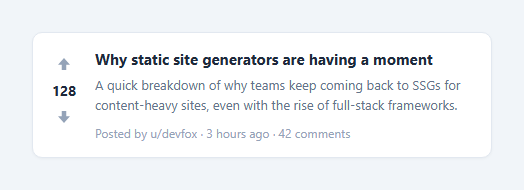
Forum and link-aggregator sites like Reddit and Hacker News use a simple two-arrow voting widget to let users rank content: an up arrow, a running score, and a down arrow, stacked vertically beside each post. Clicking an arrow changes the score and highlights whichever direction is currently active — clicking it again cancels the vote, and clicking the opposite arrow flips it.
This snippet reproduces that exact interaction model in plain HTML, CSS, and vanilla JavaScript, with a single vote(btn, direction) function driving all the logic and no external state library involved.
How vote state is tracked
Each .vote widget stores two numbers directly on its own dataset: data-count is the *base* score before the current user's vote, and data-user-vote is 1, -1, or 0 depending on what the current user has clicked. The displayed count is always baseCount + userVote — recomputing it this way (rather than mutating the base count directly) means toggling a vote off always returns to the exact original number, with no drift from repeated clicks.
How the toggle logic works
The core of vote() is one line: userVote = userVote === direction ? 0 : direction. If you click upvote while already upvoted, this sets userVote back to 0, canceling it. If you click upvote while downvoted, it jumps straight to 1 — a single click flips a downvote into an upvote, exactly like the real thing, because the displayed count moves by up to 2 in one click (from -1 to +1 relative to base).
How the active-color highlighting works
Two CSS classes, .vote-btn.up.active and .vote-btn.down.active, recolor the arrow icons — orange for upvote, indigo for downvote. The count text itself picks up a matching .up-color or .down-color class so the whole widget visually agrees on which direction is currently selected. Both classes are toggled based on the freshly computed userVote, so only one arrow (or neither) is ever highlighted at a time.
Accessibility
Both buttons carry aria-pressed, updated alongside the visual state on every click, so screen readers announce whether a given arrow is currently the active vote — a natural fit since each arrow behaves like a toggle button, not a one-shot action.
Build with AI
Build, Understand, Optimize, and Extend It With AI
Give this snippet's HTML, CSS, and JS to an AI coding assistant like Claude and ask it to explain why storing a base count and a separate signed user-vote value, then always recomputing the displayed total from both, is more robust than incrementing or decrementing the displayed number directly on every click. It's also worth asking the assistant to help you wire the optimistic UI update shown here to a real backend endpoint — specifically how to reconcile a slow or failed network response with the vote the user already sees applied, including what should happen if the request fails and the UI needs to roll back to the previous state.
Prompt to recreate it
Copy this into your AI assistant of choice to build the effect from scratch, or as a jumping-off point for your own variant:
Build a Reddit/Hacker-News style upvote/downvote widget in plain HTML, CSS, and JavaScript — no framework, no state library.

Requirements:
- A vertical widget with an up-arrow button, a numeric count in the middle, and a down-arrow button below it, sitting beside a post preview card.
- Store the post's base score and the current user's vote (1, -1, or 0) as data attributes on the widget's own container element — do not use a global JS variable for vote state.
- The displayed count must always be computed as base score plus the current user vote, never incremented or decremented in place, so that canceling a vote always returns to the exact original number with no drift from repeated clicks.
- Clicking the currently active arrow again must cancel the vote back to 0. Clicking the opposite arrow while one direction is already active must flip directly to the new direction in a single click.
- Whichever direction is currently active must recolor both that arrow icon and the count text to match (e.g. orange for up, indigo for down), and both arrow buttons must keep an aria-pressed attribute in sync with whether they are the currently active vote.
- The component must support multiple independent instances on the same page without any id collisions or shared state between them.
Want to tighten it up first? Run this prompt through the AI Prompt Studio to score it across 8 quality dimensions, catch anti-patterns, and tune the wording for Claude, ChatGPT, or Gemini before you paste it in.
Step by step
How to Use
- 1Load the snippetClick "Upvote / Downvote Widget" in the sidebar Library tab. The preview shows a post card with a 128-point vote widget beside it.
- 2Click the arrowsClick the up arrow to see the count increase and turn orange, click it again to cancel the vote, then try the down arrow to see it flip to indigo.
- 3Set a real starting countIn the HTML panel, update data-count on the .vote div to the post's actual score from your backend.
- 4Wire it to your APIIn the JS panel, extend vote() to send the new userVote value to your server (e.g. via fetch) instead of, or alongside, updating the DOM.
- 5Recolor the statesIn the CSS panel, change the colors on .vote-btn.up.active and .vote-btn.down.active to match your brand.
- 6Export in your formatClick "HTML" for a standalone file, "JSX" for React, or "Tailwind" for React + Tailwind CSS.
Real-world uses
Common Use Cases
Got questions?
Frequently Asked Questions
The displayed count is always recalculated as baseCount + userVote, where baseCount never changes and userVote is only ever 1, -1, or 0. Because the count is derived fresh each time rather than incremented in place, canceling a vote always returns to the exact original number.
The ternary in vote() sets userVote directly to the new direction whenever it differs from the current one, so a single click flips from +1 to -1 (or vice versa) — the count moves by 2 relative to the base in one click, matching real vote-flipping behavior.
Add a fetch call inside vote() that sends the widget's id and the new userVote value to your API. You can update the DOM optimistically as shown, then reconcile with the server's authoritative count in the fetch response if they ever disagree.
Yes. Hide the .vote-count element with display: none and keep only the two buttons — the same toggle logic works for a simple like/dislike pair without displaying a running total.
Yes. Both arrows are real button elements with aria-pressed and a visible focus-visible outline, so they can be reached with Tab and activated with Enter or Space like any native button.
Yes. Because all state is stored on each .vote element's own dataset rather than in a global variable, any number of independent widgets can coexist on one page without interfering with each other.
Add a small formatCount helper that divides by 1000 and appends "k" above a threshold, then call it when setting countEl.textContent instead of writing the raw number directly.
Yes. Add a disabled attribute to both buttons when there is no logged-in user, and check for it at the top of vote() to bail out early, optionally redirecting to a login prompt instead.