

Learn Coding Visually
Learn to code with interactive, live-preview playgrounds — HTML, CSS, JavaScript, React & more.
 HTML Playground42 lessons · Click-based · Live preview
 CSS PlaygroundLearn CSS with a live editor
 JavaScript Playground60 lessons · DOM · Async · Canvas
 React PlaygroundLearn React with a live code editor
 GSAP PlaygroundLearn GSAP animation interactively
 SVG Playground44 lessons · shapes · paths · animation
 SCSS Playground45 lessons · Sass modules · tokens
 Tailwind PlaygroundLearn Tailwind CSS with a live editor
 Bootstrap 5 Playground50 lessons · live preview
Typing Speed Test WPM Counter — HTML CSS JS Snippet
Typing Speed Test (WPM Counter) · Games · Plain HTML, CSS & JS · Live preview
What's included
Features
About this UI Snippet
Typing Speed Test WPM Counter — Live Character Diffing, Words-Per-Minute Calculation & Accuracy Scoring
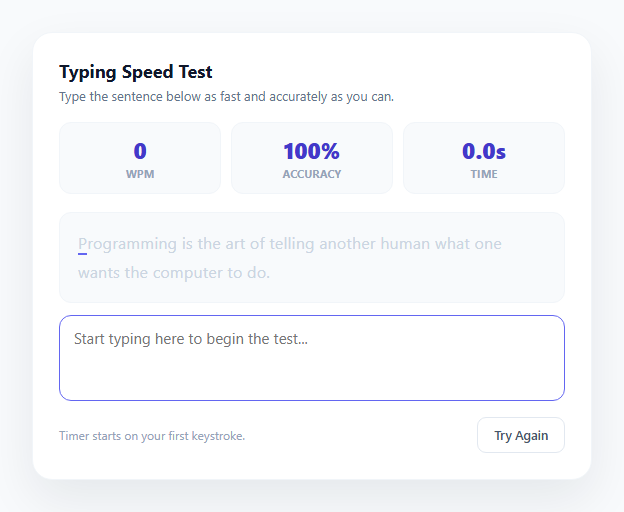
Typing speed tests are a deceptively small feature that requires getting several interconnected pieces of logic right at once: character-by-character comparison against a target string, a words-per-minute formula that only starts counting from the user's first keystroke, an accuracy percentage that updates live, and a completion check that triggers the moment the typed text exactly matches the target. This snippet implements all of it in vanilla JavaScript with no dependencies, using the same core technique that speed-typing sites like MonkeyType and 10FastFingers rely on: comparing two strings index by index and re-rendering the sample text with per-character CSS classes on every keystroke.
Character-by-character diffing
The heart of the snippet is renderTarget(typed), which loops over every character of the target sentence and compares it against the corresponding character the user has typed so far. Each target character is wrapped in its own <span> and assigned one of three classes: char-correct (green) if typed[i] === target[i], char-incorrect (red background) if the user typed something different at that position, or no class at all if the user has not reached that character yet — except for the very next character, which gets char-current to show a blinking-style underline cursor indicator. If the user has typed more characters than the target sentence contains (for example, extra characters at the end), those are appended in a separate char-extra span with a red underline, so over-typing is visually distinct from a wrong-character mismatch rather than silently ignored. This span-per-character approach means the entire sample re-renders on every input event, which is cheap enough at typical sentence lengths (60-90 characters) to run smoothly on every keystroke without any debouncing.
The words-per-minute formula
WPM is calculated using the standard typing-test convention: one "word" equals five characters (including spaces), regardless of actual word boundaries, because this normalizes scoring across sentences with different average word lengths. The formula is words = typed.length / 5, then wpm = Math.round((typed.length / 5) / (elapsedSeconds / 60)). Critically, the timer does not start when the component loads — it starts on the very first input event via a null-check on startTime, matching how real typing tests behave (you should not be penalized for time spent reading the prompt before you start typing). A setInterval running every 100ms recalculates and redisplays the live WPM, accuracy, and elapsed time while the test is in progress, so numbers update smoothly rather than jumping only on keystrokes.
Accuracy scoring and completion detection
computeAccuracy(typed) counts how many typed characters match the target at the same index, divided by the total number of characters typed so far (not the target length), so accuracy reflects the quality of what has actually been typed at any moment — including dips caused by mistakes that were later corrected. The test only completes when typed.length >= target.length && typed === target, an exact string equality check, meaning a single leftover typo blocks completion until the user backspaces and fixes it, mirroring the "you cannot finish with mistakes present" behavior of most typing test tools. On completion, finishTest() stops the interval timer, disables the textarea so no further input is registered, and reveals a results overlay summarizing final WPM, accuracy, and total time.
Random sample rotation and reset flow
Five sample sentences of varying length and vocabulary live in a SAMPLES array; pickSample() selects one at random using Math.floor(Math.random() * SAMPLES.length). Both the header "Try Again" button and the results overlay's "Try Again" button call the same resetTest() function, which clears the interval, resets startTime to null, re-enables the textarea, picks a fresh random sample, and re-renders the target text in its untyped state — ensuring every attempt starts from a clean, consistent baseline with no leftover timer or stale DOM classes from the previous run.
Build with AI
Build, Understand, Optimize, and Extend It With AI
Paste this snippet's HTML, CSS, and JS into an AI coding assistant like Claude and ask it to walk through exactly how renderTarget() builds the per-character span markup on every keystroke, and how the WPM formula and the null-startTime check work together to make sure timing only begins once real typing starts. It's also worth asking the assistant to extend the test meaningfully: request a fixed-duration mode (for example a 60-second countdown where the test ends automatically regardless of completion), a per-word accuracy breakdown highlighting which specific words caused the most retyping, or a results history stored in localStorage so returning users can see their WPM trend over multiple sessions. Because the character-diffing and timing logic are cleanly separated from the DOM rendering, it's a good snippet to ask an assistant to refactor into a reusable typing-test engine you could reuse in other contexts.
Prompt to recreate it
Copy this into your AI assistant of choice to build the effect from scratch, or as a jumping-off point for your own variant:
Build a typing speed test in plain HTML, CSS, and JavaScript that measures words-per-minute and accuracy in real time as the user types — no external libraries or fonts.

Requirements:
- Display a sample sentence and provide a text input where the user types it; on every keystroke, re-render the sample text so each character is individually marked correct, incorrect, or not-yet-typed compared against the same-index character the user has typed so far.
- Handle the case where the user types more characters than the sample sentence contains by visually flagging the extra characters distinctly, rather than silently ignoring or crashing on them.
- Start a timer precisely on the user's first keystroke (not on page load), and calculate a live words-per-minute value using the standard convention of one word equaling five characters, updating continuously (for example every 100ms) rather than only on each keystroke.
- Calculate and display a live accuracy percentage based on how many of the characters typed so far exactly match the target at their position.
- Detect completion only when the typed text exactly matches the full target sentence (including catching any leftover uncorrected mistakes), and at that point stop the timer, disable further input, and show a results summary of final WPM, accuracy, and total elapsed time.
- Provide a "Try again" control that resets all state — timer, input value, disabled state, and displayed stats — and selects a new random sentence from a pool of at least four sample sentences of varying length.
- Make sure rapid typing does not cause any visual lag or flicker in the character highlighting, and that backspacing correctly reverts characters from correct/incorrect back to their untyped appearance.
Want to tighten it up first? Run this prompt through the AI Prompt Studio to score it across 8 quality dimensions, catch anti-patterns, and tune the wording for Claude, ChatGPT, or Gemini before you paste it in.
Source Code
<div class="typing-card">
  <div class="card-header">
    <h2 class="card-title">Typing Speed Test</h2>
    <p class="card-sub">Type the sentence below as fast and accurately as you can.</p>
  </div>

  <div class="stat-row">
    <div class="stat">
      <span class="stat-value" id="stat-wpm">0</span>
      <span class="stat-label">WPM</span>
    </div>
    <div class="stat">
      <span class="stat-value" id="stat-accuracy">100%</span>
      <span class="stat-label">Accuracy</span>
    </div>
    <div class="stat">
      <span class="stat-value" id="stat-time">0.0s</span>
      <span class="stat-label">Time</span>
    </div>
  </div>

  <div class="sample-text" id="sample-text" aria-live="off"></div>

  <textarea class="type-input" id="type-input" rows="3" placeholder="Start typing here to begin the test..." autocomplete="off" autocorrect="off" autocapitalize="off" spellcheck="false"></textarea>

  <div class="card-footer">
    <span class="hint" id="hint-text">Timer starts on your first keystroke.</span>
    <button class="btn btn-outline" id="btn-restart">Try Again</button>
  </div>

  <div class="results-overlay" id="results-overlay">
    <div class="results-card">
      <p class="results-eyebrow">Test complete</p>
      <h3 class="results-title">Great typing!</h3>
      <div class="results-grid">
        <div class="results-stat">
          <span class="results-value" id="final-wpm">0</span>
          <span class="results-label">WPM</span>
        </div>
        <div class="results-stat">
          <span class="results-value" id="final-accuracy">0%</span>
          <span class="results-label">Accuracy</span>
        </div>
        <div class="results-stat">
          <span class="results-value" id="final-time">0.0s</span>
          <span class="results-label">Time</span>
        </div>
      </div>
      <button class="btn btn-primary" id="btn-try-again">Try Again</button>
    </div>
  </div>
</div>
* { box-sizing: border-box; margin: 0; padding: 0; }
body { font-family: system-ui, sans-serif; background: #f8fafc; min-height: 100vh; display: flex; align-items: center; justify-content: center; padding: 24px; }
.typing-card {
width: 560px; max-width: 100%;
background: #ffffff; border-radius: 20px;
padding: 26px; box-shadow: 0 20px 50px rgba(15, 23, 42, 0.08);
border: 1px solid #f1f5f9;
position: relative;
}
.card-header { margin-bottom: 18px; }
.card-title { font-size: 18px; font-weight: 700; color: #0f172a; margin-bottom: 4px; }
.card-sub { font-size: 13px; color: #64748b; }
.stat-row { display: flex; gap: 10px; margin-bottom: 18px; }
.stat { flex: 1; background: #f8fafc; border-radius: 12px; padding: 12px; text-align: center; border: 1px solid #f1f5f9; }
.stat-value { display: block; font-size: 22px; font-weight: 800; color: #4338ca; font-variant-numeric: tabular-nums; }
.stat-label { display: block; font-size: 10.5px; font-weight: 700; letter-spacing: 0.05em; text-transform: uppercase; color: #94a3b8; margin-top: 2px; }
.sample-text {
font-size: 16px; line-height: 1.8; color: #cbd5e1;
background: #f8fafc; border-radius: 12px; padding: 16px 18px;
margin-bottom: 12px; letter-spacing: 0.2px;
border: 1px solid #f1f5f9;
user-select: none;
}
.sample-text .char-correct { color: #16a34a; }
.sample-text .char-incorrect { color: #ef4444; background: rgba(239, 68, 68, 0.1); border-radius: 2px; }
.sample-text .char-extra { color: #ef4444; text-decoration: underline; }
.sample-text .char-current { border-bottom: 2px solid #6366f1; }
.type-input {
width: 100%; resize: none;
font-family: inherit; font-size: 15px; color: #1e293b;
border: 1.5px solid #e2e8f0; border-radius: 12px; padding: 12px 14px;
outline: none; transition: border-color 0.15s;
margin-bottom: 12px;
}
.type-input:focus { border-color: #6366f1; }
.type-input.shake { animation: shake 0.3s; }
@keyframes shake {
0%, 100% { transform: translateX(0); }
25% { transform: translateX(-4px); }
75% { transform: translateX(4px); }
}
.card-footer { display: flex; align-items: center; justify-content: space-between; gap: 12px; }
.hint { font-size: 12px; color: #94a3b8; }
.btn { padding: 9px 16px; font-size: 12.5px; font-weight: 600; border-radius: 9px; cursor: pointer; font-family: inherit; transition: all 0.15s; border: none; }
.btn-outline { background: transparent; color: #475569; border: 1.5px solid #e2e8f0; }
.btn-outline:hover { border-color: #6366f1; color: #6366f1; }
.btn-primary { background: #6366f1; color: #fff; }
.btn-primary:hover { background: #4f46e5; }
.results-overlay {
position: absolute; inset: 0; border-radius: 20px;
background: rgba(255, 255, 255, 0.97);
display: flex; align-items: center; justify-content: center;
opacity: 0; pointer-events: none; transform: scale(0.97);
transition: opacity 0.2s, transform 0.2s;
}
.results-overlay.show { opacity: 1; pointer-events: all; transform: scale(1); }
.results-card { text-align: center; padding: 20px; }
.results-eyebrow { font-size: 11px; font-weight: 700; letter-spacing: 0.06em; text-transform: uppercase; color: #6366f1; margin-bottom: 6px; }
.results-title { font-size: 22px; font-weight: 800; color: #0f172a; margin-bottom: 18px; }
.results-grid { display: flex; gap: 20px; margin-bottom: 20px; justify-content: center; }
.results-stat { display: flex; flex-direction: column; }
.results-value { font-size: 28px; font-weight: 800; color: #4338ca; }
.results-label { font-size: 10.5px; font-weight: 700; letter-spacing: 0.05em; text-transform: uppercase; color: #94a3b8; margin-top: 2px; }const SAMPLES = [
"The quick brown fox jumps over the lazy dog near the riverbank.",
"Typing quickly and accurately is a skill that improves with steady practice.",
"Great design is not just what it looks like, it is how it works.",
"Programming is the art of telling another human what one wants the computer to do.",
"Consistency and small daily habits build mastery faster than occasional bursts of effort.",
];
const sampleEl = document.getElementById('sample-text');
const inputEl = document.getElementById('type-input');
const statWpm = document.getElementById('stat-wpm');
const statAccuracy = document.getElementById('stat-accuracy');
const statTime = document.getElementById('stat-time');
const hintText = document.getElementById('hint-text');
const restartBtn = document.getElementById('btn-restart');
const tryAgainBtn = document.getElementById('btn-try-again');
const resultsOverlay = document.getElementById('results-overlay');
const finalWpm = document.getElementById('final-wpm');
const finalAccuracy = document.getElementById('final-accuracy');
const finalTime = document.getElementById('final-time');
let target = '';
let startTime = null;
let timerId = null;
let finished = false;
function pickSample() {
const idx = Math.floor(Math.random() * SAMPLES.length);
return SAMPLES[idx];
}
function renderTarget(typed) {
let html = '';
for (let i = 0; i < target.length; i++) {
const targetChar = target[i];
const typedChar = typed[i];
let cls = '';
if (typedChar === undefined) {
cls = i === typed.length ? 'char-current' : '';
} else if (typedChar === targetChar) {
cls = 'char-correct';
} else {
cls = 'char-incorrect';
}
html += '<span class="' + cls + '">' + escapeHtml(targetChar) + '</span>';
}
// Extra characters typed beyond target length
if (typed.length > target.length) {
html += '<span class="char-extra">' + escapeHtml(typed.slice(target.length)) + '</span>';
}
sampleEl.innerHTML = html;
}
function escapeHtml(str) {
return str.replace(/[&<>]/g, ch => ({ '&': '&', '<': '<', '>': '>' }[ch]));
}
function computeAccuracy(typed) {
let correct = 0;
const len = Math.min(typed.length, target.length);
for (let i = 0; i < len; i++) {
if (typed[i] === target[i]) correct++;
}
const totalTyped = typed.length || 1;
const accuracy = Math.max(0, Math.round((correct / totalTyped) * 100));
return typed.length === 0 ? 100 : accuracy;
}
function computeWpm(typed, elapsedSeconds) {
if (elapsedSeconds <= 0) return 0;
const words = typed.length / 5;
const minutes = elapsedSeconds / 60;
return Math.round(words / minutes);
}
function updateLiveStats() {
const typed = inputEl.value;
const elapsed = startTime ? (Date.now() - startTime) / 1000 : 0;
statWpm.textContent = computeWpm(typed, elapsed);
statAccuracy.textContent = computeAccuracy(typed) + '%';
statTime.textContent = elapsed.toFixed(1) + 's';
}
function startTimer() {
startTime = Date.now();
hintText.textContent = 'Keep going...';
timerId = setInterval(updateLiveStats, 100);
}
function stopTimer() {
clearInterval(timerId);
}
function finishTest() {
finished = true;
stopTimer();
inputEl.disabled = true;
const typed = inputEl.value;
const elapsed = (Date.now() - startTime) / 1000;
const wpm = computeWpm(typed, elapsed);
const accuracy = computeAccuracy(typed);
finalWpm.textContent = wpm;
finalAccuracy.textContent = accuracy + '%';
finalTime.textContent = elapsed.toFixed(1) + 's';
statWpm.textContent = wpm;
statAccuracy.textContent = accuracy + '%';
statTime.textContent = elapsed.toFixed(1) + 's';
resultsOverlay.classList.add('show');
}
function handleInput() {
if (finished) return;
const typed = inputEl.value;
if (startTime === null && typed.length > 0) {
startTimer();
}
renderTarget(typed);
updateLiveStats();
if (typed.length >= target.length && typed === target) {
finishTest();
}
}
function resetTest() {
finished = false;
clearInterval(timerId);
startTime = null;
target = pickSample();
inputEl.value = '';
inputEl.disabled = false;
statWpm.textContent = '0';
statAccuracy.textContent = '100%';
statTime.textContent = '0.0s';
hintText.textContent = 'Timer starts on your first keystroke.';
resultsOverlay.classList.remove('show');
renderTarget('');
inputEl.focus();
}
inputEl.addEventListener('input', handleInput);
restartBtn.addEventListener('click', resetTest);
tryAgainBtn.addEventListener('click', resetTest);
resetTest();Step by step
How to Use
- 1Start typing to beginClick into the textarea and start typing the displayed sentence. The timer starts automatically on your first keystroke via the null-check on startTime inside handleInput() — there is no separate start button.
- 2Watch live character feedbackAs you type, renderTarget() re-renders the sample sentence on every input event, coloring correct characters green (.char-correct) and incorrect ones red (.char-incorrect). Extra characters typed beyond the sentence length appear underlined in red via .char-extra.
- 3Monitor your live WPM and accuracyThe three stat tiles above the sentence update every 100ms via a setInterval calling updateLiveStats(), showing your current words-per-minute, accuracy percentage, and elapsed time in real time as you type.
- 4Complete the test and view resultsFinish typing the full sentence exactly as shown — the test only completes when your typed text exactly equals the target string. finishTest() then disables the textarea and reveals an overlay with your final WPM, accuracy, and total time.
- 5Try again with a new random sentenceClick "Try Again" (either in the footer or on the results overlay) to call resetTest(), which picks a new random sentence from the SAMPLES array, clears the timer, and re-enables the textarea for a fresh attempt.
- 6Add your own sample sentencesEdit the SAMPLES array at the top of the JS panel to add, remove, or replace sentences. Longer or more complex sentences with punctuation and varied word lengths make for a more challenging or realistic typing test.
Real-world uses
Common Use Cases
Got questions?
Frequently Asked Questions
Standard typing test convention (used by MonkeyType, 10FastFingers, and most typing tutors) defines one "word" as five characters including spaces, regardless of actual word boundaries. This normalizes the WPM score across sentences with different average word lengths — a sentence full of short words and one full of long words produce comparable, fair WPM figures under this formula, rather than actual word-counting which would unfairly reward or penalize vocabulary choice.
The timer starts on the very first input event where startTime is still null, captured as Date.now() at that moment — not when the page loads or the textarea is focused. This means time spent reading the sentence before typing does not count against you. The timer stops the instant the typed text exactly equals the target string, at which point finishTest() clears the interval and disables further input.
computeAccuracy() counts how many characters in the currently typed text match the target string at the same index, then divides by the total number of characters typed so far (not the target sentence length). This means accuracy reflects real-time quality of your current input — if you make a mistake and then backspace to fix it, accuracy recovers immediately since the incorrect character is no longer part of the typed string being measured.
Any characters typed beyond the target sentence's length are rendered in a separate span with the char-extra class, shown in red with an underline, so over-typing is visually distinguished from simply mistyping a character that exists in the target. Because completion requires exact string equality (typed === target), extra trailing characters will also prevent the test from completing until they are removed.
Yes, edit the SAMPLES array at the top of the JS panel — it is a plain array of strings, and pickSample() selects a random index from whatever length the array currently is via Math.floor(Math.random() * SAMPLES.length). You can add as many sentences as you want, including longer paragraphs, though very long text will make the sample-text panel taller and may need adjusted line-height or a max-height with scroll.