Source Code
<div class="demo">
  <div class="phone-frame">
    <div class="form-screen">
      <div class="form-header">Checkout details</div>
      <div class="form-scroll">
        <div class="ik-field">
          <label for="ikEmail">Email</label>
          <input id="ikEmail" type="email" inputmode="email" autocomplete="email" placeholder="you@example.com" />
          <span class="ik-tag">type="email" — @ and .com keys surfaced</span>
        </div>
        <div class="ik-field">
          <label for="ikPhone">Phone</label>
          <input id="ikPhone" type="tel" inputmode="tel" autocomplete="tel" placeholder="(555) 123-4567" />
          <span class="ik-tag">type="tel" — full numeric phone keypad</span>
        </div>
        <div class="ik-field">
          <label for="ikCard">Card number</label>
          <input id="ikCard" inputmode="numeric" pattern="[0-9\s]*" autocomplete="cc-number" placeholder="4242 4242 4242 4242" maxlength="19" />
          <span class="ik-tag">inputmode="numeric" + pattern — digit-only keypad, no dot/hyphen keys wasted</span>
        </div>
        <div class="ik-field">
          <label for="ikZip">Postal code</label>
          <input id="ikZip" inputmode="text" autocomplete="postal-code" placeholder="SW1A 1AA" />
          <span class="ik-tag">inputmode="text" — many postal codes contain letters, a numeric pad would be wrong here</span>
        </div>
        <div class="ik-field">
          <label for="ikQty">Quantity</label>
          <input id="ikQty" inputmode="decimal" pattern="[0-9]*\.?[0-9]*" placeholder="1" />
          <span class="ik-tag">inputmode="decimal" — numeric pad that also includes a decimal point</span>
        </div>
        <div class="ik-field">
          <label for="ikSite">Website</label>
          <input id="ikSite" type="url" inputmode="url" autocomplete="url" placeholder="https://example.com" />
          <span class="ik-tag">type="url" — / and .com keys surfaced, no autocapitalize</span>
        </div>
      </div>
    </div>
  </div>
</div>
* { box-sizing: border-box; margin: 0; padding: 0; }
body { font-family: system-ui, sans-serif; background: #f8fafc; display: flex; align-items: center; justify-content: center; min-height: 100vh; padding: 24px; }
.demo { display: flex; }
.phone-frame { width: 300px; height: 520px; border-radius: 32px; border: 8px solid #0f172a; background: #0f172a; overflow: hidden; box-shadow: 0 30px 60px rgba(15,23,42,0.25); }
.form-screen { height: 100%; background: #fff; display: flex; flex-direction: column; }
.form-header { padding: 14px 16px; font-size: 14px; font-weight: 800; color: #111827; border-bottom: 1px solid #f1f5f9; flex-shrink: 0; }
.form-scroll { flex: 1; overflow-y: auto; padding: 16px; display: flex; flex-direction: column; gap: 16px; }
.ik-field { display: flex; flex-direction: column; gap: 5px; }
.ik-field label { font-size: 12px; font-weight: 700; color: #334155; }
.ik-field input { padding: 10px 12px; border: 1.5px solid #e2e8f0; border-radius: 10px; font-size: 13px; font-family: inherit; }
.ik-field input:focus-visible { outline: none; border-color: #6366f1; box-shadow: 0 0 0 3px rgba(99,102,241,0.15); }
.ik-tag { font-size: 10px; color: #6366f1; font-weight: 600; background: #eef2ff; padding: 4px 8px; border-radius: 6px; align-self: flex-start; line-height: 1.4; }// This snippet is intentionally markup-driven — every meaningful decision
// (which keyboard layout appears) is expressed declaratively through the
// type/inputmode/pattern/autocomplete attributes on each <input>, which is
// exactly the point: correct mobile keyboard behavior requires no JavaScript
// at all, only choosing the right combination of HTML attributes per field.
//
// This small script only adds a live client-side sanity check so the digit-
// only fields visibly demonstrate why "pattern" still matters even once
// inputmode has already picked the right visual keyboard: inputmode is a
// STRONG HINT about which keys to show, but it does not by itself restrict
// which characters a user can actually type (a keyboard with a numeric
// layout can usually still be switched by the user, or a physical keyboard
// bypasses it entirely) — real validation still needs pattern or JS.
document.querySelectorAll('input[pattern]').forEach((input) => {
input.addEventListener('input', () => {
const isValid = new RegExp('^' + input.pattern + '$').test(input.value);
input.style.borderColor = input.value && !isValid ? '#ef4444' : '';
});
});Learn Coding Visually
Learn to code with interactive, live-preview playgrounds — HTML, CSS, JavaScript, React & more.
 HTML Playground42 lessons · Click-based · Live preview
 CSS PlaygroundLearn CSS with a live editor
 JavaScript Playground60 lessons · DOM · Async · Canvas
 React PlaygroundLearn React with a live code editor
 GSAP PlaygroundLearn GSAP animation interactively
 SVG Playground44 lessons · shapes · paths · animation
 SCSS Playground45 lessons · Sass modules · tokens
 Tailwind PlaygroundLearn Tailwind CSS with a live editor
 Bootstrap 5 Playground50 lessons · live preview
Mobile Keyboard Guide — Correct inputmode, type, and pattern Per Form Field
Mobile Keyboard Guide — Correct inputmode/type/pattern Per Field · Mobile · Plain HTML, CSS & JS · Live preview
What's included
Features
About this UI Snippet
Mobile Keyboard Attributes — A Field-by-Field Reference
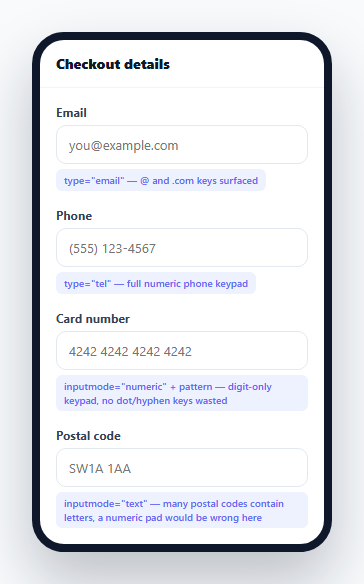
The single biggest, cheapest improvement most mobile forms are missing costs zero JavaScript: choosing the correct type, inputmode, and pattern attribute combination for each field so the mobile keyboard that appears actually matches what the user needs to type. Get it wrong, and a phone number field pops up a full QWERTY keyboard requiring several extra taps to reach the numbers; get it right, and the correct numeric keypad appears the instant the field is focused.
`inputmode` controls the keyboard layout; `type` and `pattern` do different, complementary jobs
These three attributes are often confused for redundant ways of doing the same thing, but they each solve a different problem. inputmode is purely a *presentation* hint telling the browser which virtual keyboard layout to show (numeric, decimal, tel, email, url, search, text, or none) — it has no effect on validation. type (like type="email" or type="tel") affects both the keyboard *and* triggers the browser's built-in validation and semantics for that field type. pattern is a regex constraint used purely for validation, independent of which keyboard is shown — which is why the card number field in this demo pairs inputmode="numeric" (for the keyboard) with a pattern (for validation), since a generic text input has no dedicated "credit card" type of its own.
Why the postal code field deliberately does *not* use a numeric keypad
ikZip uses inputmode="text", not inputmode="numeric" — a decision that looks wrong at first glance for a "code" field, until you remember that postal codes in the UK, Canada, and several other countries routinely include letters (SW1A 1AA). Defaulting every "looks numeric" field to a numeric keypad is a common but genuinely incorrect assumption; the right choice always depends on the actual full range of valid values for that specific field, not a surface-level guess based on the field's name.
`numeric` versus `decimal` — a subtle but real distinction
inputmode="numeric" surfaces a keypad with no decimal point key at all — correct for a card number or a quantity that must always be a whole number. inputmode="decimal" surfaces a numeric keypad that does include a decimal point key — correct for a quantity or amount field where fractional values are valid. Using numeric on a field that actually needs to accept decimals forces the user to switch keyboards mid-entry (or blocks decimal input on some devices entirely); using decimal everywhere "just to be safe" needlessly adds an extra key to fields that should never have accepted a decimal point in the first place.
Why `inputmode` alone is never sufficient validation
The demo's small JS layer exists specifically to make one point visible: inputmode is only a *hint* about which keyboard to display — it does not, by itself, prevent a user from switching keyboards, pasting arbitrary text, or typing from a connected physical keyboard that ignores the hint entirely. Real validation for any field where the input format actually matters (like the card number here) still needs an explicit pattern attribute or JavaScript-based validation — inputmode improves the *typing experience*, it does not enforce *data correctness*.
Build with AI
Build, Understand, Optimize, and Extend It With AI
Ask an AI assistant to explain the precise difference between inputmode="numeric" and inputmode="decimal" with concrete examples of fields that should use each, and why relying on inputmode alone is never sufficient for validating that a value is actually correctly formatted. It's also worth asking for a broader reference table covering additional field types (like a search field, a one-time-passcode field with autocomplete="one-time-code", or a currency amount field), or for guidance on which autocomplete token values pair correctly with each inputmode choice.
Prompt to recreate it
Copy this into your AI assistant of choice to build the effect from scratch, or as a jumping-off point for your own variant:
Build a reference mobile form in HTML and CSS (minimal JavaScript, only for a small validation demonstration) showing correct type/inputmode/pattern/autocomplete attribute choices for common field types — no external library.

Requirements:
- Include at least six distinct fields: email, phone number, credit card number, postal code, a decimal quantity, and a website URL — each using the objectively correct combination of type, inputmode, pattern, and autocomplete attributes for that specific kind of data.
- The credit card number field must use inputmode="numeric" (a keypad with no decimal key, since card numbers are always whole digits) paired with a pattern attribute restricting input to digits and spaces, since HTML has no dedicated credit-card input type.
- The decimal quantity field must use inputmode="decimal" (a keypad that DOES include a decimal key), demonstrating the distinction from the numeric-only card field.
- The postal code field must deliberately use inputmode="text" rather than a numeric keyboard, since many real-world postal codes include letters — annotate why this choice was made rather than defaulting to a numeric keypad.
- Add a small annotation or label beneath each field briefly explaining which specific attribute combination was used and why.
- Add a small JavaScript layer that live-validates any field with a pattern attribute against that pattern as the user types, demonstrating that inputmode alone controls only the keyboard's appearance and does not itself enforce that the entered data is actually valid.
Want to tighten it up first? Run this prompt through the AI Prompt Studio to score it across 8 quality dimensions, catch anti-patterns, and tune the wording for Claude, ChatGPT, or Gemini before you paste it in.
Step by step
How to Use
- 1Open this snippet on an actual mobile deviceThe keyboard layout differences are only visible where a real software keyboard exists — tap each field to see its specific layout.
- 2Tap the Email fieldA keyboard with @ and .com shortcut keys surfaces, thanks to type="email" combined with inputmode="email".
- 3Tap the Phone fieldA full numeric telephone keypad appears — type="tel" is the correct semantic type for phone numbers, distinct from generic numeric input.
- 4Compare Card number and QuantityCard number uses inputmode="numeric" (no decimal key, since card numbers are always whole digits); Quantity uses inputmode="decimal" (includes a decimal key, since fractional quantities are valid).
- 5Tap Postal codeDeliberately kept as inputmode="text" rather than numeric, since many countries' postal codes include letters — see the tag beneath the field for the reasoning.
- 6Apply the same attribute combinations to your own formsMatch each field's real valid value range (not just its visual "looks numeric" appearance) to the correct type/inputmode/pattern combination from this reference.
Real-world uses
Common Use Cases
Got questions?
Frequently Asked Questions
inputmode is purely a presentation hint controlling which virtual keyboard layout appears — it has no effect on validation. type (like email or tel) affects the keyboard too, but also triggers the browser's built-in validation and semantics for that specific field type. They work together, not as alternatives to each other.
numeric surfaces a keypad with no decimal point key at all, correct for fields that must always be whole numbers (like a card number). decimal surfaces a numeric keypad that does include a decimal point key, correct for fields where fractional values are valid (like a quantity or amount).
Postal codes in many countries (the UK and Canada, for example) routinely include letters, not just digits. Defaulting every "looks like a code" field to a numeric keypad is a common but incorrect assumption — the correct inputmode always depends on the field's actual full range of valid values.
No — inputmode only affects which keyboard layout is displayed. It does not prevent a user from switching keyboards, pasting arbitrary text, or typing from a connected physical keyboard. Real validation for fields where format actually matters still requires an explicit pattern attribute or JavaScript-based validation.
HTML has no dedicated credit-card input type, so inputmode="numeric" is used purely to get the correct digit-focused keyboard, while a separate pattern attribute handles the actual format validation — the two attributes are doing two different, complementary jobs.
Yes, wherever the field maps to a standard autofill category (email, tel, cc-number, postal-code, url, and many others) — autocomplete lets the browser offer to fill the field from saved data, which is a separate but equally valuable mobile UX improvement alongside choosing the right keyboard.