

Learn Coding Visually
Learn to code with interactive, live-preview playgrounds — HTML, CSS, JavaScript, React & more.
 HTML Playground42 lessons · Click-based · Live preview
 CSS PlaygroundLearn CSS with a live editor
 JavaScript Playground60 lessons · DOM · Async · Canvas
 React PlaygroundLearn React with a live code editor
 GSAP PlaygroundLearn GSAP animation interactively
 SVG Playground44 lessons · shapes · paths · animation
 SCSS Playground45 lessons · Sass modules · tokens
 Tailwind PlaygroundLearn Tailwind CSS with a live editor
 Bootstrap 5 Playground50 lessons · live preview
Lottie Onboarding Mascot Modal — Free HTML CSS JS Snippet
Lottie Onboarding Mascot Modal · Modals · Plain HTML, CSS & JS · Live preview
What's included
Features
About this UI Snippet
Lottie Onboarding Mascot Modal — Animated Welcome Screen for New Users
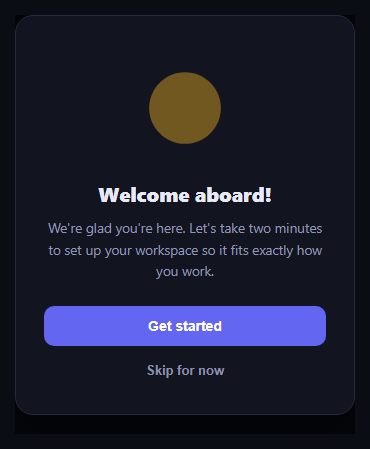
First impressions matter, and this onboarding modal uses a real Lottie animation from lottie-web as a friendly animated mascot at the top of a welcome screen, rather than a static logo or icon.
The mascot animation
The lottie-web UMD script loads from a CDN via cdnUrls, and on page load the snippet calls lottie.loadAnimation({ container, renderer: 'svg', loop: true, autoplay: true, animationData }) against an inline animation JSON object, so the mascot pulses continuously behind the welcome copy without any external .json request.
Welcome copy and primary action
Below the mascot, a bold headline and one short paragraph explain what's about to happen, followed by a full-width primary "Get started" button that would normally kick off a setup wizard or product tour.
A real skip path
A secondary "Skip for now" link sits below the primary button, giving users who already know the product an obvious way out without hunting for a close icon — both actions in this demo render a status message confirming which path was taken.
Build with AI
Build, Understand, Optimize, and Extend It With AI
Hand this snippet's HTML, CSS, and JavaScript to an AI coding assistant like Claude and ask it to adapt "Lottie Onboarding Mascot Modal" to your project — restyle it to match your design system, wire it up to real data instead of the static example, or port it to the framework you're building in.
Prompt to recreate it
Copy this into your AI assistant of choice to build the effect from scratch, or as a jumping-off point for your own variant:
Build a modals component called "Lottie Onboarding Mascot Modal" using plain HTML, CSS, and vanilla JavaScript — no framework, no build step.

Requirements:
- Match the structure and behavior of the "Lottie Onboarding Mascot Modal" snippet from the UI Snippets Library.
- Keep the markup semantic and the styling self-contained (no external dependencies beyond what the original snippet uses).
- Keep the JavaScript vanilla, with no framework runtime required.
- Make it easy to restyle via CSS custom properties or class overrides so it can be dropped into a real project.
Want to tighten it up first? Run this prompt through the AI Prompt Studio to score it across 8 quality dimensions, catch anti-patterns, and tune the wording for Claude, ChatGPT, or Gemini before you paste it in.
Source Code
<div class="lom-backdrop">
  <div class="lom-modal" role="dialog" aria-modal="true">
    <div class="lom-mascot" id="lomMascot"></div>
    <h2 class="lom-title">Welcome aboard!</h2>
    <p class="lom-copy">We're glad you're here. Let's take two minutes to set up your workspace so it fits exactly how you work.</p>
    <button class="lom-cta" id="lomGetStarted" type="button">Get started</button>
    <button class="lom-skip" id="lomSkip" type="button">Skip for now</button>
  </div>
</div>*{box-sizing:border-box}
body{font-family:system-ui,-apple-system,sans-serif;background:#0b0d14;min-height:100vh;margin:0;padding:24px}
.lom-backdrop{min-height:100vh;display:flex;align-items:center;justify-content:center;background:rgba(0,0,0,.5)}
.lom-modal{font-family:system-ui,-apple-system,sans-serif;background:#12141f;color:#e7e9f5;border:1px solid #262a3d;border-radius:18px;padding:32px 28px;max-width:340px;width:100%;text-align:center;box-shadow:0 20px 60px rgba(0,0,0,.4)}
.lom-mascot{width:120px;height:120px;margin:0 auto 12px}
.lom-title{font-size:20px;margin:0 0 10px;font-weight:800}
.lom-copy{font-size:13.5px;color:#9096b3;line-height:1.6;margin:0 0 24px}
.lom-cta{width:100%;background:#6366f1;border:none;color:#fff;font-size:14px;font-weight:700;padding:12px;border-radius:10px;cursor:pointer;margin-bottom:12px}
.lom-cta:hover{background:#4f52e0}
.lom-skip{background:none;border:none;color:#8b90ab;font-size:13px;font-weight:600;cursor:pointer;padding:4px}
.lom-skip:hover{color:#c7cae6;text-decoration:underline}
.lom-status{margin-top:14px;font-size:12px;color:#4ade80;font-weight:600;min-height:16px}// Same minimal Lottie animation JSON as the other snippets in this set,
// used here as a small looping onboarding mascot/icon animation.
var animData = {
v: "5.7.4", fr: 30, ip: 0, op: 60, w: 200, h: 200, nm: "pulse", ddd: 0, assets: [],
layers: [{
ddd: 0, ind: 1, ty: 4, nm: "circle", sr: 1,
ks: {
o: { a: 1, k: [
{ i: { x: [0.667], y: [1] }, o: { x: [0.333], y: [0] }, t: 0, s: [100], e: [40] },
{ i: { x: [0.667], y: [1] }, o: { x: [0.333], y: [0] }, t: 30, s: [40], e: [100] },
{ t: 60, s: [100] }
] },
r: { a: 0, k: 0 },
p: { a: 0, k: [100, 100, 0] },
a: { a: 0, k: [0, 0, 0] },
s: { a: 1, k: [
{ i: { x: [0.667, 0.667, 0.667], y: [1, 1, 1] }, o: { x: [0.333, 0.333, 0.333], y: [0, 0, 0] }, t: 0, s: [70, 70, 100], e: [100, 100, 100] },
{ i: { x: [0.667, 0.667, 0.667], y: [1, 1, 1] }, o: { x: [0.333, 0.333, 0.333], y: [0, 0, 0] }, t: 30, s: [100, 100, 100], e: [70, 70, 100] },
{ t: 60, s: [70, 70, 100] }
] }
},
ao: 0,
shapes: [{
ty: "gr",
it: [
{ ty: "el", p: { a: 0, k: [0, 0] }, s: { a: 0, k: [120, 120] } },
{ ty: "fl", c: { a: 0, k: [0.984, 0.749, 0.141, 1] }, o: { a: 0, k: 100 } },
{ ty: "tr", p: { a: 0, k: [0, 0] }, a: { a: 0, k: [0, 0] }, s: { a: 0, k: [100, 100] }, r: { a: 0, k: 0 }, o: { a: 0, k: 100 } }
]
}],
ip: 0, op: 60, st: 0, bm: 0
}]
};
var mascotContainer = document.getElementById('lomMascot');
lottie.loadAnimation({
container: mascotContainer,
renderer: 'svg',
loop: true,
autoplay: true,
animationData: animData,
});
function showStatus(message) {
var modal = document.querySelector('.lom-modal');
var existing = modal.querySelector('.lom-status');
if (existing) existing.remove();
var status = document.createElement('div');
status.className = 'lom-status';
status.textContent = message;
modal.appendChild(status);
}
document.getElementById('lomGetStarted').addEventListener('click', function () {
showStatus('Starting the setup walkthrough…');
});
document.getElementById('lomSkip').addEventListener('click', function () {
showStatus('Onboarding skipped — you can restart it anytime from settings.');
});Step by step
How to Use
- 1Load the snippetClick "Lottie Onboarding Mascot Modal" in the sidebar to load its HTML, CSS, and JS into the editor panels. The preview updates instantly.
- 2Edit the codeModify any panel — HTML, CSS, or JS. The preview refreshes as you type. Use Reset in each panel header to restore the original.
- 3Preview on devicesClick the Mobile (375px), Tablet (768px), or Desktop buttons in the preview header to check responsiveness.
- 4Export in your formatClick "HTML" to download a standalone file, "JSX" for a React component, "Tailwind" for a React + Tailwind CSS component, "Tailwind HTML" for a standalone HTML file with Tailwind CDN, "Vue" for a Vue 3 SFC with <template>/<script setup>/<style scoped>, or "Angular" for a standalone Angular .component.ts file. "Copy all" copies the full code to clipboard.
- 5Save your versionClick "Save as", type a name, and press Enter. Your snippet saves to IndexedDB and appears in the Saved tab.
Real-world uses
Common Use Cases
Got questions?
Frequently Asked Questions
Yes, loop is set to true, so the animation plays continuously for as long as the modal is visible.
In this demo it shows a status message; in a real app you would close the modal and record that the user opted out of onboarding, typically in a user preference or flag.
Yes — export a mascot animation from After Effects with the Bodymovin/Lottie plugin as JSON and pass it as the animationData object in place of the inline example.