

Learn Coding Visually
Learn to code with interactive, live-preview playgrounds — HTML, CSS, JavaScript, React & more.
 HTML Playground42 lessons · Click-based · Live preview
 CSS PlaygroundLearn CSS with a live editor
 JavaScript Playground60 lessons · DOM · Async · Canvas
 React PlaygroundLearn React with a live code editor
 GSAP PlaygroundLearn GSAP animation interactively
 SVG Playground44 lessons · shapes · paths · animation
 SCSS Playground45 lessons · Sass modules · tokens
 Tailwind PlaygroundLearn Tailwind CSS with a live editor
 Bootstrap 5 Playground50 lessons · live preview
Fabric.js Sticky Note Board — Draggable Canvas Notes Snippet
Fabric.js Sticky Note Board · Misc · Plain HTML, CSS & JS · Live preview
What's included
Features
About this UI Snippet
Fabric.js Sticky Note Board — Grouping Shapes and Text Together
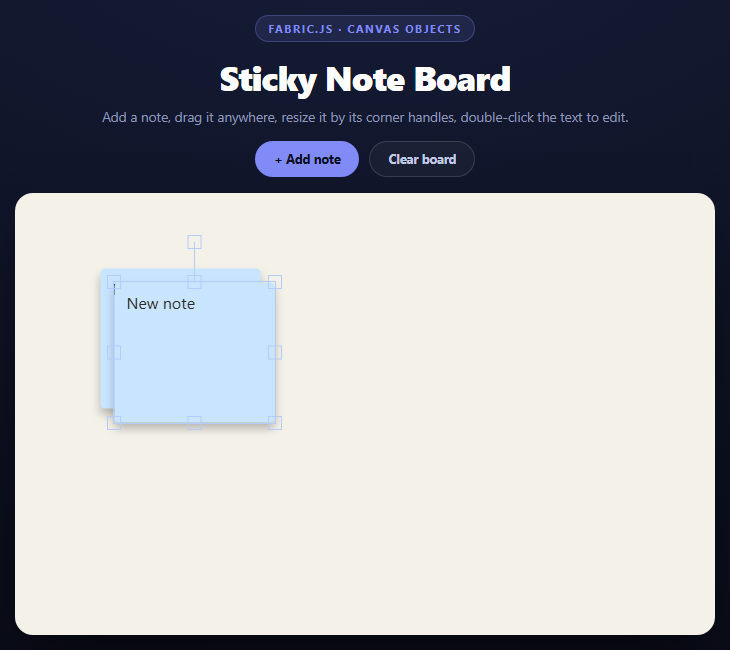
A sticky note is conceptually one object — a colored card with text on it — but on an HTML5 <canvas> there is no such thing as a "note" primitive. Fabric.js solves this with fabric.Group, which wraps several individually-drawn objects so they behave as one for selection, dragging, and resizing, while still letting you reach inside for the text.
Building a note as a group
Each note is a fabric.Rect (the card) plus a fabric.IText (the editable label), constructed with coordinates relative to (0, 0) and then handed to new fabric.Group([rect, text], { left, top }). Fabric repositions the whole group's bounding box to left/top and keeps the two children's relative offsets intact. Drag the group and both children move together; grab a corner handle and hasControls: true (the default) lets you scale the whole card including its text proportionally.
Reaching inside a group: subTargetCheck
By default, clicking anywhere on a Fabric group selects the *group*, not the object you clicked. Setting subTargetCheck: true makes Fabric also hit-test the children and report which one you actually clicked, via opt.subTargets on interaction events. This snippet listens for mousedblclick on the group and checks opt.subTargets[0] — if it's the i-text child, that's the signal to start editing.
Editing text inside a group: ungroup, edit, regroup
Fabric's IText supports rich in-place editing (enterEditing(), a blinking cursor, text selection) but only when it is a canvas object in its own right, not while it's locked inside a group's coordinate space. So on double-click this snippet:
1. Removes the group from the canvas and adds just the text object back, positioned at the group's former on-canvas location.
2. Calls target.enterEditing() and target.selectAll() so the user can start typing immediately.
3. Listens for the text object's editing:exited event — fired when the user clicks away or presses Escape — and at that point rebuilds a fresh Rect + IText pair with the (possibly changed) text, regroups them, and adds the group back.
This ungroup-edit-regroup dance is the standard Fabric.js pattern for editable text inside a draggable shape, because Fabric does not support editing a text object *while* it remains a group child.
Random pastel fills
Each new note picks a color from a small PASTELS array with Math.random(), and a drop shadow (shadow: { color, blur, offsetX, offsetY }) is applied to the rect so the notes visually lift off the corkboard-colored canvas background.
Clearing the board
canvas.clear() removes every object but also resets backgroundColor, so the click handler re-sets it immediately after clearing to keep the board's paper tone.
Build with AI
Build, Understand, Optimize, and Extend It With AI
This snippet's interesting mechanic is the ungroup-edit-regroup dance for in-place text editing, so that's worth probing first. Paste the code into an AI assistant like Claude and ask it to walk through exactly why Fabric.IText can't be edited while it remains a group child, and what the editing:exited listener has to rebuild versus what it could preserve by keeping a reference to the original rect. Then ask what happens to a note's resized dimensions after an edit-regroup cycle — the current implementation always rebuilds the rect at a fixed 160x140, so resizing before editing gets lost, which is a good bug to find and fix together. To extend it: add persistence with canvas.toJSON()/loadFromJSON(), grid snapping via the object:moving event, a text color or card color picker, or connecting lines between related notes using fabric.Line objects that track their linked notes' positions.
Prompt to recreate it
Copy this into your AI assistant of choice to build the effect from scratch, or as a jumping-off point for your own variant:
Build a canvas-based sticky note board using Fabric.js (v5, from a CDN) in plain HTML, CSS, and JavaScript.

Requirements:
- A new fabric.Canvas bound to a <canvas> element with a warm paper-colored background, inside a rounded, shadowed board container.
- An "Add note" button that creates a new sticky note: a fabric.Rect (rounded corners, a random color from a small pastel palette, a soft drop shadow) plus a fabric.IText label, combined into a single fabric.Group so the whole note drags and resizes as one unit via Fabric's built-in object controls.
- Each new note should be offset slightly from the previous one so multiple notes don't stack exactly on top of each other, and should become the active (selected) object immediately after being added.
- Set subTargetCheck: true on each group so double-clicking a note can identify its text child via opt.subTargets in a mousedblclick handler.
- Implement the ungroup-edit-regroup pattern for text editing: on double-click, remove the group, add just the IText object back at the correct canvas position, call enterEditing() and selectAll() on it, and listen for its editing:exited event to rebuild a fresh Rect + IText group (preserving whatever text was typed) and add it back to the canvas.
- Add a "Clear board" button that calls canvas.clear() and re-sets the background color afterward (clear() resets it).
- Seed the board with two starter notes on load.
- Style it as a light corkboard-style canvas inside a dark page shell, with a clean toolbar above it.
Want to tighten it up first? Run this prompt through the AI Prompt Studio to score it across 8 quality dimensions, catch anti-patterns, and tune the wording for Claude, ChatGPT, or Gemini before you paste it in.
Source Code
<div class="fsb-stage">
  <div class="fsb-head">
    <span class="fsb-tag">Fabric.js · canvas objects</span>
    <h2>Sticky Note Board</h2>
    <p>Add a note, drag it anywhere, resize it by its corner handles, double-click the text to edit.</p>
  </div>
  <div class="fsb-toolbar">
    <button class="fsb-btn" id="fsbAdd">+ Add note</button>
    <button class="fsb-btn fsb-btn-ghost" id="fsbClear">Clear board</button>
  </div>
  <div class="fsb-board">
    <canvas id="fsbCanvas"></canvas>
  </div>
</div>*{box-sizing:border-box;margin:0;padding:0}
body{font-family:system-ui,-apple-system,sans-serif;background:radial-gradient(120% 100% at 50% 0%,#161d38,#080a14);color:#fff;min-height:100vh;display:flex;align-items:center;justify-content:center;padding:24px}
.fsb-stage{width:min(700px,94vw);display:flex;flex-direction:column;align-items:center;gap:16px}
.fsb-head{text-align:center}
.fsb-tag{display:inline-block;font-size:11px;font-weight:700;letter-spacing:.14em;text-transform:uppercase;color:#818cf8;background:rgba(129,140,248,.12);border:1px solid rgba(129,140,248,.3);padding:5px 12px;border-radius:99px;margin-bottom:12px}
.fsb-head h2{font-size:clamp(24px,5vw,34px);font-weight:800;letter-spacing:-.02em}
.fsb-head p{font-size:13.5px;color:#8e97b8;margin-top:7px}
.fsb-toolbar{display:flex;gap:10px}
.fsb-btn{padding:9px 18px;border-radius:99px;border:1px solid rgba(129,140,248,.5);background:#818cf8;color:#0b0f22;font:700 12.5px system-ui;cursor:pointer;transition:transform .15s,background .18s}
.fsb-btn:hover{transform:translateY(-1px);background:#93a0fb}
.fsb-btn-ghost{background:rgba(255,255,255,.04);color:#c3cbe8;border-color:rgba(255,255,255,.14)}
.fsb-btn-ghost:hover{background:rgba(255,255,255,.09);color:#fff}
.fsb-board{width:100%;border-radius:18px;overflow:hidden;background:#f4f1e8;border:1px solid rgba(255,255,255,.08);box-shadow:0 24px 60px -24px rgba(0,0,0,.8)}var PASTELS = ['#fff2a8', '#ffd3e0', '#c6f2d6', '#c9e4ff', '#ffe0c2', '#e7d4ff'];
var canvas = new fabric.Canvas('fsbCanvas', {
width: 660,
height: 440,
backgroundColor: '#f4f1e8',
selection: true
});
var noteCount = 0;
function randomPastel() {
return PASTELS[Math.floor(Math.random() * PASTELS.length)];
}
function addNote() {
noteCount++;
var offset = (noteCount % 6) * 14;
var left = 70 + offset;
var top = 60 + offset;
var color = randomPastel();
// The rect and the text are two separate Fabric objects grouped into
// one — grouping is what lets a single drag/resize gesture move both
// together while the text stays independently editable via double-click.
var rect = new fabric.Rect({
left: 0,
top: 0,
width: 160,
height: 140,
rx: 4,
ry: 4,
fill: color,
shadow: { color: 'rgba(0,0,0,0.25)', blur: 10, offsetX: 0, offsetY: 6 }
});
var text = new fabric.IText('New note', {
left: 12,
top: 12,
width: 136,
fontSize: 16,
fontFamily: 'system-ui, sans-serif',
fill: '#2b2a24',
editable: true
});
var group = new fabric.Group([rect, text], {
left: left,
top: top,
subTargetCheck: true,
hasControls: true,
lockRotation: false
});
// Double-clicking the group enters editing on the text sub-object
// directly, so the user never has to ungroup manually.
group.on('mousedblclick', function (opt) {
var target = opt.subTargets && opt.subTargets[0];
if (target && target.type === 'i-text') {
canvas.setActiveObject(target);
canvas.remove(group);
canvas.add(target);
target.set({ left: group.left + 12, top: group.top + 12 });
target.enterEditing();
target.selectAll();
canvas.requestRenderAll();
target.on('editing:exited', function () {
canvas.remove(target);
var newRect = new fabric.Rect({ left: 0, top: 0, width: 160, height: 140, rx: 4, ry: 4, fill: color, shadow: rect.shadow });
var newText = new fabric.IText(target.text || 'New note', { left: 12, top: 12, width: 136, fontSize: 16, fontFamily: 'system-ui, sans-serif', fill: '#2b2a24' });
var newGroup = new fabric.Group([newRect, newText], { left: target.left - 12, top: target.top - 12, subTargetCheck: true });
wireDoubleClick(newGroup, color);
canvas.add(newGroup);
canvas.requestRenderAll();
});
}
});
canvas.add(group);
canvas.setActiveObject(group);
canvas.requestRenderAll();
}
function wireDoubleClick(group, color) {
group.off('mousedblclick');
group.on('mousedblclick', function (opt) {
var target = opt.subTargets && opt.subTargets[0];
if (target && target.type === 'i-text') {
canvas.setActiveObject(target);
canvas.remove(group);
canvas.add(target);
target.set({ left: group.left + 12, top: group.top + 12 });
target.enterEditing();
target.selectAll();
canvas.requestRenderAll();
target.on('editing:exited', function () {
canvas.remove(target);
var newRect = new fabric.Rect({ left: 0, top: 0, width: 160, height: 140, rx: 4, ry: 4, fill: color, shadow: { color: 'rgba(0,0,0,0.25)', blur: 10, offsetX: 0, offsetY: 6 } });
var newText = new fabric.IText(target.text || 'New note', { left: 12, top: 12, width: 136, fontSize: 16, fontFamily: 'system-ui, sans-serif', fill: '#2b2a24' });
var newGroup = new fabric.Group([newRect, newText], { left: target.left - 12, top: target.top - 12, subTargetCheck: true });
wireDoubleClick(newGroup, color);
canvas.add(newGroup);
canvas.requestRenderAll();
});
}
});
}
document.getElementById('fsbAdd').addEventListener('click', addNote);
document.getElementById('fsbClear').addEventListener('click', function () {
canvas.clear();
canvas.backgroundColor = '#f4f1e8';
canvas.requestRenderAll();
});
addNote();
addNote();Step by step
How to Use
- 1Add the Fabric.js CDNInclude fabric.min.js from the CDN panel — it attaches a global fabric object.
- 2Paste HTML, CSS, and JSA canvas board renders with two starter sticky notes.
- 3Click "+ Add note"A new pastel note appears, offset from the last one, and is auto-selected.
- 4Drag and resizeGrab a note to move it, or its corner handles to scale it.
- 5Double-click the textThe note ungroups its text for in-place editing, then regroups on blur.
- 6Clear the boardThe Clear board button empties the canvas and resets the background.
Real-world uses
Common Use Cases
Got questions?
Frequently Asked Questions
Fabric groups objects for interaction purposes, not just visuals — a fabric.Group gives the pair one shared selection box, one set of resize handles, and one drag gesture. Without grouping, dragging the rect would leave the text behind.
Fabric.IText\u2019s editing mode (cursor, selection, keyboard input) operates in the object\u2019s own coordinate space and is not supported while the object is a group child, whose coordinates are relative to the group. The snippet temporarily removes the text from the group, edits it standalone, then rebuilds the group on editing:exited.
By default Fabric groups treat clicks as hitting the group as a whole. Setting subTargetCheck: true makes Fabric also hit-test each child and report it via opt.subTargets in interaction event handlers, which is how the double-click handler knows whether the text specifically was clicked.
Listen for the group\u2019s object:moving event and round event.target.left / event.target.top to the nearest grid increment before Fabric renders the frame, similar to the snapping pattern used in the Konva drag-and-snap snippet.
Call canvas.toJSON() to serialize every object (including groups) to a plain object, store it, and later restore with canvas.loadFromJSON(json, canvas.renderAll.bind(canvas)).
requestRenderAll batches multiple render requests within the same animation frame into a single repaint, which avoids redundant redraws when several object properties change in quick succession, such as during the group-rebuild sequence.