


Learn Coding Visually
Learn to code with interactive, live-preview playgrounds — HTML, CSS, JavaScript, React & more.
 HTML Playground42 lessons · Click-based · Live preview
 CSS PlaygroundLearn CSS with a live editor
 JavaScript Playground60 lessons · DOM · Async · Canvas
 React PlaygroundLearn React with a live code editor
 GSAP PlaygroundLearn GSAP animation interactively
 SVG Playground44 lessons · shapes · paths · animation
 SCSS Playground45 lessons · Sass modules · tokens
 Tailwind PlaygroundLearn Tailwind CSS with a live editor
 Bootstrap 5 Playground50 lessons · live preview
Canvas Confetti Burst Button — Celebration Effect
Canvas Confetti Burst Button · Buttons · Plain HTML, CSS & JS · Live preview
What's included
Features
About this UI Snippet
Canvas Confetti Burst Button — Physics Presets and a Scoped Canvas
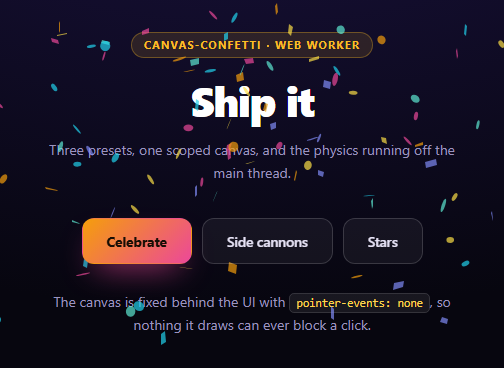
Confetti on a success state is one of the few animations that reliably makes people smile, and canvas-confetti is the library almost every product reaches for. It is also one of the easiest to ship badly: dropped in with defaults it hijacks the entire page with its own fixed canvas, fires a single synthetic-looking puff, and keeps animating for users who have explicitly asked for less motion.
This snippet is the version that survives code review.
Scoping the canvas
Calling the global confetti() directly makes the library append its own fixed, full-screen canvas to <body> and manage it globally. That is fine for a demo and a problem in an app: you do not control its z-index, its stacking context, or when it is torn down.
var fire = confetti.create(document.getElementById('ccbCanvas'), { resize: true, useWorker: true, disableForReducedMotion: true });
confetti.create() returns an instance bound to your canvas, which you position and layer yourself. Three options matter:
- `resize: true` keeps the canvas backing store in step with the viewport. Without it the drawing surface stays at its initial size and particles land in the wrong places after a window resize or a phone rotation.
- `useWorker: true` moves the particle loop into an OffscreenCanvas in a Web Worker. A 200-particle burst then cannot stutter the main thread — which matters because confetti usually fires at exactly the moment something else expensive is happening, like a route change or a success re-render.
- `disableForReducedMotion: true` is the library's built-in prefers-reduced-motion check. It is one boolean and it is the difference between a delightful effect and an accessibility complaint.
The matching CSS is not optional:
.ccb-canvas { position: fixed; inset: 0; pointer-events: none; z-index: 5 }
pointer-events: none means a full-screen canvas sitting over your interface can never swallow a click. Forgetting it produces a page that becomes mysteriously unclickable for a few seconds after every celebration.
Why one burst looks fake
The realistic() preset is the library's own documented recipe, and the reasoning behind it is the most transferable idea here.
A single confetti() call gives every particle the same launch velocity and the same spread. Real explosions do not work that way — some fragments go far and fast, others tumble slowly nearby. So instead of one burst of 200, this fires five overlapping bursts that together add up to 200:
shot(0.25, { spread: 26, startVelocity: 55 }) — a tight, fast core.
shot(0.35, { spread: 100, decay: 0.91, scalar: 0.8 }) — a wide spray of smaller, faster-fading pieces.
shot(0.1, { spread: 120, startVelocity: 25, decay: 0.92, scalar: 1.2 }) — a few large, slow, lingering ones.
Because each has its own spread, startVelocity, decay and scalar, the layers resolve at different rates and the eye reads one organic explosion rather than a uniform puff. The particleRatio pattern also means the total is defined once: change total and every layer scales proportionally.
The physics parameters worth knowing
- `spread` — the angular cone in degrees. 26 is a jet, 120 is a shower, 360 is omnidirectional. - `startVelocity` — initial speed, so effectively how far particles travel. - `decay` — velocity retained per frame. Values under 1 mean drag; 0.91 stops particles noticeably sooner than the 0.94 default. - `gravity` — set to 0 in the stars preset so pieces drift outward and hang instead of falling. That single change turns confetti into a sparkle effect. - `ticks` — how many frames a particle lives before it is removed regardless of position. Lowering it to 60 is what keeps the zero-gravity stars from floating forever. - `scalar` — particle size multiplier, used here to make some layers visibly chunkier.
Side cannons
cannons() fires two emitters from the screen edges, angled inward at 60° and 120°, from origin: { x: 0 } and origin: { x: 1 }. Origin is expressed in normalized 0–1 coordinates, not pixels, so the emitters stay pinned to the edges at every viewport size.
Rather than one large burst, it emits four particles per frame inside a requestAnimationFrame loop bounded by a timestamp. That sustained stream is what reads as a cannon rather than a pop, and capping it with Date.now() < end guarantees it terminates even if the tab is backgrounded mid-run.
Reusing it
Fire on genuine milestones — a completed purchase, a finished onboarding, a shipped deploy — not on every click, because the effect is only delightful while it stays rare. Swap COLORS for your brand, and keep zIndex high enough to clear your own modals. Compare with a hand-built confetti button that uses CSS custom properties instead of canvas, or a confetti celebration card for a full success state.
Build with AI
Build, Understand, Optimize, and Extend It With AI
Most of what separates a good confetti implementation from a careless one is configuration, so this is a productive snippet to talk through. Paste the HTML, CSS, and JS into an AI assistant like Claude and ask it to explain why confetti.create bound to your own canvas is preferable to calling the global confetti() directly, and what specifically you lose control of with the global version. Then have it walk through the five shots in the realistic preset and explain what each contributes — try collapsing them into one call with 200 particles to see how much flatter it reads. Ask what gravity: 0 combined with a low ticks value does, and why ticks is necessary once gravity is removed. For optimization, ask whether useWorker has a fallback path in browsers without OffscreenCanvas and how you would detect it. To extend it: have it fire from a real success event rather than a click, add confetti.shapeFromText to emit emoji, scale particleCount down on small screens, and add an instance.reset() teardown for a single-page app. Treat the code less like a finished artifact and more like a starting point for a conversation.
Prompt to recreate it
Copy this into your AI assistant of choice to build the effect from scratch, or as a jumping-off point for your own variant:
Build a celebration button using canvas-confetti (from a CDN, global confetti) in plain HTML, CSS, and JavaScript, with three distinct physics presets.

Requirements:
- Do NOT call the global confetti() directly. Create a scoped instance with confetti.create(yourCanvasElement, { resize: true, useWorker: true, disableForReducedMotion: true }) and explain each option: the global call appends its own fixed canvas to body and manages it globally so you control neither z-index nor teardown; resize keeps the backing store in step with the viewport so particles do not land wrong after a rotation; useWorker moves the particle loop into an OffscreenCanvas in a Web Worker so a heavy burst cannot stutter the main thread; and disableForReducedMotion is the library's built-in prefers-reduced-motion respect.
- Style the canvas as position: fixed, inset: 0, with pointer-events: none — and explain that without pointer-events: none the invisible full-screen canvas intercepts clicks, making the page mysteriously unclickable for seconds after each celebration.
- Preset 1 "realistic": fire FIVE overlapping bursts rather than one, using a helper that takes a ratio of a single total particle count so the layers scale together. Give each layer different spread, startVelocity, decay and scalar values — a tight fast core (spread ~26, velocity ~55), a mid spread, a wide spray of smaller fast-decaying pieces (spread ~100, decay ~0.91, scalar ~0.8), and a few large slow lingering ones (spread ~120, low velocity, scalar ~1.2). Explain that one burst gives every particle identical velocity and spread, which reads as a synthetic puff, whereas layers resolving at different rates read as one organic explosion.
- Preset 2 "side cannons": two emitters at normalized origins x: 0 and x: 1 angled inward at 60 and 120 degrees, emitting a few particles per frame inside a requestAnimationFrame loop bounded by a Date.now() deadline of roughly 1.2 seconds. Explain that origins are normalized 0-to-1 coordinates rather than pixels so the emitters stay pinned to the edges at any viewport size, and that a sustained stream reads as a cannon where a single burst reads as a pop.
- Preset 3 "stars": set gravity to 0 so particles drift outward and hang instead of falling, pair it with a low ticks value (around 60) so they still disappear rather than floating forever, use spread: 360, and mix two calls with different scalar values and the 'star' and 'circle' shapes.
- Keep a shared COLORS array and a high zIndex so bursts clear any modals, dispatch the presets from one delegated click handler on the button row, and style it as a dark celebratory page with one gradient primary button.
Want to tighten it up first? Run this prompt through the AI Prompt Studio to score it across 8 quality dimensions, catch anti-patterns, and tune the wording for Claude, ChatGPT, or Gemini before you paste it in.
Source Code
<div class="ccb-wrap">
  <span class="ccb-tag">canvas-confetti · web worker</span>
  <h2>Ship it</h2>
  <p>Three presets, one scoped canvas, and the physics running off the main thread.</p>

  <canvas class="ccb-canvas" id="ccbCanvas"></canvas>

  <div class="ccb-actions">
    <button class="ccb-btn primary" data-fx="realistic">Celebrate</button>
    <button class="ccb-btn" data-fx="cannons">Side cannons</button>
    <button class="ccb-btn" data-fx="stars">Stars</button>
  </div>

  <p class="ccb-note">The canvas is fixed behind the UI with <code>pointer-events: none</code>, so nothing it draws can ever block a click.</p>
</div>*{box-sizing:border-box;margin:0;padding:0}
body{font-family:system-ui,-apple-system,sans-serif;background:radial-gradient(120% 90% at 50% 8%,#1a1240,#07060f 62%);color:#fff;min-height:100vh;display:flex;align-items:center;justify-content:center;padding:26px}
/* Scoped, non-interactive overlay. canvas-confetti would otherwise append its
own fixed canvas to <body> and own the whole page. */
.ccb-canvas{position:fixed;inset:0;width:100%;height:100%;pointer-events:none;z-index:5}
.ccb-wrap{position:relative;z-index:1;text-align:center;max-width:440px}
.ccb-tag{display:inline-block;font-size:10.5px;font-weight:700;letter-spacing:.14em;text-transform:uppercase;color:#fbbf24;background:rgba(251,191,36,.12);border:1px solid rgba(251,191,36,.32);padding:5px 12px;border-radius:99px;margin-bottom:14px}
.ccb-wrap h2{font-size:clamp(28px,6vw,42px);font-weight:800;letter-spacing:-.03em}
.ccb-wrap p{font-size:14px;color:#9b93bd;margin-top:10px;line-height:1.65}
.ccb-actions{display:flex;gap:10px;justify-content:center;flex-wrap:wrap;margin:34px 0 26px}
.ccb-btn{position:relative;z-index:6;padding:13px 24px;border-radius:12px;border:1px solid rgba(255,255,255,.16);background:rgba(255,255,255,.05);color:#e6e2f5;font:600 13.5px system-ui;cursor:pointer;transition:background .16s,border-color .16s,transform .12s}
.ccb-btn:hover{background:rgba(255,255,255,.11);border-color:rgba(255,255,255,.32)}
.ccb-btn:active{transform:scale(.96)}
.ccb-btn.primary{background:linear-gradient(135deg,#f59e0b,#ec4899);border-color:transparent;color:#160e05;font-weight:700;box-shadow:0 14px 32px -14px rgba(236,72,153,.9)}
.ccb-note{font-size:12px;color:#7b7398;line-height:1.6}
.ccb-note code{font-family:ui-monospace,SFMono-Regular,monospace;font-size:11.5px;background:rgba(255,255,255,.07);border:1px solid rgba(255,255,255,.12);padding:2px 6px;border-radius:5px;color:#fcd34d}// Binding to our own canvas keeps the effect scoped. resize keeps the backing
// store in step with the viewport; useWorker moves the particle loop into a
// Web Worker so a heavy burst cannot stutter the main thread.
var fire = confetti.create(document.getElementById('ccbCanvas'), {
resize: true,
useWorker: true,
disableForReducedMotion: true
});
var COLORS = ['#f59e0b', '#ec4899', '#818cf8', '#22d3ee', '#5eead4', '#fde047'];
// The library's own "realistic" recipe: one burst looks synthetic because every
// particle shares a velocity. Five overlapping bursts with different spreads,
// velocities and decays read as a single organic explosion.
function realistic() {
var total = 200;
var base = { origin: { y: 0.62 }, colors: COLORS, zIndex: 9999 };
function shot(ratio, opts) {
fire(Object.assign({}, base, opts, {
particleCount: Math.floor(total * ratio)
}));
}
shot(0.25, { spread: 26, startVelocity: 55 });
shot(0.2, { spread: 60 });
shot(0.35, { spread: 100, decay: 0.91, scalar: 0.8 });
shot(0.1, { spread: 120, startVelocity: 25, decay: 0.92, scalar: 1.2 });
shot(0.1, { spread: 120, startVelocity: 45 });
}
// Two emitters angled inward from the edges, fired repeatedly over 1.2s.
function cannons() {
var end = Date.now() + 1200;
(function frame() {
fire({ particleCount: 4, angle: 60, spread: 60, origin: { x: 0, y: 0.68 }, colors: COLORS, zIndex: 9999 });
fire({ particleCount: 4, angle: 120, spread: 60, origin: { x: 1, y: 0.68 }, colors: COLORS, zIndex: 9999 });
if (Date.now() < end) requestAnimationFrame(frame);
})();
}
function stars() {
var opts = {
spread: 360,
ticks: 60,
gravity: 0,
decay: 0.94,
startVelocity: 22,
origin: { y: 0.55 },
colors: ['#fde047', '#fbbf24', '#fff'],
zIndex: 9999
};
fire(Object.assign({}, opts, { particleCount: 34, scalar: 1.1, shapes: ['star'] }));
fire(Object.assign({}, opts, { particleCount: 12, scalar: 0.72, shapes: ['circle'] }));
}
var EFFECTS = { realistic: realistic, cannons: cannons, stars: stars };
document.querySelector('.ccb-actions').addEventListener('click', function (e) {
var btn = e.target.closest('.ccb-btn');
if (!btn) return;
var fx = EFFECTS[btn.dataset.fx];
if (fx) fx();
});
realistic();Step by step
How to Use
- 1Add the canvas-confetti CDNInclude confetti.browser from the CDN panel — global confetti.
- 2Paste HTML, CSS, and JSA celebration fires once on load from a scoped canvas.
- 3Press CelebrateFive layered bursts combine into one organic explosion.
- 4Try Side cannonsTwo edge emitters stream particles inward for just over a second.
- 5Try StarsZero gravity plus a low tick count makes pieces hang, then vanish.
- 6Rebrand itChange the COLORS array and keep zIndex above your own overlays.
Real-world uses
Common Use Cases
Got questions?
Frequently Asked Questions
The global call makes the library append its own fixed full-screen canvas to the body and manage it globally, so you control neither its z-index, its stacking context, nor its teardown. confetti.create returns an instance bound to a canvas you own and position yourself, which is what makes it safe inside an app layout.
It moves the particle simulation into an OffscreenCanvas running in a Web Worker, so the animation loop is off the main thread. That matters because confetti usually fires exactly when something else expensive is happening — a route change or a success re-render — and a 200-particle burst on the main thread would stutter against it.
A single call gives every particle the same launch velocity and spread, which reads as a uniform synthetic puff. Five overlapping bursts with different spread, startVelocity, decay and scalar values resolve at different rates — a tight fast core, a wide spray of small pieces, and a few large slow ones — so the eye reads one organic explosion.
Setting gravity to 0 stops particles falling, so they drift outward and hang, which turns confetti into a sparkle or star effect. ticks caps how many frames a particle lives regardless of position, so lowering it to around 60 is what makes those zero-gravity pieces disappear instead of floating forever.
The canvas is fixed and covers the entire viewport. Without pointer-events: none it intercepts clicks, so the page becomes mysteriously unclickable for several seconds after every celebration — a bug that is easy to ship because the canvas is invisible once the particles fade.
Create the instance once in a mount effect with confetti.create against a canvas ref and keep it in a ref, since calling create on every render would spawn a new worker each time. Call instance.reset() in cleanup to clear particles and release the worker. Fire it from event handlers as a side effect rather than during render.