

Learn Coding Visually
Learn to code with interactive, live-preview playgrounds — HTML, CSS, JavaScript, React & more.
 HTML Playground42 lessons · Click-based · Live preview
 CSS PlaygroundLearn CSS with a live editor
 JavaScript Playground60 lessons · DOM · Async · Canvas
 React PlaygroundLearn React with a live code editor
 GSAP PlaygroundLearn GSAP animation interactively
 SVG Playground44 lessons · shapes · paths · animation
 SCSS Playground45 lessons · Sass modules · tokens
 Tailwind PlaygroundLearn Tailwind CSS with a live editor
 Bootstrap 5 Playground50 lessons · live preview
Bootstrap Copy-to-Clipboard Feedback — Free HTML CSS JS Snippet
Bootstrap Copy-to-Clipboard Feedback · Buttons · Plain HTML, CSS & JS · Live preview
What's included
Features
About this UI Snippet
Bootstrap Copy-to-Clipboard Feedback — HTML, CSS & JavaScript
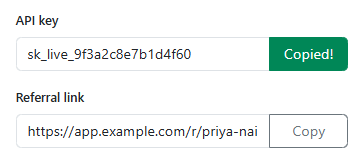
A copy button with no feedback leaves a user unsure whether the click actually registered — this snippet's flash() function is the single place that owns the "Copied!" state, swapping the button's label and adding bscopy-copied for 1.6 seconds before reverting both, so the confirmation is impossible to miss without permanently changing the button.
The copy itself tries navigator.clipboard.writeText() first, since it's the modern, promise-based, permission-aware API — but it only works in a secure context (window.isSecureContext), so legacyCopy() provides a real working fallback using a temporary off-screen <textarea> and document.execCommand('copy') for anywhere the modern API isn't available, including .then()'s own rejection path if the user denies clipboard permission.
flash() guards against a click landing while a previous flash is still showing, using a data-busy attribute rather than a separate boolean variable per button — since there are two independent copy buttons on this page sharing one flash() function, storing the busy flag on each button's own dataset (instead of one shared variable) is what keeps copying the API key from resetting the referral link's unrelated flash timer, or vice versa.
Build with AI
Build, Understand, Optimize, and Extend It With AI
Hand this snippet to an AI coding assistant like Claude and ask it to add a small checkmark icon animation alongside the "Copied!" text, or to add a toast notification variant of the same feedback for a copy action that happens somewhere less visually prominent than a dedicated input field.
Prompt to recreate it
Copy this into your AI assistant of choice to build the effect from scratch, or as a jumping-off point for your own variant:
Build a set of Bootstrap 5.3 copy-to-clipboard buttons, using the real Bootstrap CDN framework (bootstrap.min.css and bootstrap.bundle.min.js), not custom CSS made to resemble it.

Requirements:
- At least two separate read-only input fields (e.g. an API key and a referral link), each with its own adjacent Copy button.
- Clicking Copy should use navigator.clipboard.writeText() when available in a secure context, and fall back to a working document.execCommand('copy') approach (via a temporary off-screen textarea) otherwise, including as a fallback if the Clipboard API call is rejected.
- On a successful copy, the clicked button must show "Copied!" (with a distinct visual style) for about 1.5-2 seconds, then automatically revert to its original label and style.
- Each button must track its own "currently flashing" state independently (not a single shared flag across all buttons), and a rapid re-click on a button that's still showing its "Copied!" state should be ignored rather than restarting or stacking the timer.
Want to tighten it up first? Run this prompt through the AI Prompt Studio to score it across 8 quality dimensions, catch anti-patterns, and tune the wording for Claude, ChatGPT, or Gemini before you paste it in.
Source Code
<div class="container py-5 d-flex justify-content-center">
  <div class="card bscopy-card">
    <div class="card-body p-4">
      <label class="form-label small fw-semibold">API key</label>
      <div class="input-group mb-3">
        <input type="text" class="form-control" readonly value="sk_live_9f3a2c8e7b1d4f60">
        <button type="button" class="btn btn-outline-secondary bscopy-btn" data-copy="sk_live_9f3a2c8e7b1d4f60">Copy</button>
      </div>

      <label class="form-label small fw-semibold">Referral link</label>
      <div class="input-group">
        <input type="text" class="form-control" readonly value="https://app.example.com/r/priya-nair">
        <button type="button" class="btn btn-outline-secondary bscopy-btn" data-copy="https://app.example.com/r/priya-nair">Copy</button>
      </div>
    </div>
  </div>
</div>
.bscopy-card { width: 420px; max-width: 100%; border: 1px solid #eceef1; border-radius: 14px; }
.bscopy-btn { min-width: 88px; transition: background .15s, color .15s, border-color .15s; }
.bscopy-btn.bscopy-copied { background: #198754; border-color: #198754; color: #fff; }const buttons = Array.from(document.querySelectorAll('.bscopy-btn'));
function legacyCopy(text) {
const ta = document.createElement('textarea');
ta.value = text;
ta.style.position = 'fixed';
ta.style.left = '-9999px';
document.body.appendChild(ta);
ta.focus();
ta.select();
try { document.execCommand('copy'); } catch (e) { /* nothing left to fall back to */ }
document.body.removeChild(ta);
}
function flash(btn) {
if (btn.dataset.busy) return; // ignore rapid re-clicks mid-flash
btn.dataset.busy = '1';
const original = btn.textContent;
btn.textContent = 'Copied!';
btn.classList.add('bscopy-copied');
setTimeout(() => {
btn.textContent = original;
btn.classList.remove('bscopy-copied');
delete btn.dataset.busy;
}, 1600);
}
buttons.forEach(btn => {
btn.addEventListener('click', () => {
const text = btn.dataset.copy;
if (navigator.clipboard && window.isSecureContext) {
navigator.clipboard.writeText(text).then(() => flash(btn), () => { legacyCopy(text); flash(btn); });
} else {
legacyCopy(text);
flash(btn);
}
});
});Step by step
How to Use
- 1Load the snippetTwo read-only fields show an API key and a referral link, each with its own Copy button.
- 2Click "Copy" next to the API keyThe button turns green and reads "Copied!" for about 1.6 seconds before reverting.
- 3Click it again immediately, mid-flashNothing resets or double-fires — the busy guard ignores the extra click until the current flash finishes.
- 4Click "Copy" on the referral linkIts own button flashes independently, without affecting the API key button's state at all.
- 5Paste the copied text anywhereIt matches exactly what was shown in the field, confirming the clipboard write actually happened.
Real-world uses
Common Use Cases
Got questions?
Frequently Asked Questions
It's a deprecated API being phased out of some browsers entirely; navigator.clipboard is the current standard and should always be tried first where available, with execCommand kept purely as a compatibility fallback.
The .then() rejection path on navigator.clipboard.writeText() falls back to legacyCopy(), so the copy still has a real chance of succeeding through the older API instead of silently failing.
This page has two independent copy buttons; a single shared flag would make clicking one button during the other's flash animation either do nothing or incorrectly reset the wrong button's state.
Yes. Keep the copied text and a per-button "flashing" boolean in component state (or a ref, since it doesn't need to trigger extra renders), and drive the temporary label/class change from a timeout the same way flash() does.