


Learn Coding Visually
Learn to code with interactive, live-preview playgrounds — HTML, CSS, JavaScript, React & more.
 HTML Playground42 lessons · Click-based · Live preview
 CSS PlaygroundLearn CSS with a live editor
 JavaScript Playground60 lessons · DOM · Async · Canvas
 React PlaygroundLearn React with a live code editor
 GSAP PlaygroundLearn GSAP animation interactively
 SVG Playground44 lessons · shapes · paths · animation
 SCSS Playground45 lessons · Sass modules · tokens
 Tailwind PlaygroundLearn Tailwind CSS with a live editor
 Bootstrap 5 Playground50 lessons · live preview
Bootstrap Code Block With Copy + Line Numbers — Free HTML CSS JS Snippet
Bootstrap Code Block With Copy + Line Numbers · Misc · Plain HTML, CSS & JS · Live preview
What's included
Features
About this UI Snippet
Bootstrap Code Block With Copy + Line Numbers — HTML, CSS & JavaScript
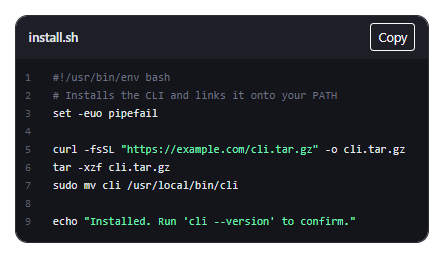
Keeping the line-number gutter and the code perfectly aligned is the entire design challenge here, and this snippet solves it by generating both from the exact same CODE array — gutter.innerHTML maps over CODE.length to produce sequential numbers, and pre.innerHTML maps over the same array to render each line, so a gutter number and its code line can never drift apart even if lines are added or removed, since both are derived from one array's length and index rather than counted separately by hand.
Highlighting is deliberately minimal and line-based: highlight() checks whether a trimmed line starts with # to color it as a comment, and separately wraps any double-quoted text in a string-colored span — good enough for a shell script or a config snippet without pulling in a full tokenizing syntax highlighter for a handful of lines.
The important correctness detail is what "Copy" actually copies: CODE.join('\n') — the original, plain-text array — not the DOM's rendered innerHTML. Copying rendered HTML would paste literal <span class="bscode-comment"> tags into whatever the user pastes into; copying from the source array guarantees the clipboard always holds exactly the real code, with no highlighting markup ever leaking into it.
Build with AI
Build, Understand, Optimize, and Extend It With AI
Hand this snippet to an AI coding assistant like Claude and ask it to swap in highlight.js (loaded from a CDN) for genuine multi-language syntax highlighting while keeping the same gutter-from-array line-numbering approach, or to add a "Download as file" button using a Blob the same way bootstrap-two-factor-backup-codes downloads its codes.
Prompt to recreate it
Copy this into your AI assistant of choice to build the effect from scratch, or as a jumping-off point for your own variant:
Build a Bootstrap-styled code block with line numbers and a copy button, using the real Bootstrap CDN framework (bootstrap.min.css and bootstrap.bundle.min.js) for the surrounding card/header only — the code block itself should use plain dark-theme CSS.

Requirements:
- Store the code as an array of individual lines, one string per line.
- Render a line-number gutter and the code pane from that same array, so the numbers and lines always stay in sync regardless of how many lines exist.
- Apply simple line-based highlighting: lines starting with a comment character get one color, and double-quoted substrings within any line get a different color — no external syntax highlighting library required.
- A "Copy" button must copy the original plain-text lines joined with newlines, never the rendered HTML with highlighting markup included, and show a temporary "Copied!" confirmation that reverts automatically.
- The gutter and the code pane should scroll independently so a long line doesn't push the line numbers out of view.
Want to tighten it up first? Run this prompt through the AI Prompt Studio to score it across 8 quality dimensions, catch anti-patterns, and tune the wording for Claude, ChatGPT, or Gemini before you paste it in.
Source Code
<div class="container py-5 d-flex justify-content-center">
  <div class="card bscode-card">
    <div class="bscode-header">
      <span class="small fw-semibold">install.sh</span>
      <button type="button" class="btn btn-sm btn-outline-light" id="bscodeCopy">Copy</button>
    </div>
    <div class="bscode-body">
      <div class="bscode-gutter" id="bscodeGutter"></div>
      <pre class="bscode-pre" id="bscodePre"></pre>
    </div>
  </div>
</div>
.bscode-card { width: 460px; max-width: 100%; border-radius: 14px; overflow: hidden; border: 1px solid #2c2e36; }
.bscode-header {
display: flex; justify-content: space-between; align-items: center;
padding: 8px 14px; background: #1e1f26; color: #e3e4e8;
}
.bscode-body { display: flex; background: #14151a; }
.bscode-gutter {
padding: 12px 10px; text-align: right; color: #5b5f6b;
font: 12.5px/1.6 ui-monospace, Menlo, Consolas, monospace; user-select: none; flex-shrink: 0;
}
.bscode-pre {
margin: 0; padding: 12px 14px; color: #e1e4e8; overflow-x: auto; flex: 1;
font: 12.5px/1.6 ui-monospace, Menlo, Consolas, monospace; white-space: pre;
}
.bscode-pre .bscode-comment { color: #6b7280; }
.bscode-pre .bscode-string { color: #86efac; }const CODE = [
'#!/usr/bin/env bash',
'# Installs the CLI and links it onto your PATH',
'set -euo pipefail',
'',
'curl -fsSL "https://example.com/cli.tar.gz" -o cli.tar.gz',
'tar -xzf cli.tar.gz',
'sudo mv cli /usr/local/bin/cli',
'',
'echo "Installed. Run \'cli --version\' to confirm."',
];
const gutter = document.getElementById('bscodeGutter');
const pre = document.getElementById('bscodePre');
const copyBtn = document.getElementById('bscodeCopy');
function highlight(line) {
if (line.trim().startsWith('#')) return '<span class="bscode-comment">' + line + '</span>';
return line.replace(/"([^"]*)"/g, '<span class="bscode-string">"$1"</span>');
}
gutter.innerHTML = CODE.map((_, i) => (i + 1)).join('<br>');
pre.innerHTML = CODE.map(highlight).join('\n');
copyBtn.addEventListener('click', () => {
navigator.clipboard.writeText(CODE.join('\n')).then(() => {
const original = copyBtn.textContent;
copyBtn.textContent = 'Copied!';
setTimeout(() => { copyBtn.textContent = original; }, 1500);
});
});Step by step
How to Use
- 1Load the snippetA dark code block appears with line numbers 1 through 9 in the gutter, comments and quoted strings colored differently from plain code.
- 2Scroll the code horizontally if a line is longThe gutter stays fixed in place while only the code pane scrolls, since they're two separate flex children.
- 3Click "Copy"The button briefly reads "Copied!" before reverting, and the clipboard holds the plain script text with no HTML markup in it.
- 4Paste it anywhereIt pastes as clean, runnable shell script text, line numbers and coloring both correctly excluded.
Real-world uses
Common Use Cases
Got questions?
Frequently Asked Questions
For a short, illustrative code block, a full tokenizer is often more weight than the content warrants — the line-based comment/string check here covers the common visual cases with zero dependencies, though swapping in highlight.js is a reasonable upgrade for genuinely complex multi-language code.
Nothing else needs to change — both the gutter and the code pane re-derive their length and numbering from CODE.length automatically the next time the page loads.
No — CODE.join('\n') copies only the actual script content; the numbers exist purely in the separate gutter element and were never part of the copied text to begin with.
Yes. Keep CODE as a plain array, map it to both the gutter numbers and the highlighted lines in the render function, and keep the Copy handler joining the original array rather than reading back from the rendered DOM.