Source Code
<div class="cr-wrap">
  <button type="button" class="cr-btn" id="crBtn">
    <svg class="cr-ring" width="22" height="22" viewBox="0 0 22 22">
      <circle class="cr-ring-track" cx="11" cy="11" r="9" />
      <circle class="cr-ring-fill" id="crRingFill" cx="11" cy="11" r="9" />
    </svg>
    <span id="crLabel">Send message</span>
  </button>
  <p class="cr-status" id="crStatus">Ready to send</p>
</div>
* { box-sizing: border-box; margin: 0; padding: 0; }
body { font-family: system-ui, -apple-system, sans-serif; background: #0f172a; color: #e2e8f0; display: flex; justify-content: center; align-items: center; min-height: 100vh; padding: 24px; }
.cr-wrap { text-align: center; width: 100%; max-width: 240px; }
.cr-btn {
display: inline-flex; align-items: center; gap: 9px;
border: none; border-radius: 11px; background: #6366f1; color: #fff;
font-family: inherit; font-size: 14px; font-weight: 700;
padding: 12px 20px; cursor: pointer; transition: background 0.15s, transform 0.1s;
}
.cr-btn:hover:not(:disabled) { background: #4f46e5; }
.cr-btn:active:not(:disabled) { transform: scale(0.97); }
.cr-btn:disabled { background: #334155; cursor: not-allowed; }
.cr-ring { flex-shrink: 0; transform: rotate(-90deg); }
.cr-ring-track { fill: none; stroke: rgba(255,255,255,0.18); stroke-width: 2.5; }
.cr-ring-fill { fill: none; stroke: #fff; stroke-width: 2.5; stroke-linecap: round; stroke-dasharray: 56.5; stroke-dashoffset: 56.5; transition: stroke-dashoffset 0.1s linear; }
.cr-btn:disabled .cr-ring-track { stroke: rgba(255,255,255,0.1); }
.cr-btn:disabled .cr-ring-fill { stroke: #94a3b8; }
.cr-status { margin-top: 12px; font-size: 12px; color: #94a3b8; font-weight: 600; min-height: 16px; }var btn = document.getElementById('crBtn');
var label = document.getElementById('crLabel');
var ringFill = document.getElementById('crRingFill');
var status = document.getElementById('crStatus');
var COOLDOWN_MS = 6000;
var CIRCUMFERENCE = 56.5;
var timerId = null;
var cooling = false;
function startCooldown() {
cooling = true;
btn.disabled = true;
var startTime = Date.now();
// Fire the real action once, then hold the button disabled while a ring
// sweeps around it to show exactly how much cooldown time remains.
function tick() {
var elapsed = Date.now() - startTime;
var remaining = Math.max(0, COOLDOWN_MS - elapsed);
var progress = 1 - remaining / COOLDOWN_MS;
ringFill.style.strokeDashoffset = String(CIRCUMFERENCE * (1 - progress));
var secondsLeft = Math.ceil(remaining / 1000);
if (remaining <= 0) {
endCooldown();
return;
}
label.textContent = 'Wait ' + secondsLeft + 's';
status.textContent = 'Sent \u2014 next send unlocks in ' + secondsLeft + 's';
timerId = requestAnimationFrame(tick);
}
tick();
}
function endCooldown() {
cooling = false;
cancelAnimationFrame(timerId);
btn.disabled = false;
label.textContent = 'Send message';
status.textContent = 'Ready to send';
ringFill.style.strokeDashoffset = String(CIRCUMFERENCE);
}
btn.addEventListener('click', function () {
if (cooling) return;
// Real send action goes here.
status.textContent = 'Message sent!';
startCooldown();
});Learn Coding Visually
Learn to code with interactive, live-preview playgrounds — HTML, CSS, JavaScript, React & more.
 HTML Playground42 lessons · Click-based · Live preview
 CSS PlaygroundLearn CSS with a live editor
 JavaScript Playground60 lessons · DOM · Async · Canvas
 React PlaygroundLearn React with a live code editor
 GSAP PlaygroundLearn GSAP animation interactively
 SVG Playground44 lessons · shapes · paths · animation
 SCSS Playground45 lessons · Sass modules · tokens
 Tailwind PlaygroundLearn Tailwind CSS with a live editor
 Bootstrap 5 Playground50 lessons · live preview
Cooldown Ring Button — Free Rate-Limit JS Button Snippet
Cooldown Ring Button · Buttons · Plain HTML, CSS & JS · Live preview
What's included
Features
About this UI Snippet
Cooldown Ring Button — Rate-Limited Action Button with an SVG Countdown Ring
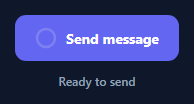
A cooldown ring button prevents spam-clicking an action — sending a message, requesting an OTP, submitting a form — by disabling itself immediately after use and visually counting down, via a filling ring around the button itself, until it can be pressed again. It replaces a plain disabled state (which gives no sense of *when* the button will come back) with a concrete, glanceable timer baked directly into the control. This snippet builds it in plain HTML, CSS, and vanilla JavaScript with no dependency.
An SVG ring driven by stroke-dashoffset
The ring is two overlapping SVG <circle> elements: a static .cr-ring-track and an animated .cr-ring-fill. The fill circle's stroke-dasharray is set to its own circumference (56.5, precomputed for r="9"), which turns the dash pattern into "one dash exactly as long as the whole circle, then a gap." Setting stroke-dashoffset to that same value hides the entire stroke; animating stroke-dashoffset down toward 0 reveals the circle progressively, clockwise from the top (the rotate(-90deg) on the parent <svg> moves the start point from 3 o'clock to 12 o'clock).
requestAnimationFrame against Date.now(), not setInterval
startCooldown() records a startTime and drives the ring with a tick() function scheduled via requestAnimationFrame, computing elapsed and remaining from Date.now() on every frame rather than counting down a fixed interval. This keeps the ring and the "Wait Ns" label numerically accurate even if the tab is briefly backgrounded or a frame is dropped, which a naive setInterval(fn, 1000) countdown would drift on.
Disabling the control, not just styling it
While cooling, btn.disabled = true is set on the real <button> element — not just a visual class — so the click handler's early-return guard is a second line of defense, not the only one. A disabled native button also can't receive focus via Tab in most browsers and is automatically skipped by assistive technology as non-interactive, which a CSS-only "looks disabled" button would not guarantee.
Wiring the real action
The actual send/submit call belongs right where the click handler fires it, before startCooldown() is called — the pattern only cares that a single click triggers the action exactly once and then locks the button until COOLDOWN_MS elapses. Change COOLDOWN_MS to match how expensive or how rate-limited the underlying action actually is: a few seconds for a chat send button, a full 60 seconds for an OTP resend.
Build with AI
Build, Understand, Optimize, and Extend It With AI
Paste this snippet's HTML, CSS, and JS into an AI coding assistant like Claude and ask it to explain exactly how setting stroke-dasharray to the circle's own circumference turns stroke-dashoffset into a 0-to-100% reveal control, and why the countdown is computed from Date.now() on every frame instead of decrementing a counter on a fixed interval. It's also worth asking the assistant to add a sound or haptic cue when the cooldown ends, make COOLDOWN_MS configurable per button instance so different actions on the same page can have different cooldowns, or persist the cooldown end time in sessionStorage so a page refresh does not reset an in-progress cooldown.
Prompt to recreate it
Copy this into your AI assistant of choice to build the effect from scratch, or as a jumping-off point for your own variant:
Build a "cooldown ring" button in plain HTML, CSS, and JavaScript — no libraries, no canvas.

Requirements:
- A button containing a small SVG ring (two overlapping circles: a static track and an animated fill) plus a text label, and a status line below the button.
- The ring's fill circle must use stroke-dasharray set to its own circumference and animate stroke-dashoffset from full (hidden) to zero (fully revealed) as the cooldown progresses, rotated so the sweep starts at the top of the circle.
- On click, trigger a placeholder action exactly once, then set the button's native disabled attribute to true and begin a cooldown period of a fixed, easily-configurable duration.
- Drive the cooldown countdown using requestAnimationFrame with elapsed time computed from Date.now() on every frame (not a fixed setInterval tick), updating both the ring's stroke-dashoffset and a live "Wait Ns" label showing the remaining whole seconds.
- When the cooldown duration fully elapses, re-enable the button, reset the ring to its hidden state, and restore the button's original label and status text.
- Guard the click handler so it does nothing while the cooldown is in progress, even if the disabled attribute were somehow bypassed.
Want to tighten it up first? Run this prompt through the AI Prompt Studio to score it across 8 quality dimensions, catch anti-patterns, and tune the wording for Claude, ChatGPT, or Gemini before you paste it in.
Step by step
How to Use
- 1Paste HTML, CSS, and JSA "Send message" button renders with a thin ring track around a small icon and a status line beneath it.
- 2Click to trigger the actionThe click handler fires the action once, then immediately disables the button and starts the cooldown ring.
- 3Watch the ring and labelThe ring sweeps clockwise while the label counts down the remaining whole seconds until the button re-enables.
- 4Wait for it to re-enableOnce COOLDOWN_MS has fully elapsed, the button re-enables, the ring resets, and the label returns to its resting text.
- 5Tune the cooldown lengthChange the COOLDOWN_MS constant in the JS panel to match how rate-limited the real action actually is.
- 6Wire your real actionPut the actual API call or state update at the top of the click handler, right before startCooldown() runs.
Real-world uses
Common Use Cases
Got questions?
Frequently Asked Questions
An SVG circle with its dash array set to its own circumference gives precise, easily-animated control over exactly how much of the stroke is visible via stroke-dashoffset, and it composes cleanly with a rotate() transform to control the start angle — a conic-gradient approach requires more CSS trickery to mask into a ring shape and round the stroke ends.
Computing elapsed time from Date.now() on every animation frame keeps the ring and label numerically accurate regardless of dropped frames or a briefly backgrounded tab. A fixed setInterval(fn, 1000) countdown can drift because it assumes each tick fires exactly on schedule, which browsers do not guarantee.
Two things: the native button.disabled attribute is set to true, which browsers already refuse to fire click events on, and the click handler itself also checks the cooling flag and returns early as a second guard.
Change the single COOLDOWN_MS constant in the JS panel — everything else (the ring animation, the countdown label, and when the button re-enables) derives from that one value.
Put it at the top of the click handler, before startCooldown() is called, so the real action fires exactly once per successful click and the cooldown always starts immediately afterward.
Yes. Keep cooling and the remaining-time value in component state, store the requestAnimationFrame id in a ref so updating it does not trigger re-renders, and bind the ring circle's stroke-dashoffset to the computed progress. Clean up the animation frame on unmount.