



Learn Coding Visually
Learn to code with interactive, live-preview playgrounds — HTML, CSS, JavaScript, React & more.
 HTML Playground42 lessons · Click-based · Live preview
 CSS PlaygroundLearn CSS with a live editor
 JavaScript Playground60 lessons · DOM · Async · Canvas
 React PlaygroundLearn React with a live code editor
 GSAP PlaygroundLearn GSAP animation interactively
 SVG Playground44 lessons · shapes · paths · animation
 SCSS Playground45 lessons · Sass modules · tokens
 Tailwind PlaygroundLearn Tailwind CSS with a live editor
 Bootstrap 5 Playground50 lessons · live preview
Auto-Retry Loader with Exponential Backoff Countdown and Manual Retry
Auto-Retry Loader with Countdown and Manual Retry · Loaders · Plain HTML, CSS & JS · Live preview
What's included
Features
About this UI Snippet
Auto-Retry Loader — Exponential Backoff with an Honest, Visible Countdown
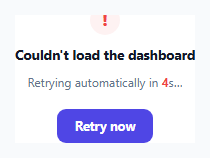
A loading spinner that just fails silently — or one that retries immediately and repeatedly on a fixed interval — are both worse than what users actually need: clear feedback about what's happening, a real automatic retry strategy that doesn't hammer a struggling backend, and the ability to take control manually at any point. This snippet implements genuine exponential backoff with a countdown that's driven by the *same* computed delay actually being waited on, not a decorative animation.
Exponential backoff, not a fixed retry interval
backoffDelayMs() computes each retry delay as 2000 * 2^attemptNumber — 2 seconds after the first failure, 4 seconds after the second, 8 after the third, and so on. Retrying at a constant fixed interval (say, always every 2 seconds) is a common but poor default: if the failure is caused by a struggling or overloaded backend, hammering it at a constant rate makes the underlying problem worse, while a backoff that gets progressively longer gives the backend genuine breathing room to recover between attempts.
The countdown shown to the user is the actual delay, not a fake animation
setFailedWithCountdown() takes the *real* computed backoff delay (converted to whole seconds) and counts down from exactly that number, updating the displayed number every second via setInterval. This is a small but important honesty detail: the countdown isn't a separate decorative timer running alongside some other actual retry schedule — it *is* the schedule, visibly counting down to the literal moment attemptLoad() will be called again.
A manual retry click resets the backoff sequence, deliberately
Clicking "Retry now" (or "Try again" after giving up) doesn't just trigger "attempt N+1" of the automatic sequence — when the give-up state has been reached, the click handler explicitly resets attempt back to 0 first. This is a deliberate distinction: an automatic retry happening because a timer expired is a passive continuation of the existing backoff sequence, while a user actively clicking a button is a fresh, deliberate signal of continued interest — treating it as a brand new attempt sequence (rather than the *nth* attempt of an already-exhausted backoff) avoids showing a confusingly short remaining-attempts count to someone who just explicitly asked to try again.
A genuine give-up state, not an infinite retry loop
After MAX_ATTEMPTS automatic attempts have failed, the loader stops retrying entirely and shows a clear "still unable to load" state with an explicit manual retry option — rather than continuing to silently retry forever with an ever-growing backoff delay that would eventually feel indistinguishable from the feature simply being broken. A bounded, clearly-communicated give-up point is what makes the manual retry option meaningful instead of superfluous.
Build with AI
Build, Understand, Optimize, and Extend It With AI
Ask an AI assistant to explain why exponential backoff is generally preferred over a fixed retry interval for handling transient failures, and to walk through why resetting the attempt counter specifically on a manual retry (rather than treating it as the next attempt in the existing sequence) is the more sensible UX choice. It's also worth asking for a version that adds jitter (a small random variation) to the backoff delay to avoid many simultaneous clients retrying at exactly the same moment, or one that caps the maximum backoff delay so it doesn't grow unreasonably long after many failures.
Prompt to recreate it
Copy this into your AI assistant of choice to build the effect from scratch, or as a jumping-off point for your own variant:
Build an auto-retry loading state with exponential backoff and a live countdown in HTML, CSS, and vanilla JavaScript — no external library.

Requirements:
- A loading card that attempts a (simulated, intentionally-failing-at-first) async request, showing a spinner while in flight.
- On failure, compute a retry delay using real exponential backoff (the delay roughly doubling with each successive failed attempt, starting from a small base delay), and display a live countdown timer counting down from that EXACT computed delay to the next automatic retry attempt — the displayed countdown must be driven by the same value actually being waited on, not a separate decorative timer.
- Automatically retry the request the instant the countdown reaches zero.
- Include a manual "Retry now" button visible during the countdown that, when clicked, cancels the countdown and retries immediately.
- Enforce a maximum number of automatic retry attempts (e.g. 3). After that many consecutive failures, stop retrying automatically and show a clearly distinct "gave up" state with an explanation and a manual retry button.
- When the manual retry button is clicked specifically from the "gave up" state, reset the attempt counter back to zero and start a completely fresh attempt sequence, rather than treating it as simply the next attempt in the already-exhausted automatic sequence.
- Show a clear, visually distinct success state once a request eventually succeeds.
Want to tighten it up first? Run this prompt through the AI Prompt Studio to score it across 8 quality dimensions, catch anti-patterns, and tune the wording for Claude, ChatGPT, or Gemini before you paste it in.
Source Code
<div class="demo">
  <div class="retry-card" id="retryCard">
    <div class="retry-spinner" id="retrySpinner"></div>
    <p class="retry-title" id="retryTitle">Loading dashboard…</p>
    <p class="retry-sub" id="retrySub">Fetching your latest data</p>
    <button class="retry-btn" id="retryBtn" hidden>Retry now</button>
  </div>
</div>
* { box-sizing: border-box; margin: 0; padding: 0; }
body { font-family: system-ui, sans-serif; background: #f8fafc; display: flex; align-items: center; justify-content: center; min-height: 100vh; padding: 24px; }
.demo { width: 320px; max-width: 100%; }
.retry-card { background: #fff; border: 1px solid #e2e8f0; border-radius: 16px; padding: 28px 22px; display: flex; flex-direction: column; align-items: center; gap: 10px; text-align: center; }
.retry-spinner { width: 30px; height: 30px; border-radius: 50%; border: 3px solid #e2e8f0; border-top-color: #6366f1; animation: spin 0.8s linear infinite; }
.retry-spinner.error { border: none; width: 30px; height: 30px; background: #fef2f2; border-radius: 50%; display: flex; align-items: center; justify-content: center; animation: none; }
.retry-spinner.error::before { content: '!'; color: #ef4444; font-weight: 800; font-size: 15px; }
@keyframes spin { to { transform: rotate(360deg); } }
.retry-title { font-size: 13.5px; font-weight: 700; color: #111827; }
.retry-sub { font-size: 12px; color: #64748b; line-height: 1.6; }
.retry-sub .countdown-num { font-weight: 700; color: #ef4444; font-variant-numeric: tabular-nums; }
.retry-btn { margin-top: 6px; padding: 9px 18px; border: none; border-radius: 9px; background: #4f46e5; color: #fff; font-size: 12.5px; font-weight: 700; cursor: pointer; font-family: inherit; }
.retry-btn:hover { background: #4338ca; }const spinner = document.getElementById('retrySpinner');
const title = document.getElementById('retryTitle');
const sub = document.getElementById('retrySub');
const retryBtn = document.getElementById('retryBtn');
const MAX_ATTEMPTS = 3;
let attempt = 0;
let countdownInterval = null;
// A real fetch that fails on purpose the first couple of times, so the
// full retry/backoff/give-up sequence is visible in this demo. Replace the
// body of this function with a real network request in production —
// everything else (backoff timing, countdown UI, give-up state) is generic.
function simulateRequest() {
return new Promise((resolve, reject) => {
setTimeout(() => {
if (attempt < 2) reject(new Error('Network error'));
else resolve({ ok: true });
}, 900);
});
}
function setLoadingState() {
spinner.className = 'retry-spinner';
title.textContent = 'Loading dashboard…';
sub.textContent = attempt === 0 ? 'Fetching your latest data' : `Retrying (attempt ${attempt + 1} of ${MAX_ATTEMPTS})…`;
retryBtn.hidden = true;
}
function setSuccessState() {
spinner.className = 'retry-spinner';
spinner.style.animation = 'none';
spinner.style.borderColor = '#10b981';
title.textContent = 'Dashboard loaded';
sub.textContent = 'Everything is up to date.';
retryBtn.hidden = true;
}
// Exponential backoff: each failed attempt waits LONGER than the last before
// retrying automatically (2s, then 4s, then 8s...) rather than hammering a
// struggling server at a constant interval — the countdown timer shown to
// the user is driven by this same computed delay, so what they see always
// matches what's actually about to happen.
function backoffDelayMs(attemptNumber) {
return 2000 * Math.pow(2, attemptNumber);
}
function setFailedWithCountdown(secondsLeft, onZero) {
spinner.className = 'retry-spinner error';
title.textContent = 'Couldn\'t load the dashboard';
sub.innerHTML = `Retrying automatically in <span class="countdown-num">${secondsLeft}</span>s…`;
retryBtn.hidden = false;
clearInterval(countdownInterval);
countdownInterval = setInterval(() => {
secondsLeft -= 1;
if (secondsLeft <= 0) {
clearInterval(countdownInterval);
onZero();
} else {
sub.innerHTML = `Retrying automatically in <span class="countdown-num">${secondsLeft}</span>s…`;
}
}, 1000);
}
function setGaveUpState() {
clearInterval(countdownInterval);
spinner.className = 'retry-spinner error';
title.textContent = 'Still unable to load';
sub.textContent = `Gave up after ${MAX_ATTEMPTS} attempts. You can try again manually.`;
retryBtn.hidden = false;
retryBtn.textContent = 'Try again';
}
async function attemptLoad() {
setLoadingState();
try {
await simulateRequest();
setSuccessState();
} catch (err) {
attempt += 1;
if (attempt >= MAX_ATTEMPTS) {
setGaveUpState();
return;
}
const delayMs = backoffDelayMs(attempt);
setFailedWithCountdown(Math.round(delayMs / 1000), attemptLoad);
}
}
retryBtn.addEventListener('click', () => {
clearInterval(countdownInterval);
// A manual retry click resets the exponential backoff sequence entirely —
// it's treated as a fresh user-initiated attempt, not "attempt N+1" of the
// automatic sequence, since the user has actively signaled continued
// interest rather than passively waiting out the countdown.
if (title.textContent.includes('Still unable')) attempt = 0;
attemptLoad();
});
attemptLoad();Step by step
How to Use
- 1Watch the initial load attemptA standard spinner shows while the (simulated) request is in flight for the first time.
- 2Watch it fail and enter a countdownOn failure, the state switches to an error icon with a live countdown showing exactly how many seconds until the next automatic retry — driven by real exponential backoff.
- 3Let the countdown reach zeroThe next attempt fires automatically the instant the countdown hits 0 — the displayed number and the actual retry timing are the same value, not two separate systems.
- 4Click "Retry now" during a countdownSkips the wait and retries immediately, without needing to wait out the remaining backoff delay.
- 5Observe the give-up state after the max attemptsAfter MAX_ATTEMPTS failed automatic attempts, retrying stops and a clear "still unable to load" message appears with a manual retry button — clicking it starts a completely fresh attempt sequence.
Real-world uses
Common Use Cases
Got questions?
Frequently Asked Questions
Exponential backoff (doubling the delay each time) avoids hammering a potentially struggling or overloaded backend at a constant rate. A progressively longer wait gives the backend genuine time to recover between attempts, which a fixed short interval does not.
It reflects the real timing exactly — the countdown starts from the actual computed backoff delay (converted to seconds) and the next attempt fires the instant it reaches zero. There is no separate "real" retry schedule running independently of what's displayed.
It immediately cancels the countdown interval and triggers a new attempt right away, without waiting for the remaining backoff delay to elapse — giving the user full manual control at any point during the automatic sequence.
No — after MAX_ATTEMPTS automatic attempts have failed, retrying stops entirely and a distinct "still unable to load" state appears with a manual retry option, rather than continuing an ever-growing backoff indefinitely.
The attempt counter is explicitly reset to zero before starting a new load — this is treated as a completely fresh attempt sequence, not a continuation of the already-exhausted automatic backoff, since a manual click represents deliberate renewed interest rather than a passive timer expiring.
Replace the body of simulateRequest() with your actual fetch or API call, keeping its Promise-based resolve/reject contract (resolving on success, rejecting on failure) — everything else, including the backoff timing, countdown display, and give-up logic, works unchanged against any request that follows that contract.