Learn Coding Visually
Learn to code with interactive, live-preview playgrounds — HTML, CSS, JavaScript, React & more.
 HTML Playground42 lessons · Click-based · Live preview
 CSS PlaygroundLearn CSS with a live editor
 JavaScript Playground60 lessons · DOM · Async · Canvas
 React PlaygroundLearn React with a live code editor
 GSAP PlaygroundLearn GSAP animation interactively
 SVG Playground44 lessons · shapes · paths · animation
 SCSS Playground45 lessons · Sass modules · tokens
 Tailwind PlaygroundLearn Tailwind CSS with a live editor
 Bootstrap 5 Playground50 lessons · live preview
SortableJS Clone Palette Page Builder — Free JS Snippet
SortableJS Shared Groups: Clone from a Palette into a Page Builder · Dashboards · Plain HTML, CSS & JS · Live preview
What's included
Features
About this UI Snippet
SortableJS Shared Groups — HTML, CSS & JavaScript
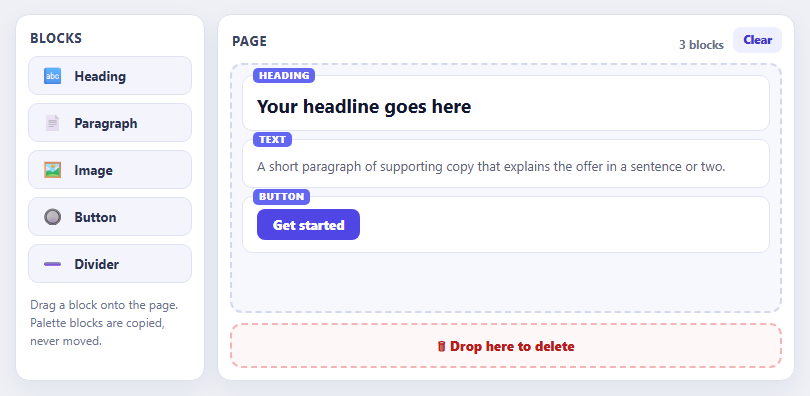
Drag and drop between lists is rarely symmetrical. A component palette should hand out copies, never lose its own items and refuse anything dropped back onto it. A canvas should accept new items and let them be rearranged. A trash zone should swallow whatever is dropped on it. SortableJS models all of this with the group option: when it is an object rather than a string, its pull and put properties define what each list allows, and that is the whole architecture of a page builder in three small configurations.
The palette uses pull: 'clone' and put: false. Cloning means dragging a block out leaves the original in place and creates a copy in the destination, so the palette always offers all five blocks. put: false means the palette accepts nothing, so blocks cannot be dropped back onto it, and sort: false stops its own items from being reordered. The canvas uses pull: true and put: true: it accepts blocks from the palette and lets its own blocks be moved out to the trash or rearranged. All three lists share the group name "builder", which is what lets items travel between them.
There is one subtlety with cloning: what arrives on the canvas is a copy of the palette chip — the small labelled button — not a rendered block. The onAdd callback fires on the destination when an item lands, and the snippet uses it to look up the block type from the copy's data attribute and replace the chip with the real block markup via replaceWith(). That separation between how a block looks as a draggable tool and how it looks on the page is the standard design in real builders. The same callback updates the block counter.
The trash is the neatest trick: an empty list in the same group with put: true and pull: false. Anything dragged onto it triggers onAdd, where the element is simply removed from the DOM, so deletion needs no special-case dragging code. onMove toggles a highlight while a block hovers over it. Page state is the DOM again, so a save function would serialise data-type attributes in order, and a Clear button resets the canvas. The seeded blocks keep the initial preview from looking empty.
Build with AI
Build, Understand, Optimize, and Extend It With AI
Ask an AI assistant like Claude to add inline editing of block text, undo and redo of page changes, or export the layout as JSON or HTML.
Prompt to recreate it
Copy this into your AI assistant of choice to build the effect from scratch, or as a jumping-off point for your own variant:
Build a mini page builder with SortableJS 1.15 loaded from a CDN.

Requirements:
- Create three lists sharing group name 'builder': a palette (pull: 'clone', put: false, sort: false), a canvas (pull: true, put: true) and an empty trash zone (put: true, pull: false).
- Palette items are chips with a data-type; in the canvas onAdd, replace the cloned chip with the real block markup for that type and update a block counter.
- The trash zone removes evt.item in onAdd and highlights while a block hovers via onMove.
- Add a Clear button, seed the canvas with three blocks, and use a dashed empty-state message when the canvas is empty.
Want to tighten it up first? Run this prompt through the AI Prompt Studio to score it across 8 quality dimensions, catch anti-patterns, and tune the wording for Claude, ChatGPT, or Gemini before you paste it in.
Source Code
<div class="pb-app">
<aside class="pb-side">
<h3>Blocks</h3>
<ul class="pb-palette" id="pbPalette"></ul>
<p class="pb-tip">Drag a block onto the page. Palette blocks are copied, never moved.</p>
</aside>
<main class="pb-main">
<div class="pb-bar"><h3>Page</h3><span id="pbCount">0 blocks</span><button type="button" id="pbClear">Clear</button></div>
<ul class="pb-canvas" id="pbCanvas" aria-label="Page canvas"></ul>
<div class="pb-trash" id="pbTrash" aria-label="Drop here to delete">🗑 Drop here to delete</div>
</main>
</div>body { background: #eef0f6; padding: 14px; font-family: system-ui, sans-serif; }
.pb-app { max-width: 780px; margin: 0 auto; display: grid; grid-template-columns: 190px 1fr; gap: 12px; }
@media (max-width: 560px) { .pb-app { grid-template-columns: 1fr; } }
.pb-side, .pb-main { background: #fff; border: 1px solid #dde1ec; border-radius: 14px; padding: 12px; box-shadow: 0 8px 24px rgba(20,30,70,.06); }
.pb-side h3, .pb-bar h3 { margin: 2px 2px 10px; font-size: 13px; letter-spacing: .05em; text-transform: uppercase; color: #3a4262; }
.pb-palette { list-style: none; margin: 0; padding: 0; display: grid; gap: 8px; }
.pb-item { display: flex; align-items: center; gap: 10px; padding: 10px 12px; background: #f4f5fc; border: 1.5px solid #dfe2f2; border-radius: 10px; font: 700 13px/1 system-ui, sans-serif; color: #2b3150; cursor: grab; user-select: none; }
.pb-item i { font-style: normal; font-size: 17px; }
.pb-tip { margin: 12px 2px 0; font-size: 12px; line-height: 1.5; color: #6b7290; }
.pb-bar { display: flex; align-items: center; gap: 10px; }
.pb-bar h3 { flex: 1; } .pb-bar span { font: 700 11.5px/1 system-ui, sans-serif; color: #6b7290; }
.pb-bar button { font: 800 11.5px/1 system-ui, sans-serif; color: #4338ca; background: #eef0ff; border: 0; border-radius: 8px; padding: 7px 10px; cursor: pointer; margin-bottom: 10px; }
.pb-canvas { list-style: none; margin: 0; padding: 10px; min-height: 250px; background: #f7f8fd; border: 2px dashed #d3d8ee; border-radius: 12px; display: flex; flex-direction: column; gap: 8px; }
.pb-canvas:empty::before { content: 'Drop blocks here'; margin: auto; color: #99a0c0; font-weight: 700; font-size: 14px; }
.pb-canvas .pb-item { cursor: grab; }
.pb-block { background: #fff; border: 1.5px solid #e1e4f3; border-radius: 10px; padding: 12px 14px; cursor: grab; position: relative; }
.pb-block .tag { position: absolute; top: -8px; left: 10px; font: 800 9.5px/1 system-ui, sans-serif; letter-spacing: .08em; text-transform: uppercase; background: #6366f1; color: #fff; padding: 3px 6px; border-radius: 5px; }
.pb-block h4 { margin: 4px 0 0; font-size: 19px; color: #12162e; } .pb-block p { margin: 4px 0 0; font-size: 13px; line-height: 1.5; color: #5b6279; }
.pb-block .img { height: 60px; border-radius: 8px; background: linear-gradient(135deg, #a5b4fc, #f0abfc); }
.pb-block .btn { display: inline-block; padding: 9px 16px; border-radius: 8px; background: #4f46e5; color: #fff; font: 800 13px/1 system-ui, sans-serif; }
.pb-block .div { height: 3px; border-radius: 2px; background: #d5daf0; margin: 10px 0 4px; }
.pb-ghost { opacity: .4; }
.pb-trash { margin-top: 10px; padding: 14px; text-align: center; border: 2px dashed #f3b6b6; border-radius: 12px; color: #b91c1c; font: 800 13px/1 system-ui, sans-serif; background: #fef7f7; transition: background .15s, transform .15s; }
.pb-trash.over { background: #fecaca; transform: scale(1.02); }const BLOCKS = {
heading: { label: 'Heading', icon: '🔤', html: '<span class="tag">Heading</span><h4>Your headline goes here</h4>' },
text: { label: 'Paragraph', icon: '📄', html: '<span class="tag">Text</span><p>A short paragraph of supporting copy that explains the offer in a sentence or two.</p>' },
image: { label: 'Image', icon: '🖼️', html: '<span class="tag">Image</span><div class="img"></div>' },
button: { label: 'Button', icon: '🔘', html: '<span class="tag">Button</span><span class="btn">Get started</span>' },
divider: { label: 'Divider', icon: '➖', html: '<span class="tag">Divider</span><div class="div"></div>' },
};
const palette = document.getElementById('pbPalette');
const canvas = document.getElementById('pbCanvas');
const trash = document.getElementById('pbTrash');
const count = document.getElementById('pbCount');
palette.innerHTML = Object.keys(BLOCKS).map(function (k) {
return '<li class="pb-item" data-type="' + k + '"><i aria-hidden="true">' + BLOCKS[k].icon + '</i>' + BLOCKS[k].label + '</li>';
}).join('');
function updateCount() { count.textContent = canvas.children.length + ' block' + (canvas.children.length === 1 ? '' : 's'); }
// PALETTE: pull:'clone' copies instead of moving; put:false means nothing can be dropped back in; sort:false locks its own order.
Sortable.create(palette, {
group: { name: 'builder', pull: 'clone', put: false },
sort: false,
animation: 150,
});
// CANVAS: accepts from the palette and reorders itself.
Sortable.create(canvas, {
group: { name: 'builder', pull: true, put: true },
animation: 170,
ghostClass: 'pb-ghost',
// The dropped element is a clone of the palette chip. Swap its chip markup for the real block preview.
onAdd: function (evt) {
const type = evt.item.dataset.type;
if (!BLOCKS[type]) return;
const li = document.createElement('li');
li.className = 'pb-block'; li.dataset.type = type; li.innerHTML = BLOCKS[type].html;
evt.item.replaceWith(li);
updateCount();
},
onSort: updateCount,
});
// TRASH: an empty Sortable in the same group accepts anything dragged out of the canvas; onAdd deletes it.
Sortable.create(trash, {
group: { name: 'builder', put: true, pull: false },
animation: 100,
emptyInsertThreshold: 24, // an empty list is a thin target; widen the zone in which a dragged item counts as over it
onAdd: function (evt) { evt.item.remove(); updateCount(); trash.classList.remove('over'); },
onMove: function (evt) { trash.classList.toggle('over', evt.to === trash); },
onUnchoose: function () { trash.classList.remove('over'); },
});
document.getElementById('pbClear').addEventListener('click', function () { canvas.innerHTML = ''; updateCount(); });
// Seed the canvas so the preview is not empty.
['heading', 'text', 'button'].forEach(function (t) {
const li = document.createElement('li');
li.className = 'pb-block'; li.dataset.type = t; li.innerHTML = BLOCKS[t].html; canvas.appendChild(li);
});
updateCount();Step by step
How to Use
- 1Drag from the paletteDrag Heading, Paragraph, Image, Button or Divider onto the page. The palette keeps its copy.
- 2Reorder the pageDrag blocks on the canvas up and down to change their order.
- 3Delete a blockDrag a block down onto the red trash zone. It highlights as you hover and the block disappears on drop.
- 4Try the paletteDrag a block back onto the palette. It refuses, because put is false.
- 5Clear the pagePress Clear to remove every block at once.
Real-world uses
Common Use Cases
Got questions?
Frequently Asked Questions
Set group: { name: "x", pull: "clone", put: false } on the source list and give the destination the same name.
Set put: false on the source group. Add sort: false to stop it reordering itself.
Handle onAdd on the destination and replace evt.item with the element you want, using the type stored in a data attribute.
Create an empty Sortable in the same group that accepts drops, and remove evt.item in its onAdd handler.
Read the destination list's children in order and collect each one's data-type attribute.
Yes. pull and put can be functions that receive the source and target and return true, false or "clone" for dynamic rules.
Yes. Use the JSX, Vue, Angular or Tailwind export buttons on this page to convert the markup and styles. The behaviour comes from SortableJS, so in a framework project install it with npm install sortablejs (or react-sortablejs / vuedraggable) instead of the CDN tag, create it in useEffect / onMounted / ngAfterViewInit, and sync your state from onEnd, and release it with destroy() when the component unmounts.