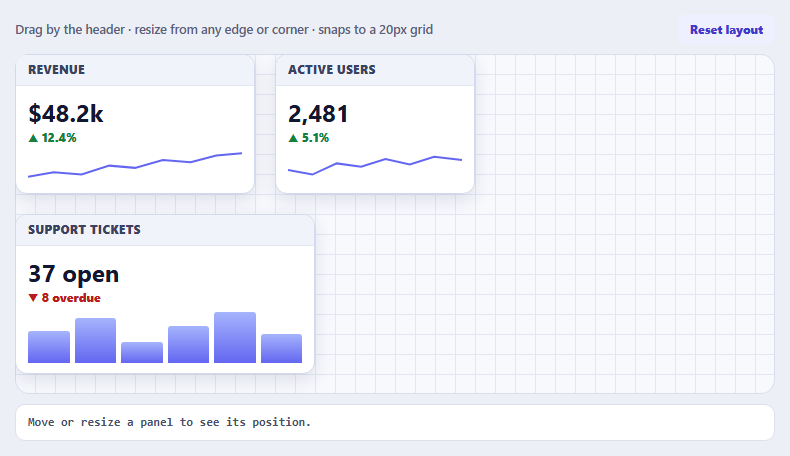
Interact.js Draggable and Resizable Dashboard Panels with Snapping
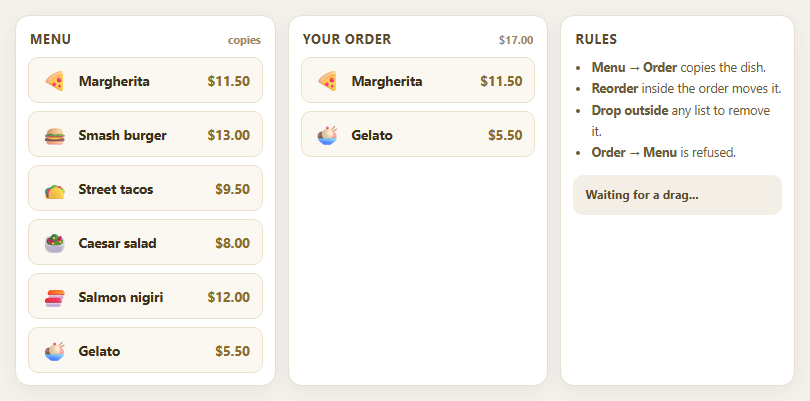
Dragula Copy vs Move Lists with Spill Control
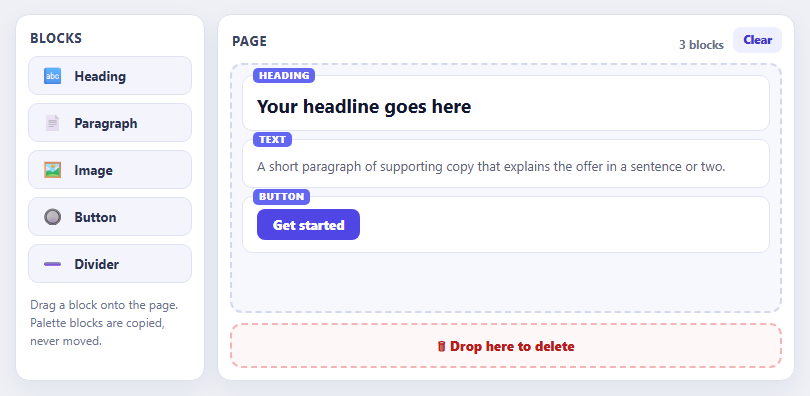
SortableJS Shared Groups: Clone from a Palette into a Page Builder
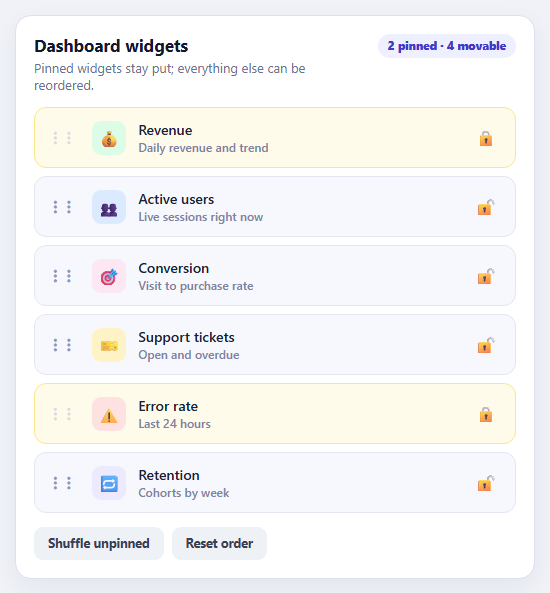
SortableJS Drag Handle with Pinned and Locked Rows
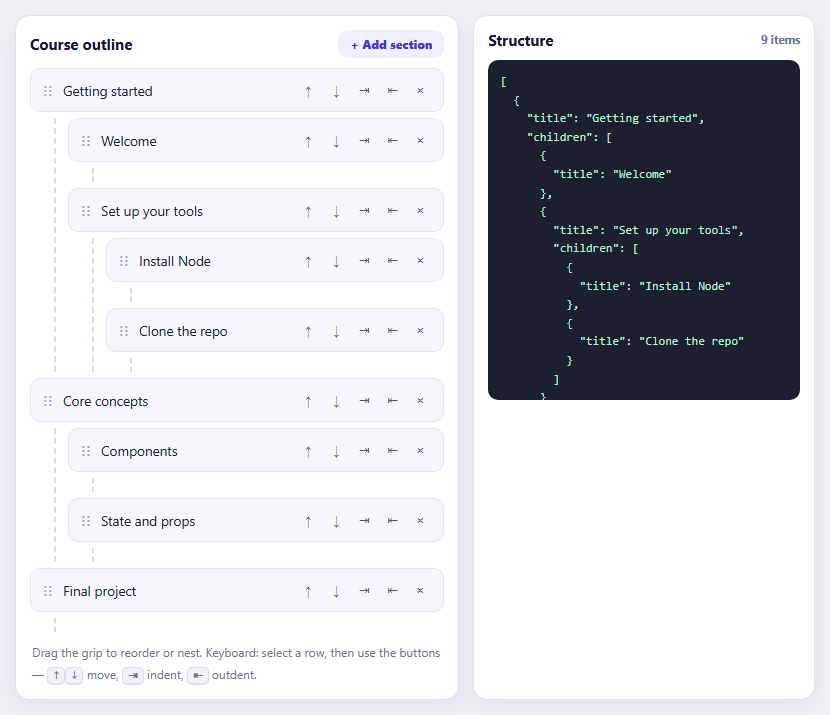
SortableJS Nested Sortable Tree with Keyboard Controls
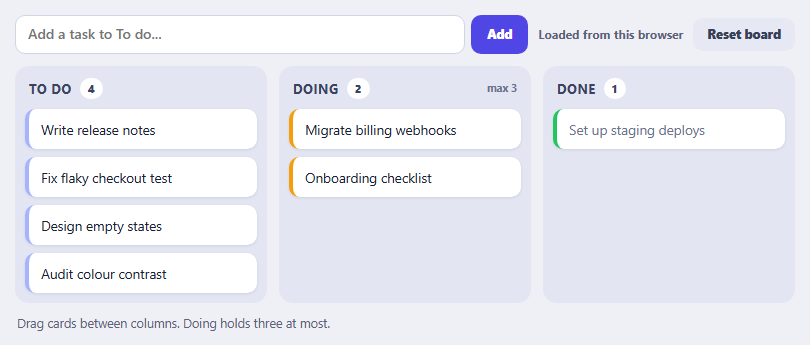
SortableJS Multi-List Kanban with Persistence and WIP Limit
Learn Coding Visually
Learn to code with interactive, live-preview playgrounds — HTML, CSS, JavaScript, React & more.
 HTML Playground42 lessons · Click-based · Live preview
 CSS PlaygroundLearn CSS with a live editor
 JavaScript Playground60 lessons · DOM · Async · Canvas
 React PlaygroundLearn React with a live code editor
 GSAP PlaygroundLearn GSAP animation interactively
 SVG Playground44 lessons · shapes · paths · animation
 SCSS Playground45 lessons · Sass modules · tokens
 Tailwind PlaygroundLearn Tailwind CSS with a live editor
 Bootstrap 5 Playground50 lessons · live preview
Interact.js Resizable Dashboard Panels — Free JS Snippet
Interact.js Draggable and Resizable Dashboard Panels with Snapping · Dashboards · Plain HTML, CSS & JS · Live preview
What's included
Features
About this UI Snippet
Interact.js Draggable and Resizable Panels — HTML, CSS & JavaScript
Free-form dashboards, floating windows and design canvases share a set of interactions: pick a panel up and put it anywhere, pull an edge or corner to resize it, keep it on the board, and line it up with its neighbours. Interact.js is a library for exactly these pointer interactions. It normalises mouse, touch and pen input, and layers behaviours on top through a small vocabulary: draggable, resizable, and modifiers that adjust the result — restrict it, snap it, limit its size.
The dragging setup shows the library's model. allowFrom: '.ip-head' means only the header starts a drag, leaving the panel body free for content and future controls. The move listener receives dx and dy — how far the pointer moved since the last event — and adds them to the panel's stored position. The position is applied with a translate transform rather than left and top, which is the performance detail that matters: changing left and top forces layout on every pointer event, while a transform is composited on the GPU and stays smooth even with many panels. The position is kept in data-x and data-y attributes so it survives between events.
Constraints come from modifiers, and this is Interact.js's best feature. restrictRect with restriction: 'parent' keeps the panel inside the board. Snapping needs a caveat. The library has a snap modifier with a grid snapper, but that grid is anchored to the page rather than to the board, so panels land on lines that do not match the board's background grid, and offset options do not fix it reliably. Rounding the position by hand is simpler and exact: the drag handler accumulates the raw, unsnapped position and displays Math.round(raw / 20) * 20, clamped to the board. For resizing, snapSize does the same for width and height, restrictSize sets a minimum panel size, and restrictEdges: { outer: 'parent' } stops a resize from pushing the edge outside the board. Modifiers run in the order given, so the snap is applied before the size limit, which is the order that gives the right result.
There is one trap in resizing that this snippet handles. Pulling the left or top edge changes the panel's size and its position, since the opposite edge must stay fixed. Interact.js reports this in event.deltaRect, and the resize handler adds deltaRect.left and deltaRect.top back into the transform. Forgetting that makes the panel appear to jump. On pointer down the touched panel is moved to the end of the board so it stacks on top, and a readout shows the current position and size. Reset restores the starting layout.
Build with AI
Build, Understand, Optimize, and Extend It With AI
Ask an AI assistant like Claude to save the layout to localStorage, add collision avoidance so panels push each other, or add keyboard nudging with arrow keys.
Prompt to recreate it
Copy this into your AI assistant of choice to build the effect from scratch, or as a jumping-off point for your own variant:
Build draggable, resizable dashboard panels with Interact.js 1.10 loaded from a CDN.

Requirements:
- Absolutely position three panels inside a relatively positioned board with a 20px grid background; store x/y in data attributes and apply with transform: translate().
- interact('.ip-panel').draggable with allowFrom '.ip-head' and a restrictRect ('parent') modifier; snap the position by accumulating an unsnapped raw x/y and displaying Math.round(raw / 20) * 20, clamped to the board (the built-in snap grid is page-anchored).
- .resizable on all four edges with snapSize, restrictSize (min 120x90) and restrictEdges (outer 'parent'); apply event.deltaRect.left/top to the position while resizing.
- Raise the touched panel on the 'down' event, show a readout of position and size, and add a Reset layout button.
Want to tighten it up first? Run this prompt through the AI Prompt Studio to score it across 8 quality dimensions, catch anti-patterns, and tune the wording for Claude, ChatGPT, or Gemini before you paste it in.
Source Code
<div class="ip-app">
<div class="ip-bar">
<span class="ip-title">Drag by the header · resize from any edge or corner · snaps to a 20px grid</span>
<div><button type="button" id="ipReset">Reset layout</button></div>
</div>
<div class="ip-board" id="ipBoard" role="group" aria-label="Dashboard board">
<div class="ip-panel" data-x="0" data-y="0" style="width:240px;height:140px" data-w="240" data-h="140" data-name="Revenue"><div class="ip-head">Revenue</div><div class="ip-body"><b>$48.2k</b><span class="ip-up">▲ 12.4%</span><svg viewBox="0 0 100 30" preserveAspectRatio="none"><polyline points="0,24 12,20 25,22 38,14 50,16 63,9 76,11 88,5 100,3"/></svg></div></div>
<div class="ip-panel" data-x="260" data-y="0" style="width:200px;height:140px" data-w="200" data-h="140" data-name="Users"><div class="ip-head">Active users</div><div class="ip-body"><b>2,481</b><span class="ip-up">▲ 5.1%</span><svg viewBox="0 0 100 30" preserveAspectRatio="none"><polyline points="0,18 14,22 28,12 42,15 56,8 70,13 84,6 100,9"/></svg></div></div>
<div class="ip-panel" data-x="0" data-y="160" style="width:300px;height:160px" data-w="300" data-h="160" data-name="Tickets"><div class="ip-head">Support tickets</div><div class="ip-body"><b>37 open</b><span class="ip-down">▼ 8 overdue</span><div class="ip-bars"><i style="height:60%"></i><i style="height:85%"></i><i style="height:40%"></i><i style="height:70%"></i><i style="height:95%"></i><i style="height:55%"></i></div></div></div>
</div>
<div class="ip-readout" id="ipRead" aria-live="polite">Move or resize a panel to see its position.</div>
</div>body { background: #eceff6; padding: 14px; font-family: system-ui, sans-serif; }
.ip-app { max-width: 760px; margin: 0 auto; }
.ip-bar { display: flex; justify-content: space-between; align-items: center; gap: 10px; margin-bottom: 10px; flex-wrap: wrap; }
.ip-title { font-size: 12.5px; color: #5b6279; font-weight: 600; }
.ip-bar button { font: 800 12px/1 system-ui, sans-serif; color: #4338ca; background: #eef0ff; border: 0; border-radius: 9px; padding: 9px 12px; cursor: pointer; }
.ip-board { position: relative; height: 340px; border-radius: 14px; overflow: hidden; background-color: #f8f9fd; background-image: linear-gradient(#e3e7f4 1px, transparent 1px), linear-gradient(90deg, #e3e7f4 1px, transparent 1px); background-size: 20px 20px; box-shadow: inset 0 0 0 1px #d9deee; }
.ip-panel { position: absolute; left: 0; top: 0; background: #fff; border: 1px solid #d3d8ec; border-radius: 12px; box-shadow: 0 6px 18px rgba(30,40,90,.12); display: flex; flex-direction: column; overflow: hidden; touch-action: none; user-select: none; box-sizing: border-box; min-width: 120px; min-height: 90px; }
.ip-panel.active { box-shadow: 0 14px 30px rgba(30,40,90,.28); border-color: #818cf8; }
.ip-head { padding: 9px 12px; background: #f1f3fb; font: 800 11.5px/1 system-ui, sans-serif; letter-spacing: .05em; text-transform: uppercase; color: #3a4262; cursor: grab; border-bottom: 1px solid #e3e6f3; }
.ip-panel.active .ip-head { cursor: grabbing; background: #e5e9ff; }
.ip-body { flex: 1; padding: 10px 12px; display: flex; flex-direction: column; justify-content: center; gap: 3px; min-height: 0; }
.ip-body b { font-size: 24px; color: #12162e; } .ip-up { font: 800 12px/1 system-ui, sans-serif; color: #15803d; } .ip-down { font: 800 12px/1 system-ui, sans-serif; color: #b91c1c; }
.ip-body svg { width: 100%; flex: 1; min-height: 14px; margin-top: 4px; } .ip-body polyline { fill: none; stroke: #6366f1; stroke-width: 2; vector-effect: non-scaling-stroke; }
.ip-bars { flex: 1; display: flex; align-items: flex-end; gap: 5px; margin-top: 4px; min-height: 14px; } .ip-bars i { flex: 1; background: linear-gradient(#a5b4fc, #6366f1); border-radius: 3px 3px 0 0; }
.ip-readout { margin-top: 10px; padding: 9px 12px; background: #fff; border: 1px solid #dde1ec; border-radius: 10px; font: 700 12px/1.4 ui-monospace, Menlo, monospace; color: #48506a; }const board = document.getElementById('ipBoard');
const readout = document.getElementById('ipRead');
const GRID = 20;
let topZ = 10;
// Remember the starting layout so Reset can restore it.
const initial = Array.prototype.map.call(board.querySelectorAll('.ip-panel'), function (p) {
return { el: p, x: +p.dataset.x, y: +p.dataset.y, w: +p.dataset.w, h: +p.dataset.h };
});
function place(p, x, y) {
p.style.transform = 'translate(' + x + 'px,' + y + 'px)'; // transform, not left/top: no layout work while dragging
p.dataset.x = x; p.dataset.y = y;
}
initial.forEach(function (i) { place(i.el, i.x, i.y); });
function report(p) {
readout.textContent = p.dataset.name + ': x=' + Math.round(p.dataset.x) + ' y=' + Math.round(p.dataset.y) + ' size=' + Math.round(p.offsetWidth) + '×' + Math.round(p.offsetHeight);
}
// Position snapping is done by hand. interact.modifiers.snap works, but its grid is anchored to the PAGE, not to the
// board, so panels would snap to lines that do not match the board's own background grid. Rounding a running
// "raw" position is exact, independent of scroll, borders and page offsets - and it is only two lines.
const snapTo = function (v) { return Math.round(v / GRID) * GRID; };
function clampTo(p, x, y) {
return [Math.min(Math.max(0, x), board.clientWidth - p.offsetWidth), Math.min(Math.max(0, y), board.clientHeight - p.offsetHeight)];
}
interact('.ip-panel')
.draggable({
allowFrom: '.ip-head', // only the header starts a drag, so the body stays free for content
inertia: false,
modifiers: [
interact.modifiers.restrictRect({ restriction: 'parent', endOnly: false }), // keep the panel inside the board
],
listeners: {
start: function (e) {
const p = e.target;
p.classList.add('active');
p._rx = +p.dataset.x || 0; p._ry = +p.dataset.y || 0; // the unsnapped position we accumulate movement into
},
move: function (e) {
const p = e.target;
p._rx += e.dx; p._ry += e.dy;
const c = clampTo(p, snapTo(p._rx), snapTo(p._ry));
place(p, c[0], c[1]);
report(p);
},
end: function (e) { e.target.classList.remove('active'); },
},
})
.resizable({
edges: { left: true, right: true, bottom: true, top: true },
margin: 8, // how close to an edge counts as grabbing it
modifiers: [
interact.modifiers.snapSize({ targets: [interact.snappers.grid({ width: GRID, height: GRID })] }), // sizes have no origin, so no offset
interact.modifiers.restrictSize({ min: { width: 120, height: 90 } }),
interact.modifiers.restrictEdges({ outer: 'parent' }),
],
listeners: {
start: function (e) { e.target.classList.add('active'); },
move: function (e) {
const p = e.target;
// Resizing from the left or top edge moves the panel too, so add the delta rect's position back in.
place(p, (+p.dataset.x || 0) + e.deltaRect.left, (+p.dataset.y || 0) + e.deltaRect.top);
p.style.width = e.rect.width + 'px';
p.style.height = e.rect.height + 'px';
report(p);
},
end: function (e) { e.target.classList.remove('active'); },
},
})
.on('down', function (e) {
// Bring the panel you touched to the front. A z-index bump is used instead of re-appending the node,
// because moving an element in the DOM in the middle of a pointer interaction can cancel it.
e.currentTarget.style.zIndex = ++topZ;
});
document.getElementById('ipReset').addEventListener('click', function () {
initial.forEach(function (i) { i.el.style.zIndex = ''; place(i.el, i.x, i.y); i.el.style.width = i.w + 'px'; i.el.style.height = i.h + 'px'; });
readout.textContent = 'Layout reset.';
});Step by step
How to Use
- 1Drag a panelDrag a panel by its header. It moves in 20-pixel steps and cannot leave the board.
- 2Resize from an edgeDrag any edge or corner. Pulling the left or top edge resizes without moving the opposite side.
- 3Feel the limitsTry to make a panel very small or push it beyond the board; the modifiers stop you.
- 4Bring a panel forwardOverlap two panels and click one. The touched panel comes to the front.
- 5ResetPress Reset layout to return every panel to its starting position and size.
Real-world uses
Common Use Cases
Got questions?
Frequently Asked Questions
Changing left and top triggers layout on every pointer event. A transform is composited and stays smooth.
Use interact.modifiers.snap with interact.snappers.grid for pointer-relative snapping and snapSize for resizing. For an element inside a container, rounding the position yourself is more precise because the built-in grid is page-anchored.
Resizing from the left or top also moves the element. Add event.deltaRect.left and top to the position, as this snippet does.
interact.snappers.grid is anchored to the page by default, so panels snap to page coordinates. Round a running raw position yourself (Math.round(raw / grid) * grid) for an exact match with the container.
Use restrictRect with restriction: "parent" for dragging, and restrictEdges with outer: "parent" for resizing.
Use interact.modifiers.restrictSize({ min: { width, height } }).
Yes. It handles mouse, touch and pen through one API; add touch-action: none to draggable elements.
Yes. Use the JSX, Vue, Angular or Tailwind export buttons on this page to convert the markup and styles. The behaviour comes from Interact.js, so in a framework project install it with npm install interactjs instead of the CDN tag, register it in useEffect / onMounted / ngAfterViewInit and keep the position in component state, and release it with interact(element).unset() when the component unmounts.