Learn Coding Visually
Learn to code with interactive, live-preview playgrounds — HTML, CSS, JavaScript, React & more.
 HTML Playground42 lessons · Click-based · Live preview
 CSS PlaygroundLearn CSS with a live editor
 JavaScript Playground60 lessons · DOM · Async · Canvas
 React PlaygroundLearn React with a live code editor
 GSAP PlaygroundLearn GSAP animation interactively
 SVG Playground44 lessons · shapes · paths · animation
 SCSS Playground45 lessons · Sass modules · tokens
 Tailwind PlaygroundLearn Tailwind CSS with a live editor
 Bootstrap 5 Playground50 lessons · live preview
SortableJS Nested Tree with Keyboard — Free JS Snippet
SortableJS Nested Sortable Tree with Keyboard Controls · Dashboards · Plain HTML, CSS & JS · Live preview
What's included
Features
About this UI Snippet
SortableJS Nested Sortable Tree — HTML, CSS & JavaScript
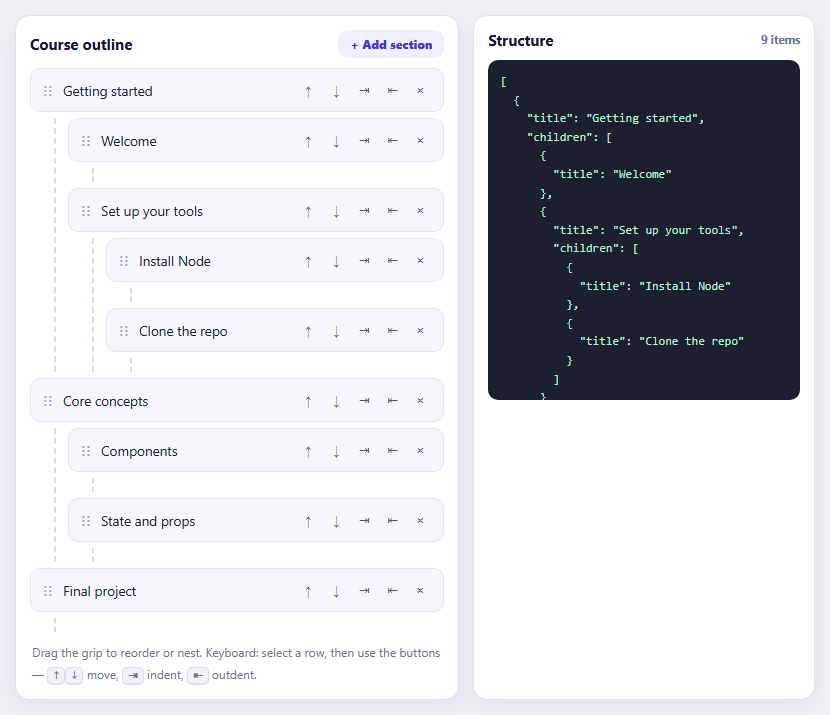
Nested lists — course outlines, navigation menus, category trees, task hierarchies — need drag and drop that understands depth. Dragging an item above or below its siblings is the easy case. The hard cases are dragging into a parent that has no children yet, dragging out to a shallower level, and doing both without the list flickering as the pointer crosses boundaries. SortableJS supports nesting by treating every list as its own Sortable instance, and this snippet shows the configuration that makes it behave.
The structural rule is that each ul, including the empty child list of every item, is a separate Sortable created with the same group name. Because every item always contains a ul — even when it is empty — there is always a drop target to move something into, and a small min-height with a dashed left border keeps empty lists visible and hittable. makeSortable is called for each list as it is built, and an item created later automatically gets its own list. Items are arranged with a drag handle, so clicking the text to select a row does not start a drag.
Two options are what make nested drops reliable. swapThreshold sets how far into a target the pointer must travel before the items swap; the default is very sensitive, and in nested lists the pointer is often over two candidate targets at once, so a value like 0.65 stops items jumping back and forth. invertSwap reverses that behaviour when dragging over the far side of an element, which improves dragging past the last item into a parent's next slot. fallbackOnBody attaches the dragged element to the body, so an ancestor with overflow or a transform cannot clip it — a classic reason a nested drag seems to vanish.
Drag and drop is not enough for accessibility: it cannot be operated with a keyboard, and a tree with only that one path excludes people. Each row therefore has move up, move down, indent and outdent buttons, implemented as plain DOM operations — indent appends the row to the previous sibling's child list, outdent inserts it after its parent — and focus is restored to the same button afterwards so repeated presses keep working. The structure panel serialises the tree recursively from the DOM after every change, which shows the practical output and confirms that the DOM is the source of truth. Titles are written with textContent, never innerHTML.
Build with AI
Build, Understand, Optimize, and Extend It With AI
Ask an AI assistant like Claude to limit nesting depth, add collapse and expand toggles for branches, or persist the tree and sync it with a server.
Prompt to recreate it
Copy this into your AI assistant of choice to build the effect from scratch, or as a jumping-off point for your own variant:
Build a nested sortable outline with SortableJS 1.15 loaded from a CDN.

Requirements:
- Render items as li elements each containing a row (drag grip, title, buttons) and an always-present child ul; create a Sortable for every ul with group 'outline', handle '.ns-grip', animation 150, fallbackOnBody: true, swapThreshold: 0.65 and invertSwap: true.
- Give empty child lists a min-height and dashed border so they can receive drops.
- Add up, down, indent and outdent buttons implemented with DOM operations (indent appends to the previous sibling's child list, outdent inserts after the parent) and restore focus to the same button afterwards.
- Serialise the outline recursively into JSON after every change and show it with an item count; use textContent for titles.
Want to tighten it up first? Run this prompt through the AI Prompt Studio to score it across 8 quality dimensions, catch anti-patterns, and tune the wording for Claude, ChatGPT, or Gemini before you paste it in.
Source Code
<div class="ns-app">
<div class="ns-panel">
<div class="ns-head"><h3>Course outline</h3><button type="button" id="nsAdd">+ Add section</button></div>
<ul class="ns-list" id="nsRoot" role="tree" aria-label="Course outline"></ul>
<p class="ns-help">Drag the grip to reorder or nest. Keyboard: select a row, then use the buttons — <kbd>↑</kbd><kbd>↓</kbd> move, <kbd>⇥</kbd> indent, <kbd>⇤</kbd> outdent.</p>
</div>
<div class="ns-panel ns-out">
<div class="ns-head"><h3>Structure</h3><span id="nsCount">0 items</span></div>
<pre id="nsJson" aria-live="polite"></pre>
</div>
</div>body { background: #eef0f6; padding: 16px; font-family: system-ui, sans-serif; }
.ns-app { max-width: 800px; margin: 0 auto; display: grid; grid-template-columns: 1.3fr 1fr; gap: 14px; }
@media (max-width: 620px) { .ns-app { grid-template-columns: 1fr; } }
.ns-panel { background: #fff; border: 1px solid #dde1ec; border-radius: 14px; padding: 14px; box-shadow: 0 8px 24px rgba(20,30,70,.06); min-width: 0; }
.ns-head { display: flex; justify-content: space-between; align-items: center; margin-bottom: 10px; }
.ns-head h3 { margin: 0; font-size: 15px; color: #12162e; } .ns-head span { font: 700 11.5px/1 system-ui, sans-serif; color: #6b7290; }
.ns-head button { font: 800 12px/1 system-ui, sans-serif; color: #4338ca; background: #eef0ff; border: 0; border-radius: 9px; padding: 8px 12px; cursor: pointer; }
.ns-list, .ns-list ul { list-style: none; margin: 0; padding: 0; }
.ns-list ul { margin: 6px 0 0 24px; padding-left: 12px; border-left: 2px dashed #d5daf0; min-height: 14px; }
.ns-item { margin-bottom: 6px; }
.ns-row { display: flex; align-items: center; gap: 8px; padding: 8px 10px; background: #f6f7fc; border: 1px solid #e3e6f2; border-radius: 10px; font-size: 13.5px; color: #1b2033; }
.ns-row:focus-within, .ns-item.sel > .ns-row { border-color: #6366f1; background: #eef0ff; }
.ns-grip { cursor: grab; color: #9aa1bd; font-size: 15px; line-height: 1; user-select: none; padding: 0 2px; }
.ns-grip:active { cursor: grabbing; }
.ns-name { flex: 1; min-width: 0; overflow: hidden; text-overflow: ellipsis; white-space: nowrap; cursor: pointer; }
.ns-btns { display: flex; gap: 2px; }
.ns-btns button { width: 26px; height: 26px; font-size: 13px; color: #4a5270; background: none; border: 0; border-radius: 6px; cursor: pointer; }
.ns-btns button:hover { background: #dfe3f5; }
.ns-ghost > .ns-row { opacity: .4; background: #c7d2fe; }
.ns-out pre { margin: 0; padding: 12px; background: #1c1f2e; color: #b8f0d0; border-radius: 10px; font: 12px/1.55 ui-monospace, Menlo, monospace; max-height: 340px; overflow: auto; white-space: pre; }
.ns-help { margin: 10px 2px 0; font-size: 12px; color: #6b7290; line-height: 1.8; }
kbd { font: 700 11px/1 ui-monospace, Menlo, monospace; background: #f0f2f8; border: 1px solid #d9dded; border-bottom-width: 2px; border-radius: 5px; padding: 1px 5px; }let uid = 0;
const DATA = [
{ t: 'Getting started', c: [{ t: 'Welcome' }, { t: 'Set up your tools', c: [{ t: 'Install Node' }, { t: 'Clone the repo' }] }] },
{ t: 'Core concepts', c: [{ t: 'Components' }, { t: 'State and props' }] },
{ t: 'Final project', c: [] },
];
const root = document.getElementById('nsRoot');
let selected = null;
function makeItem(node) {
const li = document.createElement('li');
li.className = 'ns-item'; li.setAttribute('role', 'treeitem'); li.dataset.id = 'n' + (++uid);
li.innerHTML = '<div class="ns-row"><span class="ns-grip" aria-hidden="true">⋮⋮</span><span class="ns-name" tabindex="0"></span>' +
'<span class="ns-btns"><button type="button" data-a="up" aria-label="Move up">↑</button><button type="button" data-a="down" aria-label="Move down">↓</button>' +
'<button type="button" data-a="in" aria-label="Indent">⇥</button><button type="button" data-a="out" aria-label="Outdent">⇤</button>' +
'<button type="button" data-a="del" aria-label="Delete">×</button></span></div><ul role="group"></ul>';
li.querySelector('.ns-name').textContent = node.t;
const ul = li.querySelector('ul');
(node.c || []).forEach(function (ch) { ul.appendChild(makeItem(ch)); });
makeSortable(ul);
return li;
}
// EVERY list, including each empty child list, is its own Sortable in a shared group.
// fallbackOnBody + swapThreshold are the two options nested lists need to drop reliably.
function makeSortable(ul) {
Sortable.create(ul, {
group: 'outline',
handle: '.ns-grip',
animation: 150,
fallbackOnBody: true, // put the dragged clone on <body> so a parent's overflow/transform cannot clip it
swapThreshold: 0.65, // only swap when the pointer is well inside the target: stops the list jittering
invertSwap: true,
ghostClass: 'ns-ghost',
onEnd: refresh,
});
}
function toTree(ul) {
return Array.prototype.map.call(ul.children, function (li) {
const o = { title: li.querySelector('.ns-name').textContent };
const kids = toTree(li.querySelector('ul'));
if (kids.length) o.children = kids;
return o;
});
}
function refresh() {
const tree = toTree(root);
document.getElementById('nsJson').textContent = JSON.stringify(tree, null, 2);
document.getElementById('nsCount').textContent = root.querySelectorAll('li').length + ' items';
}
DATA.forEach(function (n) { root.appendChild(makeItem(n)); });
makeSortable(root);
refresh();
function select(li) {
if (selected) selected.classList.remove('sel');
selected = li; if (li) li.classList.add('sel');
}
root.addEventListener('click', function (e) {
const li = e.target.closest('.ns-item'); if (!li) return;
const btn = e.target.closest('button');
if (!btn) { if (e.target.closest('.ns-row')) select(li); return; }
select(li);
const a = btn.dataset.a, parent = li.parentNode;
if (a === 'up' && li.previousElementSibling) parent.insertBefore(li, li.previousElementSibling);
else if (a === 'down' && li.nextElementSibling) parent.insertBefore(li.nextElementSibling, li);
else if (a === 'in' && li.previousElementSibling) li.previousElementSibling.querySelector('ul').appendChild(li); // become the last child of the sibling above
else if (a === 'out') { const grand = parent.closest('.ns-item'); if (grand) grand.parentNode.insertBefore(li, grand.nextElementSibling); }
else if (a === 'del') { select(null); li.remove(); }
refresh();
const again = document.querySelector('[data-id="' + li.dataset.id + '"] > .ns-row .ns-btns button[data-a="' + a + '"]');
if (again && a !== 'del') again.focus(); // keep focus on the same control so repeated presses keep working
});
root.addEventListener('keydown', function (e) {
if ((e.key === 'Enter' || e.key === ' ') && e.target.classList.contains('ns-name')) { e.preventDefault(); select(e.target.closest('.ns-item')); }
});
document.getElementById('nsAdd').addEventListener('click', function () {
const li = makeItem({ t: 'New section ' + (uid + 1) });
root.appendChild(li); select(li); refresh();
});Step by step
How to Use
- 1Reorder siblingsDrag a row by its grip to move it above or below another row at the same level.
- 2Nest an itemDrag a row into the dashed area of another row to make it a child, even if that row has no children yet.
- 3Move outDrag a nested row to the left, out of its parent, to make it a top-level item again.
- 4Use the buttonsClick a row, then use the up, down, indent and outdent buttons to restructure without dragging.
- 5Read the structureThe JSON panel shows the outline as nested title and children objects, updated after every change.
Real-world uses
Common Use Cases
Got questions?
Frequently Asked Questions
Create a Sortable on every list, including nested and empty ones, with the same group name. Use fallbackOnBody and a swapThreshold around 0.65.
An empty list has no height. Give nested lists a min-height (and always render the ul) so there is a drop target.
It sets how far into a target the dragged item must be before they swap. Higher values reduce jitter when several targets overlap.
A parent with overflow or a transform can clip it. Set fallbackOnBody: true so the drag clone is attached to the body.
Provide buttons or keyboard shortcuts that perform the same moves, and keep focus on the control after the DOM changes.
Walk the DOM recursively from the root list, reading each item's title and its child list, as toTree() does.
Yes. Use the JSX, Vue, Angular or Tailwind export buttons on this page to convert the markup and styles. The behaviour comes from SortableJS, so in a framework project install it with npm install sortablejs (or react-sortablejs / vuedraggable) instead of the CDN tag, create it in useEffect / onMounted / ngAfterViewInit, and sync your state from onEnd, and release it with destroy() when the component unmounts.