Learn Coding Visually
Learn to code with interactive, live-preview playgrounds — HTML, CSS, JavaScript, React & more.
 HTML Playground42 lessons · Click-based · Live preview
 CSS PlaygroundLearn CSS with a live editor
 JavaScript Playground60 lessons · DOM · Async · Canvas
 React PlaygroundLearn React with a live code editor
 GSAP PlaygroundLearn GSAP animation interactively
 SVG Playground44 lessons · shapes · paths · animation
 SCSS Playground45 lessons · Sass modules · tokens
 Tailwind PlaygroundLearn Tailwind CSS with a live editor
 Bootstrap 5 Playground50 lessons · live preview
SortableJS Handle and Locked Rows — Free JS Snippet
SortableJS Drag Handle with Pinned and Locked Rows · Dashboards · Plain HTML, CSS & JS · Live preview
What's included
Features
About this UI Snippet
SortableJS Drag Handle with Locked Rows — HTML, CSS & JavaScript
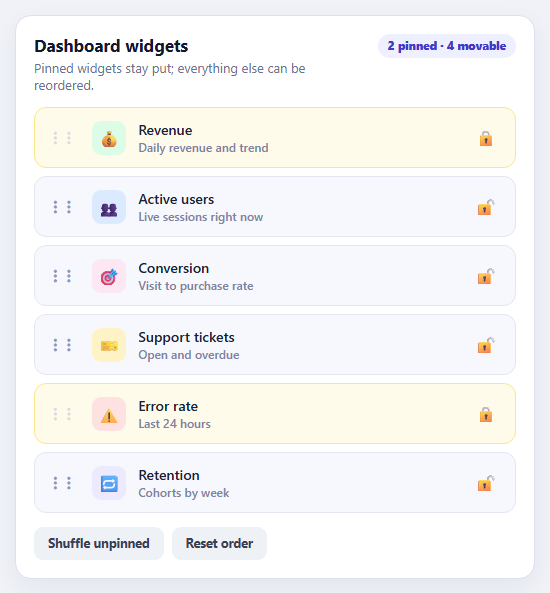
Real lists are rarely all-or-nothing. A dashboard has widgets that users may rearrange and a few that must stay where they are; a checklist has mandatory items pinned to the top; a menu keeps "Home" first. SortableJS has the options for this, but they are easy to combine wrongly, and each one has a behaviour that is not obvious from its name. This snippet puts the three together — a handle, a filter and an onMove guard — and explains why all three are needed.
The handle option restricts drag start to elements matching a selector, here the grip icon. Without it, pressing anywhere on a row starts a drag, which fights with text selection, buttons inside the row and touch scrolling. A handle turns the rest of the row back into ordinary content. The filter option is the locking mechanism: elements matching .locked cannot be picked up. But filter has a side-effect that catches nearly everyone. By default Sortable calls preventDefault on any pointer event that lands on a filtered element, so the unpin button inside a locked row silently stops working. Setting preventOnFilter: false lets clicks through while the row is still undraggable.
The third piece is the one people forget. filter only stops a locked row from being dragged; it does nothing about another row being dragged over it. Drag a movable row onto a pinned one and Sortable will happily swap them, shifting the pinned row to a new position — precisely what pinning was meant to prevent. The onMove callback receives the row being hovered as evt.related, and returning false vetoes that move, so movable rows can only be placed where there is no lock.
Two supporting details make the demo behave. Toggling a lock rebuilds that single row so its class, aria-pressed state, label and icon cannot drift out of step, then restores focus to the button. And Shuffle unpinned randomises only the movable rows and places them back into the movable slots while pinned rows keep their exact indexes, a small algorithm that is worth reading: collect the movable rows, shuffle that array with Fisher–Yates, then walk the original order and substitute only the non-locked positions.
Build with AI
Build, Understand, Optimize, and Extend It With AI
Ask an AI assistant like Claude to save the order to local storage, add per-widget resize options, or sync the pinned state with a user profile API.
Prompt to recreate it
Copy this into your AI assistant of choice to build the effect from scratch, or as a jumping-off point for your own variant:
Build a reorderable widget list with SortableJS 1.15 loaded from a CDN.

Requirements:
- Render six widget rows with a grip handle, icon, name and a pin button; use Sortable.create with handle '.lk-grip', filter '.locked' and preventOnFilter: false.
- Add onMove returning false when evt.related has the locked class so movable rows cannot displace locked ones.
- The pin button toggles the lock by rebuilding that row, updating aria-pressed and aria-label, and restoring focus; show a "n pinned · m movable" badge.
- Add a Shuffle button that randomises only unpinned rows while keeping pinned rows at their positions, and a Reset button.
Want to tighten it up first? Run this prompt through the AI Prompt Studio to score it across 8 quality dimensions, catch anti-patterns, and tune the wording for Claude, ChatGPT, or Gemini before you paste it in.
Source Code
<div class="lk-card">
  <div class="lk-head">
    <div><h3>Dashboard widgets</h3><p>Pinned widgets stay put; everything else can be reordered.</p></div>
    <span class="lk-badge" id="lkBadge" role="status" aria-live="polite"></span>
  </div>
  <ul class="lk-list" id="lkList"></ul>
  <div class="lk-foot"><button type="button" id="lkShuffle">Shuffle unpinned</button><button type="button" id="lkReset">Reset order</button></div>
</div>
body { background: #f0f2f8; padding: 18px; font-family: system-ui, sans-serif; }
.lk-card { max-width: 520px; margin: 0 auto; background: #fff; border: 1px solid #dde1ec; border-radius: 16px; padding: 18px; box-shadow: 0 8px 24px rgba(20,30,70,.06); }
.lk-head { display: flex; justify-content: space-between; align-items: flex-start; gap: 12px; margin-bottom: 14px; }
.lk-head h3 { margin: 0 0 3px; font-size: 17px; color: #12162e; } .lk-head p { margin: 0; font-size: 13px; color: #6b7290; }
.lk-badge { font: 800 11.5px/1 system-ui, sans-serif; color: #4338ca; background: #eef0ff; padding: 6px 10px; border-radius: 999px; white-space: nowrap; }
.lk-list { list-style: none; margin: 0; padding: 0; display: flex; flex-direction: column; gap: 8px; }
.lk-row { display: flex; align-items: center; gap: 12px; padding: 12px 14px; background: #f7f8fd; border: 1.5px solid #e3e6f2; border-radius: 12px; font-size: 14px; color: #1b2033; }
.lk-grip { cursor: grab; color: #8f97b8; font-size: 18px; line-height: 1; padding: 4px 2px; user-select: none; touch-action: none; }
.lk-grip:active { cursor: grabbing; }
.lk-icon { width: 34px; height: 34px; border-radius: 9px; display: grid; place-items: center; font-size: 17px; flex: none; }
.lk-name { flex: 1; font-weight: 600; } .lk-name small { display: block; font-weight: 500; font-size: 12px; color: #7b83a3; }
.lk-pin { width: 32px; height: 32px; border: 0; border-radius: 8px; background: none; font-size: 16px; cursor: pointer; color: #9aa1bd; }
.lk-pin:hover { background: #e3e6f5; }
.lk-row.locked { background: #fffbeb; border-color: #fde68a; }
.lk-row.locked .lk-grip { cursor: not-allowed; opacity: .3; }
.lk-row.locked .lk-pin { color: #d97706; }
.lk-ghost { opacity: .35; background: #c7d2fe; border-style: dashed; }
.lk-foot { display: flex; gap: 8px; margin-top: 14px; }
.lk-foot button { font: 700 12.5px/1 system-ui, sans-serif; color: #384057; background: #eef1f6; border: 0; border-radius: 9px; padding: 10px 14px; cursor: pointer; }
.lk-foot button:hover { background: #e0e5ee; }const WIDGETS = [
{ id: 'rev', n: 'Revenue', d: 'Daily revenue and trend', i: '💰', c: '#dcfce7', pin: true },
{ id: 'usr', n: 'Active users', d: 'Live sessions right now', i: '👥', c: '#dbeafe' },
{ id: 'cnv', n: 'Conversion', d: 'Visit to purchase rate', i: '🎯', c: '#fce7f3' },
{ id: 'tic', n: 'Support tickets', d: 'Open and overdue', i: '🎫', c: '#fef3c7' },
{ id: 'err', n: 'Error rate', d: 'Last 24 hours', i: '⚠️', c: '#fee2e2', pin: true },
{ id: 'ret', n: 'Retention', d: 'Cohorts by week', i: '🔁', c: '#ede9fe' },
];
const list = document.getElementById('lkList');
const badge = document.getElementById('lkBadge');
function rowHtml(w) {
return '<li class="lk-row' + (w.pin ? ' locked' : '') + '" data-id="' + w.id + '">' +
'<span class="lk-grip" aria-hidden="true" title="Drag to reorder">⠇⠇</span>' +
'<span class="lk-icon" style="background:' + w.c + '">' + w.i + '</span>' +
'<span class="lk-name">' + w.n + '<small>' + w.d + '</small></span>' +
'<button type="button" class="lk-pin" aria-pressed="' + !!w.pin + '" aria-label="' + (w.pin ? 'Unpin ' : 'Pin ') + w.n + '" title="' + (w.pin ? 'Unpin' : 'Pin in place') + '">' + (w.pin ? '🔒' : '🔓') + '</button></li>';
}
function build() { list.innerHTML = WIDGETS.map(rowHtml).join(''); status(); }
function status() {
const n = list.querySelectorAll('.locked').length;
badge.textContent = n + ' pinned · ' + (list.children.length - n) + ' movable';
}
build();
const sortable = Sortable.create(list, {
animation: 170,
handle: '.lk-grip', // only the grip starts a drag - the rest of the row stays clickable and selectable
filter: '.locked', // a locked row cannot be picked up at all
preventOnFilter: false, // ...but still lets clicks through, so its unpin button works (the default swallows them)
ghostClass: 'lk-ghost',
// Filter stops a locked row being DRAGGED; onMove stops other rows being dropped ON it, which would shift it.
onMove: function (evt) { return !evt.related.classList.contains('locked'); },
onEnd: status,
});
// Toggle a lock: rebuild that row in place so its classes, label and icon stay consistent.
list.addEventListener('click', function (e) {
const btn = e.target.closest('.lk-pin'); if (!btn) return;
const li = btn.closest('.lk-row');
const w = WIDGETS.filter(function (x) { return x.id === li.dataset.id; })[0];
w.pin = !w.pin;
const tmp = document.createElement('div'); tmp.innerHTML = rowHtml(w);
li.replaceWith(tmp.firstChild);
status();
const again = list.querySelector('[data-id="' + w.id + '"] .lk-pin'); if (again) again.focus();
});
document.getElementById('lkShuffle').addEventListener('click', function () {
// Shuffle only the movable rows and put them back into the movable slots; pinned rows keep their exact positions.
const rows = Array.prototype.slice.call(list.children);
const movable = rows.filter(function (r) { return !r.classList.contains('locked'); });
for (let i = movable.length - 1; i > 0; i--) { const j = Math.floor(Math.random() * (i + 1)); const t = movable[i]; movable[i] = movable[j]; movable[j] = t; }
let k = 0;
rows.forEach(function (r, idx) { if (!r.classList.contains('locked')) rows[idx] = movable[k++]; });
rows.forEach(function (r) { list.appendChild(r); });
});
document.getElementById('lkReset').addEventListener('click', function () {
WIDGETS.forEach(function (w) { w.pin = w.id === 'rev' || w.id === 'err'; });
build();
});Step by step
How to Use
- 1Drag a widgetDrag any unpinned row by its grip to reorder it.
- 2Try to move a pinned rowTry to drag Revenue or Error rate. The grips are disabled and the row cannot be picked up.
- 3Drop onto a pinned rowDrag a movable row over a pinned one. The pinned row does not move and stays exactly where it is.
- 4Pin and unpinClick the lock button on any row. The unpin button works inside locked rows because preventOnFilter is off.
- 5ShufflePress Shuffle unpinned. Only the movable rows are rearranged; pinned rows keep their positions.
Real-world uses
Common Use Cases
Got questions?
Frequently Asked Questions
handle limits where a drag can start. filter names elements that must not be dragged at all.
Sortable calls preventDefault on filtered elements by default. Set preventOnFilter: false to let clicks through.
filter only stops it being dragged. Use onMove and return false when evt.related is a locked row.
Collect the movable rows, shuffle that array, then rebuild the list by substituting only the non-locked positions.
Use a real button with aria-pressed and an aria-label that changes, and restore focus after re-rendering the row.
Yes. Add touch-action: none to the handle so the browser does not scroll instead of dragging.
Yes. Use the JSX, Vue, Angular or Tailwind export buttons on this page to convert the markup and styles. The behaviour comes from SortableJS, so in a framework project install it with npm install sortablejs (or react-sortablejs / vuedraggable) instead of the CDN tag, create it in useEffect / onMounted / ngAfterViewInit, and sync your state from onEnd, and release it with destroy() when the component unmounts.