Learn Coding Visually
Learn to code with interactive, live-preview playgrounds — HTML, CSS, JavaScript, React & more.
 HTML Playground42 lessons · Click-based · Live preview
 CSS PlaygroundLearn CSS with a live editor
 JavaScript Playground60 lessons · DOM · Async · Canvas
 React PlaygroundLearn React with a live code editor
 GSAP PlaygroundLearn GSAP animation interactively
 SVG Playground44 lessons · shapes · paths · animation
 SCSS Playground45 lessons · Sass modules · tokens
 Tailwind PlaygroundLearn Tailwind CSS with a live editor
 Bootstrap 5 Playground50 lessons · live preview
SortableJS Kanban with WIP Limit — Free JS Snippet
SortableJS Multi-List Kanban with Persistence and WIP Limit · Dashboards · Plain HTML, CSS & JS · Live preview
What's included
Features
About this UI Snippet
SortableJS Multi-List Kanban — HTML, CSS & JavaScript
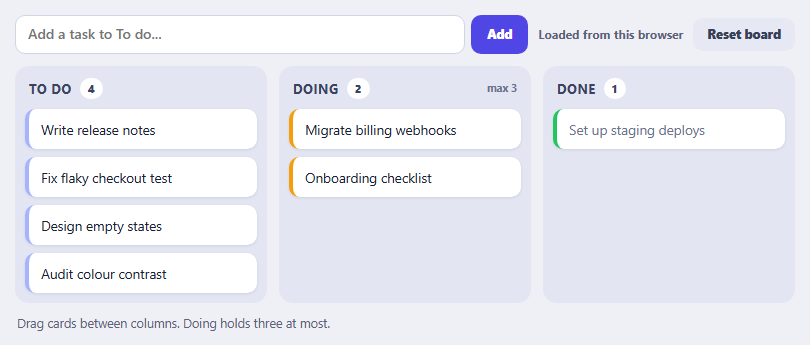
A kanban board is the canonical drag-and-drop interface: cards move between columns that represent stages. SortableJS makes the core of it almost trivial — create one Sortable per list and give them the same group name — and this snippet builds on that core with the three things that turn a demo into something usable: a rule that limits what a column accepts, saved state, and touch behaviour that does not break scrolling.
Lists that share a group name can exchange items. group can also be an object, and its put property is a function that decides whether a given list accepts a card being dragged over it. Here the Doing column refuses drops once it holds three cards — a work-in-progress limit, the mechanism that gives kanban its discipline. Because put runs while the card hovers, the list simply does not open a gap for it, which communicates the refusal without a modal. The onMove callback adds a message explaining why, and the column heading turns red when full.
Persistence introduces the most important architectural idea in the snippet: after a drag, the DOM is the source of truth. There is no separate model being updated during the drag. When onEnd fires, read() walks the three lists in their new order and rebuilds the state from the elements themselves, which is then written out. That keeps the model and the view impossible to disagree. The save is guarded because the preview here runs in a sandboxed frame with an opaque origin, where merely touching localStorage throws a SecurityError. The load and persist functions catch that and fall back to keeping the board in memory, with a status line saying which is happening — the same defensive pattern any embeddable widget needs.
On touch screens, an instant drag would make every scroll gesture pick up a card. Setting delay to 120 milliseconds with delayOnTouchOnly means a quick swipe scrolls the page while a short press-and-hold lifts a card, and mouse users are unaffected. The ghost, chosen and drag classes style the placeholder, the picked-up card and the card in flight, and the add-task form inserts a card at the top of To do and saves. Cards are inserted with text escaped, since task titles are user input.
Build with AI
Build, Understand, Optimize, and Extend It With AI
Ask an AI assistant like Claude to sync the board to a backend with optimistic updates, add card details in a modal, or add per-column colour and swimlanes.
Prompt to recreate it
Copy this into your AI assistant of choice to build the effect from scratch, or as a jumping-off point for your own variant:
Build a kanban board with SortableJS 1.15 loaded from a CDN.

Requirements:
- Create three lists (To do, Doing, Done) with Sortable.create sharing group 'kanban'; make the Doing list refuse drops through group.put() once it holds three cards.
- Use animation 160, ghostClass, chosenClass, dragClass, and delay 120 with delayOnTouchOnly.
- In onMove show a message when Doing is full; in onEnd read the state back from the DOM, update the column counts and persist it to localStorage inside try/catch, falling back to memory with a visible status when storage is blocked.
- Add a form that inserts a new card (escaped text) at the top of To do, and a Reset button restoring the default board.
Want to tighten it up first? Run this prompt through the AI Prompt Studio to score it across 8 quality dimensions, catch anti-patterns, and tune the wording for Claude, ChatGPT, or Gemini before you paste it in.
Source Code
<div class="kb-app">
  <div class="kb-top">
    <form class="kb-add" id="kbForm">
      <input id="kbNew" type="text" placeholder="Add a task to To do..." maxlength="60" aria-label="New task title">
      <button type="submit">Add</button>
    </form>
    <div class="kb-tools">
      <span class="kb-save" id="kbSave" role="status" aria-live="polite">-</span>
      <button type="button" id="kbReset">Reset board</button>
    </div>
  </div>
  <div class="kb-board">
    <section class="kb-col" data-col="todo"><h3>To do <b id="kbC-todo">0</b></h3><ul class="kb-list" id="kbL-todo"></ul></section>
    <section class="kb-col" data-col="doing"><h3>Doing <b id="kbC-doing">0</b><em id="kbLim">max 3</em></h3><ul class="kb-list" id="kbL-doing"></ul></section>
    <section class="kb-col" data-col="done"><h3>Done <b id="kbC-done">0</b></h3><ul class="kb-list" id="kbL-done"></ul></section>
  </div>
  <p class="kb-note" id="kbNote" aria-live="polite">Drag cards between columns. Doing holds three at most.</p>
</div>
body { background: #eef0f6; padding: 16px; font-family: system-ui, sans-serif; }
.kb-app { max-width: 780px; margin: 0 auto; }
.kb-top { display: flex; justify-content: space-between; gap: 10px; flex-wrap: wrap; margin-bottom: 12px; }
.kb-add { display: flex; gap: 6px; flex: 1; min-width: 240px; }
.kb-add input { flex: 1; padding: 10px 12px; border: 1.5px solid #cfd5e4; border-radius: 10px; font: 500 14px/1.2 system-ui, sans-serif; }
.kb-add input:focus { outline: 0; border-color: #4f46e5; box-shadow: 0 0 0 3px rgba(79,70,229,.14); }
.kb-add button, .kb-tools button { font: 800 12.5px/1 system-ui, sans-serif; color: #fff; background: #4f46e5; border: 0; border-radius: 10px; padding: 0 16px; cursor: pointer; }
.kb-tools { display: flex; align-items: center; gap: 10px; }
.kb-tools button { background: #e6e9f4; color: #384057; padding: 10px 14px; }
.kb-save { font: 700 12px/1 system-ui, sans-serif; color: #5b6279; }
.kb-board { display: grid; grid-template-columns: repeat(3, 1fr); gap: 12px; }
@media (max-width: 560px) { .kb-board { grid-template-columns: 1fr; } }
.kb-col { background: #e3e6f2; border-radius: 14px; padding: 10px; }
.kb-col h3 { margin: 2px 4px 10px; font-size: 13px; letter-spacing: .04em; text-transform: uppercase; color: #3a4262; display: flex; align-items: center; gap: 8px; }
.kb-col h3 b { font-size: 11px; background: #fff; border-radius: 999px; padding: 3px 8px; font-variant-numeric: tabular-nums; }
.kb-col h3 em { margin-left: auto; font: 700 10.5px/1 system-ui, sans-serif; text-transform: none; letter-spacing: 0; color: #6b7290; font-style: normal; }
.kb-col.full h3 em { color: #b91c1c; }
.kb-list { list-style: none; margin: 0; padding: 0; min-height: 170px; display: flex; flex-direction: column; gap: 8px; }
.kb-card { background: #fff; border-radius: 10px; padding: 11px 12px; font-size: 13.5px; color: #1b2033; box-shadow: 0 1px 3px rgba(20,25,60,.1); cursor: grab; border-left: 4px solid #a5b4fc; user-select: none; }
.kb-col[data-col="doing"] .kb-card { border-left-color: #f59e0b; } .kb-col[data-col="done"] .kb-card { border-left-color: #22c55e; color: #6b7290; }
.kb-ghost { opacity: .35; background: #c7d2fe; }
.kb-chosen { box-shadow: 0 10px 22px rgba(20,25,60,.25); }
.kb-drag { transform: rotate(2deg); }
.kb-note { margin: 12px 2px 0; font-size: 12.5px; color: #5b6279; }
.kb-note.warn { color: #b91c1c; font-weight: 700; }const KEY = 'kanban-sortable-v1';
const LIMIT = 3;
const DEFAULT = {
todo: [['t1', 'Write release notes'], ['t2', 'Fix flaky checkout test'], ['t3', 'Design empty states'], ['t4', 'Audit colour contrast']],
doing: [['t5', 'Migrate billing webhooks'], ['t6', 'Onboarding checklist']],
done: [['t7', 'Set up staging deploys']],
};
const COLS = ['todo', 'doing', 'done'];
const saveEl = document.getElementById('kbSave'), note = document.getElementById('kbNote');
let store = 'memory'; // becomes 'localStorage' when the browser allows it
// The preview iframe has an opaque origin, where touching localStorage THROWS. Always guard it.
function load() {
try { const raw = window.localStorage.getItem(KEY); store = 'localStorage'; return raw ? JSON.parse(raw) : null; }
catch (e) { return null; }
}
function persist(state) {
try { window.localStorage.setItem(KEY, JSON.stringify(state)); store = 'localStorage'; saveEl.textContent = 'Saved to this browser'; }
catch (e) { store = 'memory'; saveEl.textContent = 'Storage blocked here - board kept in memory'; }
}
function cardHtml(id, text) { return '<li class="kb-card" data-id="' + id + '">' + text.replace(/</g, '<') + '</li>'; }
function render(state) {
COLS.forEach(function (c) { document.getElementById('kbL-' + c).innerHTML = state[c].map(function (x) { return cardHtml(x[0], x[1]); }).join(''); });
counts();
}
// Read the board back out of the DOM: the DOM order IS the source of truth after a drag.
function read() {
const s = {};
COLS.forEach(function (c) {
s[c] = Array.prototype.map.call(document.getElementById('kbL-' + c).children, function (li) { return [li.dataset.id, li.textContent]; });
});
return s;
}
function counts() {
COLS.forEach(function (c) { document.getElementById('kbC-' + c).textContent = document.getElementById('kbL-' + c).children.length; });
document.querySelector('[data-col=doing]').classList.toggle('full', document.getElementById('kbL-doing').children.length >= LIMIT);
}
let state = load() || JSON.parse(JSON.stringify(DEFAULT));
render(state);
saveEl.textContent = store === 'localStorage' ? 'Loaded from this browser' : 'Storage blocked here - board kept in memory';
COLS.forEach(function (c) {
Sortable.create(document.getElementById('kbL-' + c), {
group: {
name: 'kanban',
// Refuse drops into Doing once it is full. put() runs on hover, so the card never even appears to fit.
put: function (to) { return to.el.id !== 'kbL-doing' || to.el.children.length < LIMIT; },
},
animation: 160,
ghostClass: 'kb-ghost', chosenClass: 'kb-chosen', dragClass: 'kb-drag',
delay: 120, delayOnTouchOnly: true, // on touch, a short press starts a drag so scrolling still works
onMove: function (evt) {
const full = evt.to.id === 'kbL-doing' && evt.from !== evt.to && evt.to.children.length >= LIMIT;
note.textContent = full ? 'Doing is full - finish something first.' : 'Drag cards between columns. Doing holds three at most.';
note.classList.toggle('warn', full);
},
onEnd: function () { state = read(); counts(); persist(state); note.classList.remove('warn'); },
});
});
document.getElementById('kbForm').addEventListener('submit', function (e) {
e.preventDefault();
const input = document.getElementById('kbNew'), text = input.value.trim();
if (!text) return;
document.getElementById('kbL-todo').insertAdjacentHTML('afterbegin', cardHtml('t' + Date.now(), text));
input.value = ''; state = read(); counts(); persist(state);
});
document.getElementById('kbReset').addEventListener('click', function () {
state = JSON.parse(JSON.stringify(DEFAULT)); render(state); persist(state);
});Step by step
How to Use
- 1Drag a cardDrag a card from To do into Doing. Counts update and the board saves.
- 2Hit the WIP limitFill Doing with three cards, then drag a fourth over it. The column refuses and a message explains why.
- 3Reorder within a columnDrag a card up or down within its own column to change its priority.
- 4Add a taskType a title and press Add. The card appears at the top of To do.
- 5Reload and resetReload to see the saved board restored (where storage is available), or press Reset board.
Real-world uses
Common Use Cases
Got questions?
Frequently Asked Questions
Create a Sortable on each list and give them the same group name, for example group: "kanban".
Use group: { name, put: function (to) { return to.el.children.length < LIMIT; } } so the list refuses drops when full.
In onEnd, read the lists back from the DOM (or use toArray()) and store the result. The DOM is already in the new order.
Sandboxed iframes without allow-same-origin have an opaque origin, and storage access throws. Wrap it in try/catch and fall back to memory.
Set delay (for example 120) with delayOnTouchOnly: true so a quick swipe scrolls and a press-and-hold starts a drag.
Use ghostClass for the placeholder, chosenClass for the picked-up element and dragClass for the element being dragged.
Yes. Use the JSX, Vue, Angular or Tailwind export buttons on this page to convert the markup and styles. The behaviour comes from SortableJS, so in a framework project install it with npm install sortablejs (or react-sortablejs / vuedraggable) instead of the CDN tag, create it in useEffect / onMounted / ngAfterViewInit, and sync your state from onEnd, and release it with destroy() when the component unmounts.