Learn Coding Visually
Learn to code with interactive, live-preview playgrounds — HTML, CSS, JavaScript, React & more.
 HTML Playground42 lessons · Click-based · Live preview
 CSS PlaygroundLearn CSS with a live editor
 JavaScript Playground60 lessons · DOM · Async · Canvas
 React PlaygroundLearn React with a live code editor
 GSAP PlaygroundLearn GSAP animation interactively
 SVG Playground44 lessons · shapes · paths · animation
 SCSS Playground45 lessons · Sass modules · tokens
 Tailwind PlaygroundLearn Tailwind CSS with a live editor
 Bootstrap 5 Playground50 lessons · live preview
Panzoom Zoomable Floor Plan — Free JS Snippet
Panzoom Zoomable Floor Plan with Room Focus · Media · Plain HTML, CSS & JS · Live preview
What's included
Features
About this UI Snippet
Panzoom Zoomable Floor Plan — HTML, CSS & JavaScript
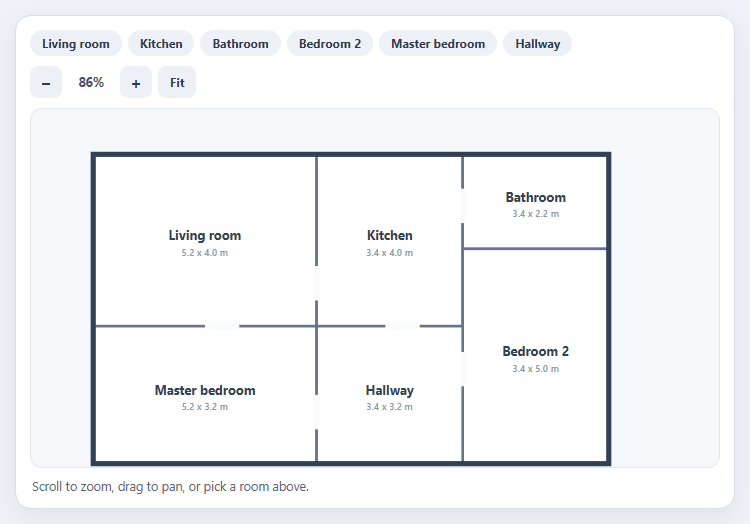
Anything that is bigger than its container — a floor plan, a seating chart, a circuit diagram, a subway map — needs the same interaction: zoom into detail, drag to look around, and a way back to the whole. Panzoom is a small, dependency-free library that does exactly that by applying a CSS transform to a single element, and it handles the parts that are painful to write by hand: pointer and touch events, pinch zoom, momentum-free dragging, and zooming toward the cursor instead of the centre.
Setup is a viewport with overflow hidden and one child element to move. Calling Panzoom(element, options) returns an instance, and there are two integration details worth knowing. First, wheel zoom is not on by default; you attach pz.zoomWithWheel to the wheel event yourself. Attaching it to the fixed viewport rather than the moving element is deliberate, and passive: false is required so the handler can stop the page from scrolling while the user zooms. Second, Panzoom emits a panzoomchange event on the element with the current scale, which the percentage readout uses.
The interesting part is "go to room". Panzoom's transform is scale(s) translate(x, y) around the element's centre, so getting a chosen point to the middle of the viewport is a small piece of algebra rather than a library call. The snippet's focusPoint function solves it: the translation is (viewportCentre − elementCentre) / scale − (point − elementCentre). Choosing the scale by fitting the room's size plus a margin into the viewport, capped at 4x, makes each room fill the view neatly. The same function powers the Fit button, focusing the plan's centre at a scale that fits.
Because the plan is inline SVG, rooms are real elements: they can be clicked, highlighted, given tooltips, and stay sharp at any zoom, which a raster image would not. One subtle bug is handled explicitly — a drag that ends over a room should not count as a click on it — by tracking pointer movement and ignoring clicks that follow a drag of more than four pixels. The viewport is focusable with a descriptive label so keyboard users can find it, and controls are real buttons.
Build with AI
Build, Understand, Optimize, and Extend It With AI
Ask an AI assistant like Claude to add animated fly-to transitions between rooms, hotspots with tooltips, or a minimap that shows the visible area.
Prompt to recreate it
Copy this into your AI assistant of choice to build the effect from scratch, or as a jumping-off point for your own variant:
Build a zoomable floor plan with Panzoom 4 loaded from a CDN.

Requirements:
- Render the plan as inline SVG (six rooms with labels and dimensions) inside a div; call Panzoom(div, { maxScale, minScale, step }) inside an overflow-hidden viewport.
- Attach pz.zoomWithWheel to the viewport's wheel event with { passive: false }, and wire + / − buttons to zoomIn and zoomOut.
- Show the live zoom percentage from the panzoomchange event.
- Implement focusPoint(x, y, scale) using the formula (viewportCentre − elementCentre) / scale − (point − elementCentre), and use it for room chips, clicking rooms, and a Fit button.
- Ignore clicks that follow a drag of more than 4px, and make the viewport keyboard-focusable with an aria-label.
Want to tighten it up first? Run this prompt through the AI Prompt Studio to score it across 8 quality dimensions, catch anti-patterns, and tune the wording for Claude, ChatGPT, or Gemini before you paste it in.
Source Code
<div class="fp-wrap">
<div class="fp-top">
<div class="fp-rooms" id="fpRooms" role="group" aria-label="Jump to room"></div>
<div class="fp-ctl">
<button type="button" id="fpOut" aria-label="Zoom out">−</button>
<span id="fpPct" aria-live="polite">100%</span>
<button type="button" id="fpIn" aria-label="Zoom in">+</button>
<button type="button" id="fpReset" class="fp-fit">Fit</button>
</div>
</div>
<div class="fp-view" id="fpView" tabindex="0" aria-label="Floor plan. Scroll to zoom, drag to pan.">
<div class="fp-canvas" id="fpCanvas"></div>
</div>
<p class="fp-help" id="fpHelp">Scroll to zoom, drag to pan, or pick a room above.</p>
</div>body { background: #eef1f5; padding: 18px; font-family: system-ui, sans-serif; }
.fp-wrap { max-width: 720px; margin: 0 auto; background: #fff; border: 1px solid #d9dfe8; border-radius: 16px; padding: 14px; box-shadow: 0 8px 24px rgba(20,30,60,.06); }
.fp-top { display: flex; justify-content: space-between; gap: 10px; flex-wrap: wrap; margin-bottom: 10px; }
.fp-rooms { display: flex; flex-wrap: wrap; gap: 6px; }
.fp-rooms button { font: 700 12px/1 system-ui, sans-serif; color: #2f3b52; background: #edf0f6; border: 0; border-radius: 999px; padding: 7px 12px; cursor: pointer; }
.fp-rooms button:hover { background: #dfe4ee; }
.fp-rooms button.on { background: #4f46e5; color: #fff; }
.fp-ctl { display: flex; align-items: center; gap: 6px; }
.fp-ctl button { width: 32px; height: 32px; font: 700 17px/1 system-ui, sans-serif; color: #2f3b52; background: #edf0f6; border: 0; border-radius: 8px; cursor: pointer; }
.fp-ctl button:hover { background: #dfe4ee; }
.fp-ctl .fp-fit { width: auto; padding: 0 12px; font-size: 12px; }
.fp-ctl span { min-width: 46px; text-align: center; font: 700 12.5px/1 system-ui, sans-serif; color: #4a5468; font-variant-numeric: tabular-nums; }
.fp-view { position: relative; height: 360px; overflow: hidden; border-radius: 12px; background: #f6f8fb; border: 1px solid #e0e5ee; cursor: grab; touch-action: none; }
.fp-view:active { cursor: grabbing; }
.fp-view:focus-visible { outline: 3px solid rgba(79,70,229,.45); outline-offset: 2px; }
.fp-canvas { width: 640px; height: 400px; }
.fp-canvas svg { display: block; width: 100%; height: 100%; }
.room { fill: #fff; stroke: #64748b; stroke-width: 3; transition: fill .2s; }
.room.hot { fill: #e0e7ff; }
.wall { stroke: #334155; stroke-width: 6; stroke-linecap: square; }
.door { stroke: #f8fafc; stroke-width: 7; }
.lbl { font: 700 15px system-ui, sans-serif; fill: #334155; text-anchor: middle; pointer-events: none; }
.dim { font: 600 11px system-ui, sans-serif; fill: #8592a8; text-anchor: middle; pointer-events: none; }
.fp-help { margin: 10px 2px 0; font-size: 12.5px; color: #5b667c; }// Rooms in floor-plan coordinates (the SVG is 640 x 400).
const ROOMS = [
{ id: 'living', name: 'Living room', x: 20, y: 20, w: 260, h: 200, area: '5.2 x 4.0 m' },
{ id: 'kitchen', name: 'Kitchen', x: 280, y: 20, w: 170, h: 200, area: '3.4 x 4.0 m' },
{ id: 'bath', name: 'Bathroom', x: 450, y: 20, w: 170, h: 110, area: '3.4 x 2.2 m' },
{ id: 'bed2', name: 'Bedroom 2', x: 450, y: 130, w: 170, h: 250, area: '3.4 x 5.0 m' },
{ id: 'bed1', name: 'Master bedroom', x: 20, y: 220, w: 260, h: 160, area: '5.2 x 3.2 m' },
{ id: 'hall', name: 'Hallway', x: 280, y: 220, w: 170, h: 160, area: '3.4 x 3.2 m' },
];
const view = document.getElementById('fpView');
const canvas = document.getElementById('fpCanvas');
const CW = 640, CH = 400;
canvas.innerHTML = '<svg viewBox="0 0 640 400" xmlns="http://www.w3.org/2000/svg">' +
ROOMS.map(function (r) {
return '<g class="rm" data-id="' + r.id + '"><rect class="room" x="' + r.x + '" y="' + r.y + '" width="' + r.w + '" height="' + r.h + '"/>' +
'<text class="lbl" x="' + (r.x + r.w / 2) + '" y="' + (r.y + r.h / 2) + '">' + r.name + '</text>' +
'<text class="dim" x="' + (r.x + r.w / 2) + '" y="' + (r.y + r.h / 2 + 18) + '">' + r.area + '</text></g>';
}).join('') +
'<rect class="wall" x="20" y="20" width="600" height="360" fill="none"/>' +
'<line class="door" x1="280" y1="150" x2="280" y2="190"/><line class="door" x1="450" y1="60" x2="450" y2="100"/>' +
'<line class="door" x1="360" y1="220" x2="400" y2="220"/><line class="door" x1="150" y1="220" x2="190" y2="220"/>' +
'<line class="door" x1="450" y1="250" x2="450" y2="290"/><line class="door" x1="280" y1="300" x2="280" y2="340"/></svg>';
const pz = Panzoom(canvas, {
maxScale: 6,
minScale: 0.6,
step: 0.3,
cursor: 'grab',
canvas: false,
});
// Wheel zoom is opt-in: attach it to the viewport (not the moving element) so the listener never moves.
view.addEventListener('wheel', pz.zoomWithWheel, { passive: false });
const pct = document.getElementById('fpPct');
canvas.addEventListener('panzoomchange', function (e) { pct.textContent = Math.round(e.detail.scale * 100) + '%'; });
document.getElementById('fpIn').addEventListener('click', pz.zoomIn);
document.getElementById('fpOut').addEventListener('click', pz.zoomOut);
// Fit the plan to the viewport, centred.
function fit() {
const vw = view.clientWidth, vh = view.clientHeight;
const s = Math.min(vw / CW, vh / CH) * 0.96;
focusPoint(CW / 2, CH / 2, s);
}
// Panzoom applies scale(s) translate(x, y) around the element's centre, so to put
// the point (px, py) of the plan at the viewport centre we solve for the translation.
function focusPoint(px, py, scale) {
const vw = view.clientWidth, vh = view.clientHeight;
const cx = CW / 2, cy = CH / 2;
const tx = (vw / 2 - cx) / scale - (px - cx);
const ty = (vh / 2 - cy) / scale - (py - cy);
pz.zoom(scale, { animate: false });
pz.pan(tx, ty, { animate: false });
}
const roomBar = document.getElementById('fpRooms');
roomBar.innerHTML = ROOMS.map(function (r) { return '<button type="button" data-id="' + r.id + '">' + r.name + '</button>'; }).join('');
function goRoom(id) {
const r = ROOMS.filter(function (x) { return x.id === id; })[0];
const vw = view.clientWidth, vh = view.clientHeight;
const s = Math.min(vw / (r.w + 60), vh / (r.h + 60), 4); // fit the room with a margin, capped
focusPoint(r.x + r.w / 2, r.y + r.h / 2, s);
roomBar.querySelectorAll('button').forEach(function (b) { b.classList.toggle('on', b.dataset.id === id); });
canvas.querySelectorAll('.rm').forEach(function (g) { g.firstChild.classList.toggle('hot', g.dataset.id === id); });
document.getElementById('fpHelp').textContent = r.name + ' - ' + r.area;
}
roomBar.addEventListener('click', function (e) { const b = e.target.closest('button'); if (b) goRoom(b.dataset.id); });
canvas.addEventListener('click', function (e) {
const g = e.target.closest('.rm');
if (g && !pz.getOptions().disablePan && !view.dataset.dragged) goRoom(g.dataset.id);
});
document.getElementById('fpReset').addEventListener('click', function () {
fit();
roomBar.querySelectorAll('button').forEach(function (b) { b.classList.remove('on'); });
canvas.querySelectorAll('.room').forEach(function (r) { r.classList.remove('hot'); });
document.getElementById('fpHelp').textContent = 'Scroll to zoom, drag to pan, or pick a room above.';
});
// Distinguish a click from the end of a drag so panning never triggers a room jump.
let downAt = null;
canvas.addEventListener('pointerdown', function (e) { downAt = [e.clientX, e.clientY]; view.dataset.dragged = ''; });
canvas.addEventListener('pointermove', function (e) {
if (downAt && Math.hypot(e.clientX - downAt[0], e.clientY - downAt[1]) > 4) view.dataset.dragged = '1';
});
document.addEventListener('pointerup', function () { setTimeout(function () { downAt = null; view.dataset.dragged = ''; }, 0); });
fit();Step by step
How to Use
- 1Scroll to zoomUse the mouse wheel over the plan. It zooms toward the cursor, and the percentage readout updates.
- 2Drag to panClick and drag to move around the plan; on touch screens, drag with one finger and pinch to zoom.
- 3Jump to a roomClick a room chip, or click a room on the plan, to zoom and centre on it with its dimensions.
- 4Use the buttonsThe + and − buttons zoom by a fixed step, and Fit returns to the whole plan.
- 5Notice the click guardDrag across a room and release; the view does not jump, because a drag is not a click.
Real-world uses
Common Use Cases
Got questions?
Frequently Asked Questions
Capturing the wheel would hijack page scrolling. You opt in by adding pz.zoomWithWheel to a wheel listener, usually on the viewport.
The handler calls preventDefault to stop the page scrolling while zooming, and passive listeners are not allowed to do that.
Panzoom transforms around the element centre, so solve for the translation: (viewportCentre − elementCentre) / scale − (point − elementCentre), then call zoom and pan.
Inline SVG is better: it stays sharp at any zoom and its shapes can be clicked, styled and labelled individually.
Record the pointer-down position and ignore the click if the pointer moved more than a few pixels.
Yes. Panzoom handles multi-touch pinch zoom and one-finger panning out of the box.
Yes. Use the JSX, Vue, Angular or Tailwind export buttons on this page to convert the markup and styles. The behaviour comes from Panzoom, so in a framework project install it with npm install @panzoom/panzoom instead of the CDN tag, create it in useEffect / onMounted / ngAfterViewInit and attach the wheel listener to the viewport, and release it with destroy() when the component unmounts.